
Seleccione el idioma

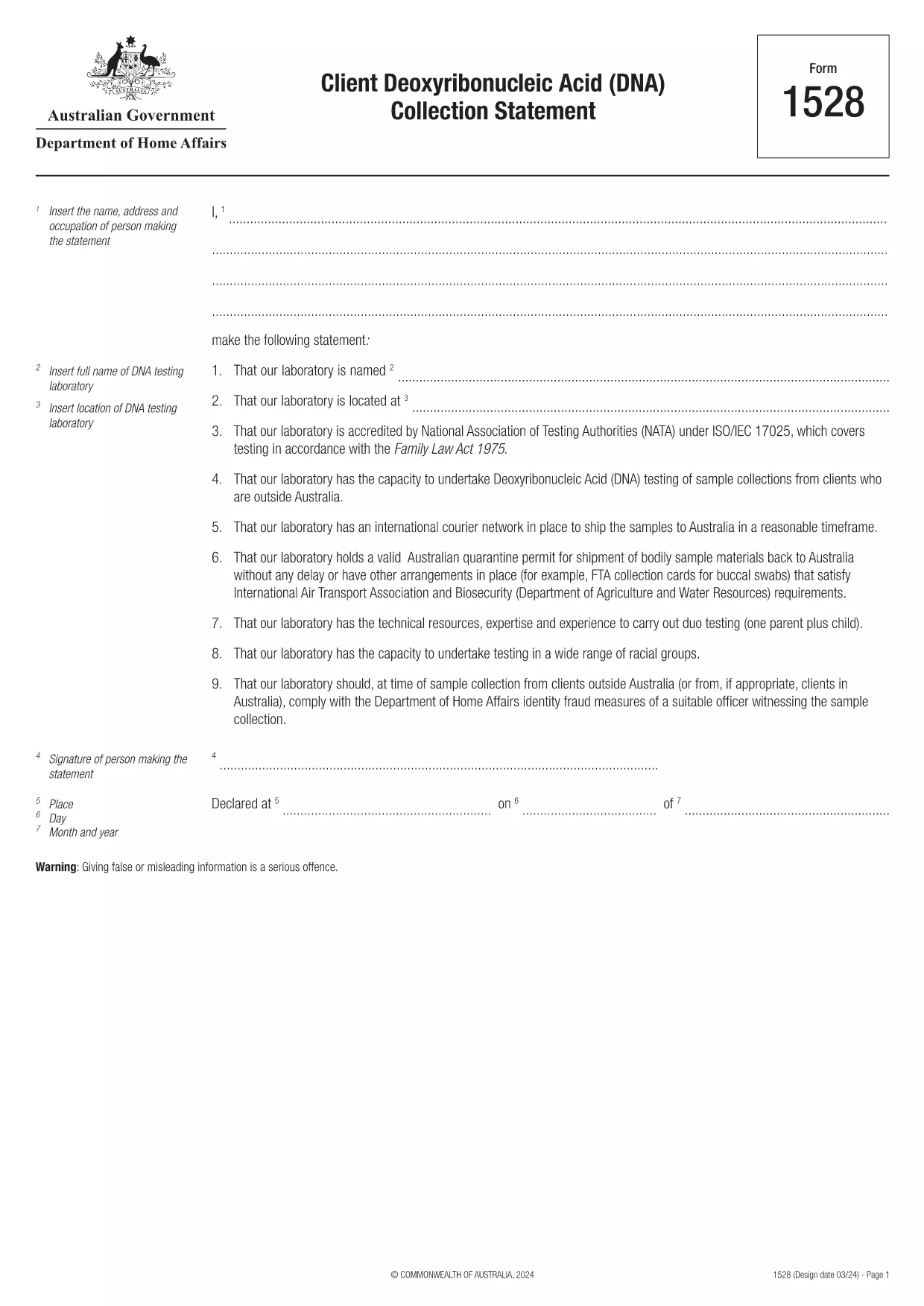
Form 1528 – Client DNA Collection Statement (Fillable PDF)

  1. País Australia
  2. Idioma Inglés
  3. Actividad Carácter o identidad
Form 1528 – Client DNA Collection Statement (Fillable PDF)

Form 1528 is the official Client Deoxyribonucleic Acid (DNA) Collection Statement required by the Australian Department of Home Affairs. The form captures the name, address and occupation of the person making the statement, as well as details of the DNA testing laboratory.

What Is Form 1528?

This form is used when an individual must provide a DNA sample for immigration, visa, or forensic purposes. It must be completed by the person providing the sample and signed by an authorised DNA testing laboratory.

How to Fill Out Form 1528 with Formize

Instead of printing, scanning, or editing the PDF manually, simply click the “Fill out this form” button on this page. The Formize PDF Filler app will load the fillable version, letting you enter data, add signatures, and save the completed document in seconds.

Common Mistakes & Tips

  • Leave no blank fields – the Department rejects forms with empty required sections.
  • Use the exact laboratory name and address as it appears on the lab’s official letterhead.
  • Check date formats – use DD/MM/YYYY throughout.
  • Sign electronically only after all information is verified; a digital signature is accepted.

Where to Submit the Completed Form

After you download the completed PDF, you can upload it through your online visa portal, email it to the requesting officer, or deliver a printed copy to the nearest Australian Visa Application Centre.

Need More Help?

For detailed guidance, review the instructions on the Department of Home Affairs website or contact your DNA testing laboratory for clarification on laboratory‑specific fields.

PREGUNTAS MÁS FRECUENTES
  • Is an electronic signature accepted on Form 1528?

    Yes. The Department of Home Affairs accepts a clear electronic signature created with the Formize PDF Filler.

  • Can I print the form after filling it online?

    Absolutely. After completing the form, you can download the PDF and print a hard copy if you prefer a physical submission.

  • What if I make a mistake after saving the form?

    Open the saved PDF again in Formize, edit the incorrect fields, and re‑save. The fillable PDF allows unlimited edits before final submission.

  • Do I need to attach any supporting documents?

    Typically, the DNA laboratory will provide a separate certification letter. Attach that letter alongside the completed Form 1528 when you submit your application.

  • How long does it take to process Form 1528?

    Processing time varies by case, but the Department generally reviews the statement within 5‑10 business days after receipt.

  • Is there a fee for using Formize’s PDF filler?

    Formize offers a free basic fillable version for Form 1528. Advanced features such as bulk signing require a paid plan, but are not needed for a single submission.

  • Can I fill out Form 1528 on a mobile device?

    Yes. The Formize PDF Filler works on smartphones and tablets, allowing you to complete the form anywhere.

  • What format should I use when uploading the completed form?

    Upload the final document as a PDF file. Ensure the file size does not exceed the portal’s limit (usually 5 MB).

CÓMO

Cómo completar Form 1528 gratis, en línea en 5 sencillos pasos:

  1. 1
    Open the Fillable Form
    Click the “Fill out this form” button on the page. The Formize PDF Filler app will launch in a new tab with the fillable version of Form 1528.
  2. 2
    Enter Your Information
    Type the required details – personal data, laboratory name, and address – directly into the highlighted fields.
  3. 3
    Add Electronic Signatures
    Use the signature tool to sign the statement and, if required, the laboratory representative’s signature.
  4. 4
    Review & Validate
    Double‑check every field for accuracy, especially dates and laboratory information.
  5. 5
    Download or Submit
    When you’re satisfied, click “Save & Download” to get the completed PDF, or use the built‑in “Submit” button to send it directly to the Home Affairs portal.
Aplicación Formize PDF Filler
SOBRE

Formas de carácter o identidad

Form 1528 es uno de los documentos que se utilizan para recopilar información sobre el carácter o las cualidades personales de un individuo. Estos formularios se pueden utilizar en diversas situaciones, como empleo, vivienda o procedimientos legales, para evaluar la idoneidad o credibilidad de un individuo. A continuación se muestran algunos ejemplos de formas que podrían considerarse "formas de caracteres" en diferentes contextos:

Formularios de referencia de carácter: estos formularios se utilizan para recopilar información de personas que pueden dar fe del carácter, las habilidades y las calificaciones de un individuo. A menudo se solicitan como parte de solicitudes de empleo, solicitudes de alquiler o procedimientos legales. Los formularios generalmente solicitan detalles sobre la relación con el solicitante, su opinión sobre el carácter del solicitante y cualquier experiencia u observación relevante.

Formularios de declaraciones personales: en determinadas situaciones, se puede pedir a las personas que proporcionen una declaración personal o un ensayo para transmitir su carácter, valores y motivaciones. Esto podría ser necesario para admisiones universitarias, solicitudes de becas o procesos de licencia profesional.

Formularios de testimonio de testigos de carácter: en procedimientos legales, se puede llamar a un testigo de carácter para que brinde testimonio sobre el carácter, la reputación o el comportamiento de un individuo. Aunque no suele tener la forma de un documento predefinido, es posible que se proporcionen formularios o plantillas para guiar al testigo en la estructuración de su testimonio.

Formularios de autorización y divulgación de verificación de antecedentes: en algunos contextos, como en las solicitudes de empleo, se puede pedir a las personas que completen formularios que autoricen una verificación de antecedentes. Estos formularios pueden incluir preguntas sobre referencias de personajes, antecedentes penales previos u otra información personal relevante.

Es importante tener en cuenta que los formularios específicos utilizados para evaluar el carácter de un individuo pueden variar según el contexto y los requisitos de la organización o institución involucrada. Por lo tanto, se recomienda consultar los formularios específicos proporcionados por la parte correspondiente para comprender la información que se busca y cómo completar los formularios con precisión.

CARACTERÍSTICAS

Relleno de PDF

La forma más fácil de llenar formularios PDF en línea

  • Rellene rápidamente Form 1528
    ¿Está buscando una manera de llenar rápidamente Form 1528 en línea? Con nuestro rellenador de formularios PDF gratuito en línea, sabrá cómo editar y rellenar este documento PDF en menos de un minuto.
  • Editor de PDF en línea fácil de usar
    ¿Cansado de imprimir archivos PDF para poder editarlos antes de volver a escanearlos y enviarlos de vuelta? Edite documentos PDF gratis en línea. Utilice nuestro editor de pdf en línea para ahorrar tiempo y papel.
  • Excelentes herramientas, todas las plataformas.
    ¿Se pregunta cómo completar Form 1528 en una Mac, o tal vez cómo usar un relleno de PDF gratis? Nuestras herramientas de PDF en línea funcionan en todas las plataformas.
  • Almacenamiento seguro de archivos
    Los archivos "Form 1528" completados se almacenan en una base de datos segura administrada por Amazon Cloud hosting. Puede eliminar sus archivos de nuestro sistema en cualquier momento. En cualquier caso, estos archivos se eliminan automáticamente después de 24 horas.
  • Chatea con {palabra clave}
    Chatea con "Form 1528" en Chatize, que es un asistente de lectura de PDF gratuito. Haga preguntas y obtenga respuestas de "Form 1528". Simplemente haga clic en el botón Chatear con documento de arriba.

Eliminar sesión de llenado

¿Eliminar la sesión de llenado seleccionada? En este caso, se perderá su progreso al completar el formulario.

Eliminar sesión de edición

¿Eliminar la sesión de edición seleccionada? En este caso, se perderá su progreso en la creación y edición del formulario.