Seleccione el idioma

Application Form A – Inborn Errors of Metabolism

  1. Idioma Inglés
  2. País Australia
  3. Actividad Health Assistance
  4. Departamento Departamento de Salud y Bienestar Familiar
Application Form A – Inborn Errors of Metabolism

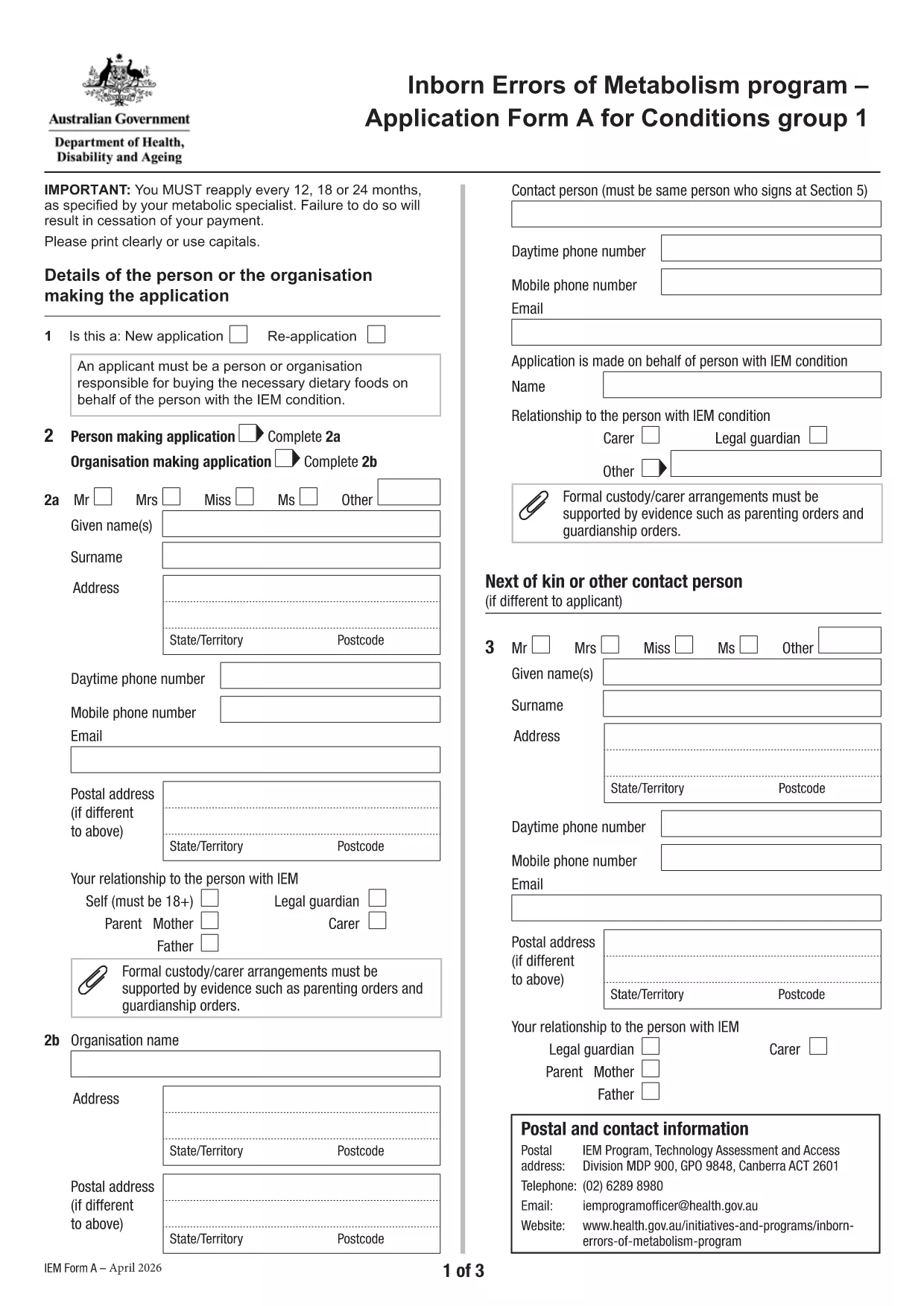
Application Form A is the official Australian Government form used to apply for financial assistance for individuals diagnosed with certain Inborn Errors of Metabolism, specifically dihydropteridine reductase (DHPR) deficiency, hyperphenylalaninemia, and phenylketonuria (PKU). The form must be completed and resubmitted every 12 months to maintain eligibility.

What is Application Form A?

This PDF form collects personal details, medical diagnosis, treatment information, and financial data required by the Department of Health’s Inborn Errors of Metabolism program. It is a fillable PDF, meaning you can type directly into the fields without printing.

Who needs to complete this form?

  • Individuals diagnosed with DHPR deficiency, hyperphenylalaninemia, or PKU.
  • Parents or legal guardians applying on behalf of a minor.
  • Anyone who has previously received assistance under the program and needs to renew their claim.

How to fill out Application Form A online

Instead of downloading the PDF and opening it in a separate editor, simply click the "Fill out this form" button on this page. The Formize PDF Filler app will load automatically, allowing you to complete the form directly in your browser.

Common mistakes to avoid

  • Leaving required fields blank – the form will not submit.
  • Providing outdated medical reports – attach the most recent diagnosis documents.
  • Using an unsupported browser – Chrome is recommended for best performance.
  • Submitting the form before the 12‑month renewal period – ensure you are within the eligibility window.

Where to submit the completed form

After you finish filling out the form, click the Submit button within the Formize interface. Your application will be securely transmitted to the Department of Health’s processing team. You will receive a confirmation email with a reference number for future inquiries.

Need more help? Review the FAQs below or contact your local health service for assistance.

PREGUNTAS MÁS FRECUENTES
  • What conditions are covered by Application Form A?

    The form is only for DHPR deficiency, hyperphenylalaninemia, and phenylketonuria (PKU). Other metabolic conditions must use Application Form B.

  • How often must I re‑apply?

    You must reassess and submit a new Application Form A every 12 months to continue receiving assistance.

  • Can I fill out the form on a mobile device?

    Yes, the Formize PDF Filler works on most smartphones and tablets, though a larger screen (tablet or desktop) is recommended for easier navigation.

  • What if I make a mistake after submitting?

    Contact the Department of Health’s Inborn Errors of Metabolism program using the reference number from your confirmation email. They can guide you on how to correct the error.

  • Do I need to print the form after filling it online?

    No. The form is submitted electronically via Formize. Printing is only necessary if you want a hard copy for your records.

  • Which browsers are supported?

    Chrome is the recommended browser for optimal performance. Firefox, Edge, and Safari also work but may have limited functionality.

  • Is my personal and medical information secure?

    Yes. Formize uses SSL encryption, and the Department of Health follows strict privacy guidelines to protect your data.

  • Can I save my progress and finish later?

    The Formize platform allows you to save a draft. Click the "Save Draft" button before exiting and return using the same link.

CÓMO

Cómo completar Application Form A gratis, en línea en 5 sencillos pasos:

  1. 1
    Open the fillable form
    Click the "Fill out this form" button on the page. The Formize PDF Filler will open in a new tab.
  2. 2
    Enter your information
    Type directly into each field. Use the tab key to move quickly between sections.
  3. 3
    Attach supporting documents
    Upload recent medical reports and proof of identity using the attachment icons beside each required field.
  4. 4
    Review and submit
    Check all entries for accuracy, then click the "Submit" button. You will receive a confirmation email with a reference number.
  5. 5
    Save a copy
    After submission, download a PDF copy of the completed form for your records.
Aplicación Formize PDF Filler
SOBRE

Application Form A plantilla

Con el conjunto tradicional de funciones para ver y completar un documento PDF, combinado con los beneficios de una aplicación web y un diseño receptivo, puede completar Application Form A en minutos.

CARACTERÍSTICAS

Relleno de PDF

La forma más fácil de llenar formularios PDF en línea

  • Rellene rápidamente Application Form A
    ¿Está buscando una manera de llenar rápidamente Application Form A en línea? Con nuestro rellenador de formularios PDF gratuito en línea, sabrá cómo editar y rellenar este documento PDF en menos de un minuto.
  • Editor de PDF en línea fácil de usar
    ¿Cansado de imprimir archivos PDF para poder editarlos antes de volver a escanearlos y enviarlos de vuelta? Edite documentos PDF gratis en línea. Utilice nuestro editor de pdf en línea para ahorrar tiempo y papel.
  • Excelentes herramientas, todas las plataformas.
    ¿Se pregunta cómo completar Application Form A en una Mac, o tal vez cómo usar un relleno de PDF gratis? Nuestras herramientas de PDF en línea funcionan en todas las plataformas.
  • Almacenamiento seguro de archivos
    Los archivos "Application Form A" completados se almacenan en una base de datos segura administrada por Amazon Cloud hosting. Puede eliminar sus archivos de nuestro sistema en cualquier momento. En cualquier caso, estos archivos se eliminan automáticamente después de 24 horas.
  • Chatea con {palabra clave}
    Chatea con "Application Form A" en Chatize, que es un asistente de lectura de PDF gratuito. Haga preguntas y obtenga respuestas de "Application Form A". Simplemente haga clic en el botón Chatear con documento de arriba.

Eliminar sesión de llenado

¿Eliminar la sesión de llenado seleccionada? En este caso, se perderá su progreso al completar el formulario.

Eliminar sesión de edición

¿Eliminar la sesión de edición seleccionada? En este caso, se perderá su progreso en la creación y edición del formulario.