
Seleccione el idioma

Application Form No – Fillable PDF for NSW Transport

  1. Idioma Inglés
  2. País Australia
  3. Departamento Transport for NSW
  4. Actividad Registro de Vehículo
Application Form No – Fillable PDF for NSW Transport

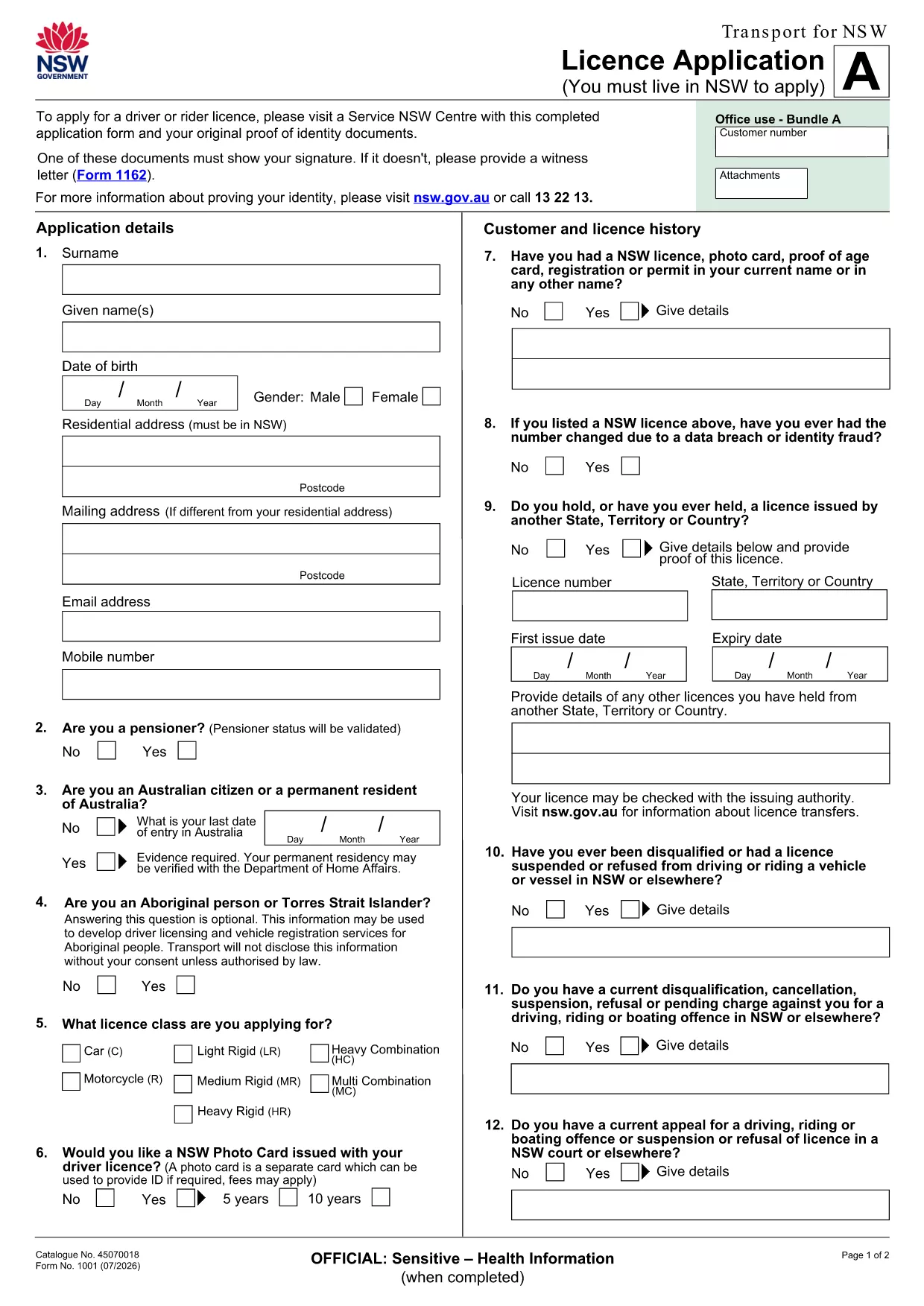
If you’re looking for the official Application Form No used by Transport for NSW, you’ve come to the right place. This page provides a direct link to the fillable PDF, step‑by‑step online instructions, and tips to ensure your submission is error‑free.

What is the Application Form No?

The Application Form No is the standard licence application used by the New South Wales transport authority. It collects personal details, licence preferences, and supporting documentation required for a new or renewed driver licence.

How to Fill the Form Online with Formize

Instead of downloading the PDF to a desktop editor, simply click the "Fill out this form" button on this page. The Formize PDF Filler app will load in your browser, letting you type directly into the fields, save progress, and export a completed PDF.

Key Sections and Required Information

  • Personal Details: Full name, address, date of birth, and contact numbers.
  • Licence Choice: Select the appropriate licence class and any endorsements.
  • Identity Verification: Upload a scanned ID or provide a reference number.
  • Signature: Use the digital signature tool in Formize to sign securely.

Common Mistakes to Avoid

  • Leaving required fields blank – the filler will highlight missing data before you submit.
  • Using non‑standard fonts or special characters in names – stick to plain text.
  • Uploading files that exceed the size limit (5 MB per file).
  • Forgetting to sign the form digitally; an unsigned form is rejected.

Download the Fillable PDF

The original, printable version of the form is available for download if you need a hard copy. Download the PDF

Ready to start? Click the button below, fill the form online, and submit it directly to Transport for NSW.

PREGUNTAS MÁS FRECUENTES
  • Do I need Adobe Acrobat to fill this form?

    No. The Formize PDF Filler works in any modern browser, so you can complete the form without installing any software.

  • Can I print the filled form after completing it online?

    Yes. After you finish, click the "Download" button to save a PDF that you can print or email.

  • What if I make a mistake while filling the form?

    Use the "Undo" button or simply edit the field again. The filler saves changes in real time.

  • Is my personal data secure?

    Formize uses SSL encryption for all data transmitted between your browser and our servers. Your information is not stored longer than needed for the submission.

  • Do I still need to sign the form with a pen?

    A digital signature accepted by Transport for NSW is sufficient. Print‑and‑sign is only required if you choose to submit a hard copy.

  • Can I save the form and finish it later?

    Yes. Click "Save" to download a partially completed PDF, then reopen it later in Formize to continue.

  • What file formats are accepted for supporting documents?

    PDF, JPG, and PNG files up to 5 MB each are accepted.

CÓMO

Cómo completar application form no gratis, en línea en 5 sencillos pasos:

  1. 1
    Open the Form
    Click the "Fill out this form" button on this page. The Formize PDF Filler will open in a new browser tab.
  2. 2
    Enter Your Information
    Type directly into each highlighted field. Use the tab key to move quickly between sections.
  3. 3
    Add Supporting Documents
    Upload scanned copies of your ID or proof of address using the upload icons inside the form.
  4. 4
    Sign Digitally
    Select the signature field and draw or type your signature using the built‑in tool.
  5. 5
    Save and Submit
    Click "Save" to download a copy for your records, then press "Submit" to send the completed form to Transport for NSW.
Aplicación Formize PDF Filler
SOBRE

Formularios de registro de vehículos

Si posee o alquila un vehículo de motor, remolque o bote, debe cumplir con ciertas obligaciones para mantener su vehículo legalmente registrado y seguro.

application form no es uno de los formularios de registro de vehículos que son documentos que se utilizan para registrar un vehículo de motor con la autoridad estatal o provincial correspondiente. Estos formularios generalmente se requieren cuando una persona compra un vehículo nuevo o usado o cuando se muda a un nuevo estado o provincia con un vehículo.

Los requisitos y formularios exactos necesarios para el registro del vehículo pueden variar según la ubicación, pero, en general, el proceso implica proporcionar información sobre el vehículo, el propietario y cualquier gravamen sobre el vehículo.

Una vez presentados los formularios de registro y las tarifas, la autoridad estatal o provincial emitirá un certificado de registro o placa al propietario del vehículo. Este registro permite que el vehículo sea operado legalmente en vías y carreteras públicas.

CARACTERÍSTICAS

Relleno de PDF

La forma más fácil de llenar formularios PDF en línea

  • Rellene rápidamente application form no
    ¿Está buscando una manera de llenar rápidamente application form no en línea? Con nuestro rellenador de formularios PDF gratuito en línea, sabrá cómo editar y rellenar este documento PDF en menos de un minuto.
  • Editor de PDF en línea fácil de usar
    ¿Cansado de imprimir archivos PDF para poder editarlos antes de volver a escanearlos y enviarlos de vuelta? Edite documentos PDF gratis en línea. Utilice nuestro editor de pdf en línea para ahorrar tiempo y papel.
  • Excelentes herramientas, todas las plataformas.
    ¿Se pregunta cómo completar application form no en una Mac, o tal vez cómo usar un relleno de PDF gratis? Nuestras herramientas de PDF en línea funcionan en todas las plataformas.
  • Almacenamiento seguro de archivos
    Los archivos "application form no" completados se almacenan en una base de datos segura administrada por Amazon Cloud hosting. Puede eliminar sus archivos de nuestro sistema en cualquier momento. En cualquier caso, estos archivos se eliminan automáticamente después de 24 horas.
  • Chatea con {palabra clave}
    Chatea con "application form no" en Chatize, que es un asistente de lectura de PDF gratuito. Haga preguntas y obtenga respuestas de "application form no". Simplemente haga clic en el botón Chatear con documento de arriba.

Eliminar sesión de llenado

¿Eliminar la sesión de llenado seleccionada? En este caso, se perderá su progreso al completar el formulario.

Eliminar sesión de edición

¿Eliminar la sesión de edición seleccionada? En este caso, se perderá su progreso en la creación y edición del formulario.