
Seleccione el idioma

IMM 5476 – Use of a Representative (Canada)

  1. País Canada
  2. Idioma Inglés Francés
  3. Actividad Visas
IMM 5476 – Use of a Representative (Canada)

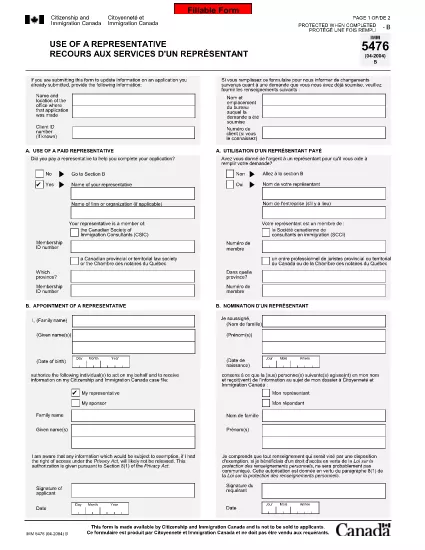
The IMM 5476 – Use of a Representative form allows you to officially appoint an immigration consultant, lawyer, or another authorized person to act on your behalf with Immigration, Refugees and Citizenship Canada (IRCC) and the Canada Border Services Agency (CBSA). This form is required for most permanent‑resident, temporary‑resident, and citizenship applications.

What Is the IMM 5476 Form?

IMM 5476 is a government‑issued PDF that records the details of your chosen representative, their contact information, and the scope of authority you are granting. It is available in both English and French and must be signed by both you (the applicant) and your representative.

How to Fill Out IMM 5476 Online

Instead of downloading the PDF and editing it manually, simply click the "Fill out this form" button on the page. Our Formize PDF Filler app will load the fillable version instantly, letting you complete the form directly in your browser.

Common Mistakes to Avoid

  • Incorrect Representative Details: Double‑check the name, address, and CRA‑issued client number of your representative.
  • Missing Signatures: Both the applicant and the representative must sign; unsigned forms are rejected.
  • Wrong Language Version: Use the official English or French version that matches the rest of your application package.
  • Out‑of‑Date Form: Always use the latest version – the link below always points to the current PDF.

When to Submit the Form

Attach IMM 5476 to the same package as your main application (e.g., Express Entry, Study Permit, Visitor Visa). If you change representatives later, submit a new, signed IMM 5476 with your updated request.

Need More Help?

While Formize does not provide live support, you can find detailed guidance on the IRCC website or consult a licensed immigration professional.

PREGUNTAS MÁS FRECUENTES
  • Do I need a lawyer to fill out IMM 5476?

    No. You can appoint any authorized representative, such as a licensed immigration consultant, lawyer, or family member, as long as they have a valid client number.

  • Can I change my representative after submitting the form?

    Yes. Submit a new, signed IMM 5476 with the updated representative’s details and include a brief letter explaining the change.

  • Is a digital signature accepted?

    IRCC accepts electronic signatures generated within a fillable PDF application like Formize, provided the signature field is clearly marked.

  • What happens if I forget to sign the form?

    An unsigned IMM 5476 will be considered incomplete and may delay processing of your entire application.

  • Do I need to submit both English and French versions?

    Submit only the language version that matches the rest of your application package. IRCC does not require both versions.

  • Is there a fee to use the Formize PDF Filler?

    No. Formize provides free access to fillable PDFs for government forms like IMM 5476.

  • Can I print the form after filling it online?

    Yes. Once you finish, click "Download PDF" and print a hard copy if your submission requires a physical signature.

  • Where can I find the latest version of IMM 5476?

    The link on this page always points to the most recent version published by Immigration, Refugees and Citizenship Canada.

CÓMO

Cómo completar IMM 5476 gratis, en línea en 5 sencillos pasos:

  1. 1
    Open the Fillable Form
    Click the "Fill out this form" button on the page. The Formize PDF Filler app will load the IMM 5476 form directly in your browser.
  2. 2
    Enter Applicant Information
    Fill in your full name, client ID, and contact details in the Applicant section. All fields are required.
  3. 3
    Enter Representative Details
    Provide the representative’s name, firm, address, phone, and email. Make sure the CRA client number matches the one on record.
  4. 4
    Add Signatures
    Use the built‑in signature fields to sign electronically. Both you and your representative must sign before saving.
  5. 5
    Download or Submit
    After completing the form, click "Download PDF" to save a copy for your records, then attach it to your immigration application package.
Aplicación Formize PDF Filler
SOBRE

Formularios de Visa

IMM 5476 es uno de los formularios de visa que son documentos que se utilizan para solicitar una visa para ingresar a un país extranjero. Una visa es un documento que permite a un ciudadano extranjero ingresar, permanecer y, en ocasiones, trabajar en un país extranjero durante un período de tiempo específico. Los formularios y requisitos exactos para obtener una visa varían según el país y el tipo de visa.

Los formularios de visa generalmente requieren información personal como el nombre, la fecha de nacimiento y la información del pasaporte, así como información sobre el propósito y la duración del viaje, el destino previsto y si al solicitante se le ha negado previamente una visa o ha sido deportado de un país. Los formularios también pueden requerir documentos de respaldo como un pasaporte, fotografías y prueba de apoyo financiero.

En los Estados Unidos, los formularios de visa más comunes son los formularios DS-160 y DS-260. El formulario DS-160 se usa para solicitar una visa de no inmigrante, mientras que el formulario DS-260 se usa para solicitar una visa de inmigrante. Estos formularios requieren información detallada sobre el historial personal y de viaje del solicitante, así como documentación de respaldo, como un pasaporte, un itinerario de viaje y registros financieros.

Otros países pueden tener diferentes formularios y requisitos de visa, pero el proceso básico generalmente implica completar una solicitud de visa, proporcionar documentación de respaldo y asistir a una entrevista con un oficial consular en una embajada o consulado de los EE. UU. Es importante tener en cuenta que el proceso de solicitud de visa puede ser complejo y llevar mucho tiempo, y se recomienda que las personas que buscan una visa consulten con un abogado de inmigración u otro profesional calificado para asegurarse de que se cumplan todos los formularios y requisitos necesarios.

CARACTERÍSTICAS

Relleno de PDF

La forma más fácil de llenar formularios PDF en línea

  • Rellene rápidamente IMM 5476
    ¿Está buscando una manera de llenar rápidamente IMM 5476 en línea? Con nuestro rellenador de formularios PDF gratuito en línea, sabrá cómo editar y rellenar este documento PDF en menos de un minuto.
  • Editor de PDF en línea fácil de usar
    ¿Cansado de imprimir archivos PDF para poder editarlos antes de volver a escanearlos y enviarlos de vuelta? Edite documentos PDF gratis en línea. Utilice nuestro editor de pdf en línea para ahorrar tiempo y papel.
  • Excelentes herramientas, todas las plataformas.
    ¿Se pregunta cómo completar IMM 5476 en una Mac, o tal vez cómo usar un relleno de PDF gratis? Nuestras herramientas de PDF en línea funcionan en todas las plataformas.
  • Almacenamiento seguro de archivos
    Los archivos "IMM 5476" completados se almacenan en una base de datos segura administrada por Amazon Cloud hosting. Puede eliminar sus archivos de nuestro sistema en cualquier momento. En cualquier caso, estos archivos se eliminan automáticamente después de 24 horas.
  • Chatea con {palabra clave}
    Chatea con "IMM 5476" en Chatize, que es un asistente de lectura de PDF gratuito. Haga preguntas y obtenga respuestas de "IMM 5476". Simplemente haga clic en el botón Chatear con documento de arriba.

Eliminar sesión de llenado

¿Eliminar la sesión de llenado seleccionada? En este caso, se perderá su progreso al completar el formulario.

Eliminar sesión de edición

¿Eliminar la sesión de edición seleccionada? En este caso, se perderá su progreso en la creación y edición del formulario.