Seleccione el idioma

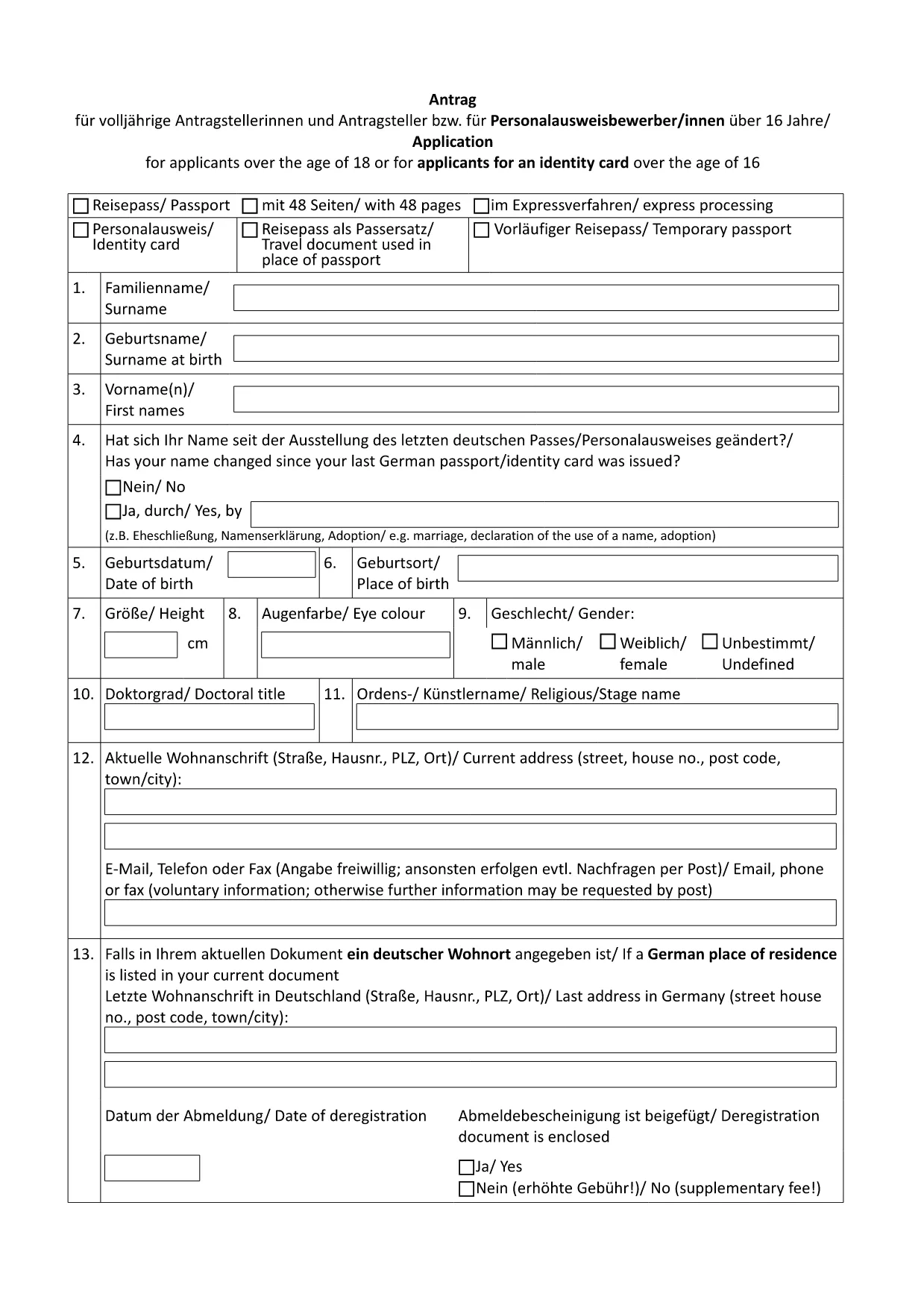
German Passport Application Form (Fillable PDF)

  1. País Alemania
  2. Idioma Inglés
  3. Departamento Federal Foreign Office
  4. Actividad Passports
German Passport Application Form (Fillable PDF)

Applying for a German passport can feel overwhelming, especially when you need to gather the right paperwork and fill out a lengthy application. With Formize’s fillable PDF solution, you can complete the official German passport application form directly in your browser, avoid transcription errors, and save a printable copy for your embassy appointment.

Why Use a Fillable PDF for Your German Passport?

  • Accuracy: Fields are validated in real time, reducing the risk of missing or incorrect information.
  • Speed: No more printing, writing, and re‑typing. Fill, save, and download instantly.
  • Secure storage: Your data stays within the Formize app until you choose to export it.
  • Eco‑friendly: Reduce paper waste by printing only the final, completed form.

How to Complete the German Passport Application Online

Follow these simple steps (see the How‑To section below for a detailed guide):

  1. Click the "Fill out this form" button on this page.
  2. Wait for the Formize PDF Filler to load.
  3. Enter your personal data, passport details, and supporting information.
  4. Review the form for completeness and correctness.
  5. Save the PDF and print a hard copy for your appointment.

Required Documents and Common Mistakes

Before you start, gather the following original documents:

  • Completed application form (the PDF you will fill out).
  • Two recent biometric passport photos.
  • Birth certificate or proof of German citizenship.
  • Current passport or ID card.
  • Proof of residence (e.g., utility bill, driver’s license).
  • Marriage or divorce certificates if applicable.

Common pitfalls to avoid:

  • Leaving any mandatory field blank.
  • Using photos that are not biometric or are cropped incorrectly.
  • Submitting outdated or non‑original documents.
  • Forgetting a name declaration when your current surname differs from the one in your previous passport.

Download & Print the Official Form

The PDF linked below is the exact form used by German embassies and consulates worldwide. Click the button, fill it online, then print a single copy for your scheduled appointment.

Download German Passport Application Form (PDF)

FAQ – German Passport Application

Find quick answers to the most common questions below. If you need further assistance, contact your local German mission.

PREGUNTAS MÁS FRECUENTES
  • Do I need to print the form after filling it online?

    Yes. German embassies require a printed, signed copy of the completed application together with original supporting documents.

  • Can I submit the application by mail?

    No. Since November 2007, all German passport applications must be submitted in person at an embassy, consulate, or honorary consul.

  • What biometric photo specifications are required?

    Two identical, recent biometric photos (35 mm × 45 mm), with a plain background and no glasses. The Formize filler does not embed photos; attach them separately.

  • How long does processing take?

    Typical processing time is six to eight weeks. If a name declaration is needed, it may take longer.

  • Is the form available in English?

    The official form is in German. However, you can fill it out using Formize and refer to the English guidance on this page.

  • What if I make a mistake after saving the PDF?

    Open the saved PDF again in the Formize filler, correct the error, and re‑save. Do not hand‑write changes on the printed form.

  • Do I need to bring my old passport?

    Yes. Bring the data page of your current or most recent passport, even if it is expired.

  • Are there fees for the application?

    Passport fees vary by age and type. Check the fee schedule on the website of the German mission where you will apply.

CÓMO

Cómo completar German passport application gratis, en línea en 5 sencillos pasos:

  1. 1
    Click the Fill‑out Button
    On this page, click the "Fill out this form" button to launch the Formize PDF Filler.
  2. 2
    Wait for the Formizer to Load
    The online filler will open in a new tab. Allow a few seconds for all fields to become interactive.
  3. 3
    Enter Your Information
    Complete each section – personal data, passport details, and supporting information – using the keyboard or drop‑down menus.
  4. 4
    Validate and Save
    Use the built‑in validation to check for missing fields, then click "Save" to download the completed PDF to your device.
  5. 5
    Print for Your Appointment
    Print a single copy of the filled form and bring it, along with the required documents, to your embassy or consulate appointment.
Aplicación Formize PDF Filler
SOBRE

German passport application plantilla

Con el conjunto tradicional de funciones para ver y completar un documento PDF, combinado con los beneficios de una aplicación web y un diseño receptivo, puede completar German passport application en minutos.

CARACTERÍSTICAS

Relleno de PDF

La forma más fácil de llenar formularios PDF en línea

  • Rellene rápidamente German passport application
    ¿Está buscando una manera de llenar rápidamente German passport application en línea? Con nuestro rellenador de formularios PDF gratuito en línea, sabrá cómo editar y rellenar este documento PDF en menos de un minuto.
  • Editor de PDF en línea fácil de usar
    ¿Cansado de imprimir archivos PDF para poder editarlos antes de volver a escanearlos y enviarlos de vuelta? Edite documentos PDF gratis en línea. Utilice nuestro editor de pdf en línea para ahorrar tiempo y papel.
  • Excelentes herramientas, todas las plataformas.
    ¿Se pregunta cómo completar German passport application en una Mac, o tal vez cómo usar un relleno de PDF gratis? Nuestras herramientas de PDF en línea funcionan en todas las plataformas.
  • Almacenamiento seguro de archivos
    Los archivos "German passport application" completados se almacenan en una base de datos segura administrada por Amazon Cloud hosting. Puede eliminar sus archivos de nuestro sistema en cualquier momento. En cualquier caso, estos archivos se eliminan automáticamente después de 24 horas.
  • Chatea con {palabra clave}
    Chatea con "German passport application" en Chatize, que es un asistente de lectura de PDF gratuito. Haga preguntas y obtenga respuestas de "German passport application". Simplemente haga clic en el botón Chatear con documento de arriba.

Eliminar sesión de llenado

¿Eliminar la sesión de llenado seleccionada? En este caso, se perderá su progreso al completar el formulario.

Eliminar sesión de edición

¿Eliminar la sesión de edición seleccionada? En este caso, se perderá su progreso en la creación y edición del formulario.