Seleccione el idioma

Punjab Birth Certificate Application Form (Fillable PDF)

  1. País India
  2. Idioma Inglés
  3. Actividad Birth Certificate
  4. Departamento Birth & Death Registration
Complete éste formulario
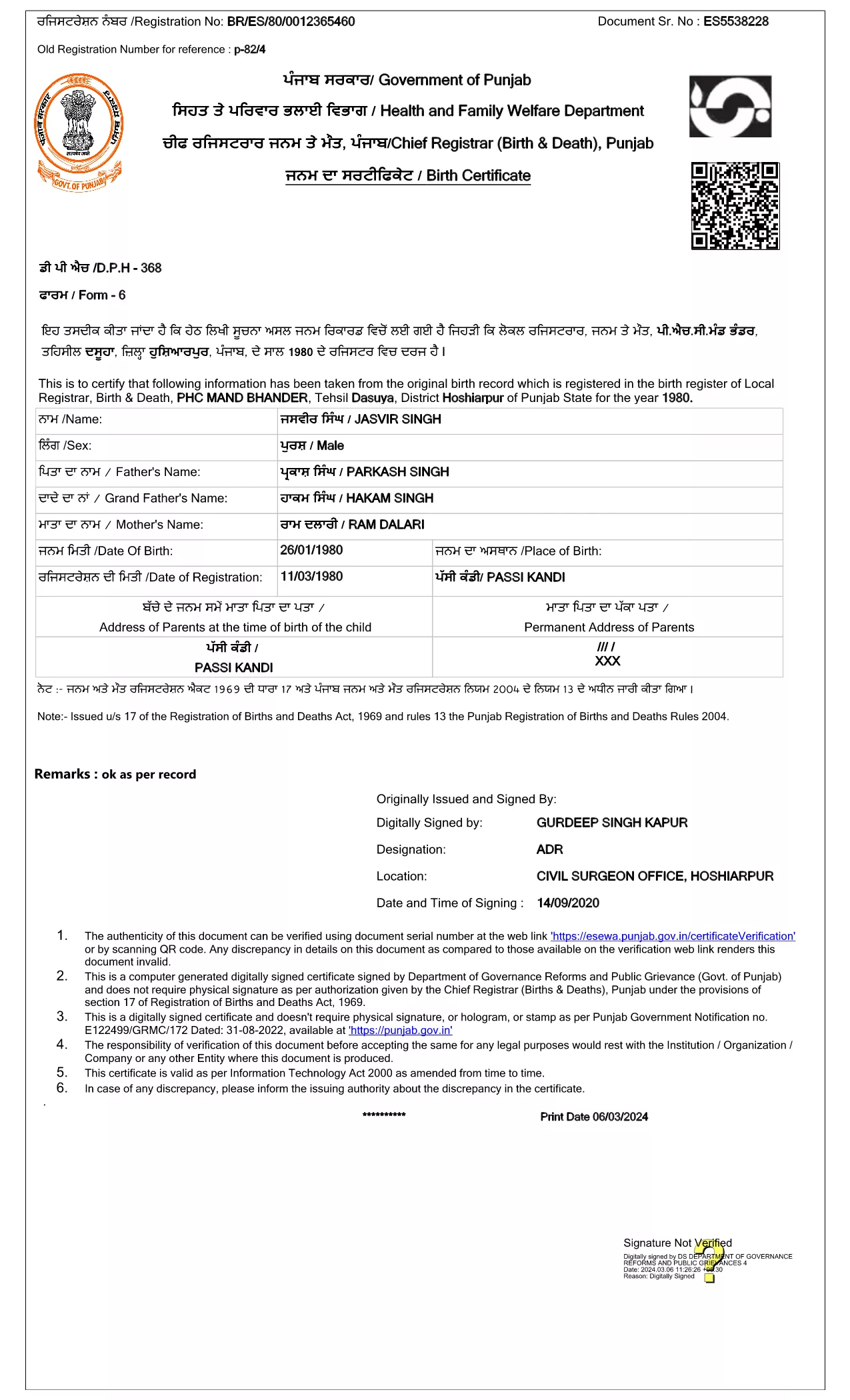
Punjab Birth Certificate Application Form (Fillable PDF)

The Punjab Birth Certificate Application Form is the government‑approved document you need to obtain a certified birth record for a child born in Punjab, India. This form is now available as a fillable PDF, allowing you to complete it directly in your browser using the Formize PDF Filler – no printer, scanner, or physical signatures required.

Why Use the Official Fillable PDF?

Using the official fillable PDF ensures that your submission complies with the Registration of Births and Deaths Act, 1969. The digital signature from the Department of Governance Reforms and Public Grievance guarantees authenticity, speeds up processing, and eliminates the need for manual handling.

How to Fill the Punjab Birth Certificate Form Online

Simply click the "Fill out this form" button on the page, wait for the Formize PDF Filler app to load, and start entering the required details. The interface is intuitive: click a field, type your answer, and move to the next section. When you’re done, save the completed PDF and submit it to the local registration office.

Required Documents & Information

  • Child’s full name (as per parents’ records)
  • Date and place of birth (village/town, district)
  • Parents’ full names, ages, and occupations
  • Proof of identity for at least one parent (Aadhaar, Voter ID, etc.)
  • Hospital discharge summary or midwife’s certificate (if applicable)

Common Mistakes to Avoid

  • Leaving mandatory fields blank – the form will not submit.
  • Using unofficial abbreviations for place names.
  • Uploading an outdated version of the PDF (always use the latest link provided).
  • Providing mismatched names between the birth record and parents’ IDs.

Follow the steps below to ensure a smooth, error‑free submission.

PREGUNTAS MÁS FRECUENTES
  • Is the Punjab birth certificate form free to download?

    Yes, the official fillable PDF is provided by the Punjab government at no cost. You only pay any standard processing fees when you submit the completed form.

  • Can I submit the filled PDF online?

    Most districts still require a physical copy, but many accept a digital PDF via email or the e‑services portal. Check your local office’s guidelines.

  • What if I make a mistake after saving the PDF?

    Open the saved PDF again in the Formize PDF Filler, correct the error, and re‑save. The form is fully editable until you finalize it.

  • Do I need a digital signature?

    The PDF is pre‑signed by the Department of Governance Reforms and Public Grievance, so no additional digital signature is required from you.

  • How long does processing take after submission?

    Processing times vary by district, typically ranging from 7 to 15 business days once the complete application and supporting documents are received.

  • What documents are required to accompany the application?

    You’ll need a parent’s ID proof (Aadhaar, Voter ID, etc.), the hospital discharge summary or midwife’s certificate, and any other documents specified by your local office.

  • Can I request a duplicate birth certificate using this form?

    Yes. Select the “Duplicate Certificate” option in the form and provide the original certificate number if available.

CÓMO

Cómo completar Punjab birth certificate gratis, en línea en 4 sencillos pasos:

  1. 1
    Open the Fillable Form
    Click the "Fill out this form" button on the page. The Formize PDF Filler will load automatically in a new tab.
  2. 2
    Enter Your Information
    Fill each highlighted field with the required details. Use the tab key or click to move between sections.
  3. 3
    Save and Review
    When all fields are completed, click "Save" to download the filled PDF. Review it for any errors before submission.
  4. 4
    Submit to the Local Office
    Print the saved PDF (if required) or submit the digital copy to your nearest Birth & Death Registration office as instructed.
Aplicación Formize PDF Filler
SOBRE

Punjab birth certificate plantilla

Con el conjunto tradicional de funciones para ver y completar un documento PDF, combinado con los beneficios de una aplicación web y un diseño receptivo, puede completar Punjab birth certificate en minutos.

CARACTERÍSTICAS

Relleno de PDF

La forma más fácil de llenar formularios PDF en línea

  • Rellene rápidamente Punjab birth certificate
    ¿Está buscando una manera de llenar rápidamente Punjab birth certificate en línea? Con nuestro rellenador de formularios PDF gratuito en línea, sabrá cómo editar y rellenar este documento PDF en menos de un minuto.
  • Editor de PDF en línea fácil de usar
    ¿Cansado de imprimir archivos PDF para poder editarlos antes de volver a escanearlos y enviarlos de vuelta? Edite documentos PDF gratis en línea. Utilice nuestro editor de pdf en línea para ahorrar tiempo y papel.
  • Excelentes herramientas, todas las plataformas.
    ¿Se pregunta cómo completar Punjab birth certificate en una Mac, o tal vez cómo usar un relleno de PDF gratis? Nuestras herramientas de PDF en línea funcionan en todas las plataformas.
  • Almacenamiento seguro de archivos
    Los archivos "Punjab birth certificate" completados se almacenan en una base de datos segura administrada por Amazon Cloud hosting. Puede eliminar sus archivos de nuestro sistema en cualquier momento. En cualquier caso, estos archivos se eliminan automáticamente después de 24 horas.
  • Chatea con {palabra clave}
    Chatea con "Punjab birth certificate" en Chatize, que es un asistente de lectura de PDF gratuito. Haga preguntas y obtenga respuestas de "Punjab birth certificate". Simplemente haga clic en el botón Chatear con documento de arriba.

Eliminar sesión de llenado

¿Eliminar la sesión de llenado seleccionada? En este caso, se perderá su progreso al completar el formulario.

Eliminar sesión de edición

¿Eliminar la sesión de edición seleccionada? En este caso, se perderá su progreso en la creación y edición del formulario.