
Seleccione el idioma

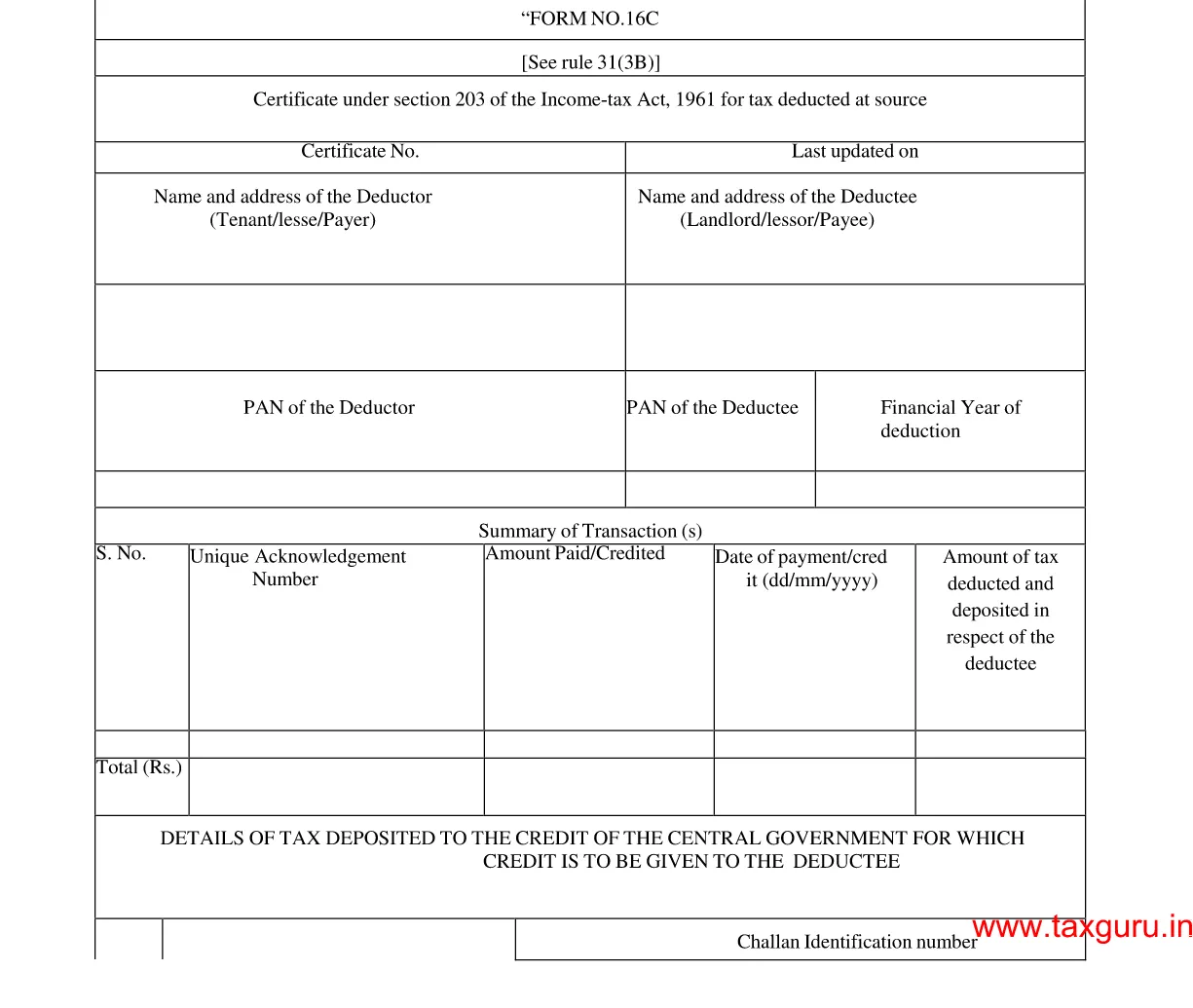
Form 16C – Fillable Tax Deduction Statement (Section 194‑IB)

  1. País India
  2. Idioma Inglés
  3. Departamento Income Tax Department
  4. Actividad Impuestos
Form 16C – Fillable Tax Deduction Statement (Section 194‑IB)

Form 16C is the official statement used by deductors to report tax deducted at source (TDS) under Section 194‑IB of the Income Tax Act, India. It details the amount deducted, the recipient’s PAN, and the date of deduction. With Formize’s fillable PDF, you can complete and submit the form in minutes—no paper, no hassle.

What is Form 16C?

Form 16C serves as a challan‑cum‑statement that records TDS on payments such as interest on securities, dividends, and other specified incomes. The form must be filed electronically with the Income Tax Department after the deduction is made.

Who Needs to File Form 16C?

  • Any person or entity deducting tax under Section 194‑IB.
  • Financial institutions, mutual funds, and companies paying interest or dividend income.
  • Businesses that have made taxable payments to residents or non‑residents.

How to Fill Form 16C Online

Follow these simple steps to complete the form without leaving the page:

  1. Click the "Fill out this form" button below.
  2. The Formize PDF Filler app loads automatically in your browser.
  3. Enter the required details (deductor name, PAN, amount, etc.) in the fillable fields.
  4. Review the information, then click Save or Download to get a completed PDF.

Common Mistakes to Avoid

  • Incorrect PAN: Double‑check the PAN of both deductor and deductee.
  • Wrong financial year: Ensure the year matches the period of deduction.
  • Missing signatures: The form requires the signature of the person responsible for deduction.
  • Incomplete head codes: Use the correct major and minor head codes as per the Income Tax rules.

Download the Fillable PDF

Ready to start? Click the button below to open the fillable version of Form 16C directly in your browser.

Fill out this form

PREGUNTAS MÁS FRECUENTES
  • What is the purpose of Form 16C?

    Form 16C records tax deducted at source under Section 194‑IB and serves as a challan‑cum‑statement for the Income Tax Department.

  • Who is required to file Form 16C?

    Any person or entity that deducts tax on interest, dividends, or similar payments under Section 194‑IB must file Form 16C.

  • Can I edit the PDF on a mobile device?

    Yes. The Formize PDF Filler works on all modern browsers, including mobile Chrome and Safari.

  • Do I need a digital signature to submit Form 16C?

    A physical signature is required on the printed form. For electronic filing, the form can be uploaded without a digital signature, but the deductor’s signature must be present on the original copy.

  • What are the major and minor head codes?

    These codes classify the nature of the payment. For example, major head code 2 and minor head code 0 are commonly used for interest payments.

  • How do I correct a mistake after submission?

    File a revised Form 16C with the corrected details before the end of the financial year, and inform the deductee of the changes.

CÓMO

Cómo completar Form 16C gratis, en línea en 4 sencillos pasos:

  1. 1
    Open the Fillable Form
    Click the "Fill out this form" button. The Formize PDF Filler loads instantly in your browser.
  2. 2
    Enter Required Information
    Complete each fillable field—deductor details, PAN, amount deducted, and the applicable head codes.
  3. 3
    Validate and Save
    Review the entered data, ensure no fields are missing, then click Save to store the completed PDF on your device.
  4. 4
    Submit to the Tax Department
    Upload the saved PDF through the Income Tax e‑filing portal as per the filing deadline.
Aplicación Formize PDF Filler
SOBRE

Formularios de impuesto

Form 16C es uno de los formularios de impuestos que son documentos utilizados para reportar información relacionada con los impuestos a la autoridad fiscal correspondiente. Hay varios tipos de formularios de impuestos, incluidos los formularios de impuestos federales, estatales y locales, que pueden variar según las circunstancias y la ubicación del contribuyente.

CARACTERÍSTICAS

Relleno de PDF

La forma más fácil de llenar formularios PDF en línea

  • Rellene rápidamente Form 16C
    ¿Está buscando una manera de llenar rápidamente Form 16C en línea? Con nuestro rellenador de formularios PDF gratuito en línea, sabrá cómo editar y rellenar este documento PDF en menos de un minuto.
  • Editor de PDF en línea fácil de usar
    ¿Cansado de imprimir archivos PDF para poder editarlos antes de volver a escanearlos y enviarlos de vuelta? Edite documentos PDF gratis en línea. Utilice nuestro editor de pdf en línea para ahorrar tiempo y papel.
  • Excelentes herramientas, todas las plataformas.
    ¿Se pregunta cómo completar Form 16C en una Mac, o tal vez cómo usar un relleno de PDF gratis? Nuestras herramientas de PDF en línea funcionan en todas las plataformas.
  • Almacenamiento seguro de archivos
    Los archivos "Form 16C" completados se almacenan en una base de datos segura administrada por Amazon Cloud hosting. Puede eliminar sus archivos de nuestro sistema en cualquier momento. En cualquier caso, estos archivos se eliminan automáticamente después de 24 horas.
  • Chatea con {palabra clave}
    Chatea con "Form 16C" en Chatize, que es un asistente de lectura de PDF gratuito. Haga preguntas y obtenga respuestas de "Form 16C". Simplemente haga clic en el botón Chatear con documento de arriba.

Eliminar sesión de llenado

¿Eliminar la sesión de llenado seleccionada? En este caso, se perderá su progreso al completar el formulario.

Eliminar sesión de edición

¿Eliminar la sesión de edición seleccionada? En este caso, se perderá su progreso en la creación y edición del formulario.