
Seleccione el idioma

Form 14454 – IRS Offshore Voluntary Disclosure Attachment (Fillable PDF)

  1. País EE.UU
  2. Idioma Inglés
  3. Actividad Impuestos
  4. Departamento Servicio de ingresos internos
Form 14454 – IRS Offshore Voluntary Disclosure Attachment (Fillable PDF)

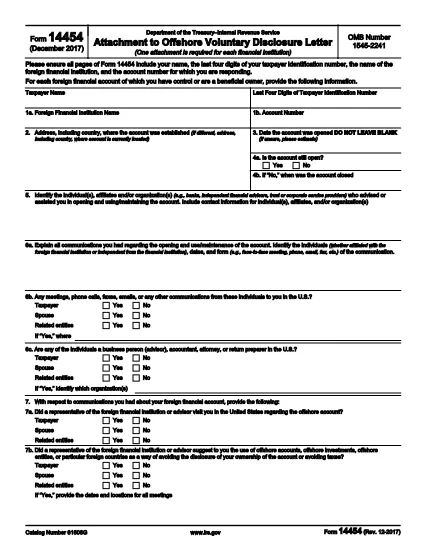
Form 14454 is the official attachment required when filing an Offshore Voluntary Disclosure Letter with the Internal Revenue Service (IRS). It captures essential details about the foreign financial institution, account numbers, and taxpayer identification.

What Is Form 14454?

This form serves as a supplemental schedule to the offshore disclosure program. Taxpayers must provide accurate information about each foreign account, including the institution’s name, address, and the last four digits of the taxpayer’s SSN or ITIN.

How to Complete the Fillable PDF Online

Instead of downloading the PDF and editing it manually, simply click the "Fill out this form" button on this page. The Formize PDF Filler app will load instantly, letting you type directly into each field, add check marks, and save a copy for your records.

  • All fields are interactive – no extra software required.
  • Use the Tab key to jump between sections quickly.
  • When finished, download the completed PDF or email it straight to the IRS.

Common Mistakes to Avoid

  • Leaving fields blank: Every required field must be filled; otherwise the IRS will reject the submission.
  • Mismatched taxpayer ID: Ensure the last four digits of the SSN/ITIN match the main disclosure letter.
  • Incorrect institution name or address: Verify the foreign bank’s official name as it appears on statements.

Where to Submit the Completed Form

After you finish the fillable PDF, attach it to your Offshore Voluntary Disclosure Letter and send the package to the IRS address listed in the program’s instructions. For electronic submissions, follow the IRS’s secure upload guidelines.

Key Definitions and Terms

Foreign Financial Institution (FFI): Any bank, brokerage, or similar entity located outside the United States.

ITIN: Individual Taxpayer Identification Number, used when a taxpayer does not have an SSN.

Use this page as your one‑stop resource for downloading, filling, and submitting Form 14454 correctly.

PREGUNTAS MÁS FRECUENTES
  • Do I need a special PDF editor to fill Form 14454?

    No. The Formize online filler works in any modern browser, so you can complete the form without installing additional software.

  • Can I save my progress and return later?

    Yes. Use the "Save" button in the filler to download a partially completed PDF, then reload it later to finish.

  • What if I make a mistake after downloading the PDF?

    Open the saved PDF again in the Formize filler, correct the error, and re‑download the updated version.

  • Is Form 14454 required for every offshore account?

    The form must be attached for each foreign financial institution you disclose under the Offshore Voluntary Disclosure Program.

  • Where do I send the completed form?

    Submit it with your Offshore Voluntary Disclosure Letter to the IRS address specified in the program’s guidance, or follow the IRS’s electronic filing procedures.

  • Is there a filing deadline for Form 14454?

    The form must be submitted together with your disclosure letter by the deadline stated in the IRS notice you received.

  • Can I use Form 14454 for non‑U.S. taxpayers?

    Form 14454 is an IRS attachment, so it is intended for U.S. taxpayers who are disclosing foreign accounts.

  • Do I need to attach supporting documents?

    Include any required statements from the foreign institution as referenced in the IRS disclosure instructions.

CÓMO

Cómo completar Form 14454 gratis, en línea en 5 sencillos pasos:

  1. 1
    Open the Fillable Form
    Click the "Fill out this form" button on the page. The Formize PDF Filler will open directly in your browser.
  2. 2
    Enter Your Information
    Type into each highlighted field. Use the Tab key to move quickly between sections.
  3. 3
    Review for Accuracy
    Double‑check every required field, especially the taxpayer ID and foreign institution details.
  4. 4
    Save or Download
    When finished, click "Download PDF" to save a copy, or use the built‑in email option to send it to your tax advisor.
  5. 5
    Submit to the IRS
    Attach the completed Form 14454 to your Offshore Voluntary Disclosure Letter and follow the IRS submission instructions.
Aplicación Formize PDF Filler
SOBRE

Formularios de impuesto

Form 14454 es uno de los formularios de impuestos que son documentos utilizados para reportar información relacionada con los impuestos a la autoridad fiscal correspondiente. Hay varios tipos de formularios de impuestos, incluidos los formularios de impuestos federales, estatales y locales, que pueden variar según las circunstancias y la ubicación del contribuyente.

CARACTERÍSTICAS

Relleno de PDF

La forma más fácil de llenar formularios PDF en línea

  • Rellene rápidamente Form 14454
    ¿Está buscando una manera de llenar rápidamente Form 14454 en línea? Con nuestro rellenador de formularios PDF gratuito en línea, sabrá cómo editar y rellenar este documento PDF en menos de un minuto.
  • Editor de PDF en línea fácil de usar
    ¿Cansado de imprimir archivos PDF para poder editarlos antes de volver a escanearlos y enviarlos de vuelta? Edite documentos PDF gratis en línea. Utilice nuestro editor de pdf en línea para ahorrar tiempo y papel.
  • Excelentes herramientas, todas las plataformas.
    ¿Se pregunta cómo completar Form 14454 en una Mac, o tal vez cómo usar un relleno de PDF gratis? Nuestras herramientas de PDF en línea funcionan en todas las plataformas.
  • Almacenamiento seguro de archivos
    Los archivos "Form 14454" completados se almacenan en una base de datos segura administrada por Amazon Cloud hosting. Puede eliminar sus archivos de nuestro sistema en cualquier momento. En cualquier caso, estos archivos se eliminan automáticamente después de 24 horas.
  • Chatea con {palabra clave}
    Chatea con "Form 14454" en Chatize, que es un asistente de lectura de PDF gratuito. Haga preguntas y obtenga respuestas de "Form 14454". Simplemente haga clic en el botón Chatear con documento de arriba.

Eliminar sesión de llenado

¿Eliminar la sesión de llenado seleccionada? En este caso, se perderá su progreso al completar el formulario.

Eliminar sesión de edición

¿Eliminar la sesión de edición seleccionada? En este caso, se perderá su progreso en la creación y edición del formulario.