
Seleccione el idioma

Form 4506‑T‑EZ (SP) – Fillable PDF for Tax Transcript Requests

  1. País EE.UU
  2. Idioma Español
  3. Actividad Impuestos
  4. Departamento Servicio de ingresos internos
Form 4506‑T‑EZ (SP) – Fillable PDF for Tax Transcript Requests

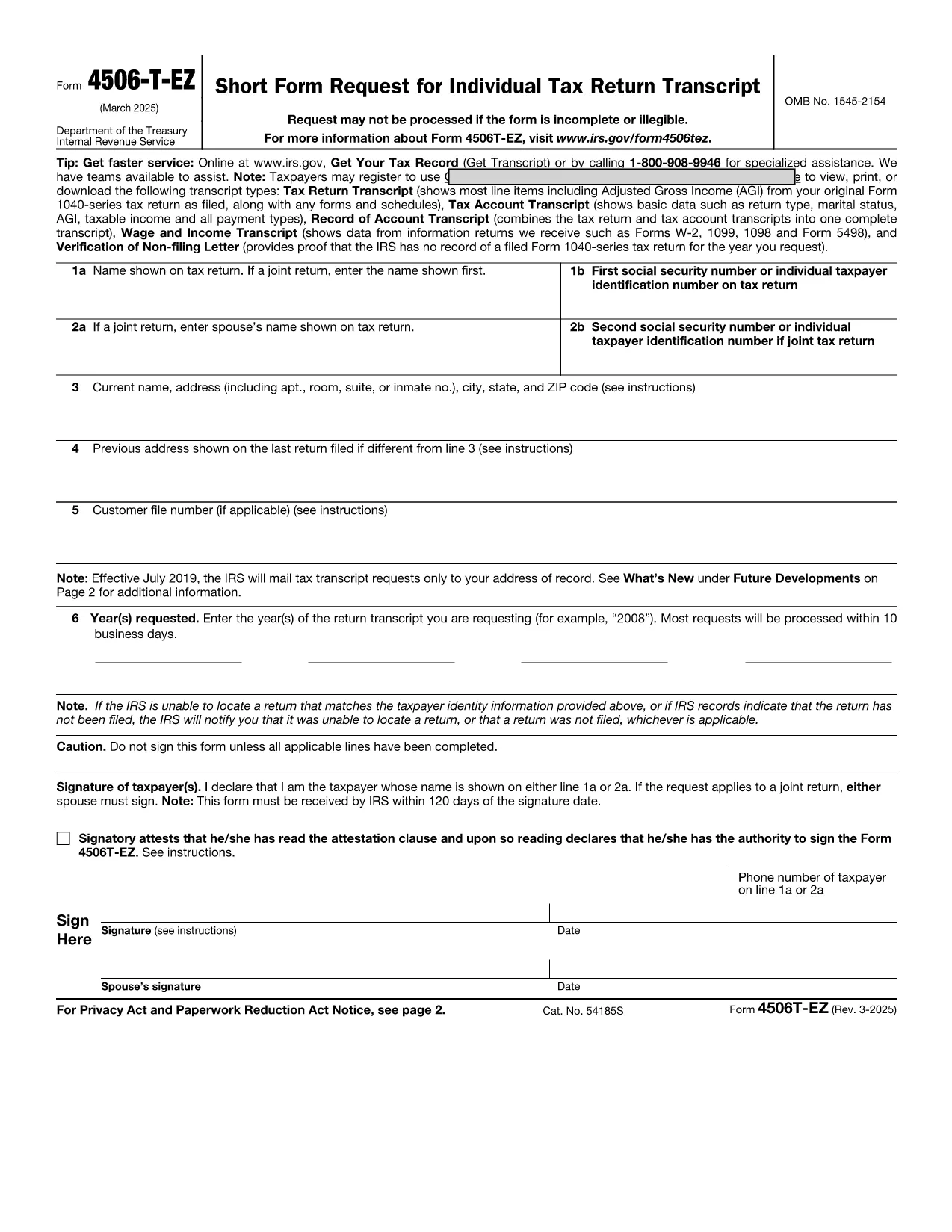
The IRS Form 4506‑T‑EZ (SP) is the Spanish‑language version of the short request for tax return transcripts. It allows individuals and businesses to obtain a copy of their tax return information, W‑2, 1099 data, or a verification of non‑filing directly from the Internal Revenue Service.

What Is Form 4506‑T‑EZ (SP)?

This one‑page form is designed for quick requests. You can use it to ask for:

  • Tax return transcripts
  • Account information
  • W‑2 and 1099 details
  • Verification of non‑filing

Key Sections of the Spanish Form

The form is divided into clear sections:

  1. Información del Contribuyente – Name, SSN, and address.
  2. Tipo de Solicitud – Choose the transcript type you need.
  3. Periodo Fiscal – Specify the tax year or period.
  4. Firma y Fecha – Your signature and date.

How to Complete the Form Using Formize

Instead of printing and scanning, simply click the “Fill out this form” button below. The Formize PDF Filler loads in your browser, letting you type directly into each field.

Common Mistakes to Avoid

  • Leaving the SSN blank or entering it with dashes.
  • Selecting the wrong transcript type.
  • Providing an incorrect tax‑year format (use MM/DD/YYYY).
  • Forgetting to sign the form – an unsigned form is rejected.

Where to Submit Your Completed Form

After you finish, you can:

  • Mail the printed copy to the address listed on the form.
  • Fax it to the IRS fax number for transcript requests.
  • Upload the signed PDF through the IRS “Get Transcript” portal (if available).

Need help? The IRS website provides additional guidance, but most users find the Formize fillable version fast and error‑free.

PREGUNTAS MÁS FRECUENTES
  • Do I need to attach any supporting documents?

    No. Form 4506‑T‑EZ (SP) is a request only. Attachments are required only for the full Form 4506‑T when you need copies of the actual return.

  • Can I request multiple years on one form?

    The short form allows one tax year per submission. For multiple years, submit a separate form for each year.

  • Is the Formize filler secure?

    Yes. Formize uses SSL encryption, and the PDF never leaves your browser unless you choose to download or upload it.

  • How long does the IRS take to process the request?

    Standard processing is 5‑10 business days for transcript requests, but it can be longer during peak filing season.

  • What if I need a transcript for a business entity?

    Use Form 4506‑T (not the EZ version) and select the appropriate entity type on the form.

  • Do I have to file the form in Spanish?

    If you are submitting the Spanish version (SP), the IRS accepts it in Spanish. You may also file the English version if preferred.

  • Can I submit the form electronically?

    The IRS does not currently accept a fully electronic submission for 4506‑T‑EZ. You must mail, fax, or upload a signed PDF.

  • What is the difference between Form 4506‑T‑EZ and Form 4506‑T?

    The EZ version is shorter and only requests transcripts. The regular 4506‑T can request copies of the actual tax return and attachments.

  • Is there a fee to request a transcript?

    No. Transcript requests are free of charge.

  • Where can I find the official PDF?

    The official IRS PDF is linked below and is used by the Formize filler.

CÓMO

Cómo completar 4506-T-EZ SP gratis, en línea en 4 sencillos pasos:

  1. 1
    Open the Fillable Form
    Click the “Fill out this form” button on the page. The Formize PDF Filler app will launch in your browser.
  2. 2
    Enter Your Information
    Type directly into each field – name, SSN, address, transcript type, and tax year. The form saves your entries in real time.
  3. 3
    Review and Sign
    Check all entries for accuracy, then use the digital signature field to sign. If you prefer a handwritten signature, download, print, sign, and re‑upload.
  4. 4
    Submit or Download
    When you’re done, click “Save & Download” to get a PDF copy you can mail, fax, or upload to the IRS portal.
Aplicación Formize PDF Filler
SOBRE

Formularios de impuesto

4506-T-EZ SP es uno de los formularios de impuestos que son documentos utilizados para reportar información relacionada con los impuestos a la autoridad fiscal correspondiente. Hay varios tipos de formularios de impuestos, incluidos los formularios de impuestos federales, estatales y locales, que pueden variar según las circunstancias y la ubicación del contribuyente.

CARACTERÍSTICAS

Relleno de PDF

La forma más fácil de llenar formularios PDF en línea

  • Rellene rápidamente 4506-T-EZ SP
    ¿Está buscando una manera de llenar rápidamente 4506-T-EZ SP en línea? Con nuestro rellenador de formularios PDF gratuito en línea, sabrá cómo editar y rellenar este documento PDF en menos de un minuto.
  • Editor de PDF en línea fácil de usar
    ¿Cansado de imprimir archivos PDF para poder editarlos antes de volver a escanearlos y enviarlos de vuelta? Edite documentos PDF gratis en línea. Utilice nuestro editor de pdf en línea para ahorrar tiempo y papel.
  • Excelentes herramientas, todas las plataformas.
    ¿Se pregunta cómo completar 4506-T-EZ SP en una Mac, o tal vez cómo usar un relleno de PDF gratis? Nuestras herramientas de PDF en línea funcionan en todas las plataformas.
  • Almacenamiento seguro de archivos
    Los archivos "4506-T-EZ SP" completados se almacenan en una base de datos segura administrada por Amazon Cloud hosting. Puede eliminar sus archivos de nuestro sistema en cualquier momento. En cualquier caso, estos archivos se eliminan automáticamente después de 24 horas.
  • Chatea con {palabra clave}
    Chatea con "4506-T-EZ SP" en Chatize, que es un asistente de lectura de PDF gratuito. Haga preguntas y obtenga respuestas de "4506-T-EZ SP". Simplemente haga clic en el botón Chatear con documento de arriba.

Eliminar sesión de llenado

¿Eliminar la sesión de llenado seleccionada? En este caso, se perderá su progreso al completar el formulario.

Eliminar sesión de edición

¿Eliminar la sesión de edición seleccionada? En este caso, se perderá su progreso en la creación y edición del formulario.