Seleccione el idioma

Form 5498‑ESA Fillable PDF – Coverdell Education Savings Account Reporting

  1. País EE.UU
  2. Idioma Inglés
  3. Actividad Impuestos
  4. Departamento Servicio de ingresos internos
Form 5498‑ESA Fillable PDF – Coverdell Education Savings Account Reporting

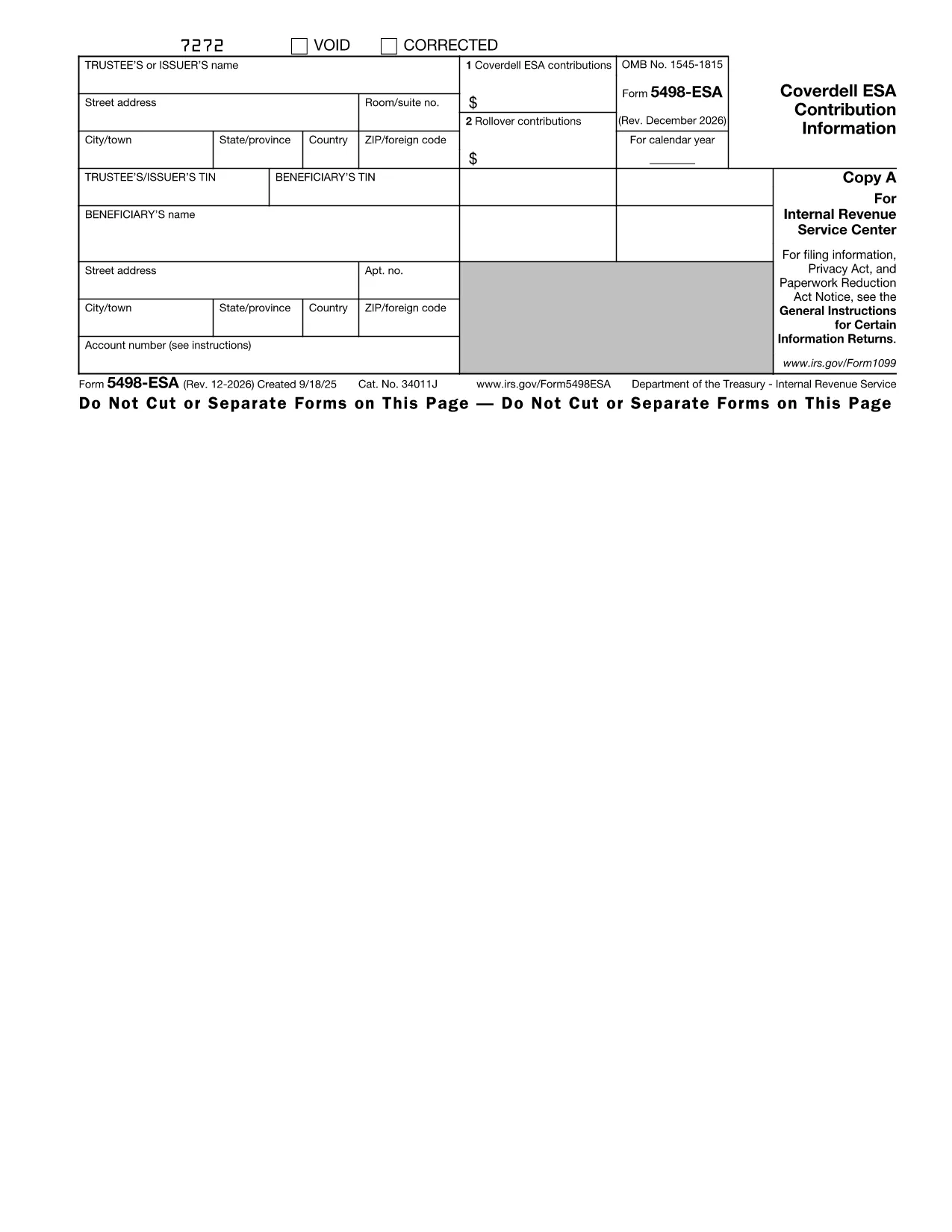
The IRS Form 5498‑ESA (Coverdell Education Savings Account Contribution Information) is the official document trustees or issuers use to report contributions, rollovers, and the year‑end fair market value of a Coverdell ESA. Accurate reporting helps the IRS track education‑savings contributions and ensures beneficiaries stay within the $2,000 annual limit.

What Is Form 5498‑ESA?

Form 5498‑ESA provides a yearly snapshot of all activity in a Coverdell ESA. It includes:

  • Trustee/issuer name, address, and TIN
  • Beneficiary name and TIN
  • Total contributions for the tax year (Box 1)
  • Rollover contributions, if any (Box 2)
  • Fair market value of the account on December 31

How to Fill Out Form 5498‑ESA Online

Instead of printing, downloading, and editing the PDF in a separate editor, simply click the "Fill out this form" button on this page. The Formize PDF Filler app will load instantly, letting you:

  1. Enter trustee and beneficiary details directly into fillable fields.
  2. Upload supporting documents if needed.
  3. Validate the data with built‑in checks that flag common mistakes.
  4. Save a completed copy or export it as a PDF for your records.

Key Deadlines and Common Errors

Deadline: Trustees must provide Copy B of Form 5498‑ESA to the beneficiary by May 31 of the year following the tax year.

Common mistakes to avoid:

  • Entering the wrong beneficiary Social Security number.
  • Reporting contributions that exceed the $2,000 limit.
  • Leaving Box 2 blank when a rollover actually occurred.
  • Failing to include the fair market value as of December 31.

Download the Fillable PDF

If you prefer to work offline, you can download the official fillable PDF directly from the IRS:

Download Form 5498‑ESA (PDF)

Why Use Formize PDF Filler?

Formize provides a secure, browser‑based environment that eliminates the need for separate PDF software. Your data never leaves the encrypted session unless you choose to save or export it. Plus, the built‑in validation helps you submit a clean, error‑free form the first time.

Ready to get started? Click the button below and let Formize guide you through every field.

Instrucciones

PREGUNTAS MÁS FRECUENTES
  • Who must file Form 5498‑ESA?

    The trustee or issuer of the Coverdell ESA files the form. A copy (Copy B) is provided to the beneficiary by May 31 of the following year.

  • Is Form 5498‑ESA deductible on my tax return?

    No. Contributions reported on Form 5498‑ESA are not deductible, but they are important for tracking contribution limits.

  • Can I file Form 5498‑ESA electronically?

    Yes. If you have 250 or more forms, electronic filing is required. For a single form, you can submit a paper copy or use an online filler like Formize.

  • What happens if I exceed the $2,000 contribution limit?

    Excess contributions plus earnings must be withdrawn by June 1 of the following year to avoid a 6% excise tax on the excess amount.

  • Do I need to attach any supporting documents?

    Generally, no supporting documents are attached to Form 5498‑ESA, but you should keep records of contributions and rollovers for your own files.

  • How do I correct an error on a filed Form 5498‑ESA?

    Submit a corrected Form 5498‑ESA with the label "Corrected" at the top of the form. The IRS provides instructions for filing amended information returns.

CÓMO

Cómo completar Form 5498-ESA gratis, en línea en 4 sencillos pasos:

  1. 1
    Click the Fill‑out Button
    On this page, click the "Fill out this form" button. The Formize PDF Filler will open in a new tab.
  2. 2
    Enter Required Information
    Type the trustee’s name, address, TIN, and the beneficiary’s details into the fillable fields. The form automatically moves you to the next section.
  3. 3
    Review and Validate
    Use the built‑in validation to check for missing or incorrect entries. Fix any highlighted errors before proceeding.
  4. 4
    Save or Export
    When all fields are complete, click "Save" to store a copy in your Formize account or "Export PDF" to download a finished PDF for your records.
Aplicación Formize PDF Filler
SOBRE

Formularios de impuesto

Form 5498-ESA es uno de los formularios de impuestos que son documentos utilizados para reportar información relacionada con los impuestos a la autoridad fiscal correspondiente. Hay varios tipos de formularios de impuestos, incluidos los formularios de impuestos federales, estatales y locales, que pueden variar según las circunstancias y la ubicación del contribuyente.

CARACTERÍSTICAS

Relleno de PDF

La forma más fácil de llenar formularios PDF en línea

  • Rellene rápidamente Form 5498-ESA
    ¿Está buscando una manera de llenar rápidamente Form 5498-ESA en línea? Con nuestro rellenador de formularios PDF gratuito en línea, sabrá cómo editar y rellenar este documento PDF en menos de un minuto.
  • Editor de PDF en línea fácil de usar
    ¿Cansado de imprimir archivos PDF para poder editarlos antes de volver a escanearlos y enviarlos de vuelta? Edite documentos PDF gratis en línea. Utilice nuestro editor de pdf en línea para ahorrar tiempo y papel.
  • Excelentes herramientas, todas las plataformas.
    ¿Se pregunta cómo completar Form 5498-ESA en una Mac, o tal vez cómo usar un relleno de PDF gratis? Nuestras herramientas de PDF en línea funcionan en todas las plataformas.
  • Almacenamiento seguro de archivos
    Los archivos "Form 5498-ESA" completados se almacenan en una base de datos segura administrada por Amazon Cloud hosting. Puede eliminar sus archivos de nuestro sistema en cualquier momento. En cualquier caso, estos archivos se eliminan automáticamente después de 24 horas.
  • Chatea con {palabra clave}
    Chatea con "Form 5498-ESA" en Chatize, que es un asistente de lectura de PDF gratuito. Haga preguntas y obtenga respuestas de "Form 5498-ESA". Simplemente haga clic en el botón Chatear con documento de arriba.

Eliminar sesión de llenado

¿Eliminar la sesión de llenado seleccionada? En este caso, se perderá su progreso al completar el formulario.

Eliminar sesión de edición

¿Eliminar la sesión de edición seleccionada? En este caso, se perderá su progreso en la creación y edición del formulario.