
Seleccione el idioma

Schedule M (Form 8858) – Fillable PDF

  1. País EE.UU
  2. Idioma Inglés
  3. Actividad Impuestos
  4. Departamento Servicio de ingresos internos
Schedule M (Form 8858) – Fillable PDF

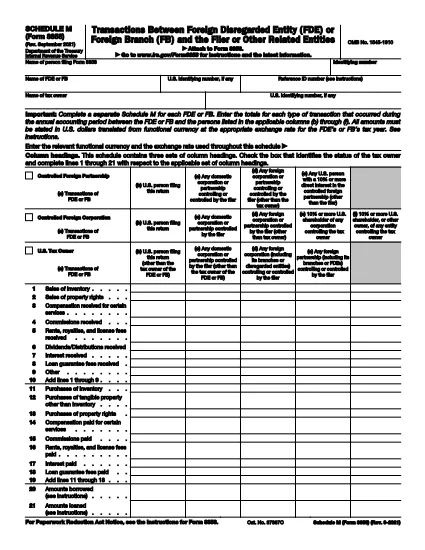
Schedule M (Form 8858) is the IRS attachment used to report transactions between a foreign disregarded entity (FDE) or foreign branch (FB) and the U.S. taxpayer who files Form 8858. Whether you’re reporting sales, purchases, loans, or capital contributions, Schedule M captures the details needed for proper tax compliance.

What Is Schedule M (Form 8858)?

Schedule M provides three distinct sets of column headings to cover different transaction types and entities. It requires you to report amounts in the functional currency of the foreign entity and then convert them to U.S. dollars using the appropriate exchange rate.

How to Complete Schedule M Online

Instead of downloading a static PDF and editing it in a separate program, simply click the "Fill out this form" button on this page. The Formize PDF Filler will load the fillable version of Schedule M, letting you enter data directly in your browser.

  • Step 1: Click the button and wait for the Formize PDF Filler to open.
  • Step 2: Select the appropriate entity type (FDE or FB) and the column that matches the transaction partner.
  • Step 3: Enter the transaction amount in the foreign currency, then input the exchange rate.
  • Step 4: Review the automatically calculated U.S. dollar total.
  • Step 5: Save the completed form and attach it to your Form 8858 filing.

Common Mistakes & Tips

Avoid these pitfalls to ensure a smooth filing:

  • Do not mix up the columns for "Related persons" and "Unrelated persons." Each column has a specific definition in the instructions.
  • Always use the exchange rate that applies to the transaction date, not an average rate, unless the instructions specifically allow it.
  • Complete a separate Schedule M for each FDE or FB you own. Consolidating multiple entities on one schedule will cause a rejection.
  • Double‑check that the functional currency is correctly identified; an incorrect currency can lead to mis‑reported amounts.

Download the Fillable PDF

When you’re ready to keep a copy for your records, you can download the official IRS fillable PDF directly from the link below.

PREGUNTAS MÁS FRECUENTES
  • Do I need a separate Schedule M for each foreign entity?

    Yes. The IRS requires a distinct Schedule M for every foreign disregarded entity or foreign branch you own.

  • Can I use an average exchange rate for all transactions?

    Only if the instructions specifically allow it. Generally, you must use the rate that applies to the date of each transaction.

  • What is the difference between columns (b) and (c) on Schedule M?

    Column (b) reports transactions with the filer or related persons, while column (c) captures transactions with unrelated persons.

  • Is the PDF on Formize.com the official IRS version?

    Yes. The PDF linked below is the official IRS Schedule M (Form 8858) PDF, made fillable through Formize’s online editor.

  • What happens if I file Schedule M with errors?

    The IRS may reject your Form 8858 filing, causing delays and possible penalties. Double‑check all amounts, exchange rates, and entity classifications.

  • Do I need to attach supporting documents for each transaction?

    You do not attach supporting documents to Schedule M itself, but retain all records in case the IRS requests them during an audit.

CÓMO

Cómo completar Form 8858 Schedule M gratis, en línea en 5 sencillos pasos:

  1. 1
    Open the Fillable Form
    Click the "Fill out this form" button on the page. The Formize PDF Filler will load the Schedule M PDF directly in your browser.
  2. 2
    Enter Entity Information
    Select whether you are reporting a Foreign Disregarded Entity (FDE) or a Foreign Branch (FB) and fill in the identifying details.
  3. 3
    Record Transaction Details
    Enter each transaction amount in the foreign currency, choose the correct column (b‑f), and provide the applicable exchange rate.
  4. 4
    Review Calculations
    The filler automatically converts foreign amounts to U.S. dollars. Verify the totals before proceeding.
  5. 5
    Save and Attach
    Save the completed Schedule M as a PDF and attach it to your Form 8858 filing with the IRS.
Aplicación Formize PDF Filler
SOBRE

Formularios de impuesto

Form 8858 Schedule M es uno de los formularios de impuestos que son documentos utilizados para reportar información relacionada con los impuestos a la autoridad fiscal correspondiente. Hay varios tipos de formularios de impuestos, incluidos los formularios de impuestos federales, estatales y locales, que pueden variar según las circunstancias y la ubicación del contribuyente.

CARACTERÍSTICAS

Relleno de PDF

La forma más fácil de llenar formularios PDF en línea

  • Rellene rápidamente Form 8858 Schedule M
    ¿Está buscando una manera de llenar rápidamente Form 8858 Schedule M en línea? Con nuestro rellenador de formularios PDF gratuito en línea, sabrá cómo editar y rellenar este documento PDF en menos de un minuto.
  • Editor de PDF en línea fácil de usar
    ¿Cansado de imprimir archivos PDF para poder editarlos antes de volver a escanearlos y enviarlos de vuelta? Edite documentos PDF gratis en línea. Utilice nuestro editor de pdf en línea para ahorrar tiempo y papel.
  • Excelentes herramientas, todas las plataformas.
    ¿Se pregunta cómo completar Form 8858 Schedule M en una Mac, o tal vez cómo usar un relleno de PDF gratis? Nuestras herramientas de PDF en línea funcionan en todas las plataformas.
  • Almacenamiento seguro de archivos
    Los archivos "Form 8858 Schedule M" completados se almacenan en una base de datos segura administrada por Amazon Cloud hosting. Puede eliminar sus archivos de nuestro sistema en cualquier momento. En cualquier caso, estos archivos se eliminan automáticamente después de 24 horas.
  • Chatea con {palabra clave}
    Chatea con "Form 8858 Schedule M" en Chatize, que es un asistente de lectura de PDF gratuito. Haga preguntas y obtenga respuestas de "Form 8858 Schedule M". Simplemente haga clic en el botón Chatear con documento de arriba.

Eliminar sesión de llenado

¿Eliminar la sesión de llenado seleccionada? En este caso, se perderá su progreso al completar el formulario.

Eliminar sesión de edición

¿Eliminar la sesión de edición seleccionada? En este caso, se perderá su progreso en la creación y edición del formulario.