
Seleccione el idioma

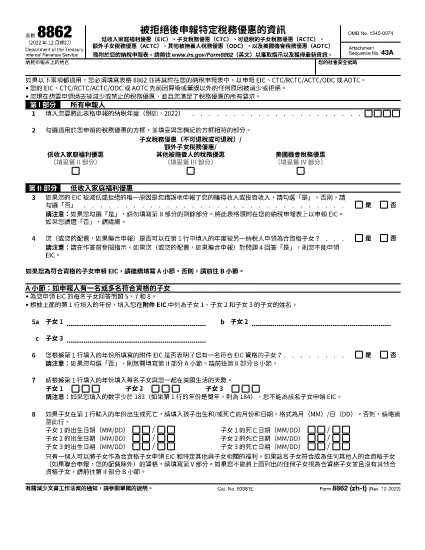
IRS Form 8862 (zh‑T) – Fillable PDF Download

  1. País EE.UU
  2. Idioma Chino tradicional)
  3. Actividad Impuestos
  4. Departamento Servicio de ingresos internos
IRS Form 8862 (zh‑T) – Fillable PDF Download

Form 8862, Information to Claim Certain Credits After Disallowance, is required when the IRS has previously denied a refundable or non‑refundable credit such as the Earned Income Credit (EIC) or Child Tax Credit (CTC). This page offers the official Traditional Chinese (zh‑T) version of the form, plus a simple, click‑to‑fill experience powered by Formize.

What Is Form 8862 (zh‑T) and When Do You Need It?

The zh‑T PDF is the exact translation of the U.S. Internal Revenue Service’s Form 8862 for taxpayers who prefer Traditional Chinese. You must attach this form to your next tax return if a credit was disallowed in a prior year and you now meet all eligibility requirements.

How to Fill Out the Chinese‑Traditional Form 8862 Online

Instead of printing, scanning, or using a separate PDF editor, follow these three steps:

  1. Click “Fill out this form” on the page.
  2. Wait for the Formize PDF Filler app to load. The fillable fields appear instantly in your browser.
  3. Enter your information, add a digital signature, and click “Save & Download”. Your completed form is ready to attach to your tax return.

Common Mistakes to Avoid on Form 8862 (zh‑T)

  • Submitting the form before the disallowance period ends – the IRS will reject it.
  • Leaving any required field blank, especially the tax year of the original disallowance.
  • Using an outdated version of the form. This PDF is the current revision (2024) and matches the latest IRS instructions.

Download the Fillable PDF and Save Your Work

For users who still prefer a local copy, the official Traditional Chinese PDF is available for direct download below. After downloading, you can open it in any PDF viewer that supports fillable fields.

Download Form 8862 (zh‑T) – Fillable PDF

Need help? Review the FAQs at the bottom of this page or contact a qualified tax professional.

Instrucciones

PREGUNTAS MÁS FRECUENTES
  • Do I need to file Form 8862 if my credit was denied for a math error?

    No. Form 8862 is only required when the IRS disallowed a credit because you didn’t meet eligibility rules, not for clerical or calculation errors.

  • Can I submit the Chinese‑Traditional form electronically?

    Yes. After completing the fillable PDF with Formize, you can upload the saved file with your electronic tax return if the e‑file platform accepts PDF attachments.

  • How long does the IRS take to process Form 8862?

    Processing time varies, but most returns with a properly completed Form 8862 are processed within 21 days of filing.

  • What credits does Form 8862 cover?

    The form is used for Earned Income Credit (EIC), Child Tax Credit (CTC), Additional Child Tax Credit (ACTC), Credit for Other Dependents (ODC), and American Opportunity Credit (AOC).

  • Is the fillable PDF free to use?

    Yes. Formize provides the fillable version at no cost; you only need an internet connection to complete it.

  • Do I need a digital signature on Form 8862?

    A signature is required. The Formize filler lets you draw, type, or upload an image of your signature directly in the browser.

  • What if I make a mistake after saving the PDF?

    Open the saved file again in the Formize filler, correct the error, and re‑save. The PDF remains fully editable until you submit it to the IRS.

CÓMO

Cómo completar Form 8862 zh-t gratis, en línea en 3 sencillos pasos:

  1. 1
    Click the Fill‑Out Button
    On this page, press the “Fill out this form” button. The Formize PDF Filler will open in a new tab.
  2. 2
    Wait for the Filler to Load
    The online app loads the fillable fields automatically. No software download is required.
  3. 3
    Complete, Sign, and Save
    Enter all required information, add a digital signature, then click “Save & Download” to get your completed Form 8862 (zh‑T).
Aplicación Formize PDF Filler
SOBRE

Formularios de impuesto

Form 8862 zh-t es uno de los formularios de impuestos que son documentos utilizados para reportar información relacionada con los impuestos a la autoridad fiscal correspondiente. Hay varios tipos de formularios de impuestos, incluidos los formularios de impuestos federales, estatales y locales, que pueden variar según las circunstancias y la ubicación del contribuyente.

CARACTERÍSTICAS

Relleno de PDF

La forma más fácil de llenar formularios PDF en línea

  • Rellene rápidamente Form 8862 zh-t
    ¿Está buscando una manera de llenar rápidamente Form 8862 zh-t en línea? Con nuestro rellenador de formularios PDF gratuito en línea, sabrá cómo editar y rellenar este documento PDF en menos de un minuto.
  • Editor de PDF en línea fácil de usar
    ¿Cansado de imprimir archivos PDF para poder editarlos antes de volver a escanearlos y enviarlos de vuelta? Edite documentos PDF gratis en línea. Utilice nuestro editor de pdf en línea para ahorrar tiempo y papel.
  • Excelentes herramientas, todas las plataformas.
    ¿Se pregunta cómo completar Form 8862 zh-t en una Mac, o tal vez cómo usar un relleno de PDF gratis? Nuestras herramientas de PDF en línea funcionan en todas las plataformas.
  • Almacenamiento seguro de archivos
    Los archivos "Form 8862 zh-t" completados se almacenan en una base de datos segura administrada por Amazon Cloud hosting. Puede eliminar sus archivos de nuestro sistema en cualquier momento. En cualquier caso, estos archivos se eliminan automáticamente después de 24 horas.
  • Chatea con {palabra clave}
    Chatea con "Form 8862 zh-t" en Chatize, que es un asistente de lectura de PDF gratuito. Haga preguntas y obtenga respuestas de "Form 8862 zh-t". Simplemente haga clic en el botón Chatear con documento de arriba.

Eliminar sesión de llenado

¿Eliminar la sesión de llenado seleccionada? En este caso, se perderá su progreso al completar el formulario.

Eliminar sesión de edición

¿Eliminar la sesión de edición seleccionada? En este caso, se perderá su progreso en la creación y edición del formulario.