
Seleccione el idioma

IRS Form 8900 – Railroad Track Maintenance Tax Credit

  1. País EE.UU
  2. Idioma Inglés
  3. Actividad Impuestos
  4. Departamento Servicio de ingresos internos
IRS Form 8900 – Railroad Track Maintenance Tax Credit

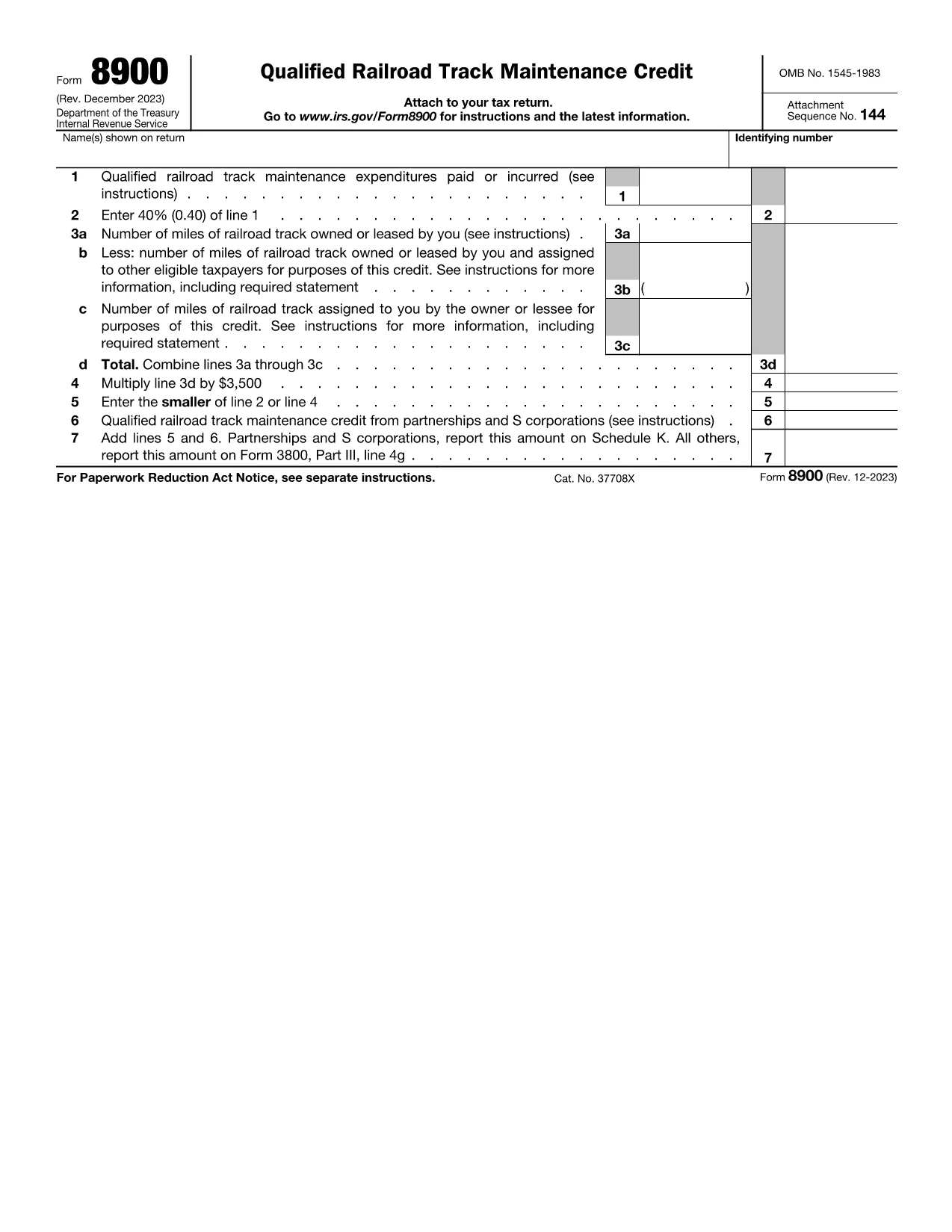
Form 8900 is the official IRS document used to claim the Railroad Track Maintenance Tax Credit (also known as the 45G credit). This credit can offset up to 50% of qualified track‑maintenance expenses, with a maximum of $3,500 per short‑line mile per year.

What Is Form 8900?

Form 8900 collects the details of maintenance costs incurred by short‑line and regional railroads. By completing the form, eligible rail carriers can receive a refundable credit that helps fund essential infrastructure upgrades.

Who Can Claim the Credit?

  • Class II and Class III railroads (short‑line and regional carriers)
  • Railroad entities that performed or paid for qualified track‑maintenance work
  • Shippers that transport property using qualifying railroads (in certain cases)

How to Complete the Form

Use the Fill out this form button on this page. The Formize PDF Filler will load the fillable version of Form 8900 directly in your browser. Follow these steps:

  1. Enter the railroad’s identification number and name.
  2. Provide the total qualified maintenance expenses for the tax year.
  3. Calculate the credit (up to 50% of expenses, not exceeding $3,500 per mile).
  4. Sign and date the form electronically.

Common Mistakes to Avoid

  • Exceeding the per‑mile cap of $3,500.
  • Including non‑qualified expenses such as administrative costs.
  • Leaving the signature field blank – the electronic signature must be applied.
  • Submitting the form without attaching supporting documentation (invoices, receipts).

Submit and Keep Records

After completing the form, download the filled PDF and attach it to your annual tax return (Form 1120‑PC, 1120‑SC, or the appropriate partnership return). Keep all supporting records for at least three years in case of an IRS audit.

Need the original PDF? Download Form 8900 (PDF) for offline use.

Instrucciones

PREGUNTAS MÁS FRECUENTES
  • What expenses qualify for the Railroad Track Maintenance Tax Credit?

    Qualified expenses include labor, material, and equipment costs directly related to maintaining or repairing track infrastructure on short‑line or regional railroads.

  • Is there a deadline to file Form 8900?

    Form 8900 must be filed with your federal tax return for the year in which the maintenance expenses were incurred. Typically, the deadline aligns with the regular tax filing deadline (April 15, with extensions if applicable).

  • Can I file Form 8900 electronically?

    Yes. Use the Formize PDF Filler to complete the form online, then download the filled PDF and attach it to your e‑filed tax return.

  • What is the maximum credit I can claim per mile?

    The credit is capped at $3,500 per short‑line track mile per year, or 50% of qualified expenses, whichever is less.

  • What should I do if I discover an error after filing?

    Amend your tax return using Form 1040‑X (or the appropriate amendment form) and submit a corrected Form 8900 with an explanation of the changes.

  • Do I need to attach supporting documents?

    While the IRS does not require attachments with the initial filing, you must retain invoices, receipts, and other proof of qualified expenses in case of an audit.

  • Is Form 8900 available in an accessible format?

    Yes. An accessible version of Form 8900 can be downloaded from the IRS website (see the "Accessible PDF" link).

CÓMO

Cómo completar Form 8900 gratis, en línea en 4 sencillos pasos:

  1. 1
    Open the Fillable Form
    Click the "Fill out this form" button on the page. The Formize PDF Filler loads the fillable version of Form 8900 directly in your browser.
  2. 2
    Enter Your Information
    Complete each field – railroad ID, maintenance costs, and calculated credit – using the on‑screen prompts.
  3. 3
    Review and Sign
    Double‑check all entries for accuracy, then apply your electronic signature and date.
  4. 4
    Download and Submit
    Save the completed PDF, attach it to your annual tax return, and keep supporting documents for at least three years.
Aplicación Formize PDF Filler
SOBRE

Formularios de impuesto

Form 8900 es uno de los formularios de impuestos que son documentos utilizados para reportar información relacionada con los impuestos a la autoridad fiscal correspondiente. Hay varios tipos de formularios de impuestos, incluidos los formularios de impuestos federales, estatales y locales, que pueden variar según las circunstancias y la ubicación del contribuyente.

CARACTERÍSTICAS

Relleno de PDF

La forma más fácil de llenar formularios PDF en línea

  • Rellene rápidamente Form 8900
    ¿Está buscando una manera de llenar rápidamente Form 8900 en línea? Con nuestro rellenador de formularios PDF gratuito en línea, sabrá cómo editar y rellenar este documento PDF en menos de un minuto.
  • Editor de PDF en línea fácil de usar
    ¿Cansado de imprimir archivos PDF para poder editarlos antes de volver a escanearlos y enviarlos de vuelta? Edite documentos PDF gratis en línea. Utilice nuestro editor de pdf en línea para ahorrar tiempo y papel.
  • Excelentes herramientas, todas las plataformas.
    ¿Se pregunta cómo completar Form 8900 en una Mac, o tal vez cómo usar un relleno de PDF gratis? Nuestras herramientas de PDF en línea funcionan en todas las plataformas.
  • Almacenamiento seguro de archivos
    Los archivos "Form 8900" completados se almacenan en una base de datos segura administrada por Amazon Cloud hosting. Puede eliminar sus archivos de nuestro sistema en cualquier momento. En cualquier caso, estos archivos se eliminan automáticamente después de 24 horas.
  • Chatea con {palabra clave}
    Chatea con "Form 8900" en Chatize, que es un asistente de lectura de PDF gratuito. Haga preguntas y obtenga respuestas de "Form 8900". Simplemente haga clic en el botón Chatear con documento de arriba.

Eliminar sesión de llenado

¿Eliminar la sesión de llenado seleccionada? En este caso, se perderá su progreso al completar el formulario.

Eliminar sesión de edición

¿Eliminar la sesión de edición seleccionada? En este caso, se perderá su progreso en la creación y edición del formulario.