Seleccione el idioma

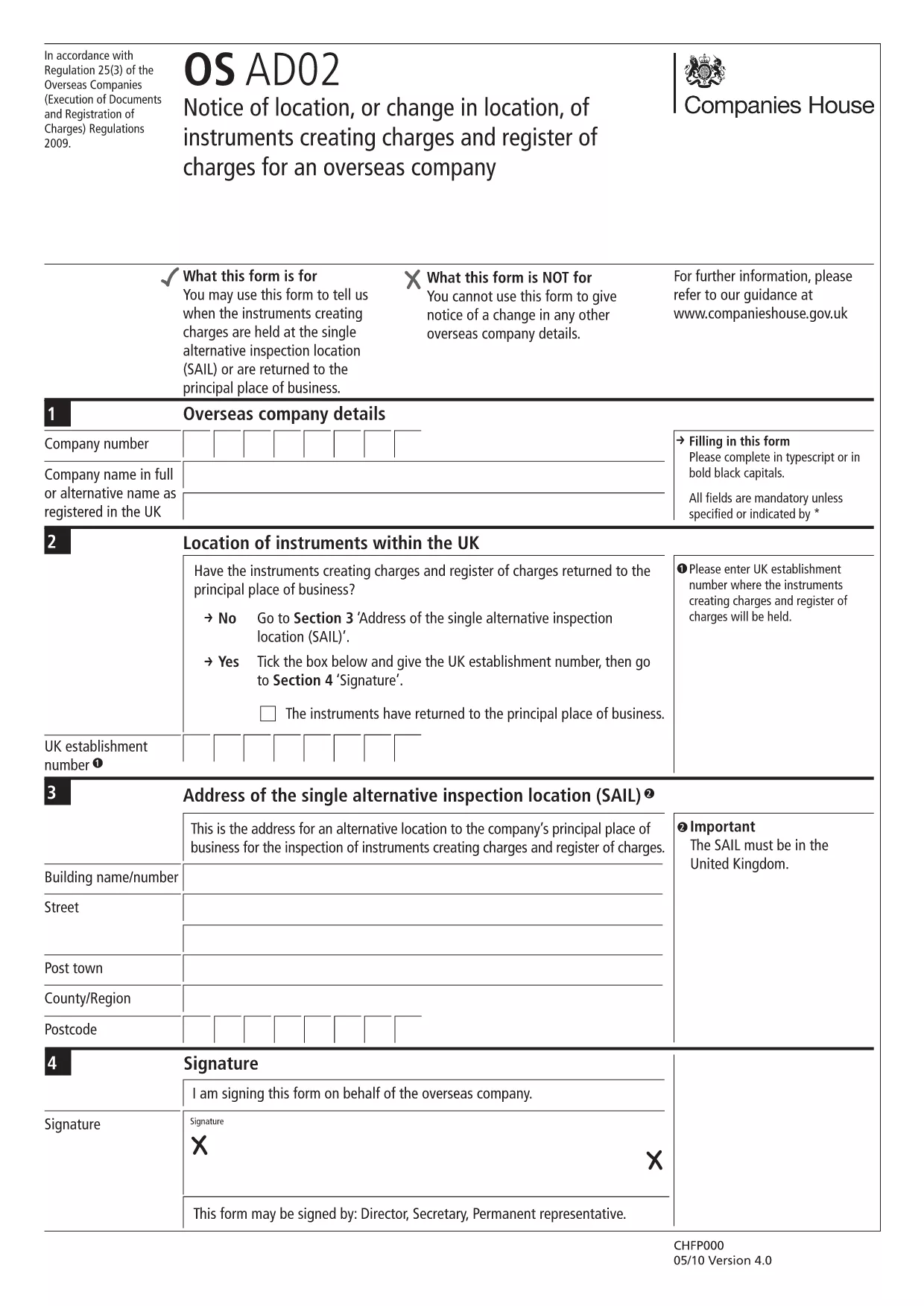
OS AD02 – Notice of Location or Change in Location of Charges

  1. Idioma Inglés
  2. País United Kingdom
  3. Actividad Company Charges
  4. Departamento Companies House
OS AD02 – Notice of Location or Change in Location of Charges

The OS AD02 (also referenced as en‑ad.02) is the official Companies House form used by overseas companies to notify a change of location for instruments that create charges, and to update the register of charges. This form is required whenever a charge‑creating instrument moves to a new jurisdiction or when the location details need correction.

What is the OS AD02 Form?

OS AD02 captures essential information about the charge, the instrument, and its new location. It ensures the public register remains accurate and that creditors can trace the security interests tied to a company.

How to Complete the OS AD02 Online

Instead of downloading the PDF and editing it manually, simply click the "Fill out this form" button on this page. The Formize PDF Filler app will load the fillable version of the OS AD02, allowing you to enter data directly in your browser.

  • Step 1: Click Fill out this form and wait for the Formize PDF Filler to load.
  • Step 2: Enter the company details, charge reference, and the new location information in the highlighted fields.
  • Step 3: Review each section for accuracy – the filler highlights required fields.
  • Step 4: Click Save & Download to obtain a completed PDF ready for submission.

Common Mistakes & Tips

To avoid delays, watch out for these frequent errors:

  • Leaving the date of change blank – the field is mandatory.
  • Mismatching the charge reference number with the one on the original filing.
  • Using an outdated address format for the new jurisdiction.
  • Failing to sign the form or attach a digital signature where required.

Tip: Use the built‑in validation in the Formize filler; it will flag incomplete or incorrectly formatted entries before you download.

Where to Submit the Completed Form

Once you have the finished PDF, submit it to Companies House via their online filing portal or by post to the address indicated on the form. Keep a copy for your records.

Need help? Refer to the Companies House guidance notes linked at the bottom of the form.

PREGUNTAS MÁS FRECUENTES
  • What is the purpose of the OS AD02 form?

    It notifies Companies House of a change in location for instruments that create charges, keeping the public register up‑to‑date.

  • Can I edit the OS AD02 after downloading it?

    Yes, but using the Formize fillable version is faster and reduces errors compared to editing a static PDF.

  • Is a digital signature accepted on the OS AD02?

    Companies House accepts a digital signature if it complies with their e‑signing standards; the Formize filler supports adding a digital signature.

  • How long does it take for Companies House to process the OS AD02?

    Processing typically takes 5‑7 business days after a correct submission, but you can track the status online.

  • What should I do if I make a mistake after submission?

    Submit an amended OS AD02 with the corrected details, clearly marking it as an amendment.

  • Do I need to pay a fee to file OS AD02?

    No, filing the OS AD02 notice of location is free of charge.

  • Can I submit the form on behalf of another company?

    Yes, provided you have proper authorisation and include the authorised signatory’s details.

  • Is the OS AD02 form available in languages other than English?

    The official version is only in English; however, you may attach a certified translation if required.

CÓMO

Cómo completar OS AD02 gratis, en línea en 5 sencillos pasos:

  1. 1
    Open the Fillable Form
    Click the "Fill out this form" button on the page. The Formize PDF Filler app will load the OS AD02 directly in your browser.
  2. 2
    Enter Required Information
    Complete each highlighted field: company details, charge reference, old and new locations, and the effective date of the change.
  3. 3
    Validate Your Entries
    Use the built‑in validation to ensure all mandatory fields are filled and formatted correctly.
  4. 4
    Save and Download
    When all data is correct, click "Save & Download" to get a completed PDF ready for submission to Companies House.
  5. 5
    Submit the Form
    Upload the PDF via the Companies House online portal or mail it to the address shown on the form.
Aplicación Formize PDF Filler
SOBRE

OS AD02 plantilla

Con el conjunto tradicional de funciones para ver y completar un documento PDF, combinado con los beneficios de una aplicación web y un diseño receptivo, puede completar OS AD02 en minutos.

CARACTERÍSTICAS

Relleno de PDF

La forma más fácil de llenar formularios PDF en línea

  • Rellene rápidamente OS AD02
    ¿Está buscando una manera de llenar rápidamente OS AD02 en línea? Con nuestro rellenador de formularios PDF gratuito en línea, sabrá cómo editar y rellenar este documento PDF en menos de un minuto.
  • Editor de PDF en línea fácil de usar
    ¿Cansado de imprimir archivos PDF para poder editarlos antes de volver a escanearlos y enviarlos de vuelta? Edite documentos PDF gratis en línea. Utilice nuestro editor de pdf en línea para ahorrar tiempo y papel.
  • Excelentes herramientas, todas las plataformas.
    ¿Se pregunta cómo completar OS AD02 en una Mac, o tal vez cómo usar un relleno de PDF gratis? Nuestras herramientas de PDF en línea funcionan en todas las plataformas.
  • Almacenamiento seguro de archivos
    Los archivos "OS AD02" completados se almacenan en una base de datos segura administrada por Amazon Cloud hosting. Puede eliminar sus archivos de nuestro sistema en cualquier momento. En cualquier caso, estos archivos se eliminan automáticamente después de 24 horas.
  • Chatea con {palabra clave}
    Chatea con "OS AD02" en Chatize, que es un asistente de lectura de PDF gratuito. Haga preguntas y obtenga respuestas de "OS AD02". Simplemente haga clic en el botón Chatear con documento de arriba.

Eliminar sesión de llenado

¿Eliminar la sesión de llenado seleccionada? En este caso, se perderá su progreso al completar el formulario.

Eliminar sesión de edición

¿Eliminar la sesión de edición seleccionada? En este caso, se perderá su progreso en la creación y edición del formulario.