Seleccione el idioma

Form E1 – Financial Statement Application (Fillable PDF)

  1. Idioma Inglés
  2. País United Kingdom
  3. Departamento Family Court
  4. Actividad Legal Forms
Form E1 – Financial Statement Application (Fillable PDF)

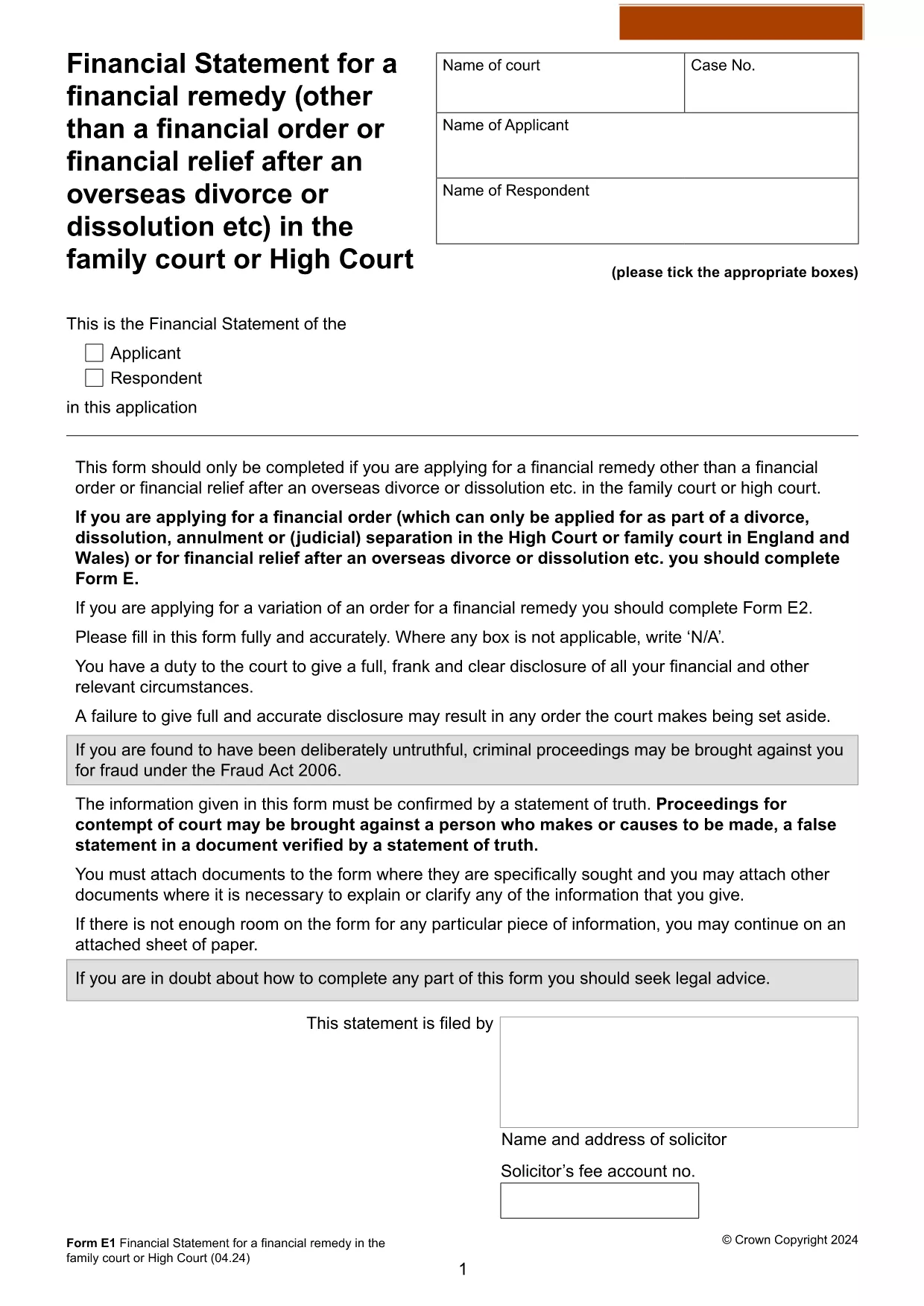
The Form E1 is the official financial statement used in UK family court proceedings when applying for a financial remedy that is not a standard financial order. This fillable PDF lets you provide a detailed breakdown of assets, liabilities, income, and expenses, ensuring the court has a clear picture of your financial situation.

What is Form E1?

Form E1 is required when you are seeking a financial remedy such as property adjustments, pension sharing, or lump‑sum payments after divorce or dissolution. It replaces older versions of the financial statement and must be completed accurately to avoid delays.

How to Fill Out Form E1 Online

Instead of downloading the PDF and editing it with a separate editor, simply click the "Fill out this form" button on this page. The Formize PDF Filler app will load in your browser, allowing you to type directly into each field, save progress, and export a completed PDF.

Common Mistakes to Avoid

  • Leaving sections blank: Every relevant section must be completed, even if the answer is zero.
  • Incorrect dates or amounts: Double‑check figures against bank statements and tax returns.
  • Missing signatures: The form requires your signature and, where applicable, the other party’s signature.
  • Using the wrong version: Ensure you are using the latest Form E1 (2024) – the link below points to the current official version.

Where to Submit the Completed Form

Once you have finished, you can either:

  1. Upload the completed PDF directly to the HM Courts & Tribunals Service portal, or
  2. Print, sign, and post the form to the family court handling your case (address is provided in the accompanying guidance).

Download the Fillable PDF

If you prefer to work offline, you can download the official fillable PDF from the UK government website. The file is fully compatible with Formize’s online filler.

Download Form E1 (PDF)

PREGUNTAS MÁS FRECUENTES
  • What is the purpose of Form E1?

    Form E1 is used to disclose a full and accurate picture of your finances when applying for a financial remedy in UK family court proceedings.

  • Can I edit Form E1 on a mobile device?

    Yes. The Formize PDF Filler works on most modern smartphones and tablets, allowing you to complete the form on‑the‑go.

  • Do I need to upload supporting documents with Form E1?

    You should attach copies of bank statements, property valuations, pension statements, and any other documents that verify the figures you entered.

  • How long does it take to fill out Form E1?

    The time varies based on the complexity of your finances, but most users complete it within 1‑2 hours when all documents are at hand.

  • Is the PDF version on Formize the latest version?

    Yes. The link provided points to the official 2024 version of Form E1 published by the UK government.

  • What if I make a mistake after submitting?

    Contact the court clerk as soon as possible. You may be allowed to file an amended Form E1 with a brief explanation of the correction.

  • Do I need a lawyer to complete Form E1?

    While not mandatory, legal advice can help ensure accuracy, especially for complex assets or cross‑border financial matters.

  • Is there a fee to download Form E1?

    No. The PDF is provided free of charge by the UK government.

CÓMO

Cómo completar Form E1 gratis, en línea en 5 sencillos pasos:

  1. 1
    Click the Fill‑out Button
    Press the "Fill out this form" button on the page to launch Formize PDF Filler in your browser.
  2. 2
    Wait for the Filler to Load
    The app loads the fillable Form E1 PDF. This takes only a few seconds.
  3. 3
    Complete Each Section
    Enter your financial details directly into the fields. Use the navigation pane to jump between sections.
  4. 4
    Review and Sign
    Check all entries for accuracy, add your digital signature where required, and have the other party sign if needed.
  5. 5
    Save or Submit
    Download the completed PDF, or upload it to the HM Courts & Tribunals Service portal as instructed by your case manager.
Aplicación Formize PDF Filler
SOBRE

Form E1 plantilla

Con el conjunto tradicional de funciones para ver y completar un documento PDF, combinado con los beneficios de una aplicación web y un diseño receptivo, puede completar Form E1 en minutos.

CARACTERÍSTICAS

Relleno de PDF

La forma más fácil de llenar formularios PDF en línea

  • Rellene rápidamente Form E1
    ¿Está buscando una manera de llenar rápidamente Form E1 en línea? Con nuestro rellenador de formularios PDF gratuito en línea, sabrá cómo editar y rellenar este documento PDF en menos de un minuto.
  • Editor de PDF en línea fácil de usar
    ¿Cansado de imprimir archivos PDF para poder editarlos antes de volver a escanearlos y enviarlos de vuelta? Edite documentos PDF gratis en línea. Utilice nuestro editor de pdf en línea para ahorrar tiempo y papel.
  • Excelentes herramientas, todas las plataformas.
    ¿Se pregunta cómo completar Form E1 en una Mac, o tal vez cómo usar un relleno de PDF gratis? Nuestras herramientas de PDF en línea funcionan en todas las plataformas.
  • Almacenamiento seguro de archivos
    Los archivos "Form E1" completados se almacenan en una base de datos segura administrada por Amazon Cloud hosting. Puede eliminar sus archivos de nuestro sistema en cualquier momento. En cualquier caso, estos archivos se eliminan automáticamente después de 24 horas.
  • Chatea con {palabra clave}
    Chatea con "Form E1" en Chatize, que es un asistente de lectura de PDF gratuito. Haga preguntas y obtenga respuestas de "Form E1". Simplemente haga clic en el botón Chatear con documento de arriba.

Eliminar sesión de llenado

¿Eliminar la sesión de llenado seleccionada? En este caso, se perderá su progreso al completar el formulario.

Eliminar sesión de edición

¿Eliminar la sesión de edición seleccionada? En este caso, se perderá su progreso en la creación y edición del formulario.