
Seleccione el idioma

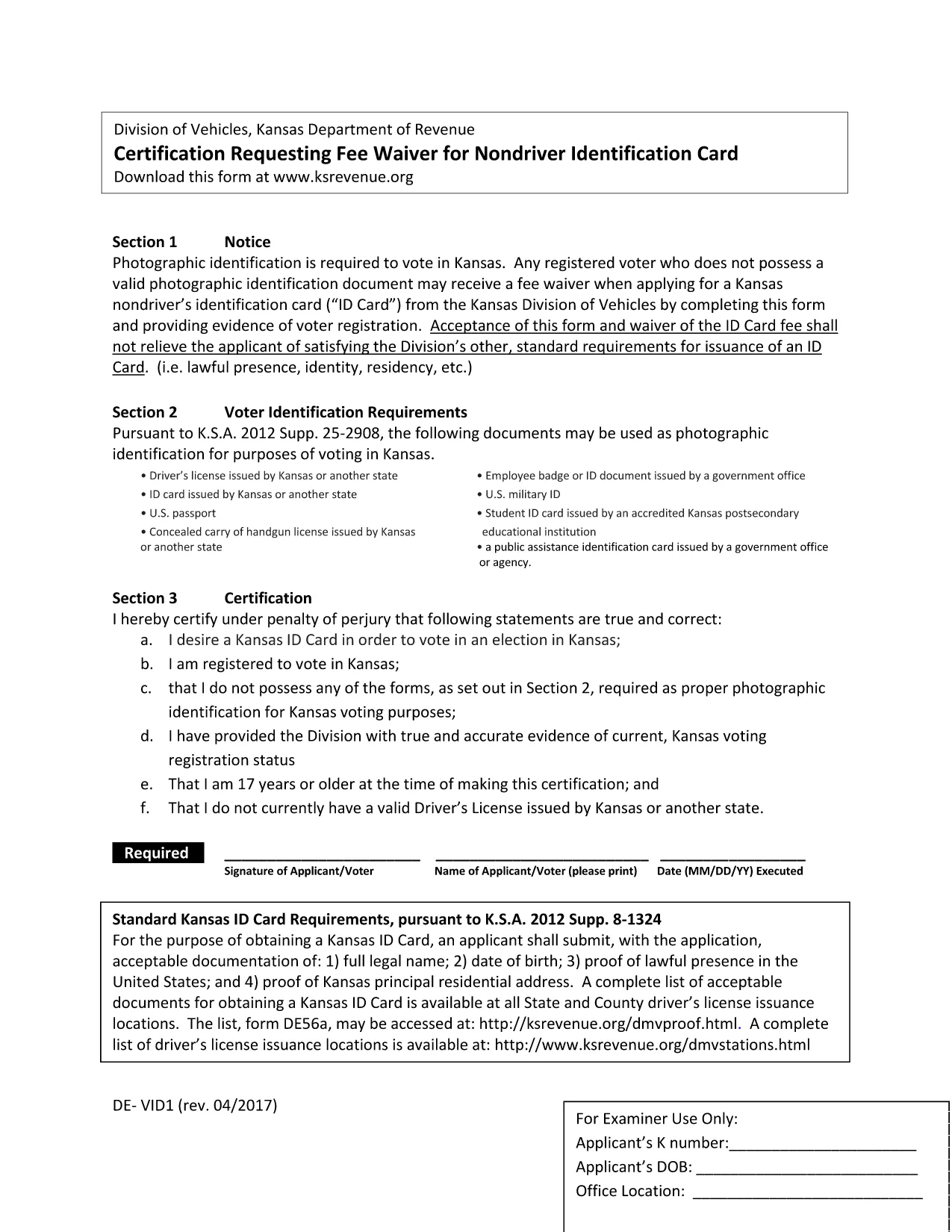
Certification Requesting Fee Waiver for Kansas Non‑Driver ID (Form DE‑VID1)

  1. Idioma Inglés
  2. País EE.UU
  3. Actividad Registro de Vehículo
  4. Departamento Department of Motor Vehicles
Certification Requesting Fee Waiver for Kansas Non‑Driver ID (Form DE‑VID1)

What Is the DE‑VID1 Form?

The Kansas DE‑VID1 is the official certification used to request a fee waiver when applying for a non‑driver identification card. This form is required by the Kansas Division of Vehicles (DOV) for anyone who qualifies for a reduced‑cost ID, such as eligible voters without a valid photo ID.

How to Complete the Form Online with Formize

Instead of printing, scanning, or editing the PDF in a separate program, you can fill out the DE‑VID1 directly on our site using the Formize PDF Filler app. The process is fast, secure, and saves you a trip to the DMV.

  • Step 1: Click the Fill out this form button below.
  • Step 2: Wait a few seconds while the Formize PDF Filler loads.
  • Step 3: Enter your personal information, voter‑registration details, and any supporting documentation notes.
  • Step 4: Review the completed form for accuracy.
  • Step 5: Click Submit to download the filled PDF or send it directly to your local DOV office.

All fields are interactive, and required fields are highlighted in red for easy identification.

Common Mistakes to Avoid

Even a small error can delay your fee‑waiver request. Make sure you:

  • Enter your name exactly as it appears on your voter registration.
  • Provide a current mailing address – PO boxes are not accepted for ID issuance.
  • Include a valid Kansas voter‑registration number or a copy of your voter registration card.
  • Sign the form electronically before downloading or printing.

Following these tips will help the DOV process your waiver quickly.

Where to Submit the Completed Form

After you have filled and saved the PDF, you can:

  • Mail it to your nearest Kansas Division of Vehicles office.
  • Bring a printed copy to a DOV service center.
  • Upload it through the Kansas DOV online portal if you have an account.

Check the official Kansas DOV website for the latest submission options.

PREGUNTAS MÁS FRECUENTES
  • Who is eligible for a fee waiver on a Kansas non‑driver ID?

    Eligible individuals include Kansas voters who lack a valid photo ID, seniors, low‑income residents, and persons with documented disabilities.

  • Do I need to attach a copy of my voter registration?

    Yes. The form requires you to provide your voter‑registration number and, if possible, a copy of the registration card as supporting evidence.

  • Can I submit the DE‑VID1 form electronically?

    You can fill the form online with Formize, then download the completed PDF. Some DOV offices accept electronic uploads through the Kansas DOV portal.

  • How long does the fee‑waiver approval take?

    Processing typically takes 5‑10 business days after the DOV receives a complete and accurate form.

  • What should I do if I make a mistake after downloading the PDF?

    Open the saved PDF again in Formize, correct the error, re‑sign, and re‑download the updated version before submitting.

  • Is there a cost to use the Formize PDF Filler?

    No. Formize provides a free, secure way to fill out the DE‑VID1 form online.

  • Do I need a Kansas address to apply for the fee waiver?

    Yes. The mailing address on the form must be a physical Kansas residence; PO boxes are not accepted for ID issuance.

CÓMO

Cómo completar DE-VID1 gratis, en línea en 5 sencillos pasos:

  1. 1
    Open the Fillable Form
    Click the "Fill out this form" button on the page. The Formize PDF Filler will open in a new tab.
  2. 2
    Load the Formize PDF Filler
    Wait a few seconds while the app loads the DE‑VID1 PDF. All fields become interactive.
  3. 3
    Enter Your Information
    Complete each required field: personal details, voter registration number, and fee‑waiver justification.
  4. 4
    Review and Sign
    Double‑check for errors, then use the built‑in e‑signature tool to sign the form.
  5. 5
    Download or Submit
    Save the filled PDF to your device or submit it directly to the Kansas DOV via mail or online portal.
Aplicación Formize PDF Filler
SOBRE

Formularios de registro de vehículos

Si posee o alquila un vehículo de motor, remolque o bote, debe cumplir con ciertas obligaciones para mantener su vehículo legalmente registrado y seguro.

DE-VID1 es uno de los formularios de registro de vehículos que son documentos que se utilizan para registrar un vehículo de motor con la autoridad estatal o provincial correspondiente. Estos formularios generalmente se requieren cuando una persona compra un vehículo nuevo o usado o cuando se muda a un nuevo estado o provincia con un vehículo.

Los requisitos y formularios exactos necesarios para el registro del vehículo pueden variar según la ubicación, pero, en general, el proceso implica proporcionar información sobre el vehículo, el propietario y cualquier gravamen sobre el vehículo.

Una vez presentados los formularios de registro y las tarifas, la autoridad estatal o provincial emitirá un certificado de registro o placa al propietario del vehículo. Este registro permite que el vehículo sea operado legalmente en vías y carreteras públicas.

CARACTERÍSTICAS

Relleno de PDF

La forma más fácil de llenar formularios PDF en línea

  • Rellene rápidamente DE-VID1
    ¿Está buscando una manera de llenar rápidamente DE-VID1 en línea? Con nuestro rellenador de formularios PDF gratuito en línea, sabrá cómo editar y rellenar este documento PDF en menos de un minuto.
  • Editor de PDF en línea fácil de usar
    ¿Cansado de imprimir archivos PDF para poder editarlos antes de volver a escanearlos y enviarlos de vuelta? Edite documentos PDF gratis en línea. Utilice nuestro editor de pdf en línea para ahorrar tiempo y papel.
  • Excelentes herramientas, todas las plataformas.
    ¿Se pregunta cómo completar DE-VID1 en una Mac, o tal vez cómo usar un relleno de PDF gratis? Nuestras herramientas de PDF en línea funcionan en todas las plataformas.
  • Almacenamiento seguro de archivos
    Los archivos "DE-VID1" completados se almacenan en una base de datos segura administrada por Amazon Cloud hosting. Puede eliminar sus archivos de nuestro sistema en cualquier momento. En cualquier caso, estos archivos se eliminan automáticamente después de 24 horas.
  • Chatea con {palabra clave}
    Chatea con "DE-VID1" en Chatize, que es un asistente de lectura de PDF gratuito. Haga preguntas y obtenga respuestas de "DE-VID1". Simplemente haga clic en el botón Chatear con documento de arriba.

Eliminar sesión de llenado

¿Eliminar la sesión de llenado seleccionada? En este caso, se perderá su progreso al completar el formulario.

Eliminar sesión de edición

¿Eliminar la sesión de edición seleccionada? En este caso, se perderá su progreso en la creación y edición del formulario.