
Seleccione el idioma

Virginia DSD 7 Form – Fillable PDF for Vehicle Registration

  1. Idioma Inglés
  2. País EE.UU
  3. Actividad Registro de Vehículo
  4. Departamento Department of Motor Vehicles
Virginia DSD 7 Form – Fillable PDF for Vehicle Registration

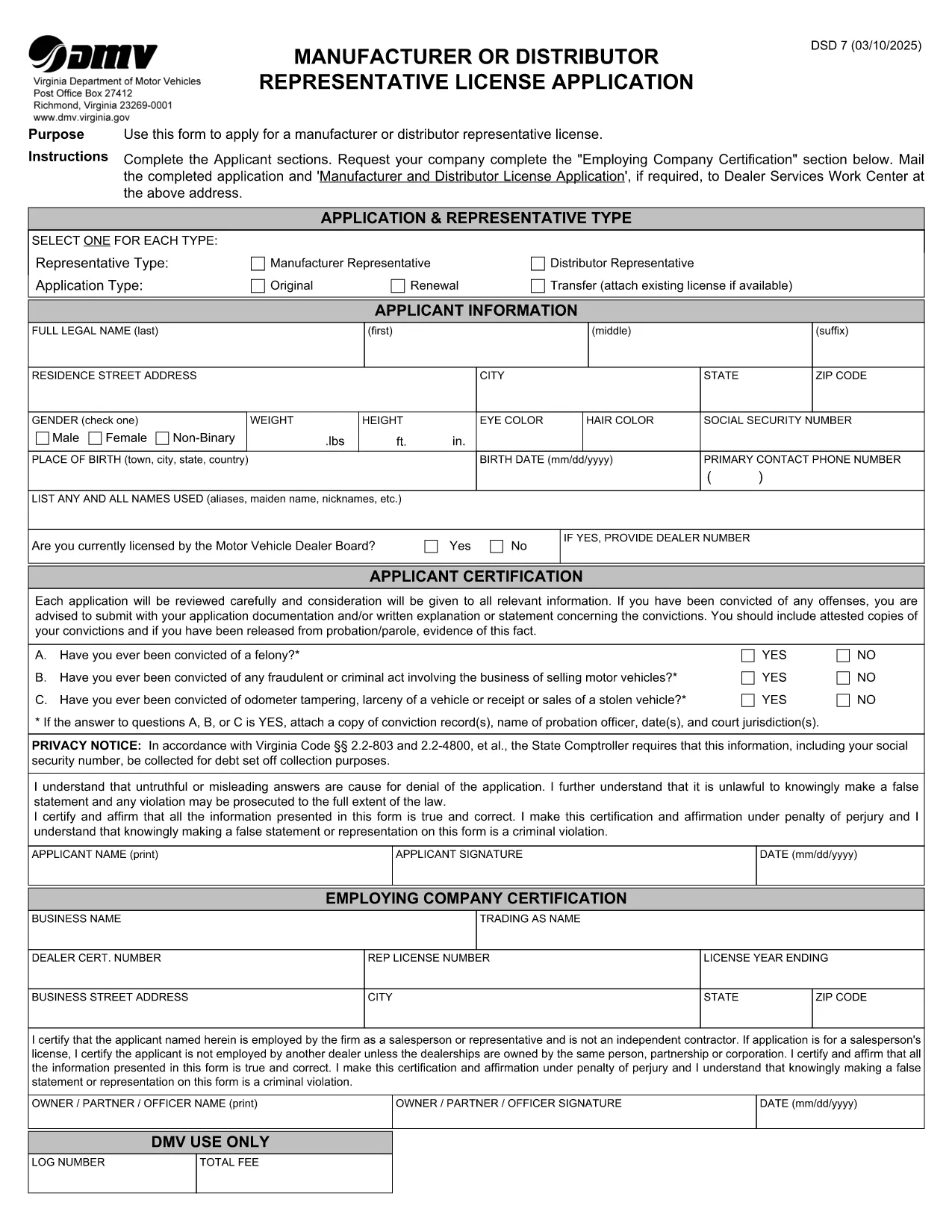
The DSD 7 form is the official Virginia Department of Motor Vehicles (DMV) document used for certain vehicle registration and title transactions. Whether you need to update ownership, correct a title error, or provide supporting information, the DSD 7 must be completed accurately.

What is the DSD 7 Form?

The DSD 7 is a fillable PDF released by the Virginia DMV. It collects details such as the vehicle identification number (VIN), owner information, and the reason for the request. The form is required for:

  • Title corrections
  • Ownership transfers that are not covered by a standard bill of sale
  • Special exemptions or clarifications requested by the DMV

How to Fill Out the DSD 7 Online

Instead of downloading the PDF and opening it in a separate editor, simply click the "Fill out this form" button below. Our Formize PDF Filler app will load the document directly in your browser, letting you type, check boxes, and sign without any software installation.

Common Mistakes to Avoid

  • Leaving required fields blank: The DMV will reject any submission missing mandatory information.
  • Incorrect VIN format: Double‑check the 17‑character VIN for typos.
  • Using the wrong signature style: Use a clear, legible electronic signature that matches your legal signature.
  • Submitting outdated documents: Attach only current supporting paperwork.

Where to Submit the Completed Form

After you finish filling the DSD 7, you can:

  • Print and mail it to the address listed on the form.
  • Upload the completed PDF through the Virginia DMV's online portal (if applicable).

Always keep a copy for your records.

PREGUNTAS MÁS FRECUENTES
  • What does DSD stand for?

    DSD stands for "Department of State Division" and is a designation used by the Virginia DMV for certain specialized forms.

  • Can I submit the DSD 7 electronically?

    Yes. After completing the form with Formize, you can upload the PDF through the Virginia DMV's online portal where electronic submissions are accepted.

  • Do I need a notary for the DSD 7?

    A notary is not required for the DSD 7 unless the specific transaction you are performing explicitly calls for notarization.

  • How long does it take the DMV to process the DSD 7?

    Processing times vary, but most standard requests are handled within 7‑10 business days after receipt.

  • What should I do if I make a mistake after submitting?

    Contact the Virginia DMV immediately. In many cases you will need to submit a corrected DSD 7 with a note explaining the error.

  • Is there a fee for filing the DSD 7?

    Yes, the DMV charges a processing fee. Check the form instructions or the DMV website for the current amount.

  • Can I save my progress and return later?

    The Formize PDF Filler allows you to download a partially completed PDF, which you can reopen later to finish.

CÓMO

Cómo completar DSD 7 form gratis, en línea en 5 sencillos pasos:

  1. 1
    Click the Fill Out Button
    Press the "Fill out this form" button on the page to launch the Formize PDF Filler.
  2. 2
    Wait for the Filler to Load
    The browser will open the fillable DSD 7 PDF. A loading spinner indicates the app is preparing the document.
  3. 3
    Complete Each Section
    Enter your information, select checkboxes, and add your electronic signature exactly as required.
  4. 4
    Review and Submit
    Double‑check all entries, then click the "Submit" button to download the completed PDF or print it for mailing.
  5. 5
    Save a Copy
    Store the final PDF on your computer or cloud storage for future reference.
Aplicación Formize PDF Filler
SOBRE

Formularios de registro de vehículos

DSD 7 form es uno de los formularios de registro de vehículos que son documentos utilizados para registrar un vehículo de motor ante la autoridad gubernamental pertinente, generalmente el Departamento de Vehículos Motorizados (DMV) o agencia equivalente. Estos formularios son necesarios cuando una persona compra un vehículo nuevo o usado, transfiere la propiedad de un vehículo o se muda a una nueva jurisdicción con un vehículo.

Los formularios de registro de vehículos específicos pueden variar según la jurisdicción, pero generalmente requieren la siguiente información:

Información del vehículo: incluye detalles sobre el vehículo, como la marca, el modelo, el año, el número de identificación del vehículo (VIN) y la lectura del odómetro.

Información del propietario: el formulario requerirá información sobre el propietario del vehículo, incluido su nombre, dirección, información de contacto y número de licencia de conducir.

Prueba de propiedad: dependiendo de las circunstancias, es posible que se requiera una prueba de propiedad, como un certificado de título, una factura de venta o un certificado de origen del fabricante (para vehículos nuevos).

Información del seguro: normalmente se requiere prueba de cobertura de seguro de vehículo válida. Esto puede incluir proporcionar el número de póliza de seguro, las fechas de cobertura y los detalles de la compañía de seguros.

Pago de tarifas: el registro de vehículos implica el pago de varias tarifas, como tarifas de registro, impuestos y posiblemente otros cargos específicos de la jurisdicción.

Además de estos requisitos básicos, algunas jurisdicciones pueden tener formularios o requisitos de documentación adicionales. Por ejemplo, en determinadas áreas pueden ser necesarios resultados de pruebas de emisiones, inspecciones de seguridad o prueba de residencia.

Una vez que se completen y envíen los formularios de registro del vehículo, la autoridad gubernamental emitirá un certificado de registro, placas y calcomanías de registro. Estos documentos indican que el vehículo está legalmente matriculado y autorizado para circular en la vía pública.

Es importante tener en cuenta que los requisitos de registro de vehículos pueden variar significativamente según la jurisdicción. Por lo tanto, se recomienda consultar con el DMV local o agencia equivalente para conocer los formularios y procedimientos específicos aplicables a su ubicación.

CARACTERÍSTICAS

Relleno de PDF

La forma más fácil de llenar formularios PDF en línea

  • Rellene rápidamente DSD 7 form
    ¿Está buscando una manera de llenar rápidamente DSD 7 form en línea? Con nuestro rellenador de formularios PDF gratuito en línea, sabrá cómo editar y rellenar este documento PDF en menos de un minuto.
  • Editor de PDF en línea fácil de usar
    ¿Cansado de imprimir archivos PDF para poder editarlos antes de volver a escanearlos y enviarlos de vuelta? Edite documentos PDF gratis en línea. Utilice nuestro editor de pdf en línea para ahorrar tiempo y papel.
  • Excelentes herramientas, todas las plataformas.
    ¿Se pregunta cómo completar DSD 7 form en una Mac, o tal vez cómo usar un relleno de PDF gratis? Nuestras herramientas de PDF en línea funcionan en todas las plataformas.
  • Almacenamiento seguro de archivos
    Los archivos "DSD 7 form" completados se almacenan en una base de datos segura administrada por Amazon Cloud hosting. Puede eliminar sus archivos de nuestro sistema en cualquier momento. En cualquier caso, estos archivos se eliminan automáticamente después de 24 horas.
  • Chatea con {palabra clave}
    Chatea con "DSD 7 form" en Chatize, que es un asistente de lectura de PDF gratuito. Haga preguntas y obtenga respuestas de "DSD 7 form". Simplemente haga clic en el botón Chatear con documento de arriba.

Eliminar sesión de llenado

¿Eliminar la sesión de llenado seleccionada? En este caso, se perderá su progreso al completar el formulario.

Eliminar sesión de edición

¿Eliminar la sesión de edición seleccionada? En este caso, se perderá su progreso en la creación y edición del formulario.