Seleccione el idioma

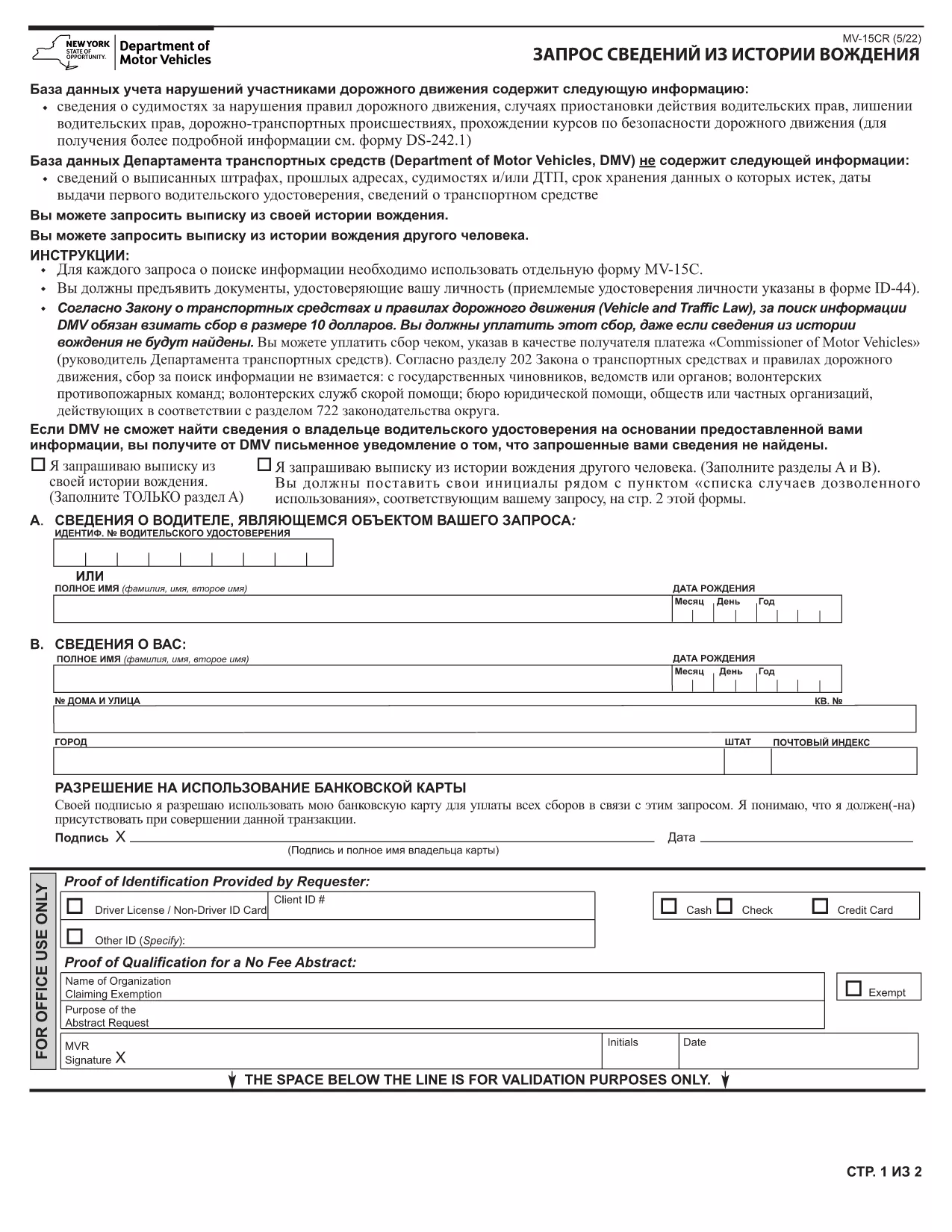
NY MV-15CR – Certified DMV Records Request Form (Fillable PDF)

  1. Idioma Inglés
  2. País EE.UU
  3. Actividad Vehicle Records
  4. Departamento Department of Motor Vehicles
NY MV-15CR – Certified DMV Records Request Form (Fillable PDF)

The MV-15CR is the New York State Department of Motor Vehicles (DMV) form used to request certified copies of motor vehicle records. Whether you need a vehicle history for a purchase, legal matter, or personal records, this fillable PDF makes the process fast and error‑free.

What Is the MV-15CR Form?

The MV-15CR (Certificate Request) allows individuals to obtain certified DMV records such as ownership history, title information, and lien status. It is required when you need an official document that can be used in courts, insurance claims, or vehicle transactions.

How to Fill Out the MV-15CR Online

Instead of downloading the PDF and editing it with a separate editor, simply click the "Fill out this form" button on this page. The Formize PDF Filler app will load directly in your browser, letting you type, select checkboxes, and sign with a mouse or touch screen. When you’re done, you can download the completed form or email it directly to the DMV.

Common Mistakes to Avoid

  • Missing Signature: All sections that require a signature must be signed; unsigned forms are rejected.
  • Incorrect Payment Details: Include the exact fee amount and a valid, signed check or money order; cash is not accepted.
  • Incomplete Address: Provide the exact mailing address where you want the records sent; a PO Box may cause delays.
  • Wrong Record Type: Tick only the records you need; selecting unnecessary records can increase processing time.

Where to Submit Your Completed Form

Mail the completed MV-15CR, payment, and a copy of your identification to:

NYS Department of Motor Vehicles
MV-15CR Processing
6 Empire State Plaza
Albany, NY 12228

Do not staple any documents and use a plain envelope.

Download the Fillable MV-15CR PDF

If you prefer to work offline, you can download the official fillable PDF below and open it with any PDF editor that supports form fields.

Download MV-15CR Fillable PDF

PREGUNTAS MÁS FRECUENTES
  • What is the purpose of the MV-15CR form?

    The MV-15CR is used to request certified copies of motor vehicle records from the New York DMV, such as ownership history, title status, and lien information.

  • Can I submit the MV-15CR electronically?

    The DMV currently requires a hard‑copy submission with payment and ID. However, you can fill out the form online using Formize, then print it for mailing.

  • How much does the certified record request cost?

    Fees vary by record type. The form includes a fee schedule; typical certified record fees range from $10 to $25 per record.

  • What identification is required?

    A clear copy of a government‑issued photo ID (driver’s license, passport, or state ID) must accompany the form.

  • How long does it take to receive the records?

    Processing usually takes 7‑10 business days after the DMV receives a complete, correctly filled form and payment.

  • Do I need a notary for the MV-15CR?

    A notary is not required unless you are requesting records for another person. In that case, a notarized signature is necessary.

  • Can I request records for a vehicle I do not own?

    Yes, but you must provide a permissible use statement and may need a notarized signature from the vehicle owner.

  • What if I make a mistake on the form?

    Correct any errors before signing. If you discover a mistake after submission, you must submit a new MV-15CR with the correct information.

CÓMO

Cómo completar MV-15CR gratis, en línea en 4 sencillos pasos:

  1. 1
    Open the Formize PDF Filler
    Click the "Fill out this form" button on the page. The Formize PDF Filler app will launch in a new tab.
  2. 2
    Enter Your Information
    Type all required fields, select the records you need, and upload a digital signature if prompted.
  3. 3
    Review and Save
    Double‑check each entry for accuracy, then click "Save" to download the completed PDF or choose "Email" to send it directly to the DMV.
  4. 4
    Submit the Form
    Print the saved PDF, attach payment and a copy of your ID, and mail it to the address listed on the form.
Aplicación Formize PDF Filler
SOBRE

MV-15CR plantilla

Con el conjunto tradicional de funciones para ver y completar un documento PDF, combinado con los beneficios de una aplicación web y un diseño receptivo, puede completar MV-15CR en minutos.

CARACTERÍSTICAS

Relleno de PDF

La forma más fácil de llenar formularios PDF en línea

  • Rellene rápidamente MV-15CR
    ¿Está buscando una manera de llenar rápidamente MV-15CR en línea? Con nuestro rellenador de formularios PDF gratuito en línea, sabrá cómo editar y rellenar este documento PDF en menos de un minuto.
  • Editor de PDF en línea fácil de usar
    ¿Cansado de imprimir archivos PDF para poder editarlos antes de volver a escanearlos y enviarlos de vuelta? Edite documentos PDF gratis en línea. Utilice nuestro editor de pdf en línea para ahorrar tiempo y papel.
  • Excelentes herramientas, todas las plataformas.
    ¿Se pregunta cómo completar MV-15CR en una Mac, o tal vez cómo usar un relleno de PDF gratis? Nuestras herramientas de PDF en línea funcionan en todas las plataformas.
  • Almacenamiento seguro de archivos
    Los archivos "MV-15CR" completados se almacenan en una base de datos segura administrada por Amazon Cloud hosting. Puede eliminar sus archivos de nuestro sistema en cualquier momento. En cualquier caso, estos archivos se eliminan automáticamente después de 24 horas.
  • Chatea con {palabra clave}
    Chatea con "MV-15CR" en Chatize, que es un asistente de lectura de PDF gratuito. Haga preguntas y obtenga respuestas de "MV-15CR". Simplemente haga clic en el botón Chatear con documento de arriba.

Eliminar sesión de llenado

¿Eliminar la sesión de llenado seleccionada? En este caso, se perderá su progreso al completar el formulario.

Eliminar sesión de edición

¿Eliminar la sesión de edición seleccionada? En este caso, se perderá su progreso en la creación y edición del formulario.