
Seleccione el idioma

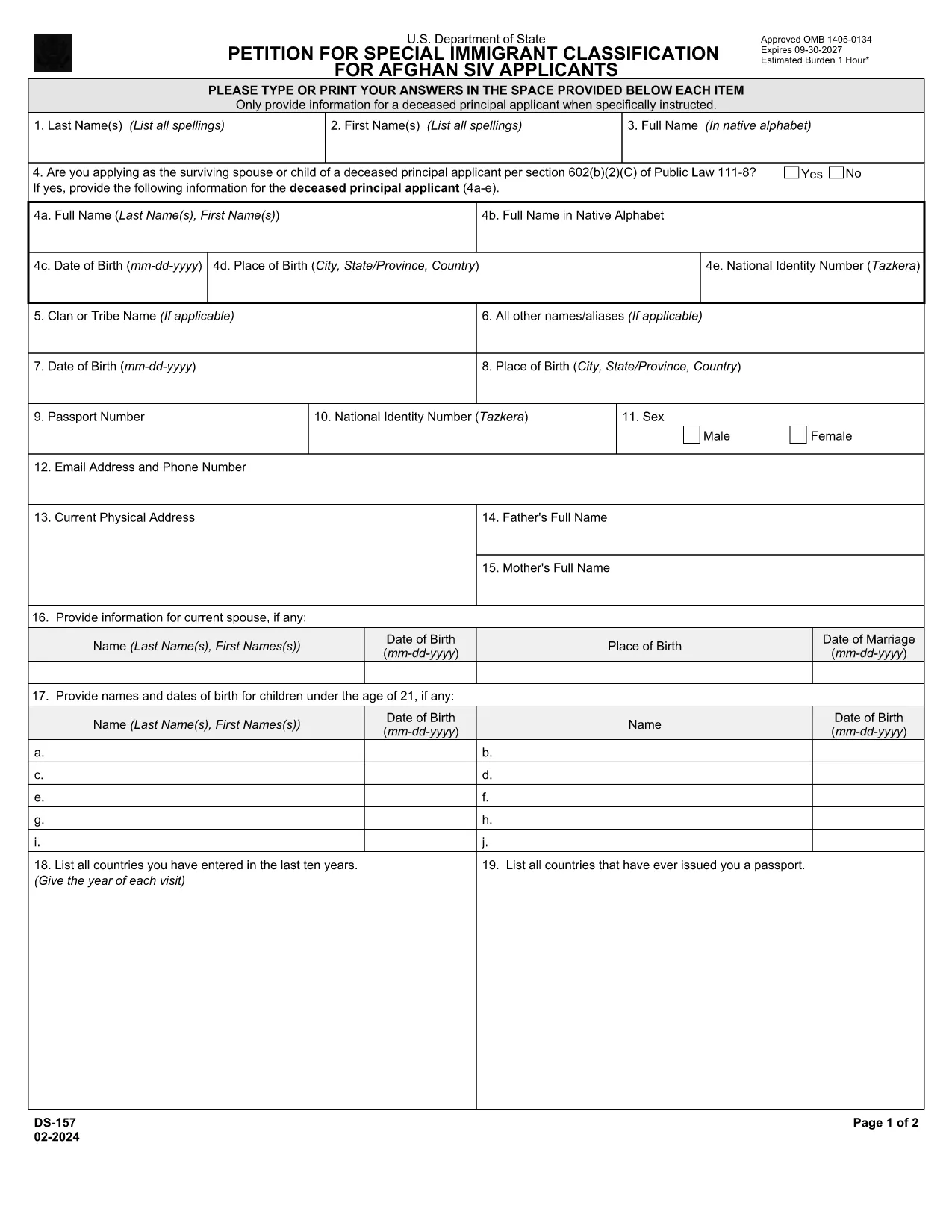
DS-157 Supplemental Nonimmigrant Visa Application – Fillable PDF

  1. Idioma Inglés
  2. País EE.UU
  3. Departamento Departamento de Estado
  4. Actividad Visas
DS-157 Supplemental Nonimmigrant Visa Application – Fillable PDF

The DS-157 (Supplemental Nonimmigrant Visa Application) is required for certain male visa applicants, especially Afghan Special Immigrant Visa (SIV) candidates. It collects detailed personal, employment, and travel information that supports the main DS-160 application.

What is the DS-157 Form?

Issued by the U.S. Department of State, the DS-157 is a supplemental questionnaire that must be submitted with your visa packet. It is a fillable PDF that can be completed electronically, printed, signed, and attached to your visa interview documents.

How to Fill the DS-157 Online with Formize

Formize provides a secure, browser‑based PDF filler so you never need to download, print, or scan the form. Follow these steps:

  • Click the **"Fill out this form"** button on this page.
  • Wait a few seconds while the Formize PDF Filler app loads.
  • Enter your information in the highlighted fields. Use the tab key or click to move between sections.
  • When finished, click **"Save & Download"** to get a copy you can print or email.
  • Sign the form with your finger (touchscreen) or type your signature, then download the completed PDF.

Common Mistakes to Avoid

  • Leaving fields blank – every question must be answered, even if the answer is “None” or “N/A”.
  • Incorrect dates – double‑check birth dates, travel dates, and employment periods.
  • Illegible signatures – use the built‑in e‑signature tool for a clear, legal signature.
  • Mismatched information – ensure details match those on your DS‑160 and supporting documents.

Where to Submit the Completed Form

Print the filled DS-157, sign it in ink if you printed a hard copy, and attach it to your visa interview packet. Submit the package to the U.S. Embassy or Consulate handling your case. Some posts now accept the PDF electronically; verify the specific instructions on your appointment notice.

Download the Official PDF

For reference or offline use, you can download the official, government‑issued PDF directly from the Department of State:

Download DS-157 PDF

Using Formize’s online filler saves you time, reduces errors, and eliminates the need for a scanner.

PREGUNTAS MÁS FRECUENTES
  • Who must complete the DS-157 form?

    All male non‑immigrant visa applicants between ages 16‑45, including Afghan SIV applicants, must submit a DS-157 in addition to the DS‑160.

  • Is the DS-157 form available in languages other than English?

    The official form is only provided in English. If you need translation assistance, you must provide an accurate English version for the U.S. Embassy.

  • Can I submit the DS-157 electronically?

    Some U.S. posts accept an electronic PDF, but most still require a printed, signed copy. Check the instructions on your appointment notice.

  • Do I need a notarized signature on the DS-157?

    No notarization is required. A regular signature (ink or e‑signature) is sufficient as long as it matches the signature on your other visa documents.

  • What happens if I make a mistake on the DS-157?

    Correct the error by crossing out the mistake neatly, writing the correct information, and initialing the change. If the mistake is extensive, download a fresh copy and refill the form.

  • How long is the DS-157 valid?

    The DS-157 is tied to a specific visa application. If your application is withdrawn or denied, you must obtain a new form for any future applications.

CÓMO

Cómo completar ds-157 gratis, en línea en 4 sencillos pasos:

  1. 1
    Open the Formize filler
    Click the "Fill out this form" button on the page. The Formize PDF Filler will open in a new tab.
  2. 2
    Enter your information
    Type directly into each highlighted field. Use the tab key or click to move to the next question.
  3. 3
    Add your signature
    Use the built‑in e‑signature tool to sign with your finger or mouse. The signature is legally binding.
  4. 4
    Save and download
    When all fields are complete, click "Save & Download" to get a copy of the filled PDF. Print it if a hard copy is required.
Aplicación Formize PDF Filler
SOBRE

Formularios de Visa

ds-157 es uno de los formularios de visa que son documentos que se utilizan para solicitar una visa para ingresar a un país extranjero. Una visa es un documento que permite a un ciudadano extranjero ingresar, permanecer y, en ocasiones, trabajar en un país extranjero durante un período de tiempo específico. Los formularios y requisitos exactos para obtener una visa varían según el país y el tipo de visa.

Los formularios de visa generalmente requieren información personal como el nombre, la fecha de nacimiento y la información del pasaporte, así como información sobre el propósito y la duración del viaje, el destino previsto y si al solicitante se le ha negado previamente una visa o ha sido deportado de un país. Los formularios también pueden requerir documentos de respaldo como un pasaporte, fotografías y prueba de apoyo financiero.

En los Estados Unidos, los formularios de visa más comunes son los formularios DS-160 y DS-260. El formulario DS-160 se usa para solicitar una visa de no inmigrante, mientras que el formulario DS-260 se usa para solicitar una visa de inmigrante. Estos formularios requieren información detallada sobre el historial personal y de viaje del solicitante, así como documentación de respaldo, como un pasaporte, un itinerario de viaje y registros financieros.

Otros países pueden tener diferentes formularios y requisitos de visa, pero el proceso básico generalmente implica completar una solicitud de visa, proporcionar documentación de respaldo y asistir a una entrevista con un oficial consular en una embajada o consulado de los EE. UU. Es importante tener en cuenta que el proceso de solicitud de visa puede ser complejo y llevar mucho tiempo, y se recomienda que las personas que buscan una visa consulten con un abogado de inmigración u otro profesional calificado para asegurarse de que se cumplan todos los formularios y requisitos necesarios.

CARACTERÍSTICAS

Relleno de PDF

La forma más fácil de llenar formularios PDF en línea

  • Rellene rápidamente ds-157
    ¿Está buscando una manera de llenar rápidamente ds-157 en línea? Con nuestro rellenador de formularios PDF gratuito en línea, sabrá cómo editar y rellenar este documento PDF en menos de un minuto.
  • Editor de PDF en línea fácil de usar
    ¿Cansado de imprimir archivos PDF para poder editarlos antes de volver a escanearlos y enviarlos de vuelta? Edite documentos PDF gratis en línea. Utilice nuestro editor de pdf en línea para ahorrar tiempo y papel.
  • Excelentes herramientas, todas las plataformas.
    ¿Se pregunta cómo completar ds-157 en una Mac, o tal vez cómo usar un relleno de PDF gratis? Nuestras herramientas de PDF en línea funcionan en todas las plataformas.
  • Almacenamiento seguro de archivos
    Los archivos "ds-157" completados se almacenan en una base de datos segura administrada por Amazon Cloud hosting. Puede eliminar sus archivos de nuestro sistema en cualquier momento. En cualquier caso, estos archivos se eliminan automáticamente después de 24 horas.
  • Chatea con {palabra clave}
    Chatea con "ds-157" en Chatize, que es un asistente de lectura de PDF gratuito. Haga preguntas y obtenga respuestas de "ds-157". Simplemente haga clic en el botón Chatear con documento de arriba.

Eliminar sesión de llenado

¿Eliminar la sesión de llenado seleccionada? En este caso, se perderá su progreso al completar el formulario.

Eliminar sesión de edición

¿Eliminar la sesión de edición seleccionada? En este caso, se perderá su progreso en la creación y edición del formulario.