
Seleccione el idioma

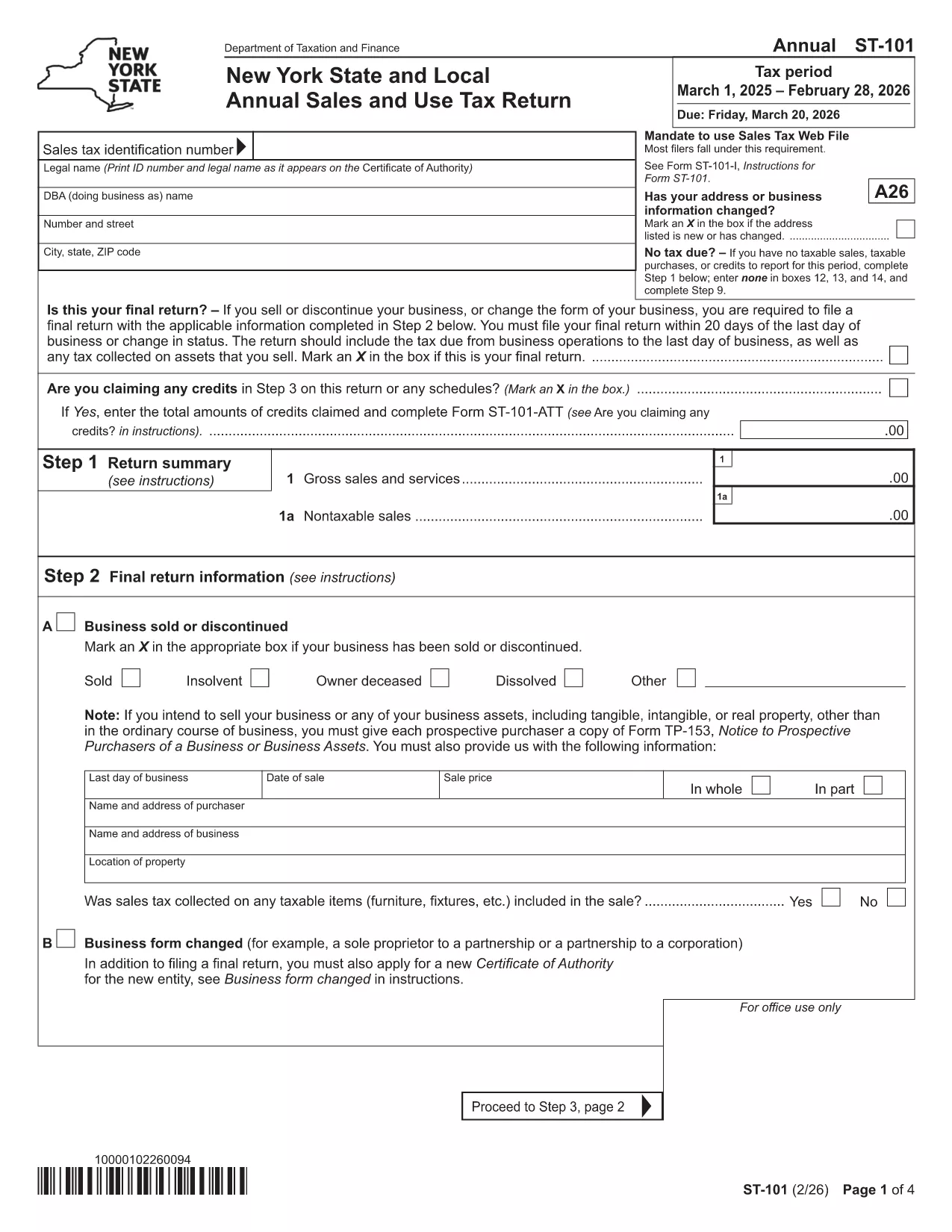
Form ST‑101 – New York State & Local Annual Sales & Use Tax Return

  1. País EE.UU
  2. Idioma Inglés
  3. Actividad Impuestos
  4. Departamento Department of Taxation
Form ST‑101 – New York State & Local Annual Sales & Use Tax Return

The Form ST‑101 is New York’s official Annual Sales and Use Tax Return for businesses that collect and remit state and local sales tax. Whether you’re a retailer, wholesaler, or service provider, filing this form accurately is essential to stay compliant and avoid penalties.

Our fillable PDF, hosted on Formize, lets you complete the return directly in your browser—no extra software needed. Simply click the Fill out this form button, let the Formize PDF Filler load, and start entering your data.

Why Use the Fillable ST‑101 PDF?

  • Instant validation: Built‑in calculations reduce math errors.
  • Save time: Auto‑populate fields and navigate with a click.
  • Secure: Your data stays in the browser until you download or submit.
  • Eco‑friendly: No printed copies until you choose to file.

How to Complete Form ST‑101 Online

Follow the simple steps below. The Formize interface guides you through each section, highlighting required fields and providing helpful tooltips.

Common Mistakes & Tips for Accurate Filing

Even seasoned filers slip up. Avoid these pitfalls:

  • Entering totals before summing line items – let the fillable form calculate for you.
  • Omitting local jurisdiction codes – double‑check your sales locations.
  • Missing the signature block – the PDF includes a digital signature field.

Submission Deadlines & Where to Send

Form ST‑101 is due **March 20** each year (or the next business day if the 20th falls on a weekend). You can:

  • e‑file through New York’s Online Services.
  • Mail the printed form to the address listed in the instructions.

Using the fillable PDF ensures your numbers are correct before you submit, giving you peace of mind.

PREGUNTAS MÁS FRECUENTES
  • What is Form ST‑101 used for?

    Form ST‑101 is the New York State and Local Annual Sales and Use Tax Return. It reports taxable sales, calculates tax owed, and reconciles any credits or exemptions.

  • Can I file Form ST‑101 online?

    Yes. After completing the fillable PDF, you can e‑file through New York’s Online Services portal or mail a printed copy.

  • Do I need a tax preparer to use the fillable PDF?

    No. The fillable PDF includes built‑in calculations and guidance, making it suitable for businesses of all sizes without professional assistance.

  • When is the filing deadline?

    The return is due by March 20 each year. If the 20th falls on a weekend or holiday, the deadline moves to the next business day.

  • What if I make a mistake after submitting?

    You can file an amended return (Form ST‑101‑A) to correct errors. The same fillable PDF format is available for the amendment.

  • Is the fillable PDF secure?

    Yes. All data stays in your browser until you choose to download or submit. Formize uses HTTPS encryption for the loading process.

CÓMO

Cómo completar Form ST-101 gratis, en línea en 4 sencillos pasos:

  1. 1
    Open the Fillable Form
    Click the **Fill out this form** button on the page. The Formize PDF Filler will open in a new tab.
  2. 2
    Enter Your Information
    Start typing in each field. The filler automatically calculates totals and validates entries.
  3. 3
    Review & Sign
    Use the built‑in review tool to double‑check every section, then add your digital signature in the designated field.
  4. 4
    Download or Submit
    When you’re done, download the completed PDF or follow the on‑screen instructions to submit it electronically to NY tax authorities.
Aplicación Formize PDF Filler
SOBRE

Formularios de impuesto

Form ST-101 es uno de los formularios de impuestos que son documentos utilizados para reportar información relacionada con los impuestos a la autoridad fiscal correspondiente. Hay varios tipos de formularios de impuestos, incluidos los formularios de impuestos federales, estatales y locales, que pueden variar según las circunstancias y la ubicación del contribuyente.

CARACTERÍSTICAS

Relleno de PDF

La forma más fácil de llenar formularios PDF en línea

  • Rellene rápidamente Form ST-101
    ¿Está buscando una manera de llenar rápidamente Form ST-101 en línea? Con nuestro rellenador de formularios PDF gratuito en línea, sabrá cómo editar y rellenar este documento PDF en menos de un minuto.
  • Editor de PDF en línea fácil de usar
    ¿Cansado de imprimir archivos PDF para poder editarlos antes de volver a escanearlos y enviarlos de vuelta? Edite documentos PDF gratis en línea. Utilice nuestro editor de pdf en línea para ahorrar tiempo y papel.
  • Excelentes herramientas, todas las plataformas.
    ¿Se pregunta cómo completar Form ST-101 en una Mac, o tal vez cómo usar un relleno de PDF gratis? Nuestras herramientas de PDF en línea funcionan en todas las plataformas.
  • Almacenamiento seguro de archivos
    Los archivos "Form ST-101" completados se almacenan en una base de datos segura administrada por Amazon Cloud hosting. Puede eliminar sus archivos de nuestro sistema en cualquier momento. En cualquier caso, estos archivos se eliminan automáticamente después de 24 horas.
  • Chatea con {palabra clave}
    Chatea con "Form ST-101" en Chatize, que es un asistente de lectura de PDF gratuito. Haga preguntas y obtenga respuestas de "Form ST-101". Simplemente haga clic en el botón Chatear con documento de arriba.

Eliminar sesión de llenado

¿Eliminar la sesión de llenado seleccionada? En este caso, se perderá su progreso al completar el formulario.

Eliminar sesión de edición

¿Eliminar la sesión de edición seleccionada? En este caso, se perderá su progreso en la creación y edición del formulario.