
Seleccione el idioma

California DMV DL 546 Health Questionnaire – Fillable PDF

  1. Idioma Inglés
  2. País EE.UU
  3. Actividad Licencia de conducir
  4. Expresar California
California DMV DL 546 Health Questionnaire – Fillable PDF

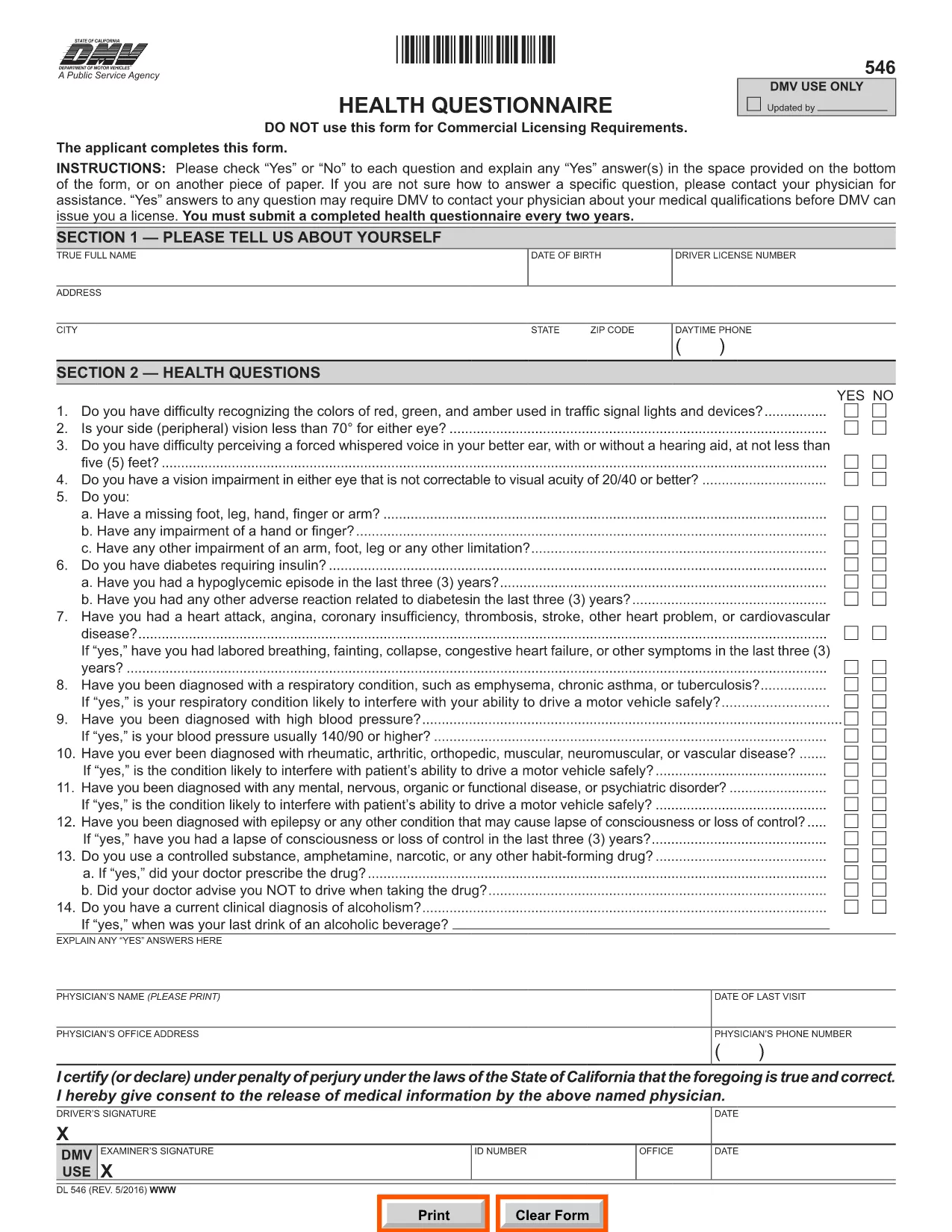
The DL 546 health questionnaire is the California Department of Motor Vehicles (DMV) form that collects medical information from anyone applying for or renewing a driver’s license. The DMV uses this form to ensure that drivers meet safety standards and can operate a vehicle without risking public health.

What Is the DL 546 Form and Who Needs It?

DL 546 is required for:

  • New driver’s license applicants
  • License renewals when the DMV requests a health update
  • Commercial driver’s license (CDL) holders needing a medical review

The questionnaire asks simple “Yes/No” questions about vision, seizures, heart conditions, and other health issues that could affect driving.

How to Complete the DL 546 Online with Formize

Formize makes the fillable PDF DL 546 experience fast and paper‑free. Follow these steps:

  1. Click the "Fill out this form" button on this page.
  2. The Formize PDF Filler app loads in your browser – no download required.
  3. Complete each question by selecting Yes or No and add any explanations in the provided text boxes.
  4. When you’re done, click Save & Sign to add an electronic signature.
  5. Download the completed form or email it directly to the DMV.

Common Mistakes to Avoid When Filling DL 546

  • Leaving a field blank: Every question must be answered, even if the answer is "No."
  • Illegible handwriting: Using the fillable PDF eliminates this risk.
  • Missing signatures or dates: The Formize app prompts you to sign before you can submit.
  • Submitting the wrong version: Ensure you are using the official California DMV PDF (linked below).

Where to Submit the Completed Form

After saving your completed DL 546, you have three submission options:

  • Online: Upload the PDF through the DMV’s MyDMV portal if available.
  • Mail: Print the PDF and send it to the address printed on the form.
  • In‑person: Bring the printed form to any California DMV office.

Choosing the online or fillable PDF route speeds up processing and reduces the chance of lost paperwork.

PREGUNTAS MÁS FRECUENTES
  • What is the purpose of the DL 546 form?

    The DL 546 health questionnaire collects medical information to confirm that a driver meets California safety standards before a license is issued or renewed.

  • Do I need to submit the DL 546 every time I renew my license?

    Only when the DMV specifically requests an updated health questionnaire. Some renewals may not require a new DL 546.

  • Can I fill out DL 546 on a mobile device?

    Yes. Formize’s PDF Filler is fully responsive, so you can complete the form on a smartphone, tablet, or computer.

  • Is an electronic signature accepted by the California DMV?

    The DMV accepts electronic signatures for the DL 546 when the form is submitted online or emailed. Always verify the latest DMV guidelines.

  • What should I do if I answer "Yes" to a health question?

    Provide a clear explanation in the space provided and, if necessary, attach a physician’s statement or medical records as instructed on the form.

  • How long does the DMV keep my DL 546 on file?

    The DMV retains health questionnaires for the period required by California law, typically several years, to verify driver fitness.

  • Can I print the completed DL 546 after filling it online?

    Yes. After saving, you can download and print the PDF for mailing or in‑person submission if you prefer a hard copy.

CÓMO

Cómo completar DL 546 gratis, en línea en 4 sencillos pasos:

  1. 1
    Open the Fillable Form
    Click the "Fill out this form" button on this page. The Formize PDF Filler will open directly in your browser.
  2. 2
    Enter Your Information
    Answer each Yes/No question, add any required explanations, and fill in your personal details in the provided fields.
  3. 3
    Add Your Electronic Signature
    When all fields are complete, click the "Sign" button to apply an e‑signature that meets DMV requirements.
  4. 4
    Save or Email the Completed PDF
    Download the finished DL 546 or use the built‑in email option to send it directly to the DMV or your physician.
Aplicación Formize PDF Filler
SOBRE

Formularios de solicitud de licencia de conducir

En la mayoría de los países, es obligatorio tener una licencia de conducir antes de poder salir a la carretera. Obtener una licencia de conducir es un hito importante para cualquier persona que quiera conducir un automóvil.

DL 546 es uno de los formularios de solicitud de licencia de conducir que son documentos que se utilizan para recopilar información de las personas que desean solicitar una licencia de conducir. Por lo general, contiene campos para el nombre del solicitante, fecha de nacimiento, número de identificación, información de contacto, así como su historial y experiencia en la licencia de conducir.

CARACTERÍSTICAS

Relleno de PDF

La forma más fácil de llenar formularios PDF en línea

  • Rellene rápidamente DL 546
    ¿Está buscando una manera de llenar rápidamente DL 546 en línea? Con nuestro rellenador de formularios PDF gratuito en línea, sabrá cómo editar y rellenar este documento PDF en menos de un minuto.
  • Editor de PDF en línea fácil de usar
    ¿Cansado de imprimir archivos PDF para poder editarlos antes de volver a escanearlos y enviarlos de vuelta? Edite documentos PDF gratis en línea. Utilice nuestro editor de pdf en línea para ahorrar tiempo y papel.
  • Excelentes herramientas, todas las plataformas.
    ¿Se pregunta cómo completar DL 546 en una Mac, o tal vez cómo usar un relleno de PDF gratis? Nuestras herramientas de PDF en línea funcionan en todas las plataformas.
  • Almacenamiento seguro de archivos
    Los archivos "DL 546" completados se almacenan en una base de datos segura administrada por Amazon Cloud hosting. Puede eliminar sus archivos de nuestro sistema en cualquier momento. En cualquier caso, estos archivos se eliminan automáticamente después de 24 horas.
  • Chatea con {palabra clave}
    Chatea con "DL 546" en Chatize, que es un asistente de lectura de PDF gratuito. Haga preguntas y obtenga respuestas de "DL 546". Simplemente haga clic en el botón Chatear con documento de arriba.

Eliminar sesión de llenado

¿Eliminar la sesión de llenado seleccionada? En este caso, se perderá su progreso al completar el formulario.

Eliminar sesión de edición

¿Eliminar la sesión de edición seleccionada? En este caso, se perderá su progreso en la creación y edición del formulario.