
Seleccione el idioma

New York DMV Form DS‑7 – Driver Review Request (Fillable PDF)

  1. Idioma Inglés
  2. País EE.UU
  3. Actividad Licencia de conducir
  4. Expresar Nueva York
New York DMV Form DS‑7 – Driver Review Request (Fillable PDF)

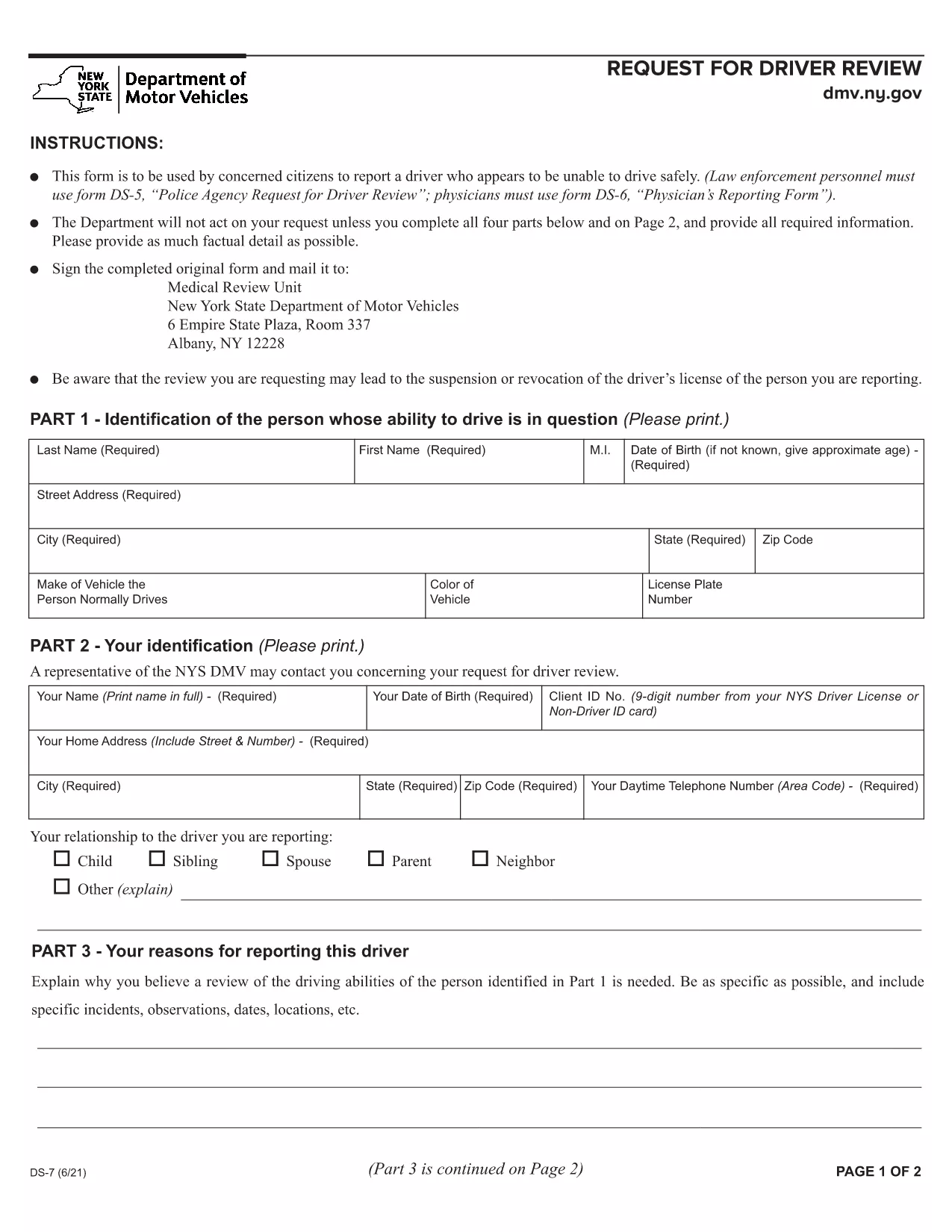
The New York Department of Motor Vehicles (DMV) requires a completed Form DS‑7 when a citizen wants to report a driver who may be unsafe on the road. This form is used by law‑enforcement, physicians, and concerned citizens to initiate a driver safety review.

Our online fillable PDF lets you complete the entire DS‑7 directly in your browser—no extra software needed. Simply click the “Fill out this form” button, wait for the Formize PDF Filler to load, and start entering your information.

Below you’ll find a quick overview of the form, detailed instructions, and tips to avoid common errors.

What Is Form DS‑7?

Form DS‑7, titled “Request for Driver Review,” collects detailed information about the driver’s behavior, vehicle details, and incident description. The DMV uses this data to determine whether a formal investigation or licensing action is required.

How to Fill Out DS‑7 Online

Follow the step‑by‑step guide in the How To section. The online filler automatically validates required fields, so you won’t miss any critical information.

Common Mistakes to Avoid

  • Leaving any required field blank – the filler will highlight missing sections.
  • Using vague descriptions – provide specific dates, times, and locations.
  • Submitting without a signature – you can sign digitally within the filler.

Submit Your Completed Form

After completing the form, click the “Submit” button to download a signed PDF. Mail or fax the PDF to the address listed on the last page of the form, or bring a printed copy to any DMV office.

Download the Fillable PDF

If you prefer to work offline, you can download the official fillable PDF directly from the New York DMV website.

PREGUNTAS MÁS FRECUENTES
  • Who can submit Form DS‑7?

    Any concerned citizen, law‑enforcement officer, or medical professional can submit a DS‑7 to request a driver safety review.

  • Is the online filler free to use?

    Yes, Formize provides a free, secure fillable PDF experience for the DS‑7 form.

  • Can I save my progress and return later?

    The filler allows you to save a draft locally on your computer and resume editing at any time before final submission.

  • Do I need to print the form after filling it out?

    Printing is optional. You can submit the signed PDF electronically by mail or fax, or bring a printed copy to a DMV office.

  • What happens after I submit the DS‑7?

    The DMV reviews the information, may contact the driver for additional details, and determines whether a formal investigation or license action is needed.

  • How long does the review process take?

    Processing times vary, but the DMV typically acknowledges receipt within 10 business days and may take several weeks for a full review.

  • Can I attach supporting documents?

    Yes, you can attach photos, police reports, or medical records as separate PDF files when you mail or fax the completed DS‑7.

  • Is there a fee to file Form DS‑7?

    No, filing a DS‑7 request is free of charge.

CÓMO

Cómo completar DS-7 form gratis, en línea en 4 sencillos pasos:

  1. 1
    Open the Fillable Form
    Click the “Fill out this form” button on the page. The Formize PDF Filler app will load in a new tab.
  2. 2
    Enter Your Information
    Complete each section—driver details, incident description, and witness information. Required fields are marked with an asterisk.
  3. 3
    Add a Digital Signature
    Use the built‑in signature tool to sign the form electronically. This satisfies the DMV’s signature requirement.
  4. 4
    Download and Submit
    After saving, click “Download PDF.” Print the document or send the PDF by mail/fax to the DMV address shown on the form.
Aplicación Formize PDF Filler
SOBRE

Formularios de solicitud de licencia de conducir

En la mayoría de los países, es obligatorio tener una licencia de conducir antes de poder salir a la carretera. Obtener una licencia de conducir es un hito importante para cualquier persona que quiera conducir un automóvil.

DS-7 form es uno de los formularios de solicitud de licencia de conducir que son documentos que se utilizan para recopilar información de las personas que desean solicitar una licencia de conducir. Por lo general, contiene campos para el nombre del solicitante, fecha de nacimiento, número de identificación, información de contacto, así como su historial y experiencia en la licencia de conducir.

CARACTERÍSTICAS

Relleno de PDF

La forma más fácil de llenar formularios PDF en línea

  • Rellene rápidamente DS-7 form
    ¿Está buscando una manera de llenar rápidamente DS-7 form en línea? Con nuestro rellenador de formularios PDF gratuito en línea, sabrá cómo editar y rellenar este documento PDF en menos de un minuto.
  • Editor de PDF en línea fácil de usar
    ¿Cansado de imprimir archivos PDF para poder editarlos antes de volver a escanearlos y enviarlos de vuelta? Edite documentos PDF gratis en línea. Utilice nuestro editor de pdf en línea para ahorrar tiempo y papel.
  • Excelentes herramientas, todas las plataformas.
    ¿Se pregunta cómo completar DS-7 form en una Mac, o tal vez cómo usar un relleno de PDF gratis? Nuestras herramientas de PDF en línea funcionan en todas las plataformas.
  • Almacenamiento seguro de archivos
    Los archivos "DS-7 form" completados se almacenan en una base de datos segura administrada por Amazon Cloud hosting. Puede eliminar sus archivos de nuestro sistema en cualquier momento. En cualquier caso, estos archivos se eliminan automáticamente después de 24 horas.
  • Chatea con {palabra clave}
    Chatea con "DS-7 form" en Chatize, que es un asistente de lectura de PDF gratuito. Haga preguntas y obtenga respuestas de "DS-7 form". Simplemente haga clic en el botón Chatear con documento de arriba.

Eliminar sesión de llenado

¿Eliminar la sesión de llenado seleccionada? En este caso, se perderá su progreso al completar el formulario.

Eliminar sesión de edición

¿Eliminar la sesión de edición seleccionada? En este caso, se perderá su progreso en la creación y edición del formulario.