
Seleccione el idioma

DL-56 National Driver Register File Check (Fillable PDF)

  1. País EE.UU
  2. Idioma Inglés
  3. Actividad Licencia de conducir
  4. Expresar Virginia
DL-56 National Driver Register File Check (Fillable PDF)

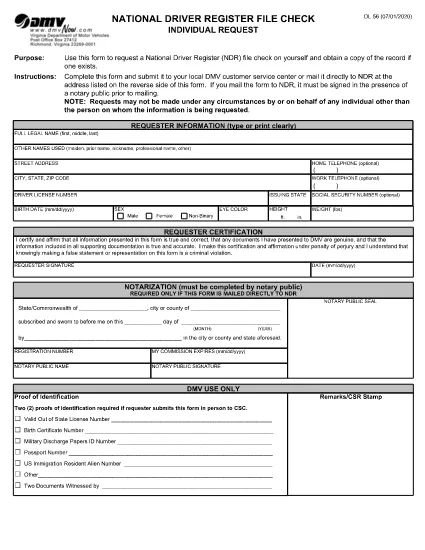
The DL-56 is the official request form used to obtain a file check from the National Driver Register (NDR). This government‑issued form lets you verify whether your driving record contains any cancellations, suspensions, or revocations that could affect licensing, employment, or insurance.

What Is the DL-56 Form?

The DL‑56 form is a simple, one‑page PDF that collects basic personal information (name, address, driver’s license number) and a notarized signature. Once submitted, the NDR returns a copy of any existing file entries associated with your driver’s license.

Who Needs a DL-56 File Check?

  • Job applicants whose position requires a clean driving record.
  • Individuals applying for a commercial driver’s license or occupational license.
  • Insurance companies assessing risk.
  • Drivers who have had a license suspended, revoked, or cancelled and need to confirm the status.

How to Complete the DL-56 Form Online

Instead of downloading the PDF and editing it in a separate editor, simply click the "Fill out this form" button on the page. The Formize PDF Filler app will load, allowing you to fill, sign, and save the document directly in your browser.

Common Mistakes to Avoid

  • Missing notarization: The NDR requires a notarized signature for mailed submissions.
  • Incorrect driver’s license number: Double‑check the number to prevent delays.
  • Leaving blank fields: Even optional fields should be marked "N/A" if not applicable.

Submit Your Request & What Happens Next

After completing the form, you can either:

  1. Download the completed PDF, have it notarized, and mail it to the address listed on the form.
  2. Save the PDF, upload it through the DMV’s online portal (if available), and follow any additional electronic submission instructions.

The NDR will process your request within 10‑15 business days and send the file check results to the address you provided.

PREGUNTAS MÁS FRECUENTES
  • What does the DL-56 form request?

    It requests a file check from the National Driver Register to see if any adverse actions (cancellation, suspension, revocation) are recorded against your driver’s license.

  • Do I need a notary for the DL-56 form?

    Yes, if you are submitting the form by mail. The notarized signature verifies your identity for the NDR.

  • How long does it take to receive the file check?

    The NDR typically processes requests within 10‑15 business days and mails the results to the address you provide.

  • Can I submit the DL-56 form electronically?

    Many states accept a digitally completed form that you later notarize and mail. Check your state DMV’s website for any fully online options.

  • Is there a fee to request a DL-56 file check?

    The federal NDR service is free. However, some states may charge a processing fee for handling the request.

  • What if my name has changed since my license was issued?

    Enter your current legal name and include any supporting documentation (e.g., marriage certificate) that explains the name change.

CÓMO

Cómo completar DL-56 form gratis, en línea en 5 sencillos pasos:

  1. 1
    Open the Fillable Form
    Click the "Fill out this form" button on this page. The Formize PDF Filler will load instantly in your browser.
  2. 2
    Enter Your Personal Information
    Complete all required fields: full legal name, mailing address, driver’s license number, and date of birth.
  3. 3
    Attach Supporting Documents
    If the form requests additional proof (e.g., identification), upload the files using the attachment field.
  4. 4
    Sign Electronically
    Use the built‑in e‑signature tool to sign the form. Remember, a notarized signature is required for mailed submissions.
  5. 5
    Save and Submit
    Download the completed PDF, have it notarized if you plan to mail it, or follow any online submission instructions provided by your state DMV.
Aplicación Formize PDF Filler
SOBRE

Formularios de solicitud de licencia de conducir

En la mayoría de los países, es obligatorio tener una licencia de conducir antes de poder salir a la carretera. Obtener una licencia de conducir es un hito importante para cualquier persona que quiera conducir un automóvil.

DL-56 form es uno de los formularios de solicitud de licencia de conducir que son documentos que se utilizan para recopilar información de las personas que desean solicitar una licencia de conducir. Por lo general, contiene campos para el nombre del solicitante, fecha de nacimiento, número de identificación, información de contacto, así como su historial y experiencia en la licencia de conducir.

CARACTERÍSTICAS

Relleno de PDF

La forma más fácil de llenar formularios PDF en línea

  • Rellene rápidamente DL-56 form
    ¿Está buscando una manera de llenar rápidamente DL-56 form en línea? Con nuestro rellenador de formularios PDF gratuito en línea, sabrá cómo editar y rellenar este documento PDF en menos de un minuto.
  • Editor de PDF en línea fácil de usar
    ¿Cansado de imprimir archivos PDF para poder editarlos antes de volver a escanearlos y enviarlos de vuelta? Edite documentos PDF gratis en línea. Utilice nuestro editor de pdf en línea para ahorrar tiempo y papel.
  • Excelentes herramientas, todas las plataformas.
    ¿Se pregunta cómo completar DL-56 form en una Mac, o tal vez cómo usar un relleno de PDF gratis? Nuestras herramientas de PDF en línea funcionan en todas las plataformas.
  • Almacenamiento seguro de archivos
    Los archivos "DL-56 form" completados se almacenan en una base de datos segura administrada por Amazon Cloud hosting. Puede eliminar sus archivos de nuestro sistema en cualquier momento. En cualquier caso, estos archivos se eliminan automáticamente después de 24 horas.
  • Chatea con {palabra clave}
    Chatea con "DL-56 form" en Chatize, que es un asistente de lectura de PDF gratuito. Haga preguntas y obtenga respuestas de "DL-56 form". Simplemente haga clic en el botón Chatear con documento de arriba.

Eliminar sesión de llenado

¿Eliminar la sesión de llenado seleccionada? En este caso, se perderá su progreso al completar el formulario.

Eliminar sesión de edición

¿Eliminar la sesión de edición seleccionada? En este caso, se perderá su progreso en la creación y edición del formulario.