
Seleccione el idioma

Wisconsin MV3112 Driver Instructor Application – Fillable PDF

  1. Idioma Inglés
  2. País EE.UU
  3. Actividad Licencia de conducir
  4. Expresar Wisconsin
Wisconsin MV3112 Driver Instructor Application – Fillable PDF

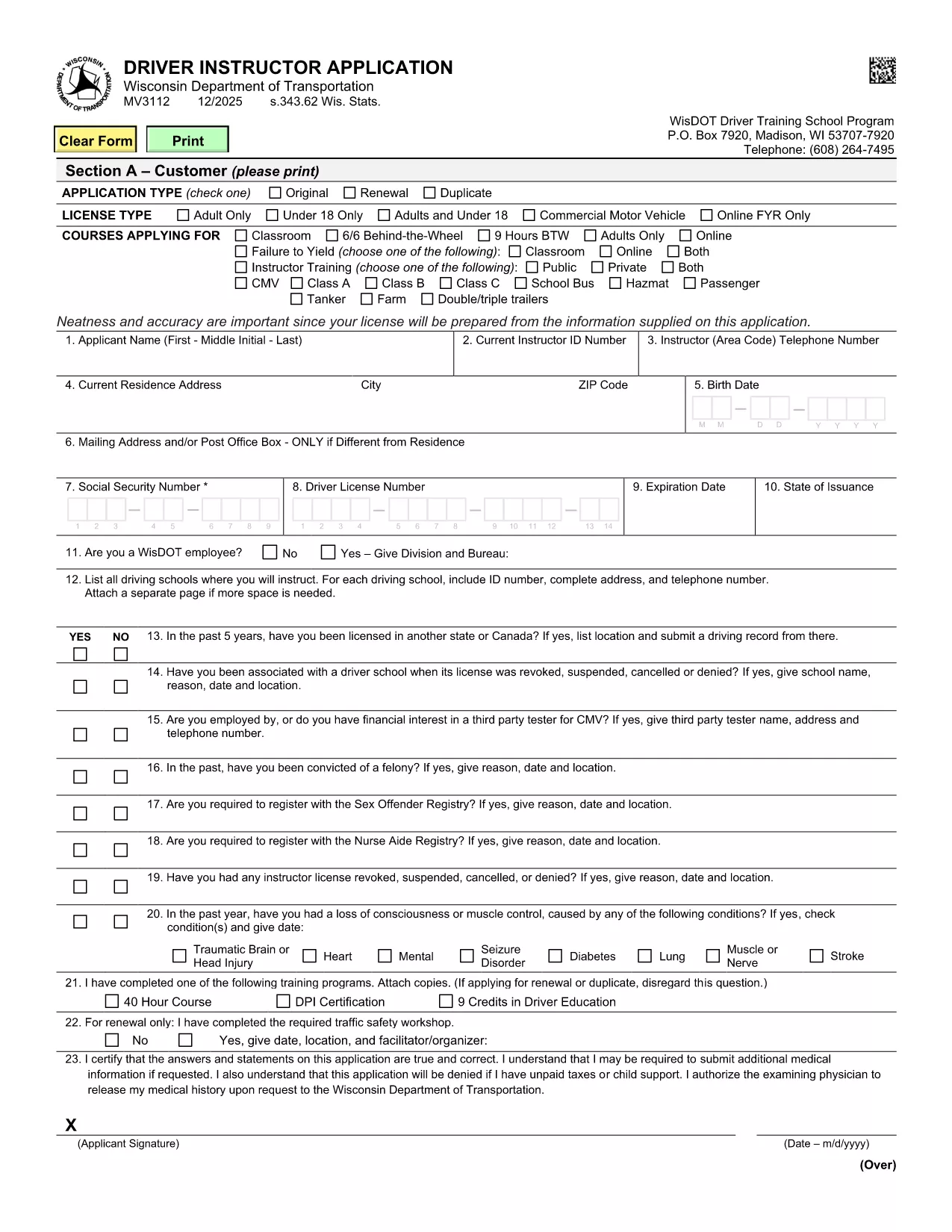
The MV3112 is the official Driver Instructor Application required by the Wisconsin Department of Transportation (WisDOT). Whether you’re starting a new driver‑training school or adding an instructor to an existing program, this form must be completed, signed, and submitted before you can begin teaching.

Formize makes the MV3112 completely fillable online. No more printing, scanning, or hand‑writing. Simply click the “Fill out this form” button, enter your information, and download a completed PDF ready for submission.

What Is the MV3112 Form?

The MV3112 collects personal data, driving history, medical qualifications, and background information about the applicant. It also includes a certification section where you attest that all statements are true and that you meet WisDOT’s eligibility criteria.

How to Complete the MV3112 Online

Follow these quick steps to fill the form using Formize’s PDF Filler:

  • Click the Fill out this form button on this page.
  • Wait for the Formize PDF Filler to load (a few seconds).
  • Enter all required information in the highlighted fields.
  • Upload any supporting documents (e.g., medical clearance, driver record).
  • Save the completed PDF, print it, sign where required, and mail it to WisDOT.

Common Mistakes to Avoid

Even a small error can delay your application. Keep these tips in mind:

  • Missing signatures: Every signature box must be signed in ink after printing.
  • Incomplete medical info: Attach the most recent medical examination if requested.
  • Incorrect fee amount: Verify the current fee on WisDOT’s website before mailing.
  • Out‑of‑date driver record: Use a driver record dated within the last 90 days.

Submission Guidelines & Fees

After you’ve filled and printed the form, mail it to:

Wisconsin Department of Transportation
Division of Driver Services
P.O. Box 7448
Madison, WI 53707‑7448

Include the application fee (check the latest WisDOT fee schedule) and any required medical documentation. Processing typically takes 10‑14 business days.

Need Help? Frequently Asked Questions

Below are answers to the most common questions about the MV3112.

PREGUNTAS MÁS FRECUENTES
  • Who is eligible to use the MV3112 form?

    Any individual who wishes to become a licensed driver instructor in Wisconsin, including those starting a new school or joining an existing one.

  • Do I need a medical examination?

    A medical exam is required only if WisDOT requests it. Attach a current medical report (within 60 days) when requested.

  • What is the application fee?

    The fee varies; check WisDOT’s current fee schedule on their website before submitting the form.

  • Can I submit the MV3112 electronically?

    WisDOT currently requires a printed, signed copy. The online filler speeds up data entry, but you must mail the final PDF.

  • How long does processing take?

    Standard processing is 10‑14 business days after WisDOT receives the complete, signed application.

  • What should I do if I make a mistake on the form?

    Correct any errors before printing. If you discover a mistake after mailing, contact WisDOT to request a replacement form.

  • Is there a deadline for submitting the MV3112?

    There is no fixed deadline, but you should submit the application before you begin any instructor activities to avoid penalties.

  • Where can I find additional guidance?

    Visit the WisDOT Driver Services website for detailed instructions, fee information, and contact details for further assistance.

CÓMO

Cómo completar MV3112 gratis, en línea en 5 sencillos pasos:

  1. 1
    Open the Fillable Form
    Click the “Fill out this form” button on this page. The Formize PDF Filler will open in a new tab.
  2. 2
    Enter Your Information
    Type your details into each highlighted field. Use the drop‑down menus where available for easy selection.
  3. 3
    Upload Supporting Documents
    Attach required files such as medical clearance or a recent driver record using the upload icons.
  4. 4
    Save and Print
    When every field is completed, click “Save PDF”. Print the document, sign the required sections in ink, and prepare it for mailing.
  5. 5
    Submit to WisDOT
    Mail the signed PDF along with the application fee to the WisDOT address listed on the form.
Aplicación Formize PDF Filler
SOBRE

Formularios de solicitud de licencia de conducir

En la mayoría de los países, es obligatorio tener una licencia de conducir antes de poder salir a la carretera. Obtener una licencia de conducir es un hito importante para cualquier persona que quiera conducir un automóvil.

MV3112 es uno de los formularios de solicitud de licencia de conducir que son documentos que se utilizan para recopilar información de las personas que desean solicitar una licencia de conducir. Por lo general, contiene campos para el nombre del solicitante, fecha de nacimiento, número de identificación, información de contacto, así como su historial y experiencia en la licencia de conducir.

CARACTERÍSTICAS

Relleno de PDF

La forma más fácil de llenar formularios PDF en línea

  • Rellene rápidamente MV3112
    ¿Está buscando una manera de llenar rápidamente MV3112 en línea? Con nuestro rellenador de formularios PDF gratuito en línea, sabrá cómo editar y rellenar este documento PDF en menos de un minuto.
  • Editor de PDF en línea fácil de usar
    ¿Cansado de imprimir archivos PDF para poder editarlos antes de volver a escanearlos y enviarlos de vuelta? Edite documentos PDF gratis en línea. Utilice nuestro editor de pdf en línea para ahorrar tiempo y papel.
  • Excelentes herramientas, todas las plataformas.
    ¿Se pregunta cómo completar MV3112 en una Mac, o tal vez cómo usar un relleno de PDF gratis? Nuestras herramientas de PDF en línea funcionan en todas las plataformas.
  • Almacenamiento seguro de archivos
    Los archivos "MV3112" completados se almacenan en una base de datos segura administrada por Amazon Cloud hosting. Puede eliminar sus archivos de nuestro sistema en cualquier momento. En cualquier caso, estos archivos se eliminan automáticamente después de 24 horas.
  • Chatea con {palabra clave}
    Chatea con "MV3112" en Chatize, que es un asistente de lectura de PDF gratuito. Haga preguntas y obtenga respuestas de "MV3112". Simplemente haga clic en el botón Chatear con documento de arriba.

Eliminar sesión de llenado

¿Eliminar la sesión de llenado seleccionada? En este caso, se perderá su progreso al completar el formulario.

Eliminar sesión de edición

¿Eliminar la sesión de edición seleccionada? En este caso, se perderá su progreso en la creación y edición del formulario.