Seleccione el idioma

Underground Storage Tank (UST) Application Form – Fillable PDF

  1. Idioma Inglés
  2. País EE.UU
  3. Departamento Environmental Protection Agency
  4. Actividad Underground Storage Tanks
Underground Storage Tank (UST) Application Form – Fillable PDF

Regulated entities that install, modify, or close an underground storage tank (UST) must submit an official application to the state environmental agency. The UST Application Form is available as a fillable PDF, making it easy to complete on any device.

What Is the UST Application Form?

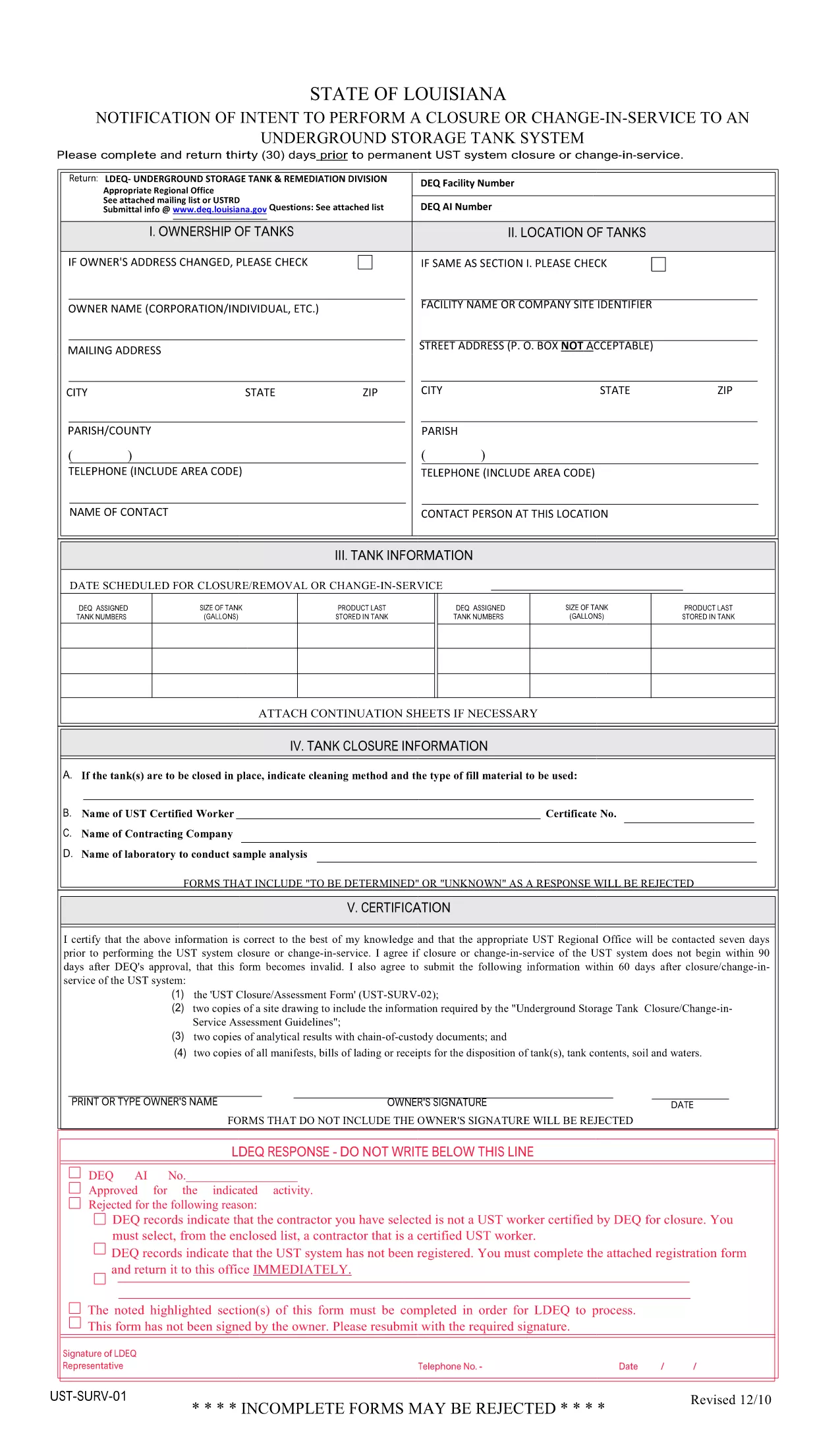
This form is the UST Notice of Intent to Perform Closure or Change‑In‑Service (PDF: UST‑SURV‑01). It is used to notify the Louisiana Department of Environmental Quality (or the equivalent state agency) 30 days before a permanent closure, significant renovation, or any change in service for an underground storage tank.

How to Fill the Form Online with Formize

Instead of downloading the PDF and editing it in a separate editor, simply click the "Fill out this form" button on this page. The Formize PDF Filler will load instantly, allowing you to enter data, add signatures, and save your completed form directly in the browser.

Key Sections You Must Complete

  • Tank Identification – tank number, location, and capacity.
  • Owner/Operator Information – legal name, contact details, and EPA ID.
  • Type of Action – closure, renovation, or change‑in‑service.
  • Technical Details – removal method, closure plan, or modification description.
  • Signature & Date – authorized representative’s signature and the date of submission.

Common Mistakes & Tips for a Smooth Submission

Do not leave any required fields blank. The online filler highlights missing data before you can submit.

Use exact tank numbers. Mismatched numbers cause processing delays.

Attach supporting documents. Upload PDF copies of permits, engineering plans, or financial assurance documents using the attachment field.

Review before sending. The preview function lets you see the final layout exactly as the agency will receive it.

Where to Find Help and Additional Resources

If you have questions about the form, consult the official PDF guide or contact your state environmental agency. The Formize help center provides step‑by‑step videos on using the PDF filler.

PREGUNTAS MÁS FRECUENTES
  • Do I need a special PDF reader to fill this form?

    No. The Formize PDF Filler works in any modern browser, so you don’t need Adobe Acrobat or any other software.

  • Can I save my progress and finish later?

    Yes. Click the "Save" button to download a draft copy. Re‑upload the draft later to continue editing.

  • What if I make a mistake after submitting?

    Contact your state environmental agency immediately. Most agencies allow a corrected form to be submitted within 10 business days.

  • Is the electronic signature legally accepted?

    Electronic signatures are accepted by most state agencies for UST applications, provided they meet the agency’s signing requirements.

  • Do I need to print the form after filling it online?

    Only if the agency requires a hard‑copy signature. Otherwise, the completed PDF can be submitted electronically.

  • How do I know which version of the form is current?

    The PDF linked on this page is the latest version released by the Louisiana DEQ. Check the agency’s website for any updates.

  • Can I fill out multiple UST forms at once?

    Yes. Open each form in a separate browser tab and use the same Formize account to manage all of them.

  • Is there a fee to use Formize’s PDF filler?

    Formize offers a free tier for basic forms. Larger organizations may need a paid plan for advanced features, but filling this UST form is free.

CÓMO

Cómo completar UST application form gratis, en línea en 5 sencillos pasos:

  1. 1
    Open the Fillable Form
    Click the "Fill out this form" button on the page. The Formize PDF Filler loads in your browser instantly.
  2. 2
    Enter Your Information
    Type directly into each field. Use the tab key to move quickly between sections.
  3. 3
    Add Attachments
    Use the attachment icon to upload supporting documents such as permits or engineering drawings.
  4. 4
    Review & Sign
    Click the preview button, check all entries, then add your electronic signature and the date.
  5. 5
    Submit or Download
    When the form is complete, either submit it directly to the agency (if the option is enabled) or download the finished PDF for manual submission.
Aplicación Formize PDF Filler
SOBRE

UST application form plantilla

Con el conjunto tradicional de funciones para ver y completar un documento PDF, combinado con los beneficios de una aplicación web y un diseño receptivo, puede completar UST application form en minutos.

CARACTERÍSTICAS

Relleno de PDF

La forma más fácil de llenar formularios PDF en línea

  • Rellene rápidamente UST application form
    ¿Está buscando una manera de llenar rápidamente UST application form en línea? Con nuestro rellenador de formularios PDF gratuito en línea, sabrá cómo editar y rellenar este documento PDF en menos de un minuto.
  • Editor de PDF en línea fácil de usar
    ¿Cansado de imprimir archivos PDF para poder editarlos antes de volver a escanearlos y enviarlos de vuelta? Edite documentos PDF gratis en línea. Utilice nuestro editor de pdf en línea para ahorrar tiempo y papel.
  • Excelentes herramientas, todas las plataformas.
    ¿Se pregunta cómo completar UST application form en una Mac, o tal vez cómo usar un relleno de PDF gratis? Nuestras herramientas de PDF en línea funcionan en todas las plataformas.
  • Almacenamiento seguro de archivos
    Los archivos "UST application form" completados se almacenan en una base de datos segura administrada por Amazon Cloud hosting. Puede eliminar sus archivos de nuestro sistema en cualquier momento. En cualquier caso, estos archivos se eliminan automáticamente después de 24 horas.
  • Chatea con {palabra clave}
    Chatea con "UST application form" en Chatize, que es un asistente de lectura de PDF gratuito. Haga preguntas y obtenga respuestas de "UST application form". Simplemente haga clic en el botón Chatear con documento de arriba.

Eliminar sesión de llenado

¿Eliminar la sesión de llenado seleccionada? En este caso, se perderá su progreso al completar el formulario.

Eliminar sesión de edición

¿Eliminar la sesión de edición seleccionada? En este caso, se perderá su progreso en la creación y edición del formulario.