Seleccione el idioma

Employee Time‑Off Request Form – Fillable PDF

  1. Idioma Inglés
  2. País EE.UU
  3. Departamento Human Resources
  4. Actividad Leave Management
Employee Time‑Off Request Form – Fillable PDF

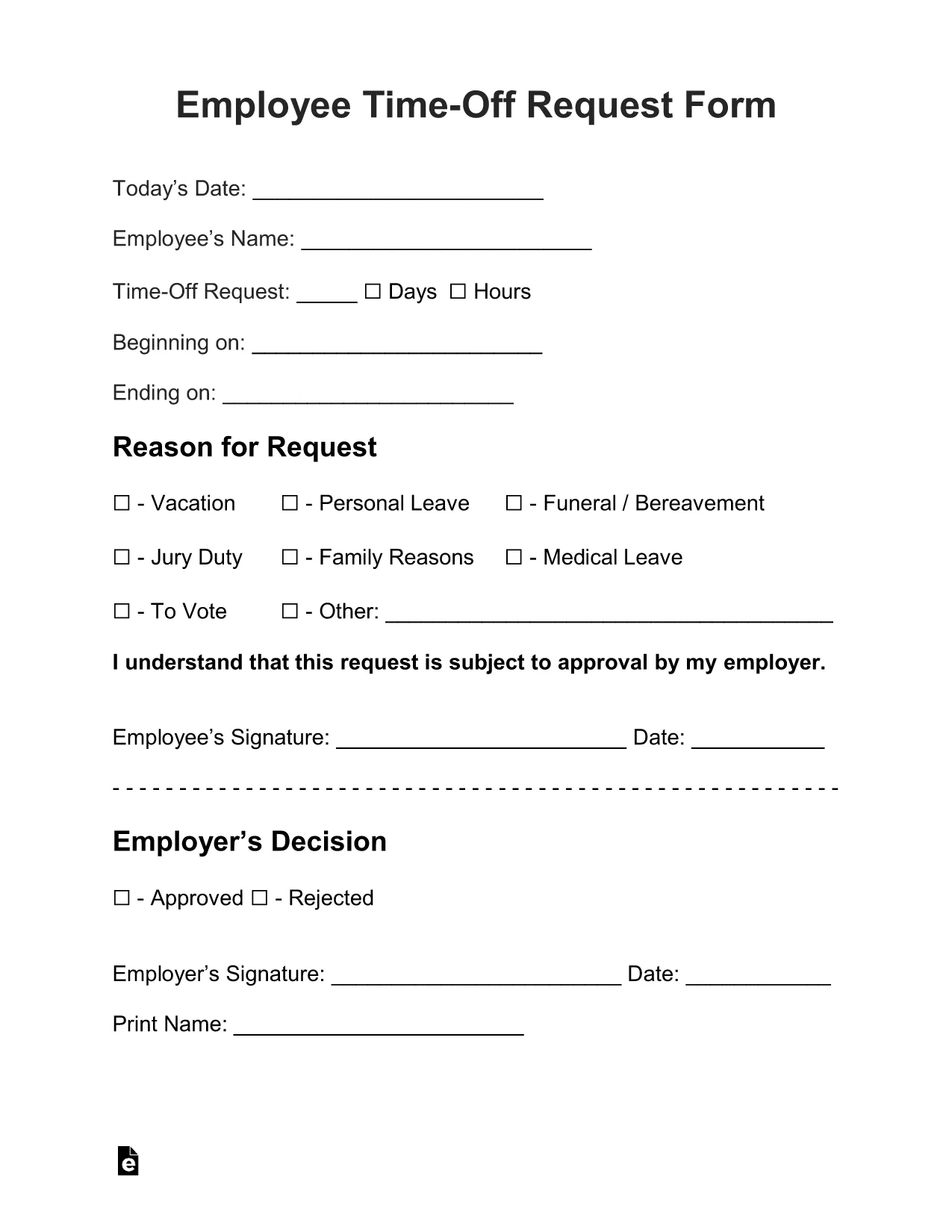
Need a quick, professional way to ask for vacation, sick leave, or personal time? The Employee Time‑Off Request Form is a standard, fillable PDF used by many U.S. employers. With Formize’s built‑in PDF Filler, you can complete the form directly in your browser—no extra software, no printing until you’re ready.

What Is the Employee Time‑Off Request Form?

This form captures essential details such as employee name, department, dates requested, type of leave, and manager approval. It is designed to be simple, compliant with HR policies, and easy to submit to your supervisor or HR department.

How to Fill Out the Form Online with Formize

Just click the "Fill out this form" button below. The Formize PDF Filler app loads instantly, letting you type, select dates, and add signatures. When you’re done, you can download the completed PDF, email it, or save it to the cloud.

Common Mistakes to Avoid

  • Leaving required fields blank: The form highlights missing information in red.
  • Incorrect dates: Double‑check start and end dates before submitting.
  • Wrong leave type: Choose the appropriate category (vacation, sick, personal, etc.).
  • Missing manager signature: Use the signature field provided; you can also upload a scanned signature.

Download, Save, and Print Your Completed Request

After filling the form, click Download PDF to store a copy on your device. You can also email the file directly from the Formize interface or print it for a hard‑copy signature if your company requires it.

Frequently Asked Questions

Below are the most common questions about using this fillable request form.

PREGUNTAS MÁS FRECUENTES
  • Do I need any special software to fill this PDF?

    No. The Formize PDF Filler works in any modern browser, so you can complete the form without Adobe Acrobat or other editors.

  • Can I edit the form after I download it?

    Yes. The downloaded PDF remains fully editable with Formize or any standard PDF editor if you need to make changes later.

  • Is my data secure while I fill out the form?

    Absolutely. Formize uses HTTPS encryption, and your data never leaves your browser unless you choose to email or upload it.

  • What if my employer requires a printed copy?

    After you finish online, click "Download PDF" and print the completed form for a hard‑copy signature.

  • Can I save a draft and finish later?

    Yes. Use the "Save Draft" button to download a partially completed PDF, then reopen it later with Formize to continue.

CÓMO

Cómo completar request form pdf gratis, en línea en 4 sencillos pasos:

  1. 1
    Open the Fillable Form
    Click the "Fill out this form" button on the page. The Formize PDF Filler loads automatically in your browser.
  2. 2
    Enter Your Information
    Type your name, employee ID, dates, and select the type of leave from the dropdown menus. All fields are editable.
  3. 3
    Add Your Signature
    Use the signature field to draw or upload a scanned signature. Your manager can sign later if needed.
  4. 4
    Save or Submit
    When the form is complete, click "Download PDF" to save a copy, or use the built‑in email button to send it directly to HR.
Aplicación Formize PDF Filler
SOBRE

request form pdf plantilla

Con el conjunto tradicional de funciones para ver y completar un documento PDF, combinado con los beneficios de una aplicación web y un diseño receptivo, puede completar request form pdf en minutos.

CARACTERÍSTICAS

Relleno de PDF

La forma más fácil de llenar formularios PDF en línea

  • Rellene rápidamente request form pdf
    ¿Está buscando una manera de llenar rápidamente request form pdf en línea? Con nuestro rellenador de formularios PDF gratuito en línea, sabrá cómo editar y rellenar este documento PDF en menos de un minuto.
  • Editor de PDF en línea fácil de usar
    ¿Cansado de imprimir archivos PDF para poder editarlos antes de volver a escanearlos y enviarlos de vuelta? Edite documentos PDF gratis en línea. Utilice nuestro editor de pdf en línea para ahorrar tiempo y papel.
  • Excelentes herramientas, todas las plataformas.
    ¿Se pregunta cómo completar request form pdf en una Mac, o tal vez cómo usar un relleno de PDF gratis? Nuestras herramientas de PDF en línea funcionan en todas las plataformas.
  • Almacenamiento seguro de archivos
    Los archivos "request form pdf" completados se almacenan en una base de datos segura administrada por Amazon Cloud hosting. Puede eliminar sus archivos de nuestro sistema en cualquier momento. En cualquier caso, estos archivos se eliminan automáticamente después de 24 horas.
  • Chatea con {palabra clave}
    Chatea con "request form pdf" en Chatize, que es un asistente de lectura de PDF gratuito. Haga preguntas y obtenga respuestas de "request form pdf". Simplemente haga clic en el botón Chatear con documento de arriba.

Eliminar sesión de llenado

¿Eliminar la sesión de llenado seleccionada? En este caso, se perderá su progreso al completar el formulario.

Eliminar sesión de edición

¿Eliminar la sesión de edición seleccionada? En este caso, se perderá su progreso en la creación y edición del formulario.