
Seleccione el idioma

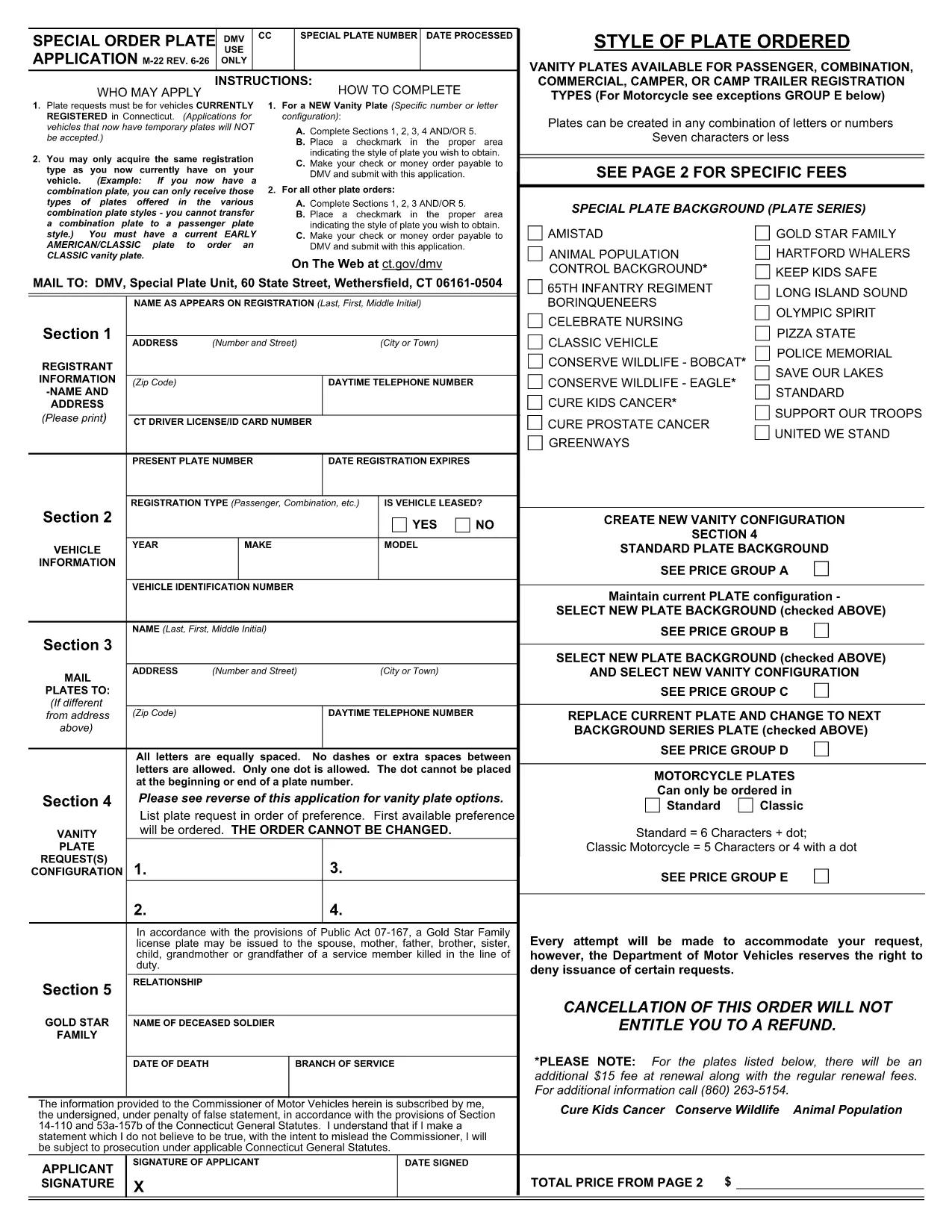
Connecticut Form M22 – Fillable PDF for Special Order License Plates

  1. País EE.UU
  2. Idioma Inglés
  3. Actividad Impuestos
  4. Departamento IRS
Connecticut Form M22 – Fillable PDF for Special Order License Plates

The Connecticut Form M22 (also called the "Special Order Plate Application") is the official document you need to request personalized or specialty license plates in CT. Instead of printing, scanning, and mailing a paper copy, you can fill the form directly in your browser using Formize’s secure PDF Filler.

What Is Form M22?

Form M22 is issued by the Connecticut Department of Motor Vehicles (DMV) and is used for:

  • Vanity plates for passenger vehicles, trucks, campers, and trailers.
  • Specialty plates that feature custom designs or charitable causes.
  • Any plate request that deviates from the standard state‑issued designs.

The form collects vehicle information, personal details, and the exact plate configuration you desire.

How to Complete the M22 Form Online

Follow these simple steps to fill out the form without ever leaving the page:

  • Click the "Fill out this form" button below the description.
  • Our Formize PDF Filler will load the official M22 PDF instantly.
  • Enter your name, address, vehicle identification number (VIN), and select the plate style you want.
  • Review each section for accuracy, then sign electronically using your mouse or touchscreen.
  • When you’re done, download the completed PDF or submit it directly to the CT DMV as instructed.

Common Mistakes to Avoid

  • Incorrect VIN or plate number – double‑check the VIN on your registration.
  • Leaving required fields blank – the form will not submit if mandatory sections are empty.
  • Using prohibited characters or messages on the plate – review CT DMV guidelines before typing your custom text.
  • Forgetting to attach supporting documents (title, proof of ownership) when you mail the form.

Where to Submit Your Completed Form

After you save the filled PDF, you have two options:

  1. Mail the form with payment to the address listed on the last page of the PDF.
  2. Visit a local Connecticut DMV office and present the printed form.

Electronic submission is not yet accepted for M22, so a printed copy is required for final delivery.

Download the Official Fillable PDF

Click the button below to open the fillable Connecticut Form M22 in the Formize PDF Filler. No additional software is needed.

Fill out this form

PREGUNTAS MÁS FRECUENTES
  • Is Form M22 available as a fillable PDF?

    Yes. The Connecticut DMV provides a fillable PDF that can be completed online using Formize’s PDF Filler.

  • Can I submit the M22 form electronically?

    Electronic submission is not accepted for M22. After filling it out, you must print the form and mail it or bring it to a DMV office.

  • What payment methods are accepted with the M22 application?

    The form requires a check or money order payable to the Connecticut DMV. Credit cards are not accepted on the paper form.

  • How long does it take to process a special order plate request?

    Processing typically takes 4–6 weeks after the DMV receives the completed M22 form and payment.

  • Do I need any additional documents with the M22 form?

    Include a copy of the vehicle title or registration and a valid photo ID. Some specialty plates may require proof of eligibility.

  • Can I change my plate request after submitting the M22 form?

    Changes are not allowed once the form is submitted. You must withdraw the request and submit a new M22 form.

  • Is there a fee for using Formize’s PDF Filler?

    No. Formize provides the filler for free; you only pay the DMV’s plate and processing fees.

CÓMO

Cómo completar Connecticut M22 PDF gratis, en línea en 4 sencillos pasos:

  1. 1
    Open the Fillable Form
    Click the "Fill out this form" button above. The Formize PDF Filler loads the official M22 PDF directly in your browser.
  2. 2
    Enter Your Information
    Fill in each required field—personal details, vehicle information, and the desired plate style. The form auto‑saves as you type.
  3. 3
    Add Your Electronic Signature
    Use your mouse, trackpad, or touchscreen to sign the form. The signature is legally binding for the CT DMV.
  4. 4
    Save or Print the Completed PDF
    When all sections are complete, click "Download" to save a copy or print the form for mailing to the DMV.
Aplicación Formize PDF Filler
SOBRE

formularios de impuestos federales

Connecticut M22 PDF es uno de los formularios de impuestos federales que son documentos utilizados para declarar y presentar impuestos federales sobre la renta ante el Servicio de Impuestos Internos (IRS) en los Estados Unidos. Estos formularios son utilizados por personas, empresas y organizaciones para informar sus ingresos, deducciones y otra información relevante necesaria para calcular su obligación tributaria federal.

El formulario de impuestos federales más utilizado es el Formulario 1040, que utilizan los contribuyentes individuales para declarar su impuesto sobre la renta personal. Otros formularios comúnmente utilizados incluyen el Formulario 1065 para sociedades, Formulario 1120 para corporaciones y Formulario 990 para organizaciones exentas de impuestos.

Los formularios de impuestos federales generalmente requieren que los contribuyentes informen diversas fuentes de ingresos, como sueldos, salarios y propinas, así como ingresos de inversiones, propiedades de alquiler y otras fuentes. Los formularios también permiten a los contribuyentes reclamar deducciones y créditos por diversos gastos, como contribuciones caritativas, intereses hipotecarios y gastos de atención médica.

Es importante presentar los formularios de impuestos federales con precisión y a tiempo, ya que no hacerlo puede generar multas y cargos por intereses por parte del IRS.

CARACTERÍSTICAS

Relleno de PDF

La forma más fácil de llenar formularios PDF en línea

  • Rellene rápidamente Connecticut M22 PDF
    ¿Está buscando una manera de llenar rápidamente Connecticut M22 PDF en línea? Con nuestro rellenador de formularios PDF gratuito en línea, sabrá cómo editar y rellenar este documento PDF en menos de un minuto.
  • Editor de PDF en línea fácil de usar
    ¿Cansado de imprimir archivos PDF para poder editarlos antes de volver a escanearlos y enviarlos de vuelta? Edite documentos PDF gratis en línea. Utilice nuestro editor de pdf en línea para ahorrar tiempo y papel.
  • Excelentes herramientas, todas las plataformas.
    ¿Se pregunta cómo completar Connecticut M22 PDF en una Mac, o tal vez cómo usar un relleno de PDF gratis? Nuestras herramientas de PDF en línea funcionan en todas las plataformas.
  • Almacenamiento seguro de archivos
    Los archivos "Connecticut M22 PDF" completados se almacenan en una base de datos segura administrada por Amazon Cloud hosting. Puede eliminar sus archivos de nuestro sistema en cualquier momento. En cualquier caso, estos archivos se eliminan automáticamente después de 24 horas.
  • Chatea con {palabra clave}
    Chatea con "Connecticut M22 PDF" en Chatize, que es un asistente de lectura de PDF gratuito. Haga preguntas y obtenga respuestas de "Connecticut M22 PDF". Simplemente haga clic en el botón Chatear con documento de arriba.

Eliminar sesión de llenado

¿Eliminar la sesión de llenado seleccionada? En este caso, se perderá su progreso al completar el formulario.

Eliminar sesión de edición

¿Eliminar la sesión de edición seleccionada? En este caso, se perderá su progreso en la creación y edición del formulario.