
Seleccione el idioma

Disability Plate – Second Set Questionnaire (MVR‑37) Fillable PDF

  1. Idioma Inglés
  2. País EE.UU
  3. Actividad Registro de Vehículo
  4. Departamento Motor Vehicle Department
Disability Plate – Second Set Questionnaire (MVR‑37) Fillable PDF

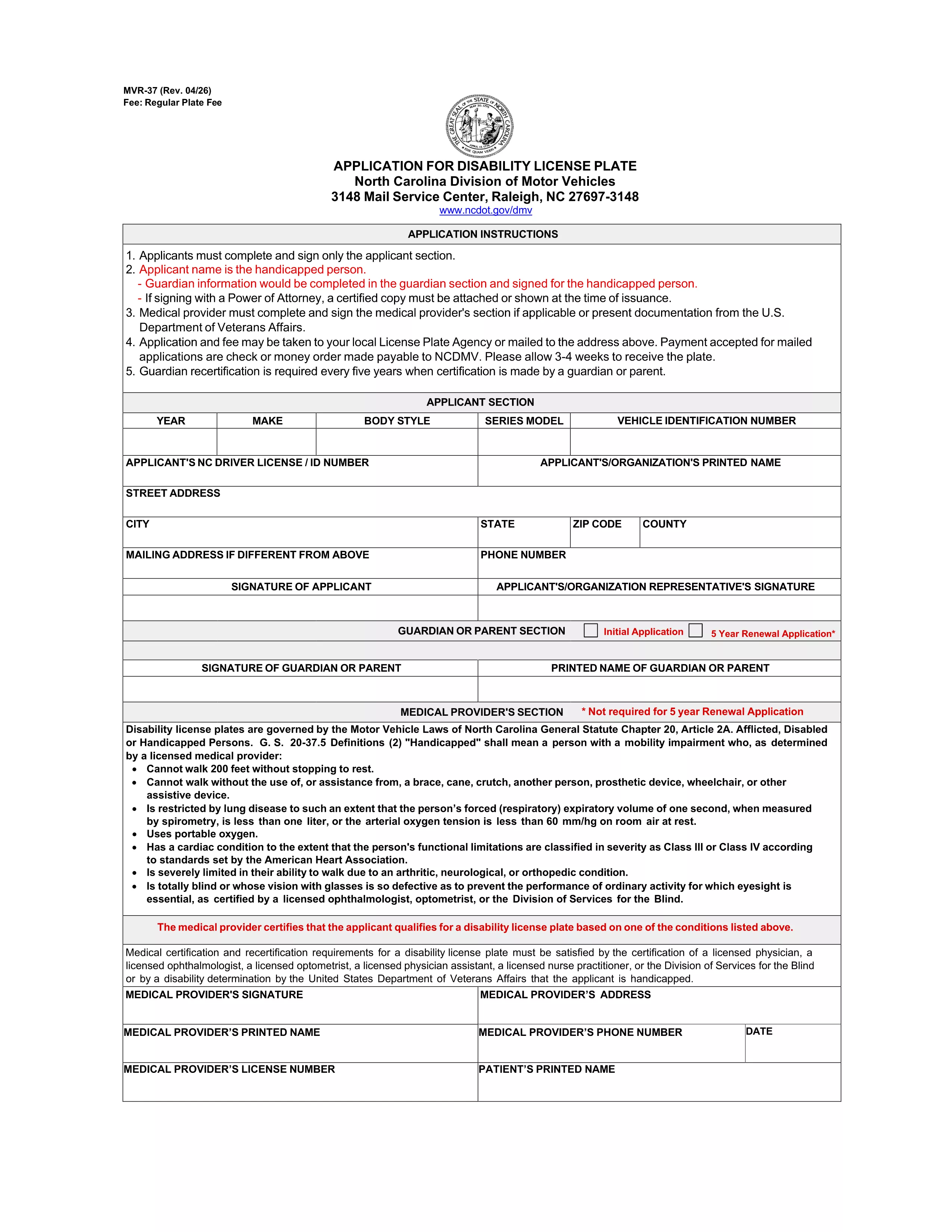
If you already have a set of disability license plates and need a replacement or an additional set, North Carolina requires the MVR‑37 – the Disability Plate Second Set Questionnaire. This official PDF form collects the medical and vehicle information needed to issue a second set of plates with the International Symbol of Access.

Unlike a paper‑only application, Formize lets you open the PDF directly in your browser, fill every field, and submit it electronically. No printing, scanning, or PDF editor downloads are required.

What Is the Disability Plate – Second Set Questionnaire?

The MVR‑37 is a two‑page questionnaire used by the North Carolina Division of Motor Vehicles (DMV). It asks for:

  • Applicant’s personal details and disability verification
  • Physician’s certification and signature
  • Vehicle information (VIN, registration, current plate numbers)
  • Reason for requesting a second set (lost, damaged, additional vehicle, etc.)

Submitting a complete, accurate MVR‑37 speeds up the issuance of your new plates.

How to Complete the MVR‑37 Form with Formize PDF Filler

Follow these simple steps to fill out the questionnaire online:

  1. Click the "Fill out this form" button on this page.
  2. Wait a few seconds while the Formize PDF Filler app loads the MVR‑37 document.
  3. Enter your information in each highlighted field. The app automatically saves your progress.
  4. When you reach the physician’s section, have the doctor sign electronically or upload a scanned signature.
  5. Review the entire form, then click "Submit" to download the completed PDF.

You can now email the PDF to the DMV or bring a printed copy to your local office.

Common Mistakes to Avoid When Applying for a Second Set

  • Missing physician signature: The form is rejected without a valid signature or notarization.
  • Incorrect VIN or plate numbers: Double‑check the vehicle identification number and current plate numbers.
  • Leaving optional fields blank: Even optional sections help the DMV verify eligibility.
  • Outdated contact information: Ensure phone numbers and email addresses are current for follow‑up.

Where to Submit Your Completed Questionnaire

After downloading the filled PDF, you have two options:

  • Mail: Send the form to North Carolina Division of Motor Vehicles, Mail Service Center, Raleigh, NC 27697‑3148.
  • In‑person: Bring the printed form to any NC DMV office. Bring a valid ID and proof of vehicle registration.

Processing usually takes 7‑10 business days.

Frequently Asked Questions

Below are the most common queries about the second‑set questionnaire.

PREGUNTAS MÁS FRECUENTES
  • Do I need a new physician certification for a second set of plates?

    Yes. The MVR‑37 requires a current physician’s signature confirming that your disability still meets eligibility criteria.

  • Can I use the same form for a replacement plate?

    The MVR‑37 is specifically for a second set or additional plates. For a lost or damaged single set, use the standard replacement form (MVR‑37R).

  • Is there a fee for a second set of disability plates?

    North Carolina charges a nominal fee for the additional set, usually $5‑$10, payable at the DMV when you submit the form.

  • How long does the DMV take to process the questionnaire?

    Processing typically takes 7‑10 business days after the DMV receives a complete and signed form.

  • Can I submit the form electronically?

    The DMV still requires a printed copy with original signatures. However, you can email the completed PDF to request a review before mailing.

  • What if I lose the second set after it’s issued?

    You must submit a new MVR‑37 questionnaire and pay the applicable fee for another replacement.

  • Do I need to provide proof of vehicle ownership?

    Yes. Include a copy of your current vehicle registration and the VIN on the form.

  • Is the MVR‑37 fillable on mobile devices?

    Formize’s PDF filler works on most smartphones and tablets, allowing you to complete the form on the go.

CÓMO

Cómo completar disability plate questionnaire gratis, en línea en 4 sencillos pasos:

  1. 1
    Open the Form
    Click the "Fill out this form" button on this page. The Formize PDF Filler app will load the MVR‑37 questionnaire directly in your browser.
  2. 2
    Enter Your Information
    Type your personal, medical, and vehicle details into each highlighted field. The app auto‑saves as you go.
  3. 3
    Add Physician Signature
    Upload a scanned signature or have the doctor sign electronically in the designated section.
  4. 4
    Review and Submit
    Double‑check all entries, then click "Submit" to download the completed PDF ready for mailing or in‑person delivery.
Aplicación Formize PDF Filler
SOBRE

Formularios de registro de vehículos

Si posee o alquila un vehículo de motor, remolque o bote, debe cumplir con ciertas obligaciones para mantener su vehículo legalmente registrado y seguro.

disability plate questionnaire es uno de los formularios de registro de vehículos que son documentos que se utilizan para registrar un vehículo de motor con la autoridad estatal o provincial correspondiente. Estos formularios generalmente se requieren cuando una persona compra un vehículo nuevo o usado o cuando se muda a un nuevo estado o provincia con un vehículo.

Los requisitos y formularios exactos necesarios para el registro del vehículo pueden variar según la ubicación, pero, en general, el proceso implica proporcionar información sobre el vehículo, el propietario y cualquier gravamen sobre el vehículo.

Una vez presentados los formularios de registro y las tarifas, la autoridad estatal o provincial emitirá un certificado de registro o placa al propietario del vehículo. Este registro permite que el vehículo sea operado legalmente en vías y carreteras públicas.

CARACTERÍSTICAS

Relleno de PDF

La forma más fácil de llenar formularios PDF en línea

  • Rellene rápidamente disability plate questionnaire
    ¿Está buscando una manera de llenar rápidamente disability plate questionnaire en línea? Con nuestro rellenador de formularios PDF gratuito en línea, sabrá cómo editar y rellenar este documento PDF en menos de un minuto.
  • Editor de PDF en línea fácil de usar
    ¿Cansado de imprimir archivos PDF para poder editarlos antes de volver a escanearlos y enviarlos de vuelta? Edite documentos PDF gratis en línea. Utilice nuestro editor de pdf en línea para ahorrar tiempo y papel.
  • Excelentes herramientas, todas las plataformas.
    ¿Se pregunta cómo completar disability plate questionnaire en una Mac, o tal vez cómo usar un relleno de PDF gratis? Nuestras herramientas de PDF en línea funcionan en todas las plataformas.
  • Almacenamiento seguro de archivos
    Los archivos "disability plate questionnaire" completados se almacenan en una base de datos segura administrada por Amazon Cloud hosting. Puede eliminar sus archivos de nuestro sistema en cualquier momento. En cualquier caso, estos archivos se eliminan automáticamente después de 24 horas.
  • Chatea con {palabra clave}
    Chatea con "disability plate questionnaire" en Chatize, que es un asistente de lectura de PDF gratuito. Haga preguntas y obtenga respuestas de "disability plate questionnaire". Simplemente haga clic en el botón Chatear con documento de arriba.

Eliminar sesión de llenado

¿Eliminar la sesión de llenado seleccionada? En este caso, se perderá su progreso al completar el formulario.

Eliminar sesión de edición

¿Eliminar la sesión de edición seleccionada? En este caso, se perderá su progreso en la creación y edición del formulario.