
Seleccione el idioma

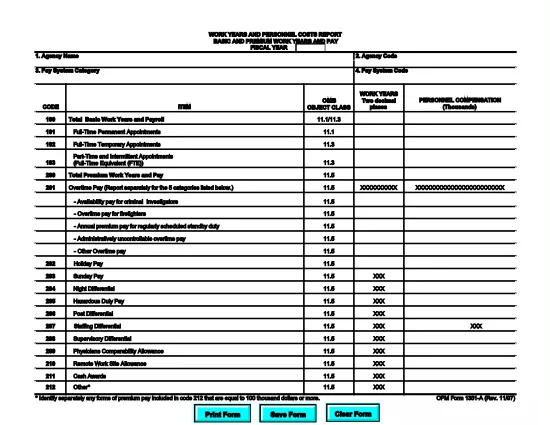
OPM Form 1351A – Work Years and Personnel Costs Report (Fillable PDF)

  1. Idioma Inglés
  2. País EE.UU
  3. Departamento Oficina de Gestión de Personal
  4. Sector Formularios OPM
OPM Form 1351A – Work Years and Personnel Costs Report (Fillable PDF)

The OPM Form 1351A (Work Years and Personnel Costs Report – Basic and Premium Work Years and Pay) is a mandatory annual report for federal agencies. It captures the number of work years, basic salary, and premium pay for all employees in a fiscal year. Accurate completion supports workforce analysis, budgeting, and compliance with Office of Personnel Management (OPM) guidelines.

What Is OPM Form 1351A?

This form collects detailed payroll data for each employee, including:

  • Basic work years
  • Premium work years (e.g., overtime, hazard pay)
  • Total basic pay and premium pay
  • Fiscal year covered

Agencies submit the data to OPM for the annual Federal Workforce Report.

How to Complete the Form Using Formize PDF Filler

Our online Formize PDF Filler turns the static PDF into an interactive form. No extra software is required—just a web browser.

  1. Click the **"Fill out this form"** button below.
  2. Wait a few seconds while the Formize PDF Filler app loads the fillable version of OPM Form 1351A.
  3. Enter the required data in each field. Navigation tabs let you jump between sections quickly.
  4. Use the **Validate** button to check for missing or incorrectly formatted entries.
  5. When finished, click **Save & Download** to get a completed PDF you can upload to OPM’s portal.

Common Mistakes to Avoid When Filing 1351A

  • Incorrect fiscal year: Verify the FY matches the reporting period.
  • Missing premium pay codes: Ensure all premium pay types (e.g., overtime, night differential) are included.
  • Rounding errors: Use the exact figures from your payroll system; do not round up or down.
  • Duplicate entries: Each employee should appear only once per fiscal year.

Download the Fillable PDF Instantly

Click the button below to open the fillable version of OPM Form 1351A. The file is hosted by the official OPM website, guaranteeing the latest version.

Helpful Resources & FAQs

Below you’ll find answers to the most common questions about OPM Form 1351A and using our PDF filler.

PREGUNTAS MÁS FRECUENTES
  • What is the purpose of OPM Form 1351A?

    Form 1351A collects annual data on basic and premium work years and pay for all federal employees, helping OPM analyze workforce costs and trends.

  • Do I need a special PDF editor to fill out Form 1351A?

    No. Our Formize PDF Filler turns the PDF into an interactive web form, so you can complete it directly in your browser.

  • Can I save my progress and return later?

    Yes. Use the "Save" button at any time to download a partially completed PDF, then reload it later in the Formize filler to continue.

  • What fiscal year should I report?

    Report the fiscal year that matches the data you are submitting (e.g., FY 2024 for the period October 1 2023 – September 30 2024).

  • Where do I submit the completed Form 1351A?

    After downloading the completed PDF, upload it to the OPM reporting portal or follow your agency’s internal submission process.

  • Is the PDF version on Formize the official OPM form?

    Yes. The file is linked directly from the official OPM website, ensuring you have the most current version.

  • What if I make a mistake after downloading?

    Open the saved PDF again with Formize, correct the errors, re‑validate, and download the updated version.

CÓMO

Cómo completar OPM Form 1351A gratis, en línea en 4 sencillos pasos:

  1. 1
    Open the Fillable Form
    Click the "Fill out this form" button on the page. The Formize PDF Filler will load the OPM Form 1351A automatically.
  2. 2
    Enter Your Data
    Complete each section—basic work years, premium work years, pay amounts, and fiscal year—using the on‑screen fields.
  3. 3
    Validate & Review
    Use the built‑in validation tool to catch missing or mismatched entries, then review the entire form for accuracy.
  4. 4
    Save and Download
    When all data is correct, click "Save & Download" to obtain a completed PDF ready for submission to OPM.
Aplicación Formize PDF Filler
SOBRE

Formularios de la Oficina de Gestión de Personal (OPM)

OPM Form 1351A es uno de los formularios oficiales que utiliza la Oficina de Gestión de Personal de los Estados Unidos, que es una agencia independiente del gobierno federal responsable de gestionar la fuerza laboral de la administración pública y los beneficios de los empleados federales. La OPM establece políticas y regulaciones relacionadas con el empleo federal, administra varios programas de personal y brinda servicios a empleados federales, jubilados y solicitantes de empleo.

A continuación se muestran algunos ejemplos de formularios de la Oficina de Gestión de Personal:

Formulario estándar 86 (SF-86) : Este formulario se utiliza para el proceso de investigación de antecedentes de personas que solicitan una autorización de seguridad. Recopila información personal, laboral, educativa y financiera completa, así como detalles sobre contactos y actividades en el extranjero.

Formulario estándar 2809 (SF-2809) : Este formulario se utiliza para inscribirse en el Programa de Beneficios de Salud para Empleados Federales (FEHB), que brinda cobertura de seguro médico a empleados federales, jubilados y sus familiares elegibles.

Formulario estándar 2817 (SF-2817): este formulario se utiliza para solicitar la continuación de la cobertura bajo el Programa de seguro dental y de visión para empleados federales (FEDVIP) después de la jubilación o separación del servicio federal.

Formulario estándar 3107 (SF-3107) : Este formulario se utiliza para solicitar beneficios de jubilación bajo el Sistema de Retiro del Servicio Civil (CSRS).

Formulario estándar 2801 (SF-2801) : Este formulario se utiliza para solicitar beneficios de jubilación bajo el Sistema de Jubilación de Empleados Federales (FERS).

Formulario estándar 15 (SF-15) : Este formulario se utiliza para solicitar la preferencia de veterano en el empleo federal. Lo presentan veteranos o sus familiares elegibles que buscan oportunidades de empleo en el gobierno federal.

Estos ejemplos representan algunos formularios OPM comunes utilizados en el contexto del empleo federal y los beneficios para empleados. Sin embargo, la OPM tiene una variedad de otras formas relacionadas con diversos programas de personal, jubilación, seguros y otros aspectos del empleo federal. Los formularios específicos requeridos pueden variar según la naturaleza de la transacción, programa o beneficio que se busca. Es recomendable consultar el sitio web oficial de la Oficina de Gestión de Personal de EE. UU. (www.opm.gov) o buscar orientación de la OPM o del personal de recursos humanos relevante para obtener información precisa y actualizada. información actualizada sobre los formularios OPM específicos relevantes para su empleo federal o necesidades relacionadas con beneficios.

CARACTERÍSTICAS

Relleno de PDF

La forma más fácil de llenar formularios PDF en línea

  • Rellene rápidamente OPM Form 1351A
    ¿Está buscando una manera de llenar rápidamente OPM Form 1351A en línea? Con nuestro rellenador de formularios PDF gratuito en línea, sabrá cómo editar y rellenar este documento PDF en menos de un minuto.
  • Editor de PDF en línea fácil de usar
    ¿Cansado de imprimir archivos PDF para poder editarlos antes de volver a escanearlos y enviarlos de vuelta? Edite documentos PDF gratis en línea. Utilice nuestro editor de pdf en línea para ahorrar tiempo y papel.
  • Excelentes herramientas, todas las plataformas.
    ¿Se pregunta cómo completar OPM Form 1351A en una Mac, o tal vez cómo usar un relleno de PDF gratis? Nuestras herramientas de PDF en línea funcionan en todas las plataformas.
  • Almacenamiento seguro de archivos
    Los archivos "OPM Form 1351A" completados se almacenan en una base de datos segura administrada por Amazon Cloud hosting. Puede eliminar sus archivos de nuestro sistema en cualquier momento. En cualquier caso, estos archivos se eliminan automáticamente después de 24 horas.
  • Chatea con {palabra clave}
    Chatea con "OPM Form 1351A" en Chatize, que es un asistente de lectura de PDF gratuito. Haga preguntas y obtenga respuestas de "OPM Form 1351A". Simplemente haga clic en el botón Chatear con documento de arriba.

Eliminar sesión de llenado

¿Eliminar la sesión de llenado seleccionada? En este caso, se perderá su progreso al completar el formulario.

Eliminar sesión de edición

¿Eliminar la sesión de edición seleccionada? En este caso, se perderá su progreso en la creación y edición del formulario.