
Seleccione el idioma

Pennsylvania MV-150 Vehicle Registration Form – Fillable PDF

  1. Idioma Inglés
  2. País EE.UU
  3. Departamento PennDOT
  4. Actividad Registro de Vehículo
Pennsylvania MV-150 Vehicle Registration Form – Fillable PDF

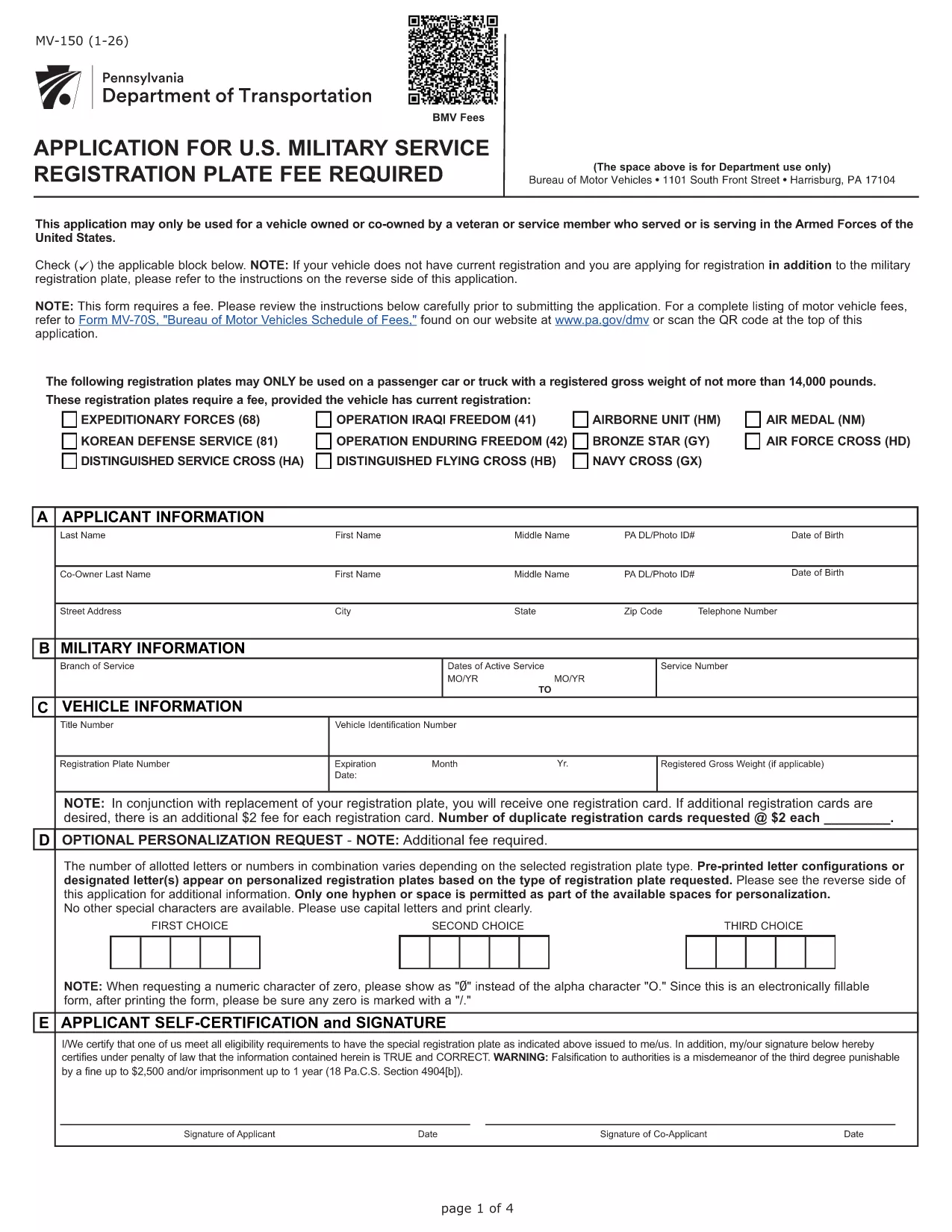
The MV-150 is Pennsylvania’s official vehicle registration application used by the Department of Transportation (PennDOT). Whether you are registering a new vehicle, renewing a plate, or updating ownership information, the MV-150 must be completed accurately and submitted with the appropriate fee.

What Is the MV-150 Form?

The MV-150 collects essential details about the vehicle, the owner, and any lienholders. It is required for:

  • Initial registration of a newly purchased vehicle
  • Renewal of an existing registration
  • Transfer of ownership
  • Adding or removing a license plate

How to Complete the MV-150 Online with Formize

Instead of downloading the PDF and editing it with a separate program, you can fill it out directly on our page using the Formize PDF Filler app:

  1. Click the "Fill out this form" button below the description.
  2. Wait a few seconds while the Formize PDF Filler loads the MV-150.
  3. Enter your information in each fillable field – the interface is intuitive and saves your progress automatically.
  4. Review the entered data, then click Submit to download the completed PDF.
  5. Print the filled PDF and attach it to your payment (check or money order) before mailing it to PennDOT.

Common Mistakes & Tips for a Smooth Submission

  • Incorrect VIN or Plate Number: Double‑check the Vehicle Identification Number (VIN) and license plate details before submitting.
  • Missing Signature: The owner’s signature is required; use the signature field in Formize or print and sign the downloaded PDF.
  • Wrong Fee Amount: Verify the current registration fee on the PennDOT website; attaching an incorrect payment may delay processing.
  • Incomplete Owner Information: Provide full name, address, and phone number; partial entries cause the form to be returned.

Where to Submit Your Completed MV-150

After filling out the form, mail the printed PDF together with your payment to:

Pennsylvania Department of Transportation
Bureau of Motor Vehicles
1101 North Front Street
Harrisburg, PA 17120

For faster processing, you may also take the completed form to any PennDOT Driver & Vehicle Service Center.

Frequently Asked Questions

Below are answers to the most common questions about the MV-150.

PREGUNTAS MÁS FRECUENTES
  • Do I need a PennDOT account to use the Formize filler?

    No. The Formize filler works directly in your browser without any login or account.

  • Can I save my progress and finish the form later?

    Yes. The filler automatically stores your entries locally. When you return, click "Load saved data" to continue.

  • Is the MV-150 form free to download?

    The PDF itself is provided by PennDOT at no cost. You only pay the registration fee when you submit the form.

  • What if I make a mistake after downloading the PDF?

    Print a new copy using the Formize filler, correct the error, and submit the updated version. Avoid hand‑editing the PDF with external editors.

  • How long does it take for PennDOT to process my MV-150?

    Processing typically takes 7‑10 business days after receipt, provided all information and payment are correct.

  • Can I submit the MV-150 electronically?

    PennDOT currently requires a printed, signed form with payment. Electronic submission is not accepted for this form.

  • What fee should I include with my MV-150?

    Visit the PennDOT fee schedule page for the latest registration fees based on vehicle type and weight.

  • Do I need to attach the MV-140 with the MV-150?

    If you are renewing registration, you must also submit the MV-140 (Request for Registration) along with the MV-150.

CÓMO

Cómo completar MV-150 gratis, en línea en 5 sencillos pasos:

  1. 1
    Open the Fillable Form
    Click the "Fill out this form" button on the page. The Formize PDF Filler will load the MV-150 automatically.
  2. 2
    Enter Your Information
    Fill in each field – owner details, vehicle data, and lienholder information if applicable. The app saves your entries in real time.
  3. 3
    Review and Download
    Check all entries for accuracy, then click the "Download Completed PDF" button to get a printable version of the filled form.
  4. 4
    Print and Sign
    Print the completed PDF, sign where required, and attach it to your payment.
  5. 5
    Mail to PennDOT
    Send the package to the PennDOT address listed on the page or bring it to a local Driver & Vehicle Service Center.
Aplicación Formize PDF Filler
SOBRE

Formularios de registro de vehículos

MV-150 es uno de los formularios del DMV, también conocidos como formularios del Departamento de Vehículos Motorizados, que son documentos utilizados en diversas transacciones y procesos relacionados con vehículos motorizados. El DMV es una agencia gubernamental responsable de la concesión de licencias de conducir, el registro de vehículos y el cumplimiento de las leyes sobre vehículos motorizados. Los formularios específicos del DMV disponibles pueden variar según la jurisdicción, pero aquí hay algunos ejemplos comunes:

Formularios de Licencia de Conducir: Estos formularios se utilizan para solicitar una licencia de conducir o para solicitar cambios o renovaciones. Por lo general, requieren información personal, prueba de identidad y pueden incluir secciones de información médica o historial de manejo.

Formularios de registro de vehículos: estos formularios se utilizan para registrar un vehículo motorizado en el DMV. Requieren información del vehículo, detalles de propiedad y prueba de seguro.

Formularios de transferencia de título: al comprar o vender un vehículo, estos formularios se utilizan para transferir la propiedad de una parte a otra. Requieren información sobre el comprador, el vendedor, los detalles del vehículo y pueden incluir una factura de venta.

Formularios de exención de responsabilidad del vehículo: al vender o transferir la propiedad de un vehículo, estos formularios notifican al DMV que el vendedor ya no es responsable del vehículo. Ayuda a proteger al vendedor de responsabilidad por accidentes o incidentes que involucren al vehículo después de la venta.

Formularios de Renovación de Matrículas y Registros: Estos formularios se utilizan para renovar el registro de vehículos o solicitar nuevas placas. Por lo general, requieren información sobre el propietario registrado, detalles de registro actuales y el pago de las tarifas aplicables.

Formularios de solicitud de registros de conducción: estos formularios permiten a las personas solicitar sus registros de conducción al DMV, que proporcionan información sobre infracciones de conducción, estado de la licencia y otros detalles relevantes.

Formularios de matrículas especiales o personalizadas: estos formularios se utilizan para solicitar matrículas personalizadas o especiales, que permiten a las personas personalizar su matrícula con caracteres o diseños específicos.

Estos son sólo algunos ejemplos de los muchos formularios que pueden estar disponibles a través del DMV. Los formularios y requisitos específicos pueden variar según la jurisdicción, por lo que es importante consultar el sitio web local del DMV o visitar una oficina del DMV para obtener los formularios correctos para sus necesidades particulares.

CARACTERÍSTICAS

Relleno de PDF

La forma más fácil de llenar formularios PDF en línea

  • Rellene rápidamente MV-150
    ¿Está buscando una manera de llenar rápidamente MV-150 en línea? Con nuestro rellenador de formularios PDF gratuito en línea, sabrá cómo editar y rellenar este documento PDF en menos de un minuto.
  • Editor de PDF en línea fácil de usar
    ¿Cansado de imprimir archivos PDF para poder editarlos antes de volver a escanearlos y enviarlos de vuelta? Edite documentos PDF gratis en línea. Utilice nuestro editor de pdf en línea para ahorrar tiempo y papel.
  • Excelentes herramientas, todas las plataformas.
    ¿Se pregunta cómo completar MV-150 en una Mac, o tal vez cómo usar un relleno de PDF gratis? Nuestras herramientas de PDF en línea funcionan en todas las plataformas.
  • Almacenamiento seguro de archivos
    Los archivos "MV-150" completados se almacenan en una base de datos segura administrada por Amazon Cloud hosting. Puede eliminar sus archivos de nuestro sistema en cualquier momento. En cualquier caso, estos archivos se eliminan automáticamente después de 24 horas.
  • Chatea con {palabra clave}
    Chatea con "MV-150" en Chatize, que es un asistente de lectura de PDF gratuito. Haga preguntas y obtenga respuestas de "MV-150". Simplemente haga clic en el botón Chatear con documento de arriba.

Eliminar sesión de llenado

¿Eliminar la sesión de llenado seleccionada? En este caso, se perderá su progreso al completar el formulario.

Eliminar sesión de edición

¿Eliminar la sesión de edición seleccionada? En este caso, se perderá su progreso en la creación y edición del formulario.