
Seleccione el idioma

Rhode Island TR-9 Vehicle Title Application (Fillable PDF)

  1. Idioma Inglés
  2. País EE.UU
  3. Departamento Rhode Island DMV
  4. Actividad Registro de Vehículo
Rhode Island TR-9 Vehicle Title Application (Fillable PDF)

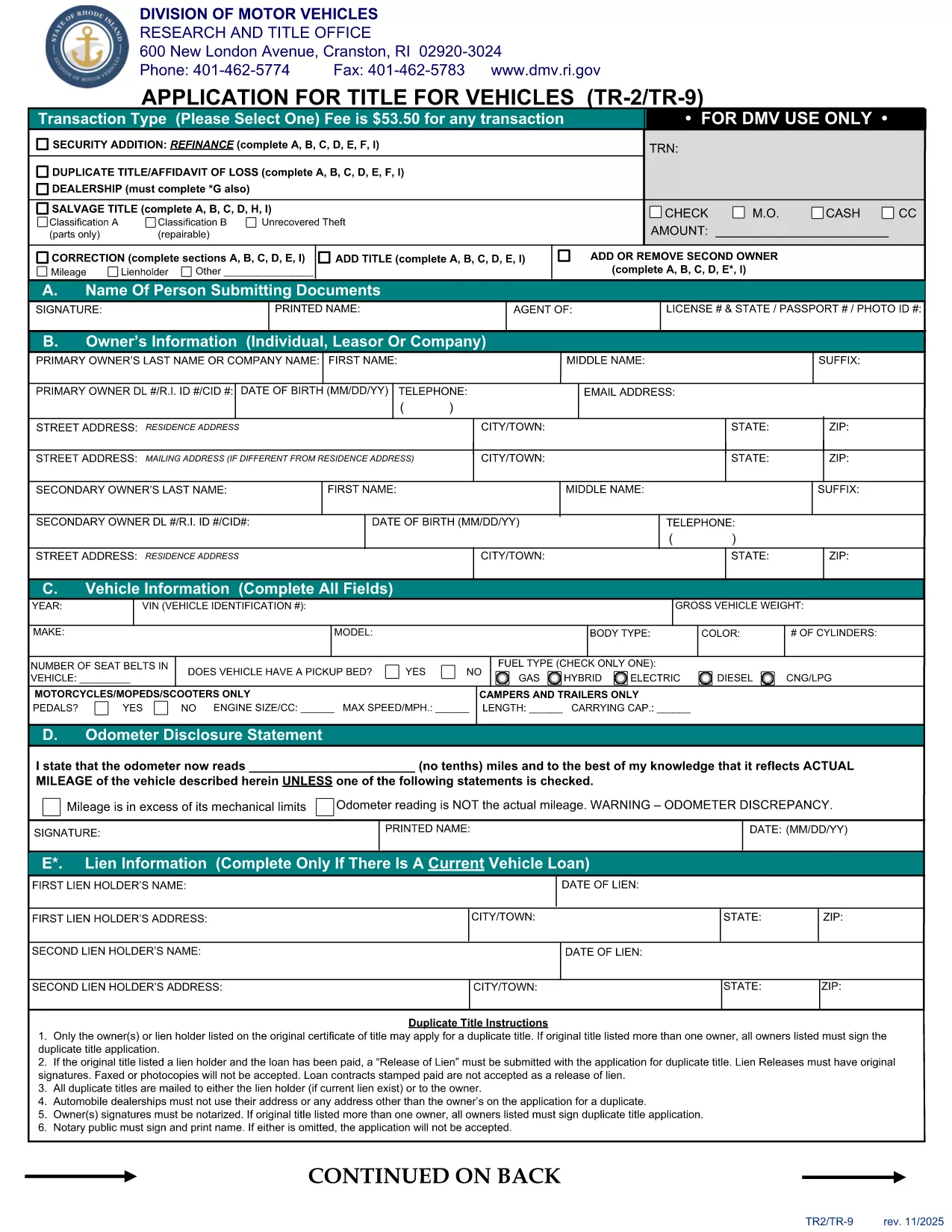
The TR-9 is the official Rhode Island DMV form used to apply for a new vehicle title or to transfer ownership. Historically it was a paper‑only document, but today you can complete it instantly as a fillable PDF.

Formize hosts a secure, browser‑based PDF filler that lets you enter all required information without installing any software. Once you finish, you can download, print, or submit the completed PDF directly to the RI DMV.

  • Fast & free: No printing or scanning required.
  • Secure: Your data stays in your browser until you choose to save.
  • Accurate: Built‑in validation helps you avoid common errors.

Below you’ll find step‑by‑step instructions, tips to prevent mistakes, and answers to the most common questions about the TR‑9 form.

PREGUNTAS MÁS FRECUENTES
  • What is the purpose of the TR-9 form?

    The TR-9 is used to apply for a new title, transfer ownership, or correct information on an existing Rhode Island vehicle title.

  • Do I need to print the form after filling it online?

    The Rhode Island DMV still requires a printed, signed copy for most transactions, so print the completed PDF before mailing or delivering it.

  • Is there a fee associated with filing a TR-9?

    Yes, the standard title fee is $53.50 (as of the latest revision). Check the RI DMV fee schedule for any additional charges.

  • Can I save my progress and finish later?

    The Formize filler allows you to download a partially completed PDF at any time. Simply reopen the file later to continue.

  • Is the fillable PDF compatible with Adobe Reader?

    Yes, the PDF is fully compatible with Adobe Acrobat Reader, but using Formize’s online filler provides a smoother, no‑install experience.

  • What common mistakes should I avoid?

    Make sure VIN numbers match the vehicle, signatures are legible, and all required fields are completed. Missing or mismatched data can delay processing.

  • How long does the online filling process take?

    Most users finish the form in under 10 minutes, especially with Formize’s built‑in validation that catches errors instantly.

CÓMO

Cómo completar TR-9 gratis, en línea en 5 sencillos pasos:

  1. 1
    Open the Fillable Form
    Click the "Fill out this form" button on the page. The Formize PDF Filler will launch directly in your browser.
  2. 2
    Wait for the Loader
    Give the app a few seconds to load all fields and validation rules.
  3. 3
    Enter Your Information
    Type in each required field (owner details, vehicle information, signatures, etc.). The filler highlights any missing or incorrectly formatted data.
  4. 4
    Review & Save
    Use the preview button to double‑check your entries, then click "Save PDF" to download the completed form.
  5. 5
    Submit to the DMV
    Print the saved PDF and mail it, or follow any electronic submission instructions provided by the Rhode Island DMV.
Aplicación Formize PDF Filler
SOBRE

Formularios de registro de vehículos

Si posee o alquila un vehículo de motor, remolque o bote, debe cumplir con ciertas obligaciones para mantener su vehículo legalmente registrado y seguro.

TR-9 es uno de los formularios de registro de vehículos que son documentos que se utilizan para registrar un vehículo de motor con la autoridad estatal o provincial correspondiente. Estos formularios generalmente se requieren cuando una persona compra un vehículo nuevo o usado o cuando se muda a un nuevo estado o provincia con un vehículo.

Los requisitos y formularios exactos necesarios para el registro del vehículo pueden variar según la ubicación, pero, en general, el proceso implica proporcionar información sobre el vehículo, el propietario y cualquier gravamen sobre el vehículo.

Una vez presentados los formularios de registro y las tarifas, la autoridad estatal o provincial emitirá un certificado de registro o placa al propietario del vehículo. Este registro permite que el vehículo sea operado legalmente en vías y carreteras públicas.

CARACTERÍSTICAS

Relleno de PDF

La forma más fácil de llenar formularios PDF en línea

  • Rellene rápidamente TR-9
    ¿Está buscando una manera de llenar rápidamente TR-9 en línea? Con nuestro rellenador de formularios PDF gratuito en línea, sabrá cómo editar y rellenar este documento PDF en menos de un minuto.
  • Editor de PDF en línea fácil de usar
    ¿Cansado de imprimir archivos PDF para poder editarlos antes de volver a escanearlos y enviarlos de vuelta? Edite documentos PDF gratis en línea. Utilice nuestro editor de pdf en línea para ahorrar tiempo y papel.
  • Excelentes herramientas, todas las plataformas.
    ¿Se pregunta cómo completar TR-9 en una Mac, o tal vez cómo usar un relleno de PDF gratis? Nuestras herramientas de PDF en línea funcionan en todas las plataformas.
  • Almacenamiento seguro de archivos
    Los archivos "TR-9" completados se almacenan en una base de datos segura administrada por Amazon Cloud hosting. Puede eliminar sus archivos de nuestro sistema en cualquier momento. En cualquier caso, estos archivos se eliminan automáticamente después de 24 horas.
  • Chatea con {palabra clave}
    Chatea con "TR-9" en Chatize, que es un asistente de lectura de PDF gratuito. Haga preguntas y obtenga respuestas de "TR-9". Simplemente haga clic en el botón Chatear con documento de arriba.

Eliminar sesión de llenado

¿Eliminar la sesión de llenado seleccionada? En este caso, se perderá su progreso al completar el formulario.

Eliminar sesión de edición

¿Eliminar la sesión de edición seleccionada? En este caso, se perderá su progreso en la creación y edición del formulario.