
Seleccione el idioma

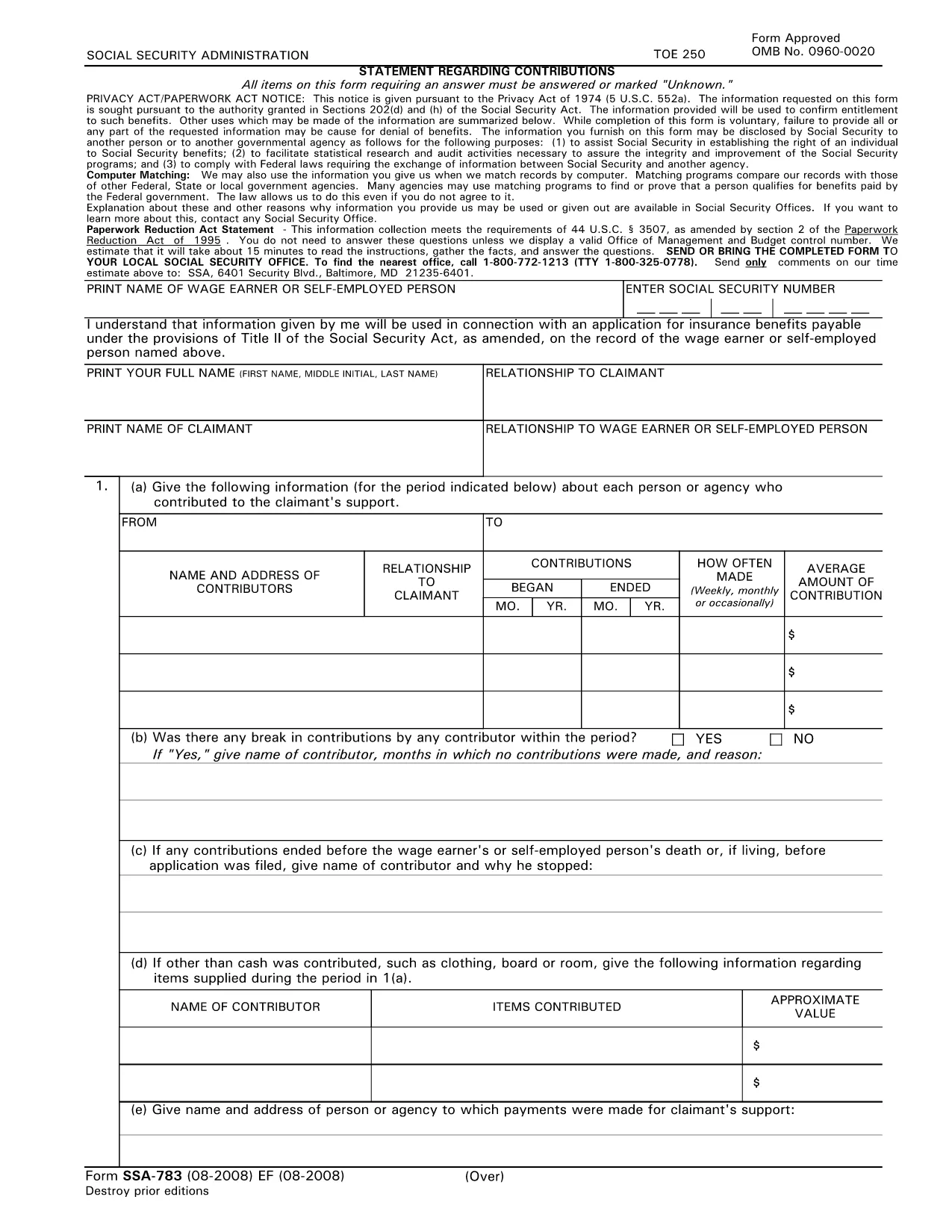
SSA‑783 Statement Regarding Contributions – Fillable PDF Form

  1. Idioma Inglés
  2. País EE.UU
  3. Actividad Seguridad Social
Complete éste formulario
SSA‑783 Statement Regarding Contributions – Fillable PDF Form

The SSA‑783 Statement Regarding Contributions is the official Social Security Administration (SSA) form used to report contributions made to a claimant’s support. Whether you’re a wage earner, self‑employed person, or an agency, completing this form accurately is essential for establishing benefit eligibility.

What Is the SSA‑783 Form?

SSA‑783 collects detailed information about each contributor, the amount contributed, and the frequency of payments. The data helps the SSA verify entitlement to benefits under Title II of the Social Security Act.

How to Fill Out the SSA‑783 Form Online

With Formize you can complete the SSA‑783 without printing or using a separate PDF editor. Follow these simple steps:

  • Click the "Fill out this form" button on the page.
  • Wait a few seconds while the Formize PDF Filler app loads.
  • Enter your information directly into the fillable fields.
  • Review each section for accuracy, then click Submit to download the completed PDF.

Common Mistakes to Avoid

  • Leaving fields blank: Incomplete forms are rejected.
  • Incorrect dates or amounts: Double‑check contribution periods and dollar figures.
  • Illegible handwriting: Using a digital fillable PDF eliminates this issue.
  • Missing signatures: The form requires the signer’s name and signature at the end.

Where to Submit the Completed Form

After you download the finished SSA‑783 PDF, mail it to your local Social Security office or bring it in person. You can locate the nearest office by calling 1‑800‑772‑1213 (TTY 1‑800‑325‑0778).

Why Use Formize’s Fillable PDF

Formize provides a secure, browser‑based PDF filler that:

  • Eliminates the need for third‑party PDF editors.
  • Auto‑saves your progress so you can return later.
  • Ensures the final document meets SSA formatting requirements.

Ready to start? Click the button below and complete your SSA‑783 in minutes.

Fill out this form

PREGUNTAS MÁS FRECUENTES
  • Who must file the SSA‑783 form?

    Anyone who has received contributions toward a claimant’s support—such as a wage earner, self‑employed individual, or agency—must file SSA‑783 to document those payments.

  • Is the SSA‑783 form free to download?

    Yes. Formize provides a free, downloadable fillable PDF of the SSA‑783 form.

  • Can I save my progress and finish later?

    Yes. The Formize PDF Filler automatically saves your entries, allowing you to return and complete the form at any time.

  • How long does it usually take to complete?

    Most users finish the SSA‑783 in 10‑15 minutes, depending on the number of contributors listed.

  • What should I do if I make a mistake?

    Simply correct the field in the fillable PDF before downloading the final version. If you’ve already submitted, contact your local SSA office for guidance.

  • Where do I send the completed SSA‑783?

    Mail the completed form to your local Social Security office or bring it in person. Use the SSA office locator at 1‑800‑772‑1213 for the nearest address.

  • Can I submit the SSA‑783 electronically?

    The SSA currently requires a hard‑copy submission. After filling it out online, print the PDF and send it by mail.

  • Do I need a special PDF editor?

    No. Formize’s browser‑based filler handles everything—no additional software is required.

  • Is my personal information safe?

    Formize uses SSL encryption to protect all data entered into the fillable PDF. Your information is not stored on our servers after you download the completed form.

  • What if I don’t have all the contribution details?

    Provide as much accurate information as possible. If you’re missing data, note “unknown” in the appropriate fields and explain the gap in the comments section.

CÓMO

Cómo completar SSA-783 gratis, en línea en 5 sencillos pasos:

  1. 1
    Click the Fill‑out Button
    Locate the “Fill out this form” button on the page and click it to launch the Formize PDF Filler.
  2. 2
    Wait for the Filler to Load
    A few seconds after clicking, the fillable PDF interface will appear in your browser.
  3. 3
    Enter Your Information
    Complete each required field—contributor names, dates, amounts, and signatures—using your keyboard.
  4. 4
    Review and Download
    Check all entries for accuracy, then click “Submit” to download the finished SSA‑783 PDF.
  5. 5
    Submit to SSA
    Print the saved PDF (if needed) and mail or deliver it to your local Social Security office.
Aplicación Formize PDF Filler
SOBRE

Formularios del Seguro Social

SSA-783 es uno de los formularios del Seguro Social que son documentos utilizados para solicitar varios beneficios y servicios proporcionados por la Administración del Seguro Social de los Estados Unidos (SSA). La SSA es una agencia federal que administra programas diseñados para brindar asistencia financiera a personas y familias elegibles, incluidos beneficios de jubilación, beneficios por discapacidad, beneficios para sobrevivientes y seguridad de ingreso suplementario (SSI).

Algunos formularios comunes del Seguro Social incluyen:

Solicitud de beneficios de jubilación del Seguro Social: este formulario se utiliza para solicitar beneficios de jubilación basados ​​en el historial laboral y las ganancias de una persona.

Solicitud de beneficios por discapacidad del Seguro Social: este formulario se utiliza para solicitar beneficios por discapacidad si una persona tiene una condición física o mental que le impide trabajar.

Solicitud de beneficios de sobreviviente del Seguro Social: este formulario se usa para solicitar beneficios de sobreviviente si el cónyuge o padre de una persona ha fallecido y son elegibles para los beneficios de sobreviviente.

Solicitud de inscripción en Medicare: este formulario se utiliza para inscribirse en Medicare, el programa de seguro de salud federal para personas mayores de 65 años y personas con ciertas discapacidades o afecciones médicas.

Formulario de cambio de dirección: este formulario se utiliza para actualizar la dirección de una persona con la SSA.

Formulario de solicitud de registro de ingresos: este formulario se utiliza para solicitar una copia del registro de ingresos de una persona, que se utiliza para calcular los beneficios del Seguro Social.

Estos formularios se pueden completar en línea, por correo o en persona en una oficina local del Seguro Social. Es importante revisar cuidadosamente y completar todos los formularios necesarios para garantizar el procesamiento oportuno y preciso de los beneficios del Seguro Social.

CARACTERÍSTICAS

Relleno de PDF

La forma más fácil de llenar formularios PDF en línea

  • Rellene rápidamente SSA-783
    ¿Está buscando una manera de llenar rápidamente SSA-783 en línea? Con nuestro rellenador de formularios PDF gratuito en línea, sabrá cómo editar y rellenar este documento PDF en menos de un minuto.
  • Editor de PDF en línea fácil de usar
    ¿Cansado de imprimir archivos PDF para poder editarlos antes de volver a escanearlos y enviarlos de vuelta? Edite documentos PDF gratis en línea. Utilice nuestro editor de pdf en línea para ahorrar tiempo y papel.
  • Excelentes herramientas, todas las plataformas.
    ¿Se pregunta cómo completar SSA-783 en una Mac, o tal vez cómo usar un relleno de PDF gratis? Nuestras herramientas de PDF en línea funcionan en todas las plataformas.
  • Almacenamiento seguro de archivos
    Los archivos "SSA-783" completados se almacenan en una base de datos segura administrada por Amazon Cloud hosting. Puede eliminar sus archivos de nuestro sistema en cualquier momento. En cualquier caso, estos archivos se eliminan automáticamente después de 24 horas.
  • Chatea con {palabra clave}
    Chatea con "SSA-783" en Chatize, que es un asistente de lectura de PDF gratuito. Haga preguntas y obtenga respuestas de "SSA-783". Simplemente haga clic en el botón Chatear con documento de arriba.

Eliminar sesión de llenado

¿Eliminar la sesión de llenado seleccionada? En este caso, se perderá su progreso al completar el formulario.

Eliminar sesión de edición

¿Eliminar la sesión de edición seleccionada? En este caso, se perderá su progreso en la creación y edición del formulario.