Seleccione el idioma

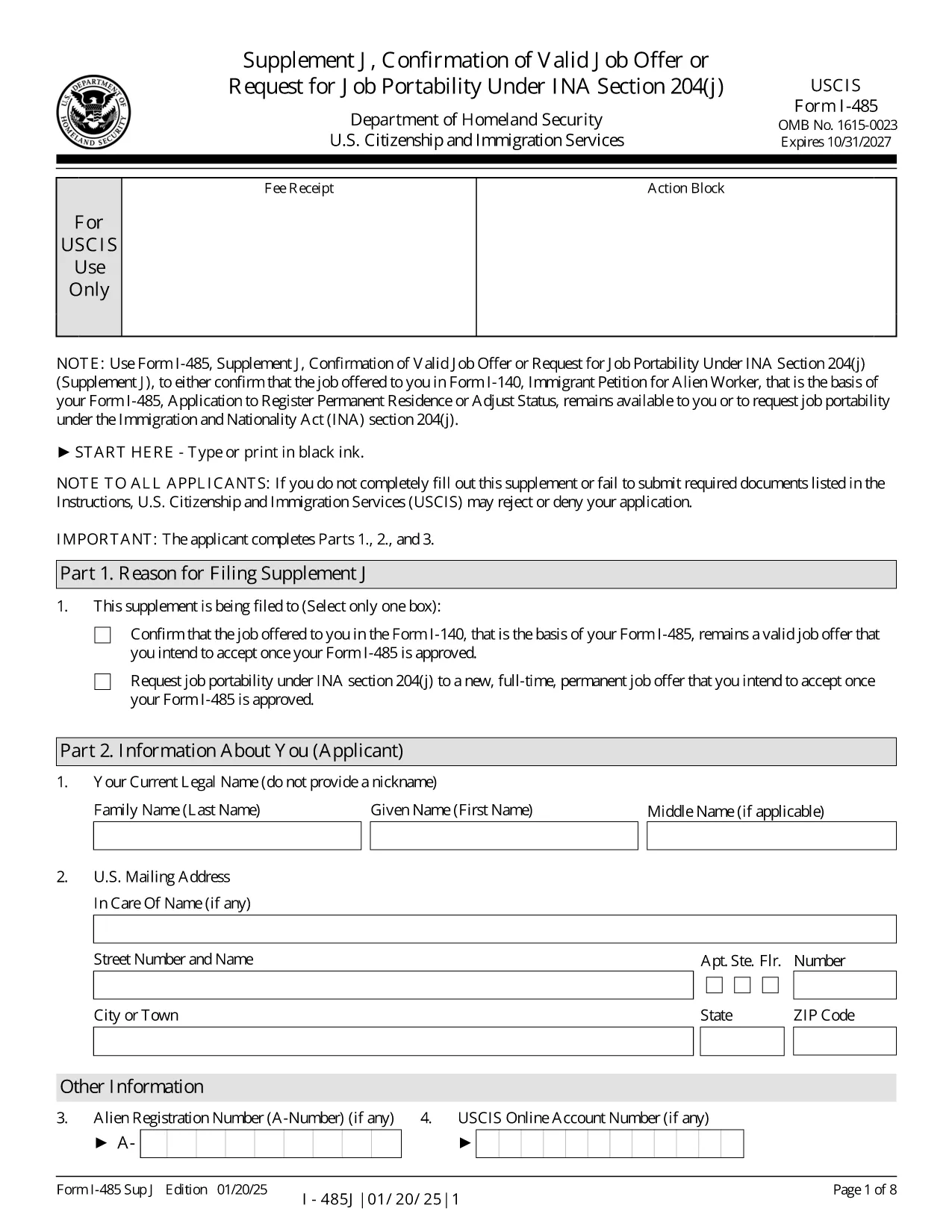
I-485 Supplement J – Fillable PDF Form

  1. País EE.UU
  2. Idioma Inglés
  3. Departamento Servicios de Inmigración y Ciudadanía de los Estados Unidos
I-485 Supplement J – Fillable PDF Form

The I-485 Supplement J is the USCIS form used to confirm that the job offer listed in your Form I‑140 is still valid, or to request job portability under INA §204(j). This supplement is required for most employment‑based adjustment‑of‑status applicants.

Our fillable PDF version lets you enter data directly on the screen, eliminates the need for printing, and ensures the correct edition of the form (current as of 01/20/25). When you finish, you can download a completed PDF ready for submission by mail or online.

Key benefits of using the Formize fillable PDF:

  • Auto‑save while you type – no lost information.
  • Built‑in validation to reduce common errors.
  • One‑click download of the final, USCIS‑approved PDF.

Below you’ll find quick answers to the most common questions and a step‑by‑step guide to finish the form in seconds.

PREGUNTAS MÁS FRECUENTES
  • Do I have to file Supplement J with every I-485 application?

    You must file Supplement J when you submit an I‑485 based on a pending or approved I‑140 that requires a job offer, or when you request job portability after 180 days of pending status.

  • Can I submit Supplement J online?

    Yes, if you have an I‑485 receipt number that begins with “IOE” and you are filing only the supplement (no other forms). Otherwise, you must file by mail.

  • What is job portability under INA §204(j)?

    Job portability allows you to change to a new, full‑time, permanent job in the same or similar occupational classification after your I‑485 has been pending for at least 180 days.

  • What happens if I make a mistake on the form?

    USCIS may reject the supplement and request a corrected version. Using the fillable PDF reduces errors because the app validates entries before you download.

  • Do I need a lawyer’s signature on Supplement J?

    If an attorney or accredited representative prepared the application, they must sign the form using Form G‑28. The fillable PDF allows you to upload a scanned signature image.

  • Is there a filing fee for Supplement J?

    No separate fee is required for Supplement J. The fee is covered by the I‑485 filing fee.

  • Can I use an older edition of the form?

    USCIS only accepts the current edition (dated 01/20/25). Using an outdated version may lead to a rejection.

  • How long does it take USCIS to process Supplement J?

    Processing time varies, but USCIS typically reviews Supplement J within the same timeframe as the pending I‑485. They may request additional evidence if needed.

  • What if I change employers after filing Supplement J?

    You would need to file a new Supplement J to confirm the new job offer, provided the new role is in the same or similar occupational classification.

  • Where can I find the official instructions for Supplement J?

    The official instructions are available on the USCIS website and can be downloaded alongside the PDF form.

CÓMO

Cómo completar I-485 Supplement J gratis, en línea en 5 sencillos pasos:

  1. 1
    Click the Fillable Form Button
    Press the “Fill out this form” button on the page. The Formize PDF Filler app will open in a new tab.
  2. 2
    Wait for the Filler to Load
    The app loads the I‑485 Supplement J template. This only takes a few seconds.
  3. 3
    Enter Your Information
    Complete each field directly on the screen. Required fields are highlighted, and the filler validates dates, numbers, and signatures.
  4. 4
    Review and Save
    When all sections are complete, click “Review” to see a preview. If everything looks correct, click “Download Completed PDF.”
  5. 5
    Submit to USCIS
    Print the downloaded PDF (if filing by mail) or upload it to your USCIS online account, following the filing instructions on the USCIS website.
Aplicación Formize PDF Filler
SOBRE

I-485 Supplement J plantilla

Con el conjunto tradicional de funciones para ver y completar un documento PDF, combinado con los beneficios de una aplicación web y un diseño receptivo, puede completar I-485 Supplement J en minutos.

CARACTERÍSTICAS

Relleno de PDF

La forma más fácil de llenar formularios PDF en línea

  • Rellene rápidamente I-485 Supplement J
    ¿Está buscando una manera de llenar rápidamente I-485 Supplement J en línea? Con nuestro rellenador de formularios PDF gratuito en línea, sabrá cómo editar y rellenar este documento PDF en menos de un minuto.
  • Editor de PDF en línea fácil de usar
    ¿Cansado de imprimir archivos PDF para poder editarlos antes de volver a escanearlos y enviarlos de vuelta? Edite documentos PDF gratis en línea. Utilice nuestro editor de pdf en línea para ahorrar tiempo y papel.
  • Excelentes herramientas, todas las plataformas.
    ¿Se pregunta cómo completar I-485 Supplement J en una Mac, o tal vez cómo usar un relleno de PDF gratis? Nuestras herramientas de PDF en línea funcionan en todas las plataformas.
  • Almacenamiento seguro de archivos
    Los archivos "I-485 Supplement J" completados se almacenan en una base de datos segura administrada por Amazon Cloud hosting. Puede eliminar sus archivos de nuestro sistema en cualquier momento. En cualquier caso, estos archivos se eliminan automáticamente después de 24 horas.
  • Chatea con {palabra clave}
    Chatea con "I-485 Supplement J" en Chatize, que es un asistente de lectura de PDF gratuito. Haga preguntas y obtenga respuestas de "I-485 Supplement J". Simplemente haga clic en el botón Chatear con documento de arriba.

Eliminar sesión de llenado

¿Eliminar la sesión de llenado seleccionada? En este caso, se perderá su progreso al completar el formulario.

Eliminar sesión de edición

¿Eliminar la sesión de edición seleccionada? En este caso, se perderá su progreso en la creación y edición del formulario.