
Seleccione el idioma

Arizona Form 96‑0531 – Fillable Vehicle Mileage Report

  1. Idioma Inglés
  2. País EE.UU
  3. Actividad Registro de Vehículo
  4. Expresar Arizona
Arizona Form 96‑0531 – Fillable Vehicle Mileage Report

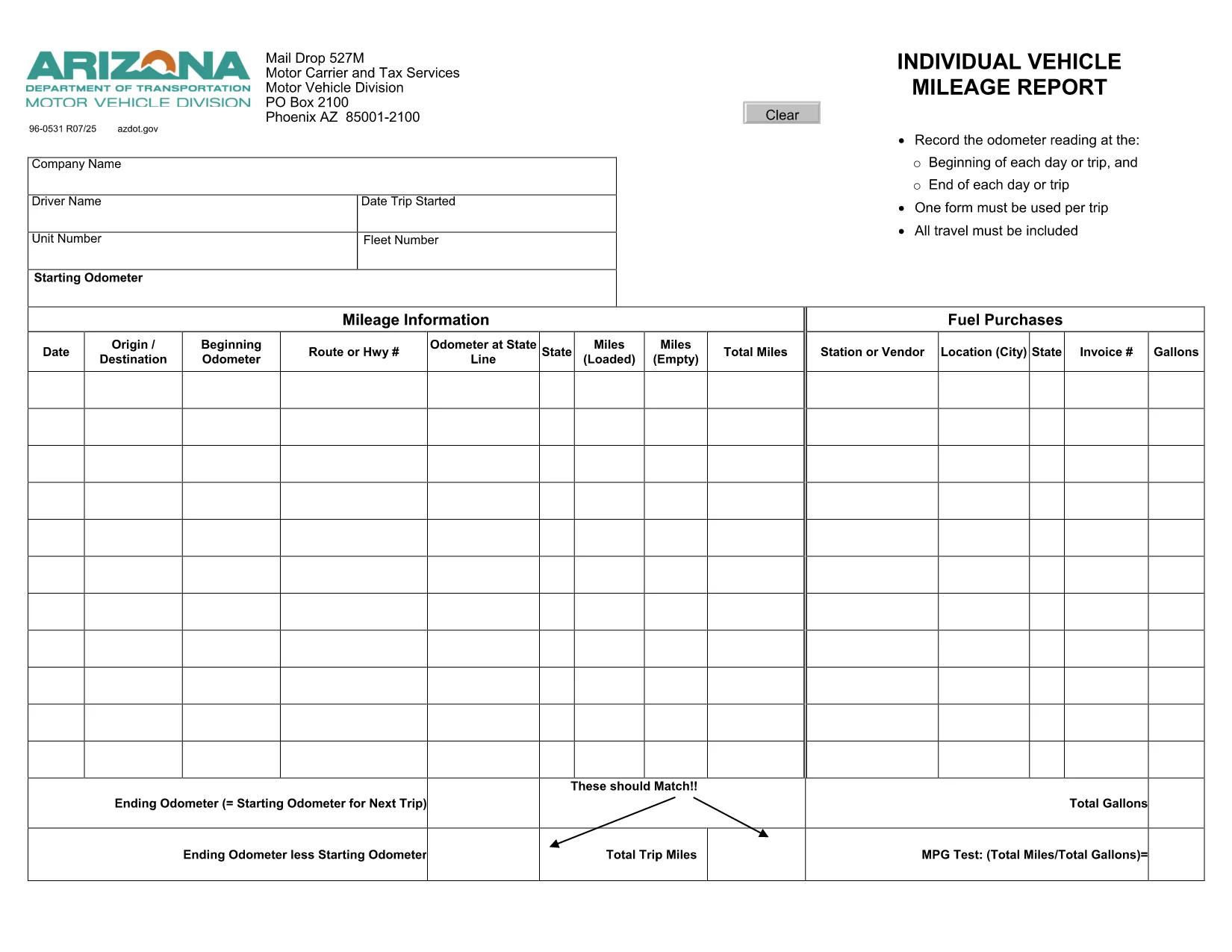
Form 96‑0531, also known as the Individual Vehicle Mileage Report, is required by the Arizona Motor Vehicle Division (MVD) for every qualified vehicle trip. Whether you’re a commercial driver, a fleet manager, or an individual tracking business mileage, this fillable PDF lets you record odometer readings, dates, and purpose of travel quickly and accurately.

What Is Form 96‑0531 Used For?

The form serves as an official trip record that helps the Arizona Department of Transportation (ADOT) verify mileage for tax deductions, reimbursement, and compliance audits. Each trip must have its own completed form, and the information is used for:

  • Calculating fuel tax credits
  • Supporting expense reports for businesses
  • Maintaining a legal record of vehicle use

How to Complete the Fillable PDF Online

Instead of printing and handwriting, use our integrated Formize PDF Filler to fill the form directly in your browser:

  1. Click the "Fill out this form" button below.
  2. Wait a few seconds while the Formize PDF Filler app loads.
  3. Enter the required data – date, driver name, odometer start/end, and trip purpose.
  4. Use the navigation tabs to move between pages; the form auto‑saves as you type.
  5. When finished, click Save & Download to get a completed PDF or email it directly to your supervisor.

Common Mistakes to Avoid

  • Leaving fields blank: Every field marked with an asterisk (*) is mandatory.
  • Incorrect odometer readings: Record the exact start and end readings; rounding can trigger audit flags.
  • Mismatched dates: The trip date must match the calendar day the vehicle was used.
  • Using the wrong form version: This page links to the current 2024 version of Form 96‑0531.

Where to Submit Your Completed Form

After saving the filled PDF, you can:

  • Upload it to the Arizona MVD portal under Vehicle Records → Trip Reports.
  • Email it to your company’s compliance officer.
  • Print a hard copy for on‑site submission at any MVD office.

Need more help? Review the official form instructions provided by ADOT.

PREGUNTAS MÁS FRECUENTES
  • What is the purpose of Form 96‑0531?

    It records individual vehicle mileage for each trip, supporting tax deductions, reimbursements, and compliance with Arizona MVD regulations.

  • Can I fill out Form 96‑0531 on a mobile device?

    Yes. The Formize PDF Filler works on most modern smartphones and tablets with a web browser.

  • Do I need Adobe Acrobat to use the fillable PDF?

    No. The form is fully editable directly in the browser via Formize, so no extra software is required.

  • How many trips can I record in one PDF?

    Each trip requires its own completed Form 96‑0531. Create a separate PDF for every journey.

  • Is the online filler secure?

    Formize uses SSL encryption, and your data is stored locally in your browser until you download or email the completed document.

  • Where do I submit the finished form?

    Upload it to the Arizona MVD portal, email it to your employer’s compliance officer, or submit a printed copy at any MVD office.

CÓMO

Cómo completar Form 96-0531 gratis, en línea en 5 sencillos pasos:

  1. 1
    Click the Fill‑out Button
    Press the "Fill out this form" button on the page to launch the Formize PDF Filler.
  2. 2
    Wait for the Filler to Load
    A short loading screen appears while the fillable PDF is prepared in your browser.
  3. 3
    Enter Trip Details
    Complete each required field – date, driver name, odometer start/end, and purpose of travel.
  4. 4
    Review and Save
    Double‑check the information, then click "Save & Download" to get the finished PDF.
  5. 5
    Submit or Print
    Email, upload, or print the completed form according to your organization’s procedures.
Aplicación Formize PDF Filler
SOBRE

Formularios de registro de vehículos

Si posee o alquila un vehículo de motor, remolque o bote, debe cumplir con ciertas obligaciones para mantener su vehículo legalmente registrado y seguro.

Form 96-0531 es uno de los formularios de registro de vehículos que son documentos que se utilizan para registrar un vehículo de motor con la autoridad estatal o provincial correspondiente. Estos formularios generalmente se requieren cuando una persona compra un vehículo nuevo o usado o cuando se muda a un nuevo estado o provincia con un vehículo.

Los requisitos y formularios exactos necesarios para el registro del vehículo pueden variar según la ubicación, pero, en general, el proceso implica proporcionar información sobre el vehículo, el propietario y cualquier gravamen sobre el vehículo.

Una vez presentados los formularios de registro y las tarifas, la autoridad estatal o provincial emitirá un certificado de registro o placa al propietario del vehículo. Este registro permite que el vehículo sea operado legalmente en vías y carreteras públicas.

CARACTERÍSTICAS

Relleno de PDF

La forma más fácil de llenar formularios PDF en línea

  • Rellene rápidamente Form 96-0531
    ¿Está buscando una manera de llenar rápidamente Form 96-0531 en línea? Con nuestro rellenador de formularios PDF gratuito en línea, sabrá cómo editar y rellenar este documento PDF en menos de un minuto.
  • Editor de PDF en línea fácil de usar
    ¿Cansado de imprimir archivos PDF para poder editarlos antes de volver a escanearlos y enviarlos de vuelta? Edite documentos PDF gratis en línea. Utilice nuestro editor de pdf en línea para ahorrar tiempo y papel.
  • Excelentes herramientas, todas las plataformas.
    ¿Se pregunta cómo completar Form 96-0531 en una Mac, o tal vez cómo usar un relleno de PDF gratis? Nuestras herramientas de PDF en línea funcionan en todas las plataformas.
  • Almacenamiento seguro de archivos
    Los archivos "Form 96-0531" completados se almacenan en una base de datos segura administrada por Amazon Cloud hosting. Puede eliminar sus archivos de nuestro sistema en cualquier momento. En cualquier caso, estos archivos se eliminan automáticamente después de 24 horas.
  • Chatea con {palabra clave}
    Chatea con "Form 96-0531" en Chatize, que es un asistente de lectura de PDF gratuito. Haga preguntas y obtenga respuestas de "Form 96-0531". Simplemente haga clic en el botón Chatear con documento de arriba.

Eliminar sesión de llenado

¿Eliminar la sesión de llenado seleccionada? En este caso, se perderá su progreso al completar el formulario.

Eliminar sesión de edición

¿Eliminar la sesión de edición seleccionada? En este caso, se perderá su progreso en la creación y edición del formulario.