
Seleccione el idioma

MVR-27ART Fillable PDF – North Carolina Specialty Plate Application

  1. Idioma Inglés
  2. País EE.UU
  3. Actividad Registro de Vehículo
  4. Expresar Carolina del Norte
MVR-27ART Fillable PDF – North Carolina Specialty Plate Application

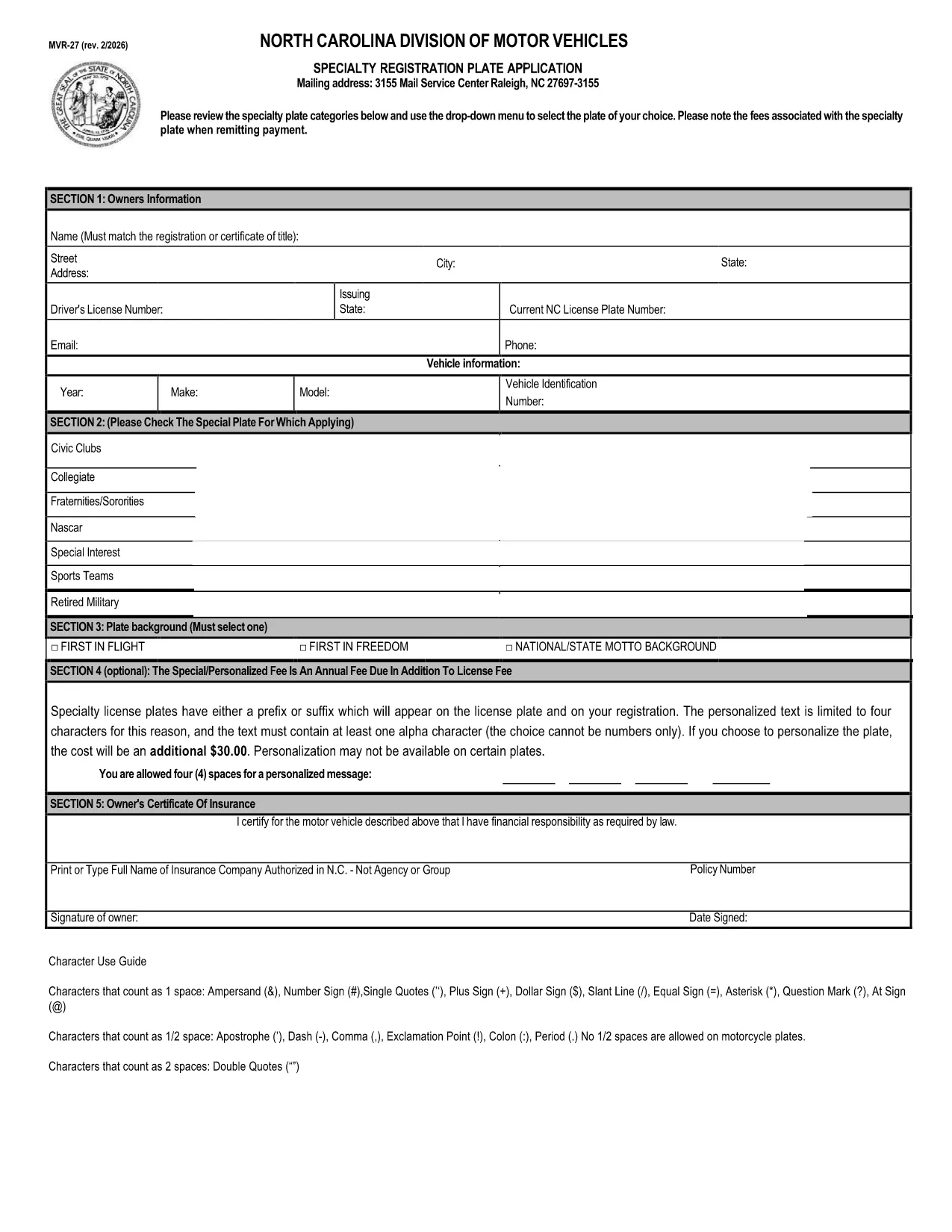
The MVR-27ART is the official North Carolina Division of Motor Vehicles (DMV) application for personalized and specialized license plates. Whether you want a custom design, a commemorative plate, or a plate supporting a cause, this form captures all the required information.

What Is the MVR-27ART Form?

The MVR-27ART (Revision 09/17) collects vehicle and owner details, plate design selection, and payment information. It is used by the NC DMV to process specialty plate requests and to ensure plates meet state regulations.

How to Fill Out the MVR-27ART Online

Instead of downloading, printing, and manually completing the PDF, simply click the **"Fill out this form"** button on this page. The Formize PDF Filler app will load directly in your browser, allowing you to type, select drop‑down options, and sign electronically.

  • Step 1: Click the green "Fill out this form" button.
  • Step 2: Wait a few seconds while the Formize PDF Filler loads.
  • Step 3: Complete each field – the form automatically validates entries.
  • Step 4: Review your information, then click "Submit" to download the completed PDF.
  • Step 5: Print the completed form (if required) and mail it with payment, or submit it electronically if your county accepts digital submissions.

Common Mistakes to Avoid

Even with a fillable PDF, a few errors can delay processing:

  • Leaving the Vehicle Identification Number (VIN) blank or entering it with spaces.
  • Choosing a plate design that is not available for your vehicle type.
  • Forgetting to sign the form – the digital signature field must be completed.
  • Submitting an outdated address; the DMV uses the address on the form for the registration sticker.

Submit Your Application & Pay Fees

After completing the form, follow your local DMV’s payment instructions. Most counties accept credit cards, checks, or money orders. Keep a copy of the completed PDF for your records.

Download the Official PDF

If you prefer the original static version, you can download it directly from the NC DMV:

Download MVR-27ART PDF

Using Formize’s online filler is faster, reduces errors, and eliminates the need for additional software.

PREGUNTAS MÁS FRECUENTES
  • Is the MVR-27ART form free to download?

    Yes, the PDF is provided by the North Carolina DMV at no cost. Fees apply only to the specialty plate you request.

  • Can I submit the form online without printing?

    Many NC counties accept a printed copy, but some allow electronic submission. Check your local DMV’s guidelines after completing the form.

  • What vehicle information do I need?

    You’ll need the VIN, make, model, year, and current registration details of the vehicle you want the specialty plate for.

  • How long does it take to process the application?

    Processing usually takes 2‑4 weeks after the DMV receives the completed form and payment.

  • What if I make a mistake after submitting?

    Contact your local DMV office. In most cases you’ll need to submit a corrected form and may have to pay a small re‑processing fee.

  • Do I need a separate insurance card for the specialty plate?

    No additional insurance is required; the plate is tied to your existing vehicle registration.

  • Can I change the plate design after it’s approved?

    You must submit a new MVR-27ART application for a different design and pay the applicable fee again.

CÓMO

Cómo completar MVR-27ART gratis, en línea en 4 sencillos pasos:

  1. 1
    Open the Fillable Form
    Click the green "Fill out this form" button on the page. The Formize PDF Filler loads directly in your browser.
  2. 2
    Enter Your Information
    Type in all required fields, select your specialty plate design, and sign using the digital signature field.
  3. 3
    Validate & Submit
    The filler checks for missing or incorrect data. Once everything looks correct, click "Submit" to download the completed PDF.
  4. 4
    Print or Send Electronically
    Print the completed form to mail with payment, or follow your county’s instructions for electronic submission.
Aplicación Formize PDF Filler
SOBRE

Formularios de registro de vehículos

Si posee o alquila un vehículo de motor, remolque o bote, debe cumplir con ciertas obligaciones para mantener su vehículo legalmente registrado y seguro.

MVR-27ART es uno de los formularios de registro de vehículos que son documentos que se utilizan para registrar un vehículo de motor con la autoridad estatal o provincial correspondiente. Estos formularios generalmente se requieren cuando una persona compra un vehículo nuevo o usado o cuando se muda a un nuevo estado o provincia con un vehículo.

Los requisitos y formularios exactos necesarios para el registro del vehículo pueden variar según la ubicación, pero, en general, el proceso implica proporcionar información sobre el vehículo, el propietario y cualquier gravamen sobre el vehículo.

Una vez presentados los formularios de registro y las tarifas, la autoridad estatal o provincial emitirá un certificado de registro o placa al propietario del vehículo. Este registro permite que el vehículo sea operado legalmente en vías y carreteras públicas.

CARACTERÍSTICAS

Relleno de PDF

La forma más fácil de llenar formularios PDF en línea

  • Rellene rápidamente MVR-27ART
    ¿Está buscando una manera de llenar rápidamente MVR-27ART en línea? Con nuestro rellenador de formularios PDF gratuito en línea, sabrá cómo editar y rellenar este documento PDF en menos de un minuto.
  • Editor de PDF en línea fácil de usar
    ¿Cansado de imprimir archivos PDF para poder editarlos antes de volver a escanearlos y enviarlos de vuelta? Edite documentos PDF gratis en línea. Utilice nuestro editor de pdf en línea para ahorrar tiempo y papel.
  • Excelentes herramientas, todas las plataformas.
    ¿Se pregunta cómo completar MVR-27ART en una Mac, o tal vez cómo usar un relleno de PDF gratis? Nuestras herramientas de PDF en línea funcionan en todas las plataformas.
  • Almacenamiento seguro de archivos
    Los archivos "MVR-27ART" completados se almacenan en una base de datos segura administrada por Amazon Cloud hosting. Puede eliminar sus archivos de nuestro sistema en cualquier momento. En cualquier caso, estos archivos se eliminan automáticamente después de 24 horas.
  • Chatea con {palabra clave}
    Chatea con "MVR-27ART" en Chatize, que es un asistente de lectura de PDF gratuito. Haga preguntas y obtenga respuestas de "MVR-27ART". Simplemente haga clic en el botón Chatear con documento de arriba.

Eliminar sesión de llenado

¿Eliminar la sesión de llenado seleccionada? En este caso, se perderá su progreso al completar el formulario.

Eliminar sesión de edición

¿Eliminar la sesión de edición seleccionada? En este caso, se perderá su progreso en la creación y edición del formulario.