
Seleccione el idioma

Pennsylvania Form MV-375 – Fillable Motor Vehicle Bond

  1. Idioma Inglés
  2. País EE.UU
  3. Actividad Registro de Vehículo
  4. Expresar Pensilvania
Pennsylvania Form MV-375 – Fillable Motor Vehicle Bond

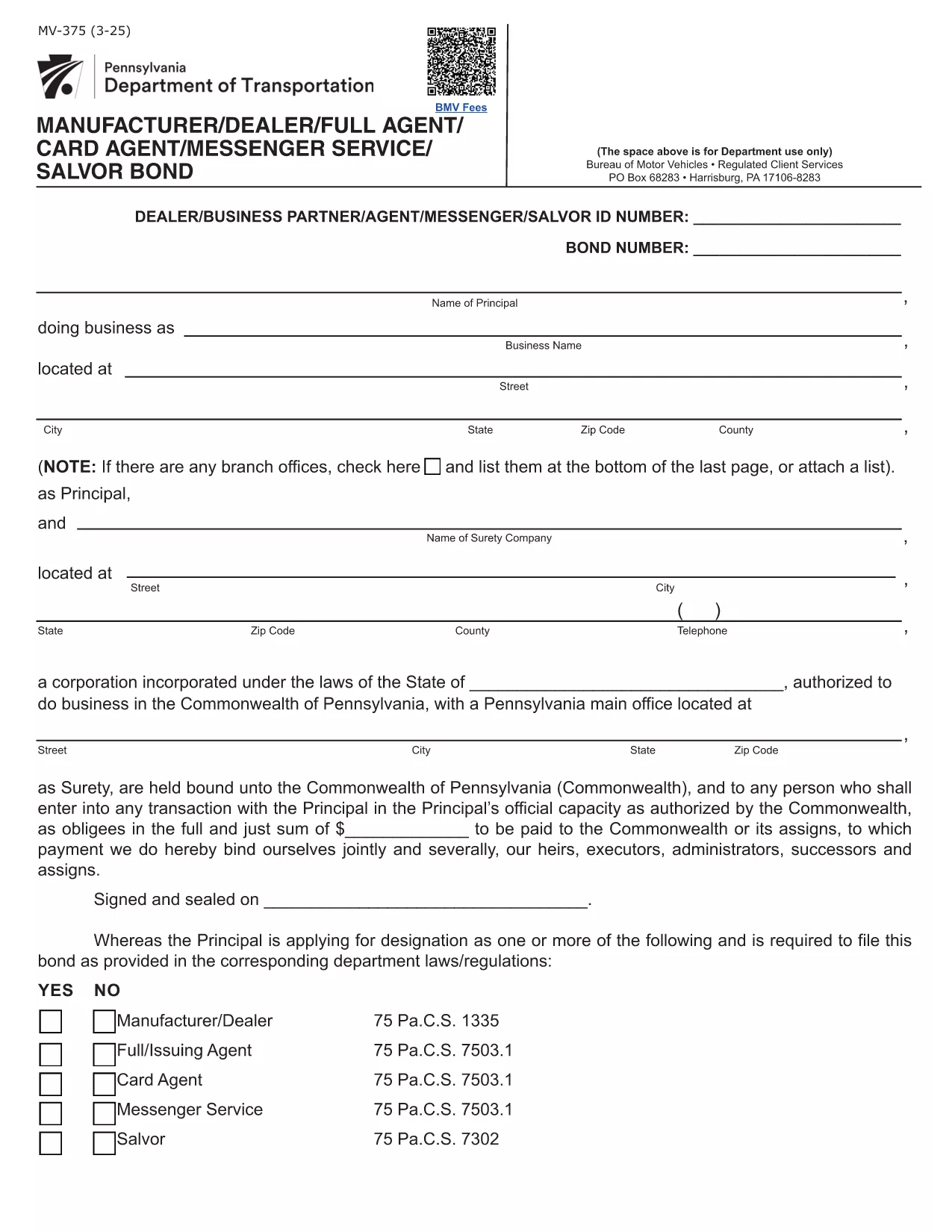
The Pennsylvania Form MV-375 is the official surety bond application used by manufacturers, dealers, full agents, card agents, messenger services, and salvors operating under the Commonwealth’s motor‑vehicle regulations. This multi‑use bond guarantees compliance with 75 Pa.C.S. statutes and protects the public from monetary loss.

What is Form MV-375?

Form MV-375 serves as a single, statewide bond for several motor‑vehicle related activities. Whether you are applying for a dealer bond, a full‑card agent bond, a messenger service bond, or a salvor bond, the same PDF form is required.

How to Fill Form MV-375 Online

Instead of downloading the PDF and editing it with a separate program, simply click the "Fill out this form" button on this page. The Formize PDF Filler app will load directly in your browser, allowing you to complete every field instantly.

Common Mistakes to Avoid

  • Leaving required fields blank – the filler will highlight missing information before you can submit.
  • Entering an incorrect bond amount – verify the amount that matches your business class (dealer, card agent, etc.).
  • Signing with a raster image instead of a digital signature – use the built‑in signature tool for a legally accepted signature.

Bond Amounts and Requirements

Bond amounts differ by activity:

  • Dealer or Manufacturer: $20,000 (or higher for multiple locations).
  • Full Card Agent: $30,000 per authorized agent.
  • Card Agent: $3,000 per location.
  • Messenger Service: $50,000 per location.
  • Salvor (Vehicle Salvage): $10,000 per location.

Where to Submit the Completed Form

After completing the form, you can:

  • Download the finished PDF and mail it to the Pennsylvania Department of Transportation (PennDOT).
  • Submit the electronic version via PennDOT’s online portal if you have a registered account.

Need assistance? Review the official PDF instructions for detailed guidance.

PREGUNTAS MÁS FRECUENTES
  • What types of businesses need Form MV-375?

    Any manufacturer, dealer, full‑card agent, card agent, messenger service, or vehicle salvor operating in Pennsylvania must file Form MV-375 as a surety bond.

  • Can I fill out MV-375 on a mobile device?

    Yes. The Formize PDF Filler is responsive and works on smartphones and tablets as long as you have a modern browser.

  • Is an electronic signature accepted?

    PennDOT accepts electronic signatures created with the Formize PDF Filler, provided the signature field is completed using the built‑in tool.

  • What happens if I enter the wrong bond amount?

    An incorrect bond amount will cause the application to be rejected. Verify the required amount for your specific activity before submitting.

  • Do I need a surety company to submit MV-375?

    Yes. The bond must be issued by a licensed surety company. The completed form includes a section for the surety’s details and signature.

  • How long does it take to process the form?

    Processing time varies by agency, but once the bond is issued and the form is submitted, PennDOT typically reviews it within 5‑10 business days.

CÓMO

Cómo completar Form MV-375 gratis, en línea en 5 sencillos pasos:

  1. 1
    Open the Fillable Form
    Click the "Fill out this form" button on this page. The Formize PDF Filler will launch in a new browser tab.
  2. 2
    Load the Form
    Wait a few seconds while the MV-375 PDF loads into the online editor.
  3. 3
    Complete All Fields
    Enter your business information, bond amount, and sign using the digital signature tool.
  4. 4
    Review for Errors
    Use the built‑in validation to check for missing or incorrect entries before finalizing.
  5. 5
    Save or Submit
    Download the completed PDF for mailing, or submit electronically if your agency accepts online filings.
Aplicación Formize PDF Filler
SOBRE

Formularios de registro de vehículos

Si posee o alquila un vehículo de motor, remolque o bote, debe cumplir con ciertas obligaciones para mantener su vehículo legalmente registrado y seguro.

Form MV-375 es uno de los formularios de registro de vehículos que son documentos que se utilizan para registrar un vehículo de motor con la autoridad estatal o provincial correspondiente. Estos formularios generalmente se requieren cuando una persona compra un vehículo nuevo o usado o cuando se muda a un nuevo estado o provincia con un vehículo.

Los requisitos y formularios exactos necesarios para el registro del vehículo pueden variar según la ubicación, pero, en general, el proceso implica proporcionar información sobre el vehículo, el propietario y cualquier gravamen sobre el vehículo.

Una vez presentados los formularios de registro y las tarifas, la autoridad estatal o provincial emitirá un certificado de registro o placa al propietario del vehículo. Este registro permite que el vehículo sea operado legalmente en vías y carreteras públicas.

CARACTERÍSTICAS

Relleno de PDF

La forma más fácil de llenar formularios PDF en línea

  • Rellene rápidamente Form MV-375
    ¿Está buscando una manera de llenar rápidamente Form MV-375 en línea? Con nuestro rellenador de formularios PDF gratuito en línea, sabrá cómo editar y rellenar este documento PDF en menos de un minuto.
  • Editor de PDF en línea fácil de usar
    ¿Cansado de imprimir archivos PDF para poder editarlos antes de volver a escanearlos y enviarlos de vuelta? Edite documentos PDF gratis en línea. Utilice nuestro editor de pdf en línea para ahorrar tiempo y papel.
  • Excelentes herramientas, todas las plataformas.
    ¿Se pregunta cómo completar Form MV-375 en una Mac, o tal vez cómo usar un relleno de PDF gratis? Nuestras herramientas de PDF en línea funcionan en todas las plataformas.
  • Almacenamiento seguro de archivos
    Los archivos "Form MV-375" completados se almacenan en una base de datos segura administrada por Amazon Cloud hosting. Puede eliminar sus archivos de nuestro sistema en cualquier momento. En cualquier caso, estos archivos se eliminan automáticamente después de 24 horas.
  • Chatea con {palabra clave}
    Chatea con "Form MV-375" en Chatize, que es un asistente de lectura de PDF gratuito. Haga preguntas y obtenga respuestas de "Form MV-375". Simplemente haga clic en el botón Chatear con documento de arriba.

Eliminar sesión de llenado

¿Eliminar la sesión de llenado seleccionada? En este caso, se perderá su progreso al completar el formulario.

Eliminar sesión de edición

¿Eliminar la sesión de edición seleccionada? En este caso, se perderá su progreso en la creación y edición del formulario.