
Seleccione el idioma

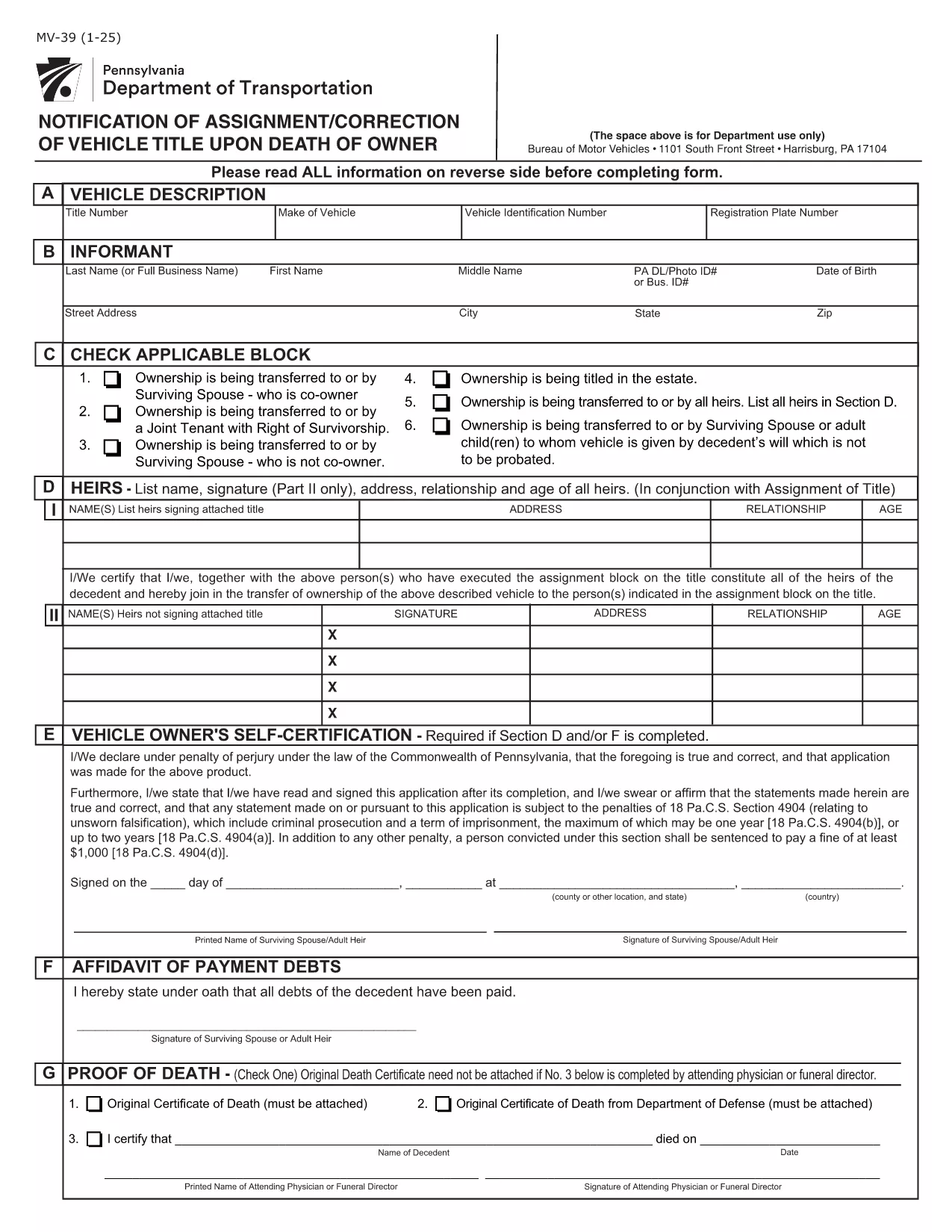
Pennsylvania Form MV-39 – Notification of Assignment/Correction of Vehicle Title

  1. Idioma Inglés
  2. País EE.UU
  3. Actividad Registro de Vehículo
  4. Expresar Pensilvania
Pennsylvania Form MV-39 – Notification of Assignment/Correction of Vehicle Title

Form MV-39, titled “Notification of Assignment/Correction of Vehicle Title upon Death of Owner,” is required by the Pennsylvania Department of Transportation (PennDOT) whenever a vehicle title must be transferred after the owner’s death.

Our online fillable PDF lets you complete the form quickly without printing or using a separate PDF editor. Simply click the “Fill out this form” button, edit the fields, and download the finished document to submit to your local BMV office.

What Is Form MV-39?

This form notifies PennDOT of a change in ownership caused by the death of the original vehicle owner. It is used to assign the title to a surviving spouse, heir, or other qualified party and to correct any errors on the original title.

How to Complete Form MV-39 Online

Follow the step‑by‑step guide below to fill out the form directly in your browser using Formize’s PDF Filler.

  • Section A – Vehicle Information: Enter VIN, make, model, and year.
  • Section B – Owner’s Details: Provide the deceased owner’s name, Social Security Number, and date of death.
  • Section C – New Owner: List the name(s) of the surviving spouse, heir, or purchaser, along with their contact information.
  • Section G & H – Registration Intent: Indicate whether the vehicle will be re‑registered.
  • Section I – Signature: The new owner must sign and date the form.

Common Mistakes to Avoid

  • Leaving any required field blank – every section marked with an asterisk (*) is mandatory.
  • Using an illegible or mismatched VIN – copy it exactly as it appears on the current title.
  • Forgetting to attach a certified copy of the death certificate when required.
  • Signing the form with a pen before the PDF is fully completed – sign only after all information is entered.

Where to Submit the Completed Form

After saving the filled PDF, mail or deliver it to your nearest PennDOT Driver & Vehicle Services (DVS) office along with any supporting documents (e.g., death certificate, proof of relationship). Some offices also accept electronic submissions; check your local BMV’s website for details.

Frequently Asked Questions

Below are answers to the most common queries about Form MV-39.

PREGUNTAS MÁS FRECUENTES
  • Do I need to print Form MV-39 after filling it online?

    Most PennDOT offices require a hard copy with an original signature, so print the completed PDF, sign it, and mail or deliver it as instructed.

  • Can I submit Form MV-39 electronically?

    Some DVS locations accept electronic submissions. Check your local office’s website for specific instructions and accepted file formats.

  • What supporting documents are required?

    You’ll need a certified copy of the owner’s death certificate, proof of relationship (e.g., marriage certificate), and any existing title documents.

  • Is there a fee for filing Form MV-39?

    PennDOT does not charge a fee for the MV-39 notification itself, but standard title transfer fees may apply when the new title is issued.

  • What if I make a mistake after submitting?

    Contact your local PennDOT office immediately. They may require you to submit a corrected MV-39 or an additional affidavit.

  • How long does it take to process the form?

    Processing times vary by office, but expect 7‑10 business days from receipt of the completed form and required documents.

CÓMO

Cómo completar MV-39 gratis, en línea en 4 sencillos pasos:

  1. 1
    Open the Fillable Form
    Click the “Fill out this form” button on the page. The Formize PDF Filler app will load the MV-39 document directly in your browser.
  2. 2
    Enter Required Information
    Complete each highlighted field (Sections A, B, C, G, H, and I). The filler validates entries in real time, so you’ll know immediately if something is missing.
  3. 3
    Review and Sign
    Double‑check all data for accuracy, then add your electronic signature in the designated signature box.
  4. 4
    Save and Submit
    Click “Save PDF” to download the completed form. Print it (if required) and submit it to your local PennDOT office with any supporting documents.
Aplicación Formize PDF Filler
SOBRE

Formularios de registro de vehículos

MV-39 es uno de los formularios de registro de vehículos que son documentos utilizados para registrar un vehículo de motor ante la autoridad gubernamental pertinente, generalmente el Departamento de Vehículos Motorizados (DMV) o agencia equivalente. Estos formularios son necesarios cuando una persona compra un vehículo nuevo o usado, transfiere la propiedad de un vehículo o se muda a una nueva jurisdicción con un vehículo.

Los formularios de registro de vehículos específicos pueden variar según la jurisdicción, pero generalmente requieren la siguiente información:

Información del vehículo: incluye detalles sobre el vehículo, como la marca, el modelo, el año, el número de identificación del vehículo (VIN) y la lectura del odómetro.

Información del propietario: el formulario requerirá información sobre el propietario del vehículo, incluido su nombre, dirección, información de contacto y número de licencia de conducir.

Prueba de propiedad: dependiendo de las circunstancias, es posible que se requiera una prueba de propiedad, como un certificado de título, una factura de venta o un certificado de origen del fabricante (para vehículos nuevos).

Información del seguro: normalmente se requiere prueba de cobertura de seguro de vehículo válida. Esto puede incluir proporcionar el número de póliza de seguro, las fechas de cobertura y los detalles de la compañía de seguros.

Pago de tarifas: el registro de vehículos implica el pago de varias tarifas, como tarifas de registro, impuestos y posiblemente otros cargos específicos de la jurisdicción.

Además de estos requisitos básicos, algunas jurisdicciones pueden tener formularios o requisitos de documentación adicionales. Por ejemplo, en determinadas áreas pueden ser necesarios resultados de pruebas de emisiones, inspecciones de seguridad o prueba de residencia.

Una vez que se completen y envíen los formularios de registro del vehículo, la autoridad gubernamental emitirá un certificado de registro, placas y calcomanías de registro. Estos documentos indican que el vehículo está legalmente matriculado y autorizado para circular en la vía pública.

Es importante tener en cuenta que los requisitos de registro de vehículos pueden variar significativamente según la jurisdicción. Por lo tanto, se recomienda consultar con el DMV local o agencia equivalente para conocer los formularios y procedimientos específicos aplicables a su ubicación.

CARACTERÍSTICAS

Relleno de PDF

La forma más fácil de llenar formularios PDF en línea

  • Rellene rápidamente MV-39
    ¿Está buscando una manera de llenar rápidamente MV-39 en línea? Con nuestro rellenador de formularios PDF gratuito en línea, sabrá cómo editar y rellenar este documento PDF en menos de un minuto.
  • Editor de PDF en línea fácil de usar
    ¿Cansado de imprimir archivos PDF para poder editarlos antes de volver a escanearlos y enviarlos de vuelta? Edite documentos PDF gratis en línea. Utilice nuestro editor de pdf en línea para ahorrar tiempo y papel.
  • Excelentes herramientas, todas las plataformas.
    ¿Se pregunta cómo completar MV-39 en una Mac, o tal vez cómo usar un relleno de PDF gratis? Nuestras herramientas de PDF en línea funcionan en todas las plataformas.
  • Almacenamiento seguro de archivos
    Los archivos "MV-39" completados se almacenan en una base de datos segura administrada por Amazon Cloud hosting. Puede eliminar sus archivos de nuestro sistema en cualquier momento. En cualquier caso, estos archivos se eliminan automáticamente después de 24 horas.
  • Chatea con {palabra clave}
    Chatea con "MV-39" en Chatize, que es un asistente de lectura de PDF gratuito. Haga preguntas y obtenga respuestas de "MV-39". Simplemente haga clic en el botón Chatear con documento de arriba.

Eliminar sesión de llenado

¿Eliminar la sesión de llenado seleccionada? En este caso, se perderá su progreso al completar el formulario.

Eliminar sesión de edición

¿Eliminar la sesión de edición seleccionada? En este caso, se perderá su progreso en la creación y edición del formulario.