
Seleccione el idioma

Pennsylvania MV-511B Requisition Form – Fillable PDF

  1. Idioma Inglés
  2. País EE.UU
  3. Actividad Registro de Vehículo
  4. Expresar Pensilvania
Pennsylvania MV-511B Requisition Form – Fillable PDF

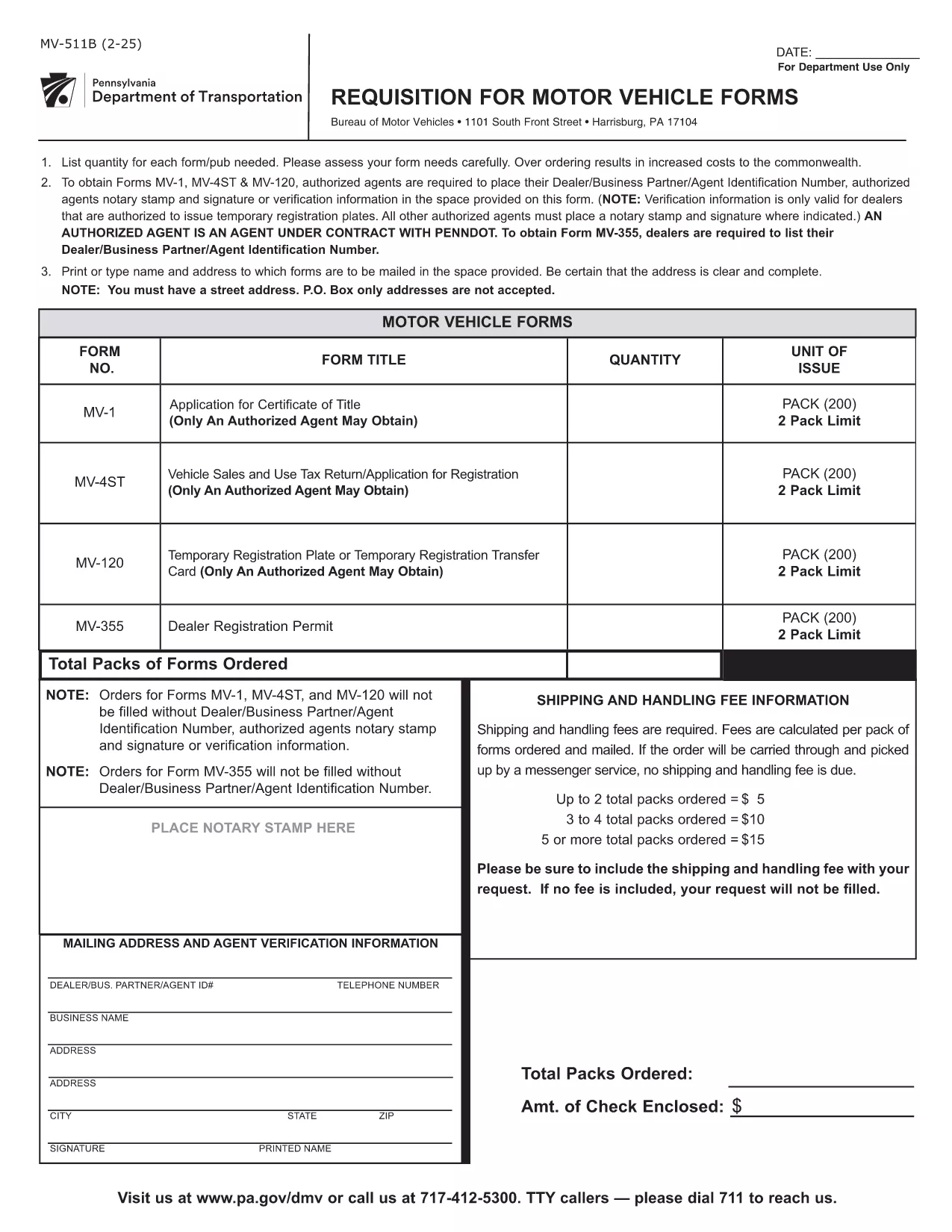
The MV-511B is Pennsylvania’s official requisition for motor vehicle registration. It is used by dealers, authorized agents, and private owners who need a temporary registration, verification, or a change of ownership. The form is now available as a fillable PDF, so you can complete it online without printing or scanning.

What Is the MV-511B Form?

This form is issued by the Pennsylvania Department of Transportation (PennDOT) and the Bureau of Motor Vehicles (BMV). It captures essential vehicle information, owner details, and the reason for the requisition (e.g., temporary plates, title transfer, or dealer verification).

How to Fill Out MV-511B Online with Formize

Instead of downloading the PDF and editing it in a separate program, simply click the "Fill out this form" button on this page. The Formize PDF Filler app will load in your browser, allowing you to:

  • Enter data directly into each field
  • Upload supporting documents
  • Apply a digital signature
  • Save or download the completed form

All changes are saved automatically, and you can submit the PDF to your local BMV office via email or print it for in‑person delivery.

Common Mistakes to Avoid

  • Incorrect DIN/Agent Number: Authorized agents must enter their exact Department Identification Number.
  • Missing Notary Stamp: If a notary is required, the stamp must be placed in the designated box.
  • Wrong Vehicle Identification Number (VIN): Double‑check the VIN for typos; an incorrect VIN will delay processing.
  • Leaving Signature Fields Blank: The form is invalid without a signature from the owner or authorized agent.

Where to Submit the Completed Form

After filling out the MV-511B, you have three submission options:

  1. Email: Send the filled PDF to bmv@pa.gov with a brief description.
  2. In‑Person: Print the form and bring it to any PennDOT BMV office.
  3. Mail: Mail the printed form to the address listed on the form’s last page.

FAQs About MV-511B

Below are answers to the most common questions regarding the MV-511B form.

PREGUNTAS MÁS FRECUENTES
  • Who can use the MV-511B form?

    The form is used by vehicle dealers, authorized agents, and private owners who need a temporary registration, verification, or a title change in Pennsylvania.

  • Do I need a notary for the MV-511B?

    A notary stamp is required only when the form is being used for certain dealer transactions or when a notarized verification is specifically requested.

  • Can I submit the form electronically?

    Yes. After completing the fillable PDF with Formize, you can email the PDF to the BMV or upload it through the PennDOT online portal if available.

  • What is a DIN/Agent Number?

    The DIN (Dealer Identification Number) is a unique identifier assigned to authorized agents and dealers by PennDOT. It must be entered accurately on the form.

  • How long is a temporary registration valid?

    Temporary registrations issued via MV-511B are typically valid for 30 days, but the exact period is printed on the completed form.

  • What should I do if I make a mistake after submitting?

    Contact your local BMV office immediately. They may require you to submit a corrected MV-511B or provide an amendment form.

CÓMO

Cómo completar MV-511B gratis, en línea en 4 sencillos pasos:

  1. 1
    Click the Fill Out Button
    On this page, click the "Fill out this form" button. The Formize PDF Filler will open in a new tab.
  2. 2
    Enter All Required Information
    Type your data into each highlighted field. Use dropdowns where available and upload any supporting documents.
  3. 3
    Apply Your Digital Signature
    When you reach the signature box, choose "Add Signature" and either draw or upload your e‑signature.
  4. 4
    Review and Save
    Double‑check every entry, then click "Save" to download a copy or "Submit" to send it directly to PennDOT.
Aplicación Formize PDF Filler
SOBRE

Formularios de registro de vehículos

MV-511B es uno de los formularios de registro de vehículos que son documentos utilizados para registrar un vehículo de motor ante la autoridad gubernamental pertinente, generalmente el Departamento de Vehículos Motorizados (DMV) o agencia equivalente. Estos formularios son necesarios cuando una persona compra un vehículo nuevo o usado, transfiere la propiedad de un vehículo o se muda a una nueva jurisdicción con un vehículo.

Los formularios de registro de vehículos específicos pueden variar según la jurisdicción, pero generalmente requieren la siguiente información:

Información del vehículo: incluye detalles sobre el vehículo, como la marca, el modelo, el año, el número de identificación del vehículo (VIN) y la lectura del odómetro.

Información del propietario: el formulario requerirá información sobre el propietario del vehículo, incluido su nombre, dirección, información de contacto y número de licencia de conducir.

Prueba de propiedad: dependiendo de las circunstancias, es posible que se requiera una prueba de propiedad, como un certificado de título, una factura de venta o un certificado de origen del fabricante (para vehículos nuevos).

Información del seguro: normalmente se requiere prueba de cobertura de seguro de vehículo válida. Esto puede incluir proporcionar el número de póliza de seguro, las fechas de cobertura y los detalles de la compañía de seguros.

Pago de tarifas: el registro de vehículos implica el pago de varias tarifas, como tarifas de registro, impuestos y posiblemente otros cargos específicos de la jurisdicción.

Además de estos requisitos básicos, algunas jurisdicciones pueden tener formularios o requisitos de documentación adicionales. Por ejemplo, en determinadas áreas pueden ser necesarios resultados de pruebas de emisiones, inspecciones de seguridad o prueba de residencia.

Una vez que se completen y envíen los formularios de registro del vehículo, la autoridad gubernamental emitirá un certificado de registro, placas y calcomanías de registro. Estos documentos indican que el vehículo está legalmente matriculado y autorizado para circular en la vía pública.

Es importante tener en cuenta que los requisitos de registro de vehículos pueden variar significativamente según la jurisdicción. Por lo tanto, se recomienda consultar con el DMV local o agencia equivalente para conocer los formularios y procedimientos específicos aplicables a su ubicación.

CARACTERÍSTICAS

Relleno de PDF

La forma más fácil de llenar formularios PDF en línea

  • Rellene rápidamente MV-511B
    ¿Está buscando una manera de llenar rápidamente MV-511B en línea? Con nuestro rellenador de formularios PDF gratuito en línea, sabrá cómo editar y rellenar este documento PDF en menos de un minuto.
  • Editor de PDF en línea fácil de usar
    ¿Cansado de imprimir archivos PDF para poder editarlos antes de volver a escanearlos y enviarlos de vuelta? Edite documentos PDF gratis en línea. Utilice nuestro editor de pdf en línea para ahorrar tiempo y papel.
  • Excelentes herramientas, todas las plataformas.
    ¿Se pregunta cómo completar MV-511B en una Mac, o tal vez cómo usar un relleno de PDF gratis? Nuestras herramientas de PDF en línea funcionan en todas las plataformas.
  • Almacenamiento seguro de archivos
    Los archivos "MV-511B" completados se almacenan en una base de datos segura administrada por Amazon Cloud hosting. Puede eliminar sus archivos de nuestro sistema en cualquier momento. En cualquier caso, estos archivos se eliminan automáticamente después de 24 horas.
  • Chatea con {palabra clave}
    Chatea con "MV-511B" en Chatize, que es un asistente de lectura de PDF gratuito. Haga preguntas y obtenga respuestas de "MV-511B". Simplemente haga clic en el botón Chatear con documento de arriba.

Eliminar sesión de llenado

¿Eliminar la sesión de llenado seleccionada? En este caso, se perderá su progreso al completar el formulario.

Eliminar sesión de edición

¿Eliminar la sesión de edición seleccionada? En este caso, se perderá su progreso en la creación y edición del formulario.