
Seleccione el idioma

VSA‑22 Application for Assigned Vehicle Identification Number (Fillable PDF)

  1. Idioma Inglés
  2. País EE.UU
  3. Actividad Registro de Vehículo
  4. Expresar Virginia
VSA‑22 Application for Assigned Vehicle Identification Number (Fillable PDF)

What Is the VSA‑22 Form?

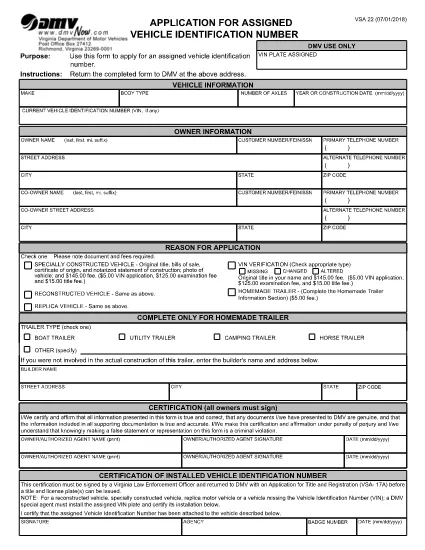
The VSA‑22 is the Virginia Department of Motor Vehicles (DMV) application used to request an assigned vehicle identification number (VIN). It is required for homemade trailers, custom‑built vehicles, and any vehicle that does not already have a DMV‑assigned VIN.

How to Fill Out VSA‑22 Online with Formize

Instead of downloading the PDF and editing it in a separate program, you can complete the form directly on our site. Follow the simple steps below and the Formize PDF Filler will load the fillable document in your browser.

  • Step 1 – Open the Form: Click the "Fill out this form" button on this page.
  • Step 2 – Load the PDF: The Formize PDF Filler app loads the VSA‑22 PDF automatically.
  • Step 3 – Enter Your Information: Fill in vehicle details, owner information, and the reason for the VIN request.
  • Step 4 – Sign & Date: Use your mouse or touch screen to add a digital signature and date.
  • Step 5 – Download or Email: Save the completed form as a PDF or email it directly to the Virginia DMV.

Common Mistakes to Avoid

Even a small error can delay processing. Make sure you:

  • Enter the exact vehicle make, model, and construction date.
  • Provide a complete mailing address for the owner and co‑owner.
  • Check the correct box for the reason you need a VIN (e.g., homemade trailer, custom build).
  • Attach the required supporting documents, such as receipts for materials or a builder’s affidavit.
  • Sign in the Applicant Certification section and, if applicable, have a law‑enforcement officer sign the VIN installation certification.

Where to Submit the Completed Form

After you have saved the filled PDF, mail it to:

Virginia Department of Motor Vehicles
P. O. Box 27412
Richmond, VA 23269-7412
United States

Include any required fees and supporting documentation. The DMV will assign a VIN and send you a VIN plate to install on your vehicle.

FAQs About the VSA‑22 Application

Below are the most frequently asked questions about the VSA‑22 form.

PREGUNTAS MÁS FRECUENTES
  • Who needs to file a VSA‑22 form?

    Anyone who builds a homemade trailer, custom vehicle, or any vehicle that does not already have a DMV‑issued VIN must submit a VSA‑22 to obtain an assigned VIN.

  • Can I use the VSA‑22 for a used vehicle?

    No. The VSA‑22 is only for vehicles that lack an assigned VIN, such as homemade trailers or custom‑built cars.

  • What supporting documents are required?

    Typically you need receipts for materials, a builder’s affidavit, and, if applicable, a law‑enforcement officer’s certification of the installed VIN.

  • How much is the fee for a VSA‑22 application?

    The fee varies by vehicle type; check the Virginia DMV fee schedule or contact your local DMV office for the current amount.

  • How long does it take to receive the assigned VIN?

    Processing usually takes 7‑10 business days after the DMV receives the completed form and all required documents.

  • Do I need to notarize the VSA‑22 form?

    Notarization is not required, but the VIN installation certification must be signed by a Virginia law‑enforcement officer.

  • Can I submit the VSA‑22 online instead of by mail?

    Virginia DMV currently requires the completed form and supporting documents to be mailed. However, you can fill out the PDF online using Formize before printing and mailing.

  • What happens if I make a mistake on the form?

    Incorrect or incomplete information can delay processing. Correct any errors before submitting, or contact the DMV for guidance.

CÓMO

Cómo completar VSA-22 form gratis, en línea en 5 sencillos pasos:

  1. 1
    Open the Fillable Form
    Click the "Fill out this form" button on this page to launch the Formize PDF Filler.
  2. 2
    Load the VSA‑22 PDF
    The Formize app automatically loads the VSA‑22 PDF from the Virginia DMV.
  3. 3
    Enter All Required Information
    Fill in vehicle details, owner data, and the reason for the VIN request using the on‑screen fields.
  4. 4
    Add Your Digital Signature
    Use your mouse, trackpad, or touchscreen to sign the Applicant Certification section.
  5. 5
    Save or Email the Completed Form
    Download the finished PDF to your computer or email it directly to the Virginia DMV address.
Aplicación Formize PDF Filler
SOBRE

Formularios de registro de vehículos

Si posee o alquila un vehículo de motor, remolque o bote, debe cumplir con ciertas obligaciones para mantener su vehículo legalmente registrado y seguro.

VSA-22 form es uno de los formularios de registro de vehículos que son documentos que se utilizan para registrar un vehículo de motor con la autoridad estatal o provincial correspondiente. Estos formularios generalmente se requieren cuando una persona compra un vehículo nuevo o usado o cuando se muda a un nuevo estado o provincia con un vehículo.

Los requisitos y formularios exactos necesarios para el registro del vehículo pueden variar según la ubicación, pero, en general, el proceso implica proporcionar información sobre el vehículo, el propietario y cualquier gravamen sobre el vehículo.

Una vez presentados los formularios de registro y las tarifas, la autoridad estatal o provincial emitirá un certificado de registro o placa al propietario del vehículo. Este registro permite que el vehículo sea operado legalmente en vías y carreteras públicas.

CARACTERÍSTICAS

Relleno de PDF

La forma más fácil de llenar formularios PDF en línea

  • Rellene rápidamente VSA-22 form
    ¿Está buscando una manera de llenar rápidamente VSA-22 form en línea? Con nuestro rellenador de formularios PDF gratuito en línea, sabrá cómo editar y rellenar este documento PDF en menos de un minuto.
  • Editor de PDF en línea fácil de usar
    ¿Cansado de imprimir archivos PDF para poder editarlos antes de volver a escanearlos y enviarlos de vuelta? Edite documentos PDF gratis en línea. Utilice nuestro editor de pdf en línea para ahorrar tiempo y papel.
  • Excelentes herramientas, todas las plataformas.
    ¿Se pregunta cómo completar VSA-22 form en una Mac, o tal vez cómo usar un relleno de PDF gratis? Nuestras herramientas de PDF en línea funcionan en todas las plataformas.
  • Almacenamiento seguro de archivos
    Los archivos "VSA-22 form" completados se almacenan en una base de datos segura administrada por Amazon Cloud hosting. Puede eliminar sus archivos de nuestro sistema en cualquier momento. En cualquier caso, estos archivos se eliminan automáticamente después de 24 horas.
  • Chatea con {palabra clave}
    Chatea con "VSA-22 form" en Chatize, que es un asistente de lectura de PDF gratuito. Haga preguntas y obtenga respuestas de "VSA-22 form". Simplemente haga clic en el botón Chatear con documento de arriba.

Eliminar sesión de llenado

¿Eliminar la sesión de llenado seleccionada? En este caso, se perderá su progreso al completar el formulario.

Eliminar sesión de edición

¿Eliminar la sesión de edición seleccionada? En este caso, se perderá su progreso en la creación y edición del formulario.