Vali keel

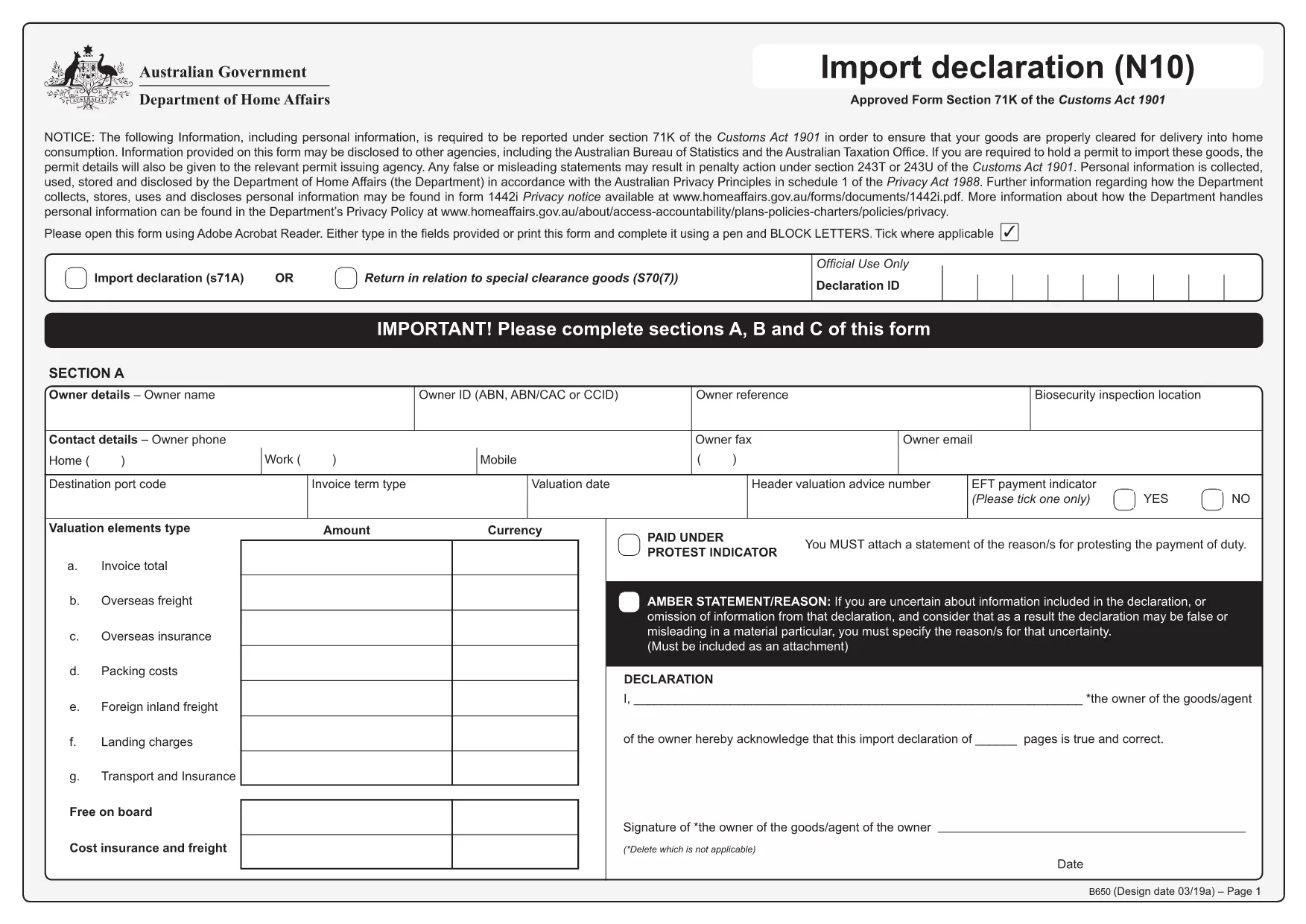
HSN Code Application Form (B650) – Fillable PDF

  1. Riik Austraalia
  2. Keel Inglise
  3. Tegevus Import/Export
  4. osakond Australian Border Force
Täitke see vorm
HSN Code Application Form (B650) – Fillable PDF

The Harmonized System Nomenclature (HSN) code is essential for classifying goods in international trade. In Australia, the official HSN code application form is the B650 Import Declaration, provided by the Australian Border Force. Our fillable PDF lets you complete the form quickly, without printing or manual data entry.

What Is the HSN Code Application Form?

The B650 form collects detailed product information, tariff classifications, and customs values. It is required for all imports that need an HSN (HS) code to clear customs and determine duties.

Why Use the Fillable PDF Version?

  • Instant online access – no need to download, print, and scan.
  • Auto‑save – your entries are stored in the browser until you submit.
  • Built‑in validation – the Formize PDF Filler highlights missing fields.
  • Secure – data never leaves your device unless you choose to upload.

Step‑by‑Step Guide to Complete the Form

Follow the simple steps below to fill out the HSN code application form directly on this page.

Common Mistakes to Avoid

Even experienced importers can slip up. Watch out for:

  • Entering an incorrect 8‑digit HS code.
  • Leaving the "Country of Origin" field blank.
  • Mismatching the declared value with the invoice.
  • Using the wrong measurement units (kg vs. lbs).

Where to Find Help

If you need clarification, consult the Australian Border Force website or the ABF Help & Support pages. Our guide is designed to reduce the need for external assistance, but official resources are always available.

KKK
  • What is an HSN code?

    HSN (Harmonized System Nomenclature) codes are standardized 6‑ to 8‑digit numbers used worldwide to classify goods for customs duties and taxes.

  • Do I need a separate form for each product?

    Yes. Each distinct product line requires its own HS code entry on the B650 form.

  • Can I edit the form after I’ve saved it?

    Absolutely. Open the saved PDF in the Formize PDF Filler again, make changes, and re‑save.

  • Is the fillable PDF free to use?

    Yes. The PDF download and the online filler are provided at no cost.

  • What if I enter the wrong HS code?

    Incorrect codes can delay customs clearance and result in penalties. Double‑check the code against the official Australian Tariff database before submitting.

  • Do I need an internet connection to submit the form?

    You only need internet to load the filler and download the completed PDF. Submission to ABF can be done offline by mailing the printed form.

KUIDAS

4 lihtsa sammuga veebis tasuta HSN code application täitmine:

  1. 1
    Open the Fillable Form
    Click the “Fill out this form” button on the page. The Formize PDF Filler app loads instantly in your browser.
  2. 2
    Enter Your Details
    Complete each section – importer details, product description, HS code, value, and country of origin. Required fields are highlighted.
  3. 3
    Validate Your Input
    When you move to the next field, the filler checks for common errors (e.g., missing HS code digits). Correct any highlighted issues.
  4. 4
    Save or Submit
    After all fields are filled, click “Save PDF” to download a completed copy, or use the “Submit to ABF” option if your organization has integrated electronic filing.
PDF-täiterakenduse vormindamine
UMBES

mall HSN code application

Traditsioonilise PDF-dokumendi vaatamise ja täitmise funktsioonide komplektiga koos veebirakenduse ja tundliku paigutuse eelistega saate märksõna HSN code application lõpule viia minutitega.

FUNKTSIOONID

PDF täiteaine

Lihtsaim viis märksõna HSN code application veebis täitmiseks

  • Täitke kiiresti HSN code application
    Kas otsite viisi HSN code application kiireks veebis täitmiseks? Meie veebipõhise tasuta PDF-vormi täitja abil saate teada, kuidas seda PDF-dokumenti vähem kui minutiga redigeerida ja täita.
  • Lihtne kasutada veebipõhist PDF-redaktorit
    Kas olete tüdinenud PDF-failide printimisest, et saaksite neid enne uuesti skannimist ja tagasisaatmist redigeerida? Redigeerige PDF-dokumente võrgus tasuta. Kasutage meie veebipõhist PDF-redaktorit, et säästa aega ja paberit.
  • Suurepärased tööriistad, kõik platvormid
    Kas soovite teada, kuidas Macis täita HSN code application või kuidas kasutada tasuta PDF-täitjat? Meie veebipõhised PDF-tööriistad töötavad kõigil platvormidel.
  • Turvaline failide salvestusruum
    Lõpetatud failid „HSN code application” salvestatakse turvatud andmebaasi, mida haldab Amazon Cloudi hostimine. Saate oma failid meie süsteemist igal ajal kustutada. Igal juhul kustutatakse need failid 24 tunni pärast automaatselt.
  • Vestelge kasutajaga HSN code application
    Vestelge kasutajaga „HSN code application” saidil Chatize, mis on tasuta PDF-i lugeja abiline. Esitage küsimusi ja saage vastused märksõnalt „HSN code application”. Klõpsake ülaloleval nupul Vestle dokumendiga.

Kustuta täitmise seanss

Kas kustutada valitud täitmisseanss? Sellisel juhul läheb teie edu vormi täitmisel kaotsi.

Kustuta redigeerimisseanss

Kas kustutada valitud redigeerimisseanss? Sel juhul lähevad teie edu vormi loomisel ja redigeerimisel kaotsi.