Vali keel

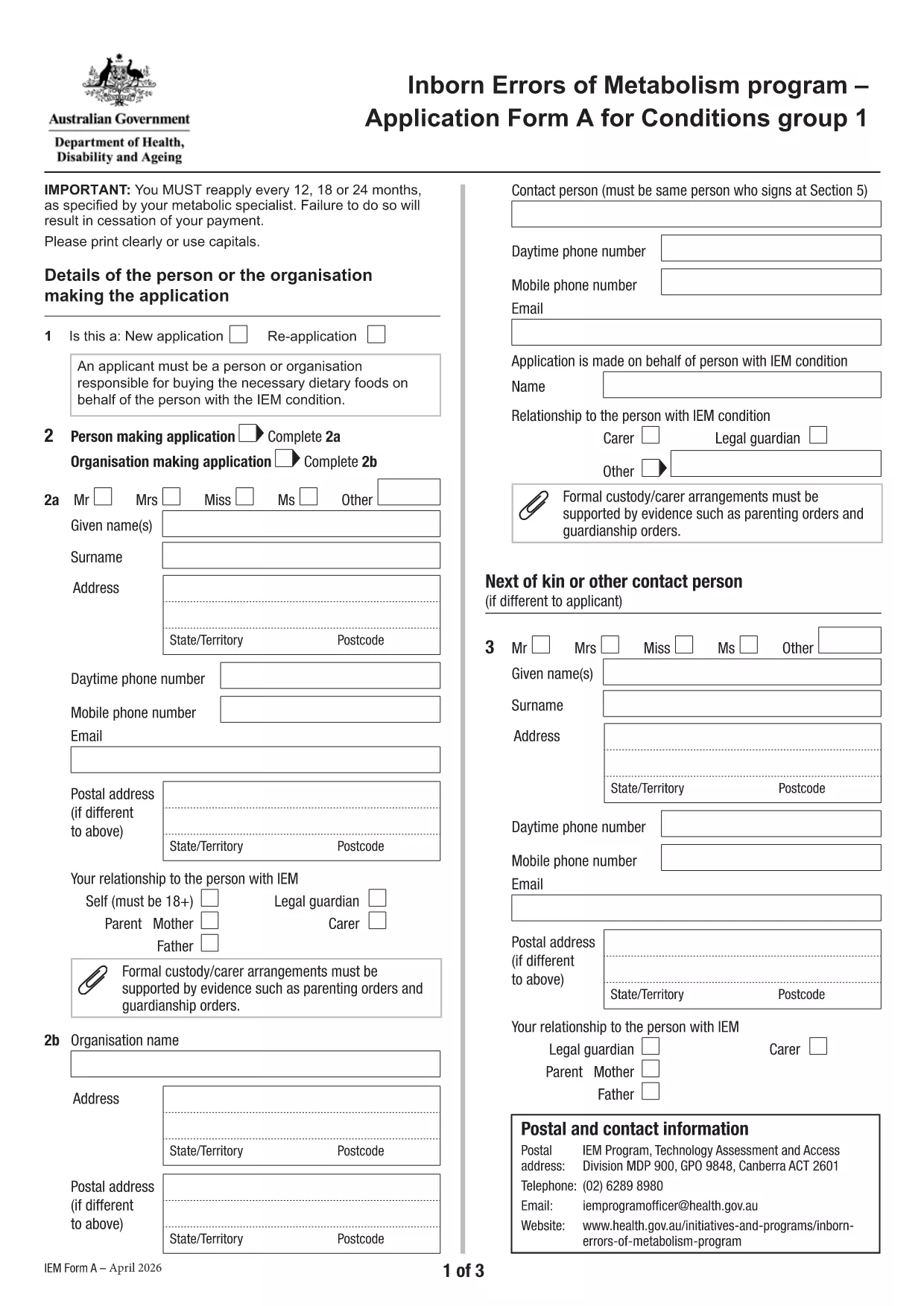
Application Form A – Inborn Errors of Metabolism (Fillable PDF)

  1. Keel Inglise
  2. Riik Austraalia
  3. Tegevus Health Financial Assistance
  4. osakond Tervise- ja perehoolekande osakond
Täitke see vorm
Application Form A – Inborn Errors of Metabolism (Fillable PDF)

Application Form A is the official Australian Government form used to apply for financial assistance for individuals diagnosed with specific Inborn Errors of Metabolism (IEM) – namely Dihydropteridine Reductase (DHPR) deficiency, hyperphenylalaninemia, and Phenylketonuria (PKU). The form is required for the annual reassessment and re‑application process.

What Is Application Form A?

This form collects detailed medical, personal, and financial information to determine eligibility for the government‑funded program that helps cover treatment costs, dietary supplements, and related health services for eligible IEM conditions.

Who Should Use This Form?

  • Individuals diagnosed with DHPR deficiency, hyperphenylalaninemia, or PKU.
  • Parents or legal guardians applying on behalf of a child with one of these conditions.
  • Anyone who received assistance in a previous year and needs to renew their eligibility.

How to Complete the Form Online with Formize

Instead of downloading the PDF and opening it in a separate editor, you can fill it out directly on this page using the Formize PDF Filler app. Follow the simple steps below.

Common Mistakes to Avoid

  • Leaving required fields blank – the filler will highlight missing information.
  • Submitting outdated medical reports – ensure all documents are from the last 12 months.
  • Using an unsupported browser – Chrome or Edge provides the best experience.

Download the Fillable PDF

If you prefer the traditional method, you can download the official PDF and print it.

KKK
  • Who is eligible to use Application Form A?

    The form is for individuals diagnosed with DHPR deficiency, hyperphenylalaninemia, or PKU who are applying for government‑funded treatment assistance.

  • How often must I re‑apply?

    Eligibility is reviewed annually. You must submit a new Application Form A every 12 months with updated medical documentation.

  • Can I submit the form electronically?

    Yes. Using the Formize PDF Filler, you can complete and submit the form online without printing.

  • What supporting documents are required?

    Recent medical reports (within the last year), a list of prescribed medications, proof of identity, and any relevant lab results.

  • Is there a fee to submit the form?

    No. The application is free of charge; however, you may incur standard postage costs if you choose to mail a paper copy.

  • What should I do if I make a mistake after submitting?

    Contact the Department of Health’s support line (02 6275 0000) within 14 days to request a correction or resubmission.

  • Can I save my progress and finish later?

    The Formize PDF Filler allows you to save a draft locally. Use the “Save Draft” button, then reopen the file to continue.

KUIDAS

5 lihtsa sammuga veebis tasuta application form a täitmine:

  1. 1
    Click “Fill out this form”
    Press the blue “Fill out this form” button on the page. The Formize PDF Filler will open in a new tab.
  2. 2
    Wait for the Formize PDF Filler to load
    The app loads the fillable version of Application Form A. This usually takes a few seconds.
  3. 3
    Enter your information
    Complete each field using your keyboard or dropdown menus. Required fields are marked with an asterisk.
  4. 4
    Review and validate
    Use the “Validate” button to check for missing or incorrectly formatted data. Correct any highlighted issues.
  5. 5
    Submit or download
    When you’re satisfied, click “Submit” to send the form to the Department of Health, or click “Download” to save a copy for your records.
PDF-täiterakenduse vormindamine
UMBES

mall application form a

Traditsioonilise PDF-dokumendi vaatamise ja täitmise funktsioonide komplektiga koos veebirakenduse ja tundliku paigutuse eelistega saate märksõna application form a lõpule viia minutitega.

FUNKTSIOONID

PDF täiteaine

Lihtsaim viis märksõna application form a veebis täitmiseks

  • Täitke kiiresti application form a
    Kas otsite viisi application form a kiireks veebis täitmiseks? Meie veebipõhise tasuta PDF-vormi täitja abil saate teada, kuidas seda PDF-dokumenti vähem kui minutiga redigeerida ja täita.
  • Lihtne kasutada veebipõhist PDF-redaktorit
    Kas olete tüdinenud PDF-failide printimisest, et saaksite neid enne uuesti skannimist ja tagasisaatmist redigeerida? Redigeerige PDF-dokumente võrgus tasuta. Kasutage meie veebipõhist PDF-redaktorit, et säästa aega ja paberit.
  • Suurepärased tööriistad, kõik platvormid
    Kas soovite teada, kuidas Macis täita application form a või kuidas kasutada tasuta PDF-täitjat? Meie veebipõhised PDF-tööriistad töötavad kõigil platvormidel.
  • Turvaline failide salvestusruum
    Lõpetatud failid „application form a” salvestatakse turvatud andmebaasi, mida haldab Amazon Cloudi hostimine. Saate oma failid meie süsteemist igal ajal kustutada. Igal juhul kustutatakse need failid 24 tunni pärast automaatselt.
  • Vestelge kasutajaga application form a
    Vestelge kasutajaga „application form a” saidil Chatize, mis on tasuta PDF-i lugeja abiline. Esitage küsimusi ja saage vastused märksõnalt „application form a”. Klõpsake ülaloleval nupul Vestle dokumendiga.

Kustuta täitmise seanss

Kas kustutada valitud täitmisseanss? Sellisel juhul läheb teie edu vormi täitmisel kaotsi.

Kustuta redigeerimisseanss

Kas kustutada valitud redigeerimisseanss? Sel juhul lähevad teie edu vormi loomisel ja redigeerimisel kaotsi.