
Vali keel

RTB-27 Condition Inspection Report – Fillable PDF

  1. Keel Inglise
  2. Riik Kanada
  3. Tegevus Üürileping
  4. osariik Briti Columbia
Täitke see vorm
RTB-27 Condition Inspection Report – Fillable PDF

The RTB-27 Condition Inspection Report is the standard form used in British Columbia for documenting the condition of a rental unit at the start and end of a tenancy. Landlords and tenants rely on this form to settle security‑deposit disputes and to meet the requirements of the Residential Tenancy Regulation (Part 3, sections 19 & 20).

What Is the RTB-27 Form?

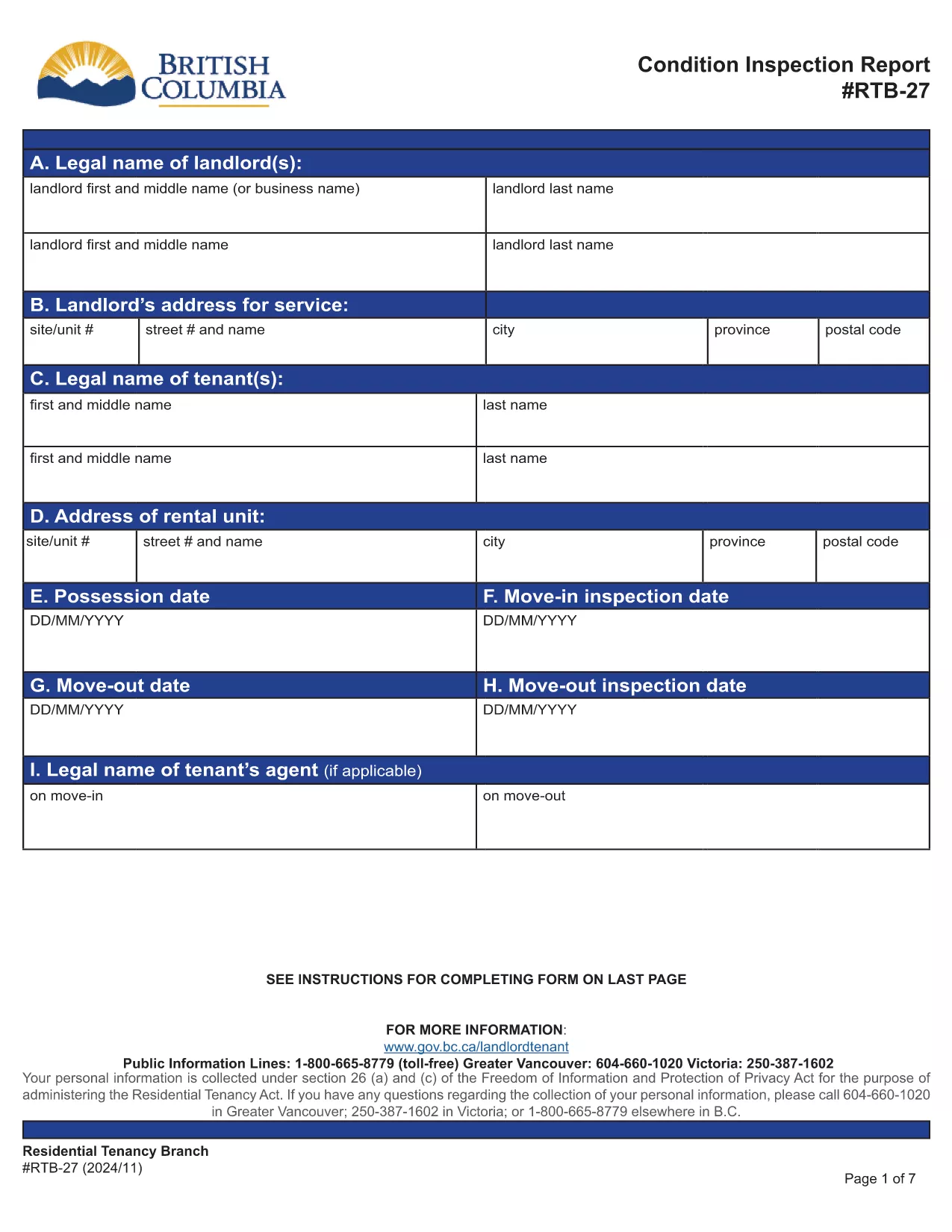
RTB‑27 captures details such as:

  • Legal names and addresses of landlord and tenant
  • Property address and unit number
  • Move‑in and move‑out inspection dates
  • Room‑by‑room condition notes and signatures

The form must be signed by both parties and kept for the duration of the tenancy.

How to Fill Out the RTB-27 Online

Instead of downloading the PDF to a desktop editor, simply click the "Fill out this form" button on this page. The Formize PDF Filler app will load the official RTB‑27 document, allowing you to:

  • Enter text directly into each field
  • Navigate with tab or mouse clicks
  • Save your progress at any time
  • Download a completed, printable PDF

Common Mistakes to Avoid

  • Leaving fields blank: Every field marked with an asterisk (*) is required.
  • Using vague descriptions: Be specific about any damage or wear.
  • Signing before both parties review: Both landlord and tenant must sign after the inspection.
  • Submitting the wrong version: Use the official PDF linked below to ensure compliance.

Where to Submit the Completed Form

After both signatures are added, keep a copy for your records and provide the original to the other party. If a dispute arises, the completed RTB‑27 can be used as evidence in Residential Tenancy Branch proceedings.

Download the Official PDF

The form below is the exact version required by the BC Residential Tenancy Branch. Click here to view the official PDF.

KKK
  • Is the RTB‑27 form required for every rental in BC?

    Yes, the Residential Tenancy Regulation requires a condition inspection report for all new tenancy agreements and for any tenancy that ends.

  • Can I use a scanned copy of the RTB‑27 instead of the fillable PDF?

    A scanned copy is accepted only if all fields are clearly legible and signatures are present. Using the fillable PDF ensures compliance and reduces errors.

  • What happens if I forget to sign the RTB‑27?

    Both parties must sign. If a signature is missing, the form is considered incomplete and may not be admissible in a dispute.

  • Do I need to submit the RTB‑27 to the Residential Tenancy Branch?

    No, you keep a copy for your records and give the original to the other party. Submit it only if a dispute is taken to the Branch.

  • Can I edit the form after I have downloaded the completed PDF?

    Once downloaded, the PDF is no longer editable. Make all changes in the Formize filler before you save and download the final version.

  • Is there a fee to use the Formize PDF Filler for RTB‑27?

    No, the online filler is free to use for this form.

  • What version of the RTB‑27 should I use?

    Always use the latest official version provided by the BC government, which is linked on this page.

KUIDAS

5 lihtsa sammuga veebis tasuta RTB-27 täitmine:

  1. 1
    Click the Fill Out Button
    Press the "Fill out this form" button on the page to launch the Formize PDF Filler.
  2. 2
    Wait for the Filler to Load
    The official RTB‑27 PDF will appear in the browser. Loading usually takes a few seconds.
  3. 3
    Enter All Required Information
    Complete each field, following the on‑screen prompts. Use the tab key to move quickly between fields.
  4. 4
    Save and Review
    Click the Save button to store your progress. Review the form for completeness and accuracy.
  5. 5
    Download or Print the Completed Form
    When finished, download the filled PDF or print it directly for signatures.
PDF-täiterakenduse vormindamine
UMBES

Vormid üürileandjatele ja/või üürnikele üürilepingutega seotud meetmete ettepaneku tegemiseks.

RTB-27 on eluruumi üürilepingute tüüp, mida kasutavad enamik eraomanikke ja korteriühistuid.

On mitmeid küsimusi, mille puhul üürileandjad või üürnikud peavad järgima teatud määrustes sätestatud reegleid. Mõnel juhul võib osutuda vajalikuks täita vorm, mida nimetatakse "ettekirjutatud vormiks", mis pakub välja toimingu, mis võib mõjutada teist üürilepingu osapoolt.

Vorme nimetatakse ettenähtud vormideks, kuna nende sõnastus on hoolikalt koostatud tagamaks, et vormi täitja ja isik, kellele see kätte toimetatakse, saaksid aru, mida pakutakse ja mida nad võivad vastuseks teha. Õige vormi esitamata jätmine võib kavandatava toimingu kehtetuks muuta.

Te ei tohi nende vormide sõnastust muuta, välja arvatud juhul, kui vorm ütleb, et saate seda teha. Kui muudate sõnastust, võib vorm muutuda kehtetuks. Samuti peate järgima kõiki vormis sätestatud etteteatamistähtaegu.

FUNKTSIOONID

PDF täiteaine

Lihtsaim viis märksõna RTB-27 veebis täitmiseks

  • Täitke kiiresti RTB-27
    Kas otsite viisi RTB-27 kiireks veebis täitmiseks? Meie veebipõhise tasuta PDF-vormi täitja abil saate teada, kuidas seda PDF-dokumenti vähem kui minutiga redigeerida ja täita.
  • Lihtne kasutada veebipõhist PDF-redaktorit
    Kas olete tüdinenud PDF-failide printimisest, et saaksite neid enne uuesti skannimist ja tagasisaatmist redigeerida? Redigeerige PDF-dokumente võrgus tasuta. Kasutage meie veebipõhist PDF-redaktorit, et säästa aega ja paberit.
  • Suurepärased tööriistad, kõik platvormid
    Kas soovite teada, kuidas Macis täita RTB-27 või kuidas kasutada tasuta PDF-täitjat? Meie veebipõhised PDF-tööriistad töötavad kõigil platvormidel.
  • Turvaline failide salvestusruum
    Lõpetatud failid „RTB-27” salvestatakse turvatud andmebaasi, mida haldab Amazon Cloudi hostimine. Saate oma failid meie süsteemist igal ajal kustutada. Igal juhul kustutatakse need failid 24 tunni pärast automaatselt.
  • Vestelge kasutajaga RTB-27
    Vestelge kasutajaga „RTB-27” saidil Chatize, mis on tasuta PDF-i lugeja abiline. Esitage küsimusi ja saage vastused märksõnalt „RTB-27”. Klõpsake ülaloleval nupul Vestle dokumendiga.

Kustuta täitmise seanss

Kas kustutada valitud täitmisseanss? Sellisel juhul läheb teie edu vormi täitmisel kaotsi.

Kustuta redigeerimisseanss

Kas kustutada valitud redigeerimisseanss? Sel juhul lähevad teie edu vormi loomisel ja redigeerimisel kaotsi.