
Vali keel

IMM 5476 – Use of a Representative (Canada)

  1. Riik Kanada
  2. Keel Inglise prantsuse keel
  3. Tegevus Viisad
Täitke see vorm
IMM 5476 – Use of a Representative (Canada)

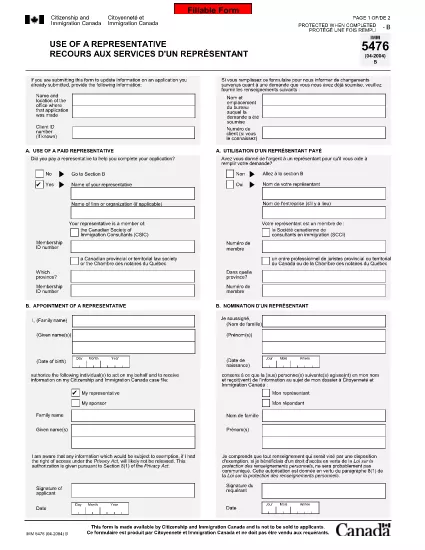
The IMM 5476 – Use of a Representative form allows you to officially appoint an immigration consultant, lawyer, or another authorized person to act on your behalf with Immigration, Refugees and Citizenship Canada (IRCC) and the Canada Border Services Agency (CBSA). This form is required for most permanent‑resident, temporary‑resident, and citizenship applications.

What Is the IMM 5476 Form?

IMM 5476 is a government‑issued PDF that records the details of your chosen representative, their contact information, and the scope of authority you are granting. It is available in both English and French and must be signed by both you (the applicant) and your representative.

How to Fill Out IMM 5476 Online

Instead of downloading the PDF and editing it manually, simply click the "Fill out this form" button on the page. Our Formize PDF Filler app will load the fillable version instantly, letting you complete the form directly in your browser.

Common Mistakes to Avoid

  • Incorrect Representative Details: Double‑check the name, address, and CRA‑issued client number of your representative.
  • Missing Signatures: Both the applicant and the representative must sign; unsigned forms are rejected.
  • Wrong Language Version: Use the official English or French version that matches the rest of your application package.
  • Out‑of‑Date Form: Always use the latest version – the link below always points to the current PDF.

When to Submit the Form

Attach IMM 5476 to the same package as your main application (e.g., Express Entry, Study Permit, Visitor Visa). If you change representatives later, submit a new, signed IMM 5476 with your updated request.

Need More Help?

While Formize does not provide live support, you can find detailed guidance on the IRCC website or consult a licensed immigration professional.

KKK
  • Do I need a lawyer to fill out IMM 5476?

    No. You can appoint any authorized representative, such as a licensed immigration consultant, lawyer, or family member, as long as they have a valid client number.

  • Can I change my representative after submitting the form?

    Yes. Submit a new, signed IMM 5476 with the updated representative’s details and include a brief letter explaining the change.

  • Is a digital signature accepted?

    IRCC accepts electronic signatures generated within a fillable PDF application like Formize, provided the signature field is clearly marked.

  • What happens if I forget to sign the form?

    An unsigned IMM 5476 will be considered incomplete and may delay processing of your entire application.

  • Do I need to submit both English and French versions?

    Submit only the language version that matches the rest of your application package. IRCC does not require both versions.

  • Is there a fee to use the Formize PDF Filler?

    No. Formize provides free access to fillable PDFs for government forms like IMM 5476.

  • Can I print the form after filling it online?

    Yes. Once you finish, click "Download PDF" and print a hard copy if your submission requires a physical signature.

  • Where can I find the latest version of IMM 5476?

    The link on this page always points to the most recent version published by Immigration, Refugees and Citizenship Canada.

KUIDAS

5 lihtsa sammuga veebis tasuta IMM 5476 täitmine:

  1. 1
    Open the Fillable Form
    Click the "Fill out this form" button on the page. The Formize PDF Filler app will load the IMM 5476 form directly in your browser.
  2. 2
    Enter Applicant Information
    Fill in your full name, client ID, and contact details in the Applicant section. All fields are required.
  3. 3
    Enter Representative Details
    Provide the representative’s name, firm, address, phone, and email. Make sure the CRA client number matches the one on record.
  4. 4
    Add Signatures
    Use the built‑in signature fields to sign electronically. Both you and your representative must sign before saving.
  5. 5
    Download or Submit
    After completing the form, click "Download PDF" to save a copy for your records, then attach it to your immigration application package.
PDF-täiterakenduse vormindamine
UMBES

Viisa vormid

IMM 5476 on üks viisavormidest, mis on dokumendid, mida kasutatakse välisriiki sisenemiseks viisa taotlemiseks. Viisa on dokument, mis võimaldab välisriigi kodanikul teatud aja jooksul välisriiki siseneda, seal viibida ja mõnikord ka seal töötada. Viisa saamise täpsed vormid ja nõuded on riigiti ja viisatüübiti erinevad.

Viisavormid nõuavad tavaliselt isikuandmeid, nagu nimi, sünniaeg ja passiandmed, samuti teavet reisi eesmärgi ja pikkuse, kavandatava sihtkoha ja selle kohta, kas taotlejale on varem viisa andmisest keeldutud või ta on riigist välja saadetud. Vormid võivad nõuda ka tõendavaid dokumente, nagu pass, fotod ja rahalise toetuse tõend.

Ameerika Ühendriikides on kõige levinumad viisavormid DS-160 ja DS-260. Vormi DS-160 kasutatakse mitteimmigrandi viisa taotlemiseks, vormi DS-260 aga immigrandi viisa taotlemiseks. Need vormid nõuavad üksikasjalikku teavet taotleja isikliku ja reisiajaloo kohta, samuti tõendavaid dokumente, nagu pass, reisi marsruut ja finantsdokumendid.

Teistes riikides võivad kehtida erinevad viisavormid ja nõuded, kuid põhiprotsess hõlmab tavaliselt viisataotluse täitmist, tõendavate dokumentide esitamist ja USA saatkonnas või konsulaadis konsulaarametnikuga vestlusel osalemist. Oluline on märkida, et viisa taotlemise protsess võib olla keeruline ja aeganõudev ning viisat taotlevatel isikutel on soovitatav konsulteerida immigratsiooniadvokaadi või muu kvalifitseeritud spetsialistiga, et tagada kõigi vajalike vormide ja nõuete täitmine.

FUNKTSIOONID

PDF täiteaine

Lihtsaim viis märksõna IMM 5476 veebis täitmiseks

  • Täitke kiiresti IMM 5476
    Kas otsite viisi IMM 5476 kiireks veebis täitmiseks? Meie veebipõhise tasuta PDF-vormi täitja abil saate teada, kuidas seda PDF-dokumenti vähem kui minutiga redigeerida ja täita.
  • Lihtne kasutada veebipõhist PDF-redaktorit
    Kas olete tüdinenud PDF-failide printimisest, et saaksite neid enne uuesti skannimist ja tagasisaatmist redigeerida? Redigeerige PDF-dokumente võrgus tasuta. Kasutage meie veebipõhist PDF-redaktorit, et säästa aega ja paberit.
  • Suurepärased tööriistad, kõik platvormid
    Kas soovite teada, kuidas Macis täita IMM 5476 või kuidas kasutada tasuta PDF-täitjat? Meie veebipõhised PDF-tööriistad töötavad kõigil platvormidel.
  • Turvaline failide salvestusruum
    Lõpetatud failid „IMM 5476” salvestatakse turvatud andmebaasi, mida haldab Amazon Cloudi hostimine. Saate oma failid meie süsteemist igal ajal kustutada. Igal juhul kustutatakse need failid 24 tunni pärast automaatselt.
  • Vestelge kasutajaga IMM 5476
    Vestelge kasutajaga „IMM 5476” saidil Chatize, mis on tasuta PDF-i lugeja abiline. Esitage küsimusi ja saage vastused märksõnalt „IMM 5476”. Klõpsake ülaloleval nupul Vestle dokumendiga.

Kustuta täitmise seanss

Kas kustutada valitud täitmisseanss? Sellisel juhul läheb teie edu vormi täitmisel kaotsi.

Kustuta redigeerimisseanss

Kas kustutada valitud redigeerimisseanss? Sel juhul lähevad teie edu vormi loomisel ja redigeerimisel kaotsi.