
Vali keel

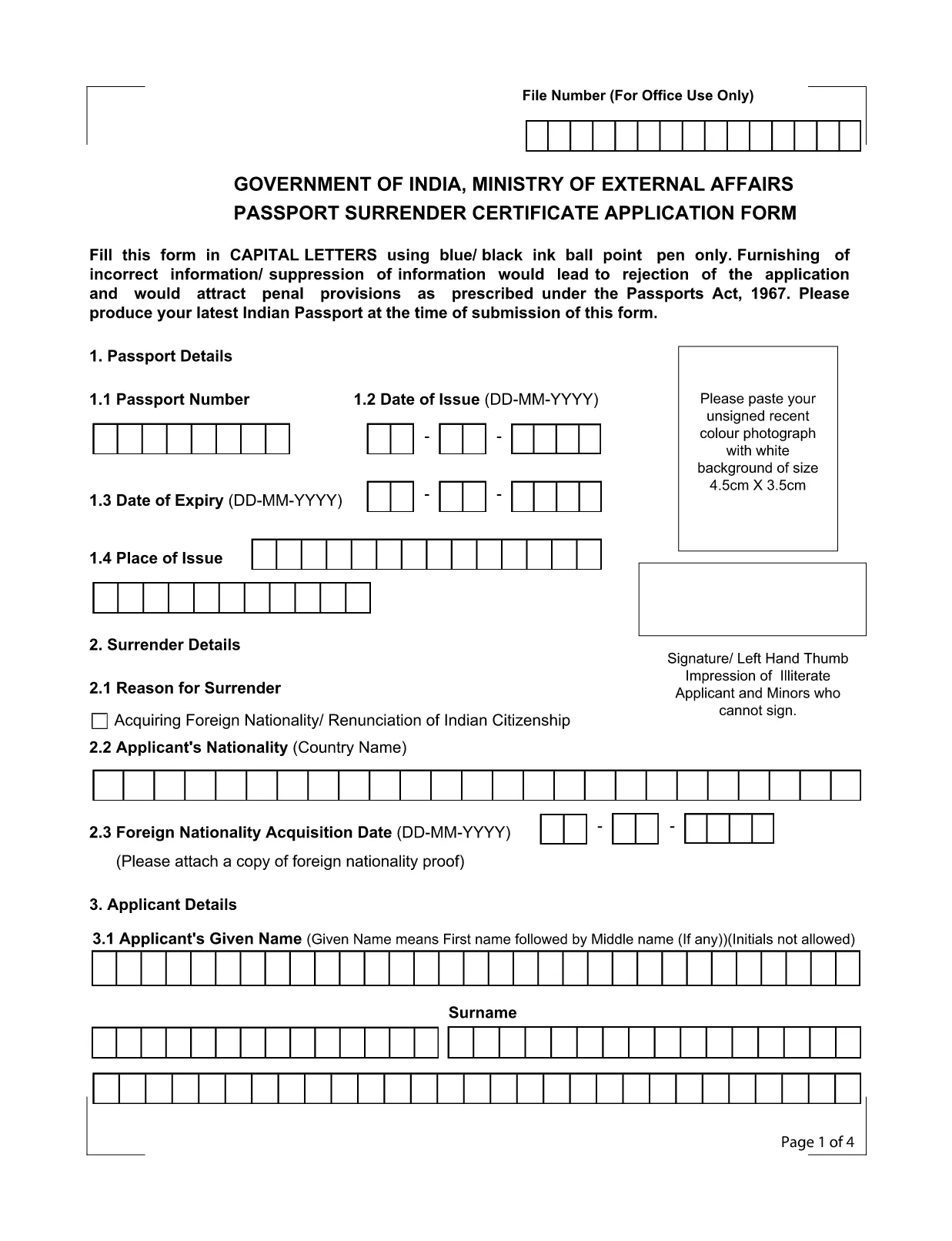
Application Form for Surrender of Indian Passport

  1. Keel Inglise
  2. Riik India
  3. osakond välisministeerium
  4. Tegevus Passport Surrender
Täitke see vorm
Application Form for Surrender of Indian Passport

The passport surrender form is a mandatory document required by the Ministry of External Affairs when you voluntarily give up your Indian passport. Whether you have acquired foreign citizenship, are moving abroad permanently, or simply need to cancel an unused passport, this official Indian passport surrender application ensures a smooth, legal transition.

What Is the Passport Surrender Form?

This form, officially titled Passport Surrender Certificate Application Form, collects personal details, passport information, and the reason for surrender. It must be filled in capital letters with a blue or black ball‑point pen if printed, but with Formize’s online PDF filler you can type directly, saving time and eliminating illegible handwriting.

How to Fill the Surrender Certificate Online

Follow these simple steps to complete the form using our integrated Formize PDF Filler:

  • Click the "Fill out this form" button on this page.
  • Wait a few seconds while the Formize PDF Filler loads the fillable document.
  • Enter all required information exactly as it appears on your passport.
  • Review each field for accuracy, then click Submit to generate a downloadable copy.

Common Mistakes to Avoid

Even a small error can lead to rejection under the Passports Act, 1967. Keep these tips in mind:

  • Use only capital letters and avoid abbreviations.
  • Do not leave any field blank; write "N/A" where applicable.
  • Ensure the passport number matches the one printed on the document.
  • Provide a valid Indian address for correspondence.

Where to Submit the Completed Form

After completing the fillable PDF, print a clear copy and submit it to the nearest Indian Mission (Consulate or Embassy) along with your original passport. Some missions also accept a scanned copy via email—check the specific mission’s guidelines.

Download the Fillable PDF Instantly

Ready to start? Click the button below to open the official fillable PDF in the Formize PDF Filler. No extra software is required.

KKK
  • Do I need to pay a fee to surrender my Indian passport?

    Yes, most Indian missions charge a nominal surrender fee. Check the specific consulate’s website for the exact amount.

  • Can I surrender my passport if I have already obtained foreign citizenship?

    Absolutely. Surrendering your Indian passport is a legal requirement after acquiring another nationality.

  • Is a scanned copy of the form acceptable?

    Some Indian missions accept a scanned, signed PDF, but most require a printed original. Verify the requirements of the mission you will visit.

  • What happens to my passport after surrender?

    The passport is cancelled and returned to the Ministry of External Affairs. You will receive a surrender certificate as proof.

  • Can I fill the form on a mobile device?

    Yes, the Formize PDF Filler works on all modern browsers, including mobile phones and tablets.

  • How long does the surrender process take?

    Processing time varies by mission, typically ranging from 7 to 14 business days after submission.

KUIDAS

4 lihtsa sammuga veebis tasuta passport surrender form india täitmine:

  1. 1
    Click the Fill-out Button
    Press the "Fill out this form" button on the page to launch the Formize PDF Filler.
  2. 2
    Wait for the Filler to Load
    A few seconds later the fillable PDF will appear in the browser. No download needed.
  3. 3
    Enter All Required Details
    Complete each field using capital letters. The filler validates dates and passport numbers automatically.
  4. 4
    Submit, Download, and Print
    After reviewing, click Submit to generate a PDF copy. Print it and take it to the nearest Indian mission.
PDF-täiterakenduse vormindamine
UMBES

Ametikohtade osakonna taotlusvormid

passport surrender form india on üks India Postiosakonna ametlikest vormidest, mis pakub erinevate teenuste jaoks erinevaid taotlusvorme. Mõned levinumad taotlusvormid hõlmavad järgmist:

Postielukindlustus: seda vormi kasutatakse postiosakonna pakutavate elukindlustuspoliiside taotlemiseks.

Säästupangakonto: seda vormi kasutatakse hoiupangakonto avamiseks postkontoris.

Rahakorraldus: seda vormi kasutatakse rahakorralduste saatmiseks postiteenuse kaudu.

Registreeritud postitus: seda vormi kasutatakse tähitud kirjade ja pakkide saatmiseks postiteenuse kaudu.

Kiirpost: seda vormi kasutatakse pakkide ja dokumentide saatmiseks kiirpostiteenuse kaudu.

Postkontori igakuine sissetulekuskeem: seda vormi kasutatakse igakuise sissetuleku skeemi konto avamiseks postkontoris.

FUNKTSIOONID

PDF täiteaine

Lihtsaim viis märksõna passport surrender form india veebis täitmiseks

  • Täitke kiiresti passport surrender form india
    Kas otsite viisi passport surrender form india kiireks veebis täitmiseks? Meie veebipõhise tasuta PDF-vormi täitja abil saate teada, kuidas seda PDF-dokumenti vähem kui minutiga redigeerida ja täita.
  • Lihtne kasutada veebipõhist PDF-redaktorit
    Kas olete tüdinenud PDF-failide printimisest, et saaksite neid enne uuesti skannimist ja tagasisaatmist redigeerida? Redigeerige PDF-dokumente võrgus tasuta. Kasutage meie veebipõhist PDF-redaktorit, et säästa aega ja paberit.
  • Suurepärased tööriistad, kõik platvormid
    Kas soovite teada, kuidas Macis täita passport surrender form india või kuidas kasutada tasuta PDF-täitjat? Meie veebipõhised PDF-tööriistad töötavad kõigil platvormidel.
  • Turvaline failide salvestusruum
    Lõpetatud failid „passport surrender form india” salvestatakse turvatud andmebaasi, mida haldab Amazon Cloudi hostimine. Saate oma failid meie süsteemist igal ajal kustutada. Igal juhul kustutatakse need failid 24 tunni pärast automaatselt.
  • Vestelge kasutajaga passport surrender form india
    Vestelge kasutajaga „passport surrender form india” saidil Chatize, mis on tasuta PDF-i lugeja abiline. Esitage küsimusi ja saage vastused märksõnalt „passport surrender form india”. Klõpsake ülaloleval nupul Vestle dokumendiga.

Kustuta täitmise seanss

Kas kustutada valitud täitmisseanss? Sellisel juhul läheb teie edu vormi täitmisel kaotsi.

Kustuta redigeerimisseanss

Kas kustutada valitud redigeerimisseanss? Sel juhul lähevad teie edu vormi loomisel ja redigeerimisel kaotsi.