
Vali keel

Form 13715 – Volunteer Site Information Sheet (Fillable PDF)

  1. Riik USA
  2. Keel Inglise
  3. Tegevus Maksud
  4. osakond Internal Revenue Service
Täitke see vorm
Form 13715 – Volunteer Site Information Sheet (Fillable PDF)

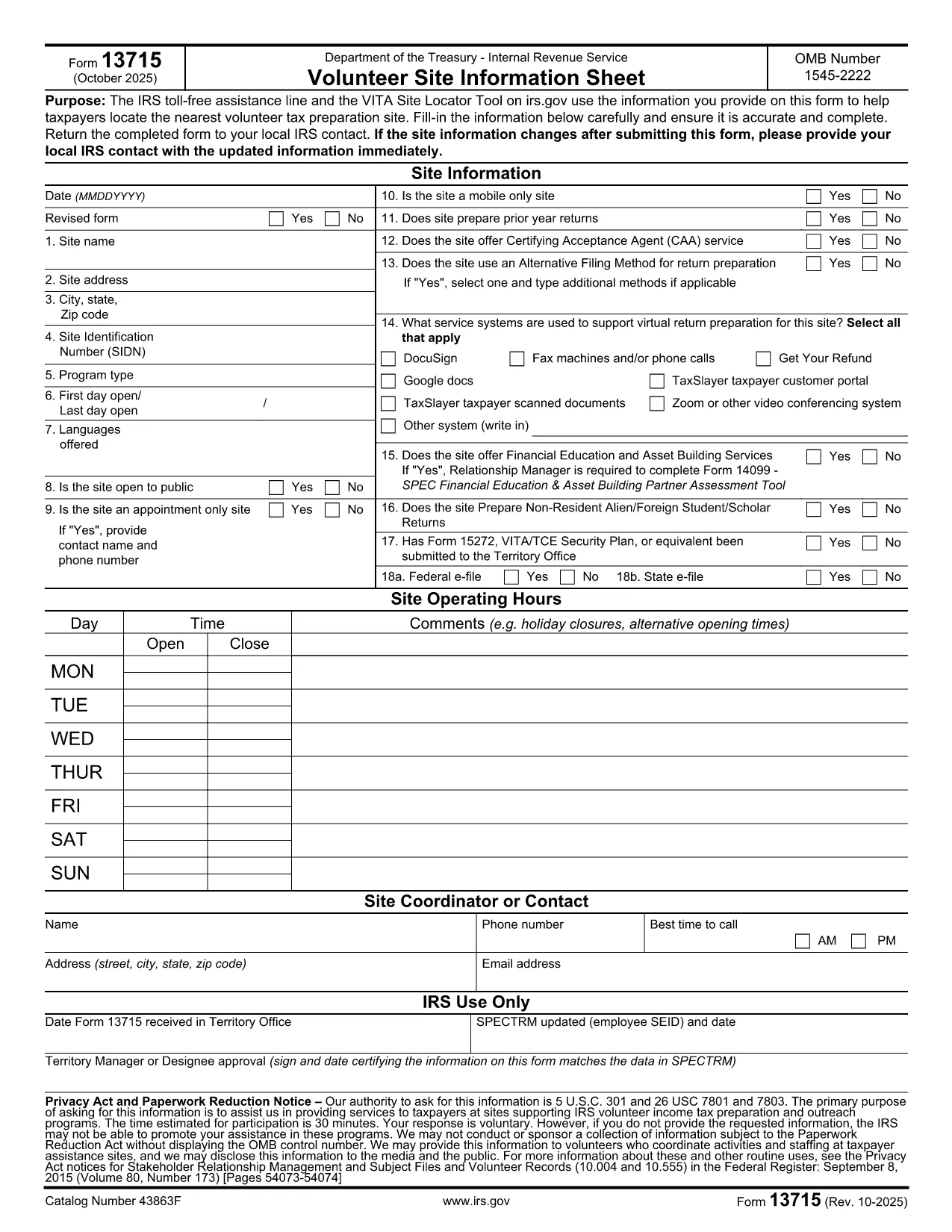
The IRS Form 13715, also known as the Volunteer Site Information Sheet, is required for any organization that wants to be listed in the VITA (Volunteer Income Tax Assistance) Site Locator tool. This form collects essential contact and service details so taxpayers can easily find the nearest volunteer tax‑preparation site.

What Is Form 13715 and Who Needs It?

Form 13715 is issued by the Internal Revenue Service (IRS) and must be completed by:

  • Non‑profit organizations that host VITA or TCE (Tax Counseling for the Elderly) sites.
  • Community centers, libraries, churches, or any entity that provides free tax‑preparation services.

The information you provide helps the IRS toll‑free assistance line and the online site locator match taxpayers with the closest volunteer site.

How to Complete the Form Using Formize

Instead of downloading the PDF and opening it in a separate editor, simply click the "Fill out this form" button on this page. The Formize PDF Filler app will load instantly, allowing you to:

  1. Enter all required details directly in your browser.
  2. Save your progress automatically.
  3. Download a completed, IRS‑ready PDF with one click.

Common Mistakes & Tips

  • Missing phone number or email: The IRS requires at least one reliable contact method.
  • Incorrect zip code: Double‑check the ZIP to ensure the site appears in the correct geographic search.
  • Out‑of‑date service hours: Update hours each year to avoid confusion for taxpayers.

Review each field carefully before saving the final PDF.

Where to Submit the Completed Form

After you finish, print the filled‑in PDF and mail it to your local IRS VITA coordinator (address is provided on the form). Some regions also accept a scanned copy via email—check the instructions on the last page of the form.

FAQs About Form 13715

Below are quick answers to the most common questions (full FAQ list is also available further down the page).

KKK
  • Do I need to print the form after filling it online?

    Yes. The IRS requires a hard‑copy signature on Form 13715 before it can be processed. Print the completed PDF, sign, and mail it.

  • Can I save a draft and finish later?

    Absolutely. Formize automatically saves your progress in the browser’s local storage. Return to the page later and continue where you left off.

  • Is there a fee to use Formize’s PDF filler?

    No. The fillable PDF tool is completely free for all IRS forms, including Form 13715.

  • What if I enter the wrong ZIP code?

    The site will not appear in the VITA locator for the intended area, and taxpayers may be directed elsewhere. Double‑check the ZIP before downloading.

  • How often should I update Form 13715?

    Update the form annually or whenever your contact information, service hours, or locations change.

  • Can I submit the form electronically?

    The IRS still requires a signed hard copy, but many regional VITA coordinators accept a scanned copy via email after the original is mailed.

  • Where can I find help if I have questions?

    Contact the IRS VITA hotline at 1‑800‑222‑2222 or reach out to your local IRS volunteer coordinator for assistance.

  • Is Form 13715 the same as Form 13614?

    No. Form 13715 collects site information for VITA locations, while Form 13614 is the IRS Individual Taxpayer Interview and used by volunteers to prepare returns.

KUIDAS

5 lihtsa sammuga veebis tasuta Form 13715 täitmine:

  1. 1
    Click the Fill‑out Button
    Press the "Fill out this form" button on this page. The Formize PDF Filler loads directly in your browser—no download required.
  2. 2
    Enter Your Information
    Complete each field: organization name, contact details, service hours, and any special instructions. The form auto‑saves as you type.
  3. 3
    Review & Validate
    Use the built‑in validation to check for missing or incorrectly formatted entries. Correct any highlighted errors.
  4. 4
    Download the Completed PDF
    When all fields are filled, click the "Download PDF" button. You’ll receive an IRS‑ready, fillable PDF ready for printing or electronic submission.
  5. 5
    Submit to Your Local IRS Coordinator
    Print the PDF and mail it to the address listed on the last page, or follow any region‑specific email instructions.
PDF-täiterakenduse vormindamine
UMBES

Maksuvormid

Form 13715 on üks maksuvormidest, mida kasutatakse maksudega seotud teabe esitamiseks asjaomasele maksuhaldurile. Maksuvorme on erinevat tüüpi, sealhulgas föderaal-, osariigi ja kohalikud maksuvormid, mis võivad olenevalt maksumaksja olukorrast ja asukohast erineda.

FUNKTSIOONID

PDF täiteaine

Lihtsaim viis märksõna Form 13715 veebis täitmiseks

  • Täitke kiiresti Form 13715
    Kas otsite viisi Form 13715 kiireks veebis täitmiseks? Meie veebipõhise tasuta PDF-vormi täitja abil saate teada, kuidas seda PDF-dokumenti vähem kui minutiga redigeerida ja täita.
  • Lihtne kasutada veebipõhist PDF-redaktorit
    Kas olete tüdinenud PDF-failide printimisest, et saaksite neid enne uuesti skannimist ja tagasisaatmist redigeerida? Redigeerige PDF-dokumente võrgus tasuta. Kasutage meie veebipõhist PDF-redaktorit, et säästa aega ja paberit.
  • Suurepärased tööriistad, kõik platvormid
    Kas soovite teada, kuidas Macis täita Form 13715 või kuidas kasutada tasuta PDF-täitjat? Meie veebipõhised PDF-tööriistad töötavad kõigil platvormidel.
  • Turvaline failide salvestusruum
    Lõpetatud failid „Form 13715” salvestatakse turvatud andmebaasi, mida haldab Amazon Cloudi hostimine. Saate oma failid meie süsteemist igal ajal kustutada. Igal juhul kustutatakse need failid 24 tunni pärast automaatselt.
  • Vestelge kasutajaga Form 13715
    Vestelge kasutajaga „Form 13715” saidil Chatize, mis on tasuta PDF-i lugeja abiline. Esitage küsimusi ja saage vastused märksõnalt „Form 13715”. Klõpsake ülaloleval nupul Vestle dokumendiga.

Kustuta täitmise seanss

Kas kustutada valitud täitmisseanss? Sellisel juhul läheb teie edu vormi täitmisel kaotsi.

Kustuta redigeerimisseanss

Kas kustutada valitud redigeerimisseanss? Sel juhul lähevad teie edu vormi loomisel ja redigeerimisel kaotsi.