
Vali keel

Form 14446 (zh‑t) – Fillable PDF & Instructions

  1. Riik USA
  2. Keel Traditsiooniline hiina keel)
  3. Tegevus Maksud
  4. osakond Internal Revenue Service
Täitke see vorm
Form 14446 (zh‑t) – Fillable PDF & Instructions

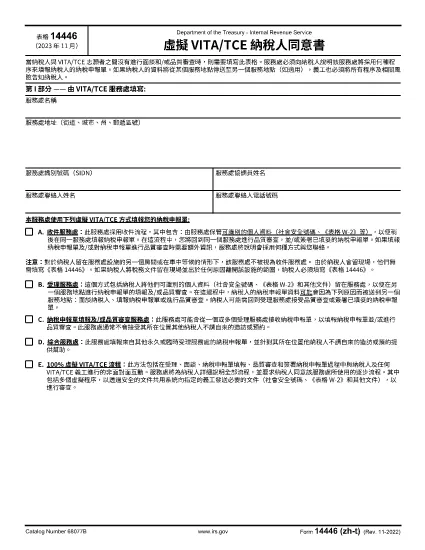
What Is Form 14446 (zh‑t)?

Form 14446, also known as the Taxpayer Site Retention Form, is required when a taxpayer leaves tax documents at an IRS service location and then departs the premises. The zh‑t version is the Traditional Chinese translation, making it accessible for Chinese‑speaking taxpayers.

How to Complete the Form Online

Instead of downloading the PDF and editing it with a desktop editor, use Formize’s built‑in PDF filler:

  1. Click the "Fill out this form" button on this page.
  2. Wait a few seconds while the Formize PDF Filler app loads.
  3. Enter the required information in each fillable field. The interface automatically saves your progress.
  4. When finished, click Submit to download a completed copy or print it directly.

Common Mistakes to Avoid

  • Leaving fields blank: Every required field must be completed; otherwise the form will be rejected.
  • Using the wrong language version: Ensure you are on the zh‑t (Traditional Chinese) PDF if you need it in Chinese.
  • Submitting the form before signing: The signature field is mandatory; use the digital signature option in Formize.
  • Incorrect dates: Use the exact date you left the documents at the site.

Where to Submit the Completed Form

After filling out Form 14446 (zh‑t), mail or deliver the completed form to the IRS office where the documents were left. Keep a copy for your records. If you are unsure which office to send it to, contact the IRS Service Center listed on the notice you received.

Download the PDF

For users who prefer a local copy, the official Traditional Chinese PDF is available below. The file is fully fillable and compatible with most PDF readers.

Download Form 14446 (zh‑t) PDF

KKK
  • Do I need to fill out Form 14446 if I stay on the IRS premises?

    No. The form is required only when the taxpayer leaves the site after leaving documents there. Staying in the same location does not trigger the requirement.

  • Can I submit the form electronically?

    The IRS currently requires a printed and signed copy. Use Formize to fill it out, then print and mail it to the appropriate IRS office.

  • Is the zh‑t version the same as the English version?

    Yes. The content is identical; only the language differs. Use the version that matches your preferred language.

  • What happens if I forget to sign the form?

    An unsigned Form 14446 will be considered incomplete and will be returned, causing delays in processing your tax documents.

  • How long should I keep a copy of the completed form?

    Retain a copy for at least three years, the standard period for IRS record‑keeping.

  • Can I fill out Form 14446 on a mobile device?

    Yes. Formize’s PDF filler works on most modern browsers, including mobile browsers, allowing you to complete the form on a phone or tablet.

  • Where can I find the IRS office address to send the form?

    The address is listed on any notice you received from the IRS service location. If you don’t have a notice, call the IRS helpline for guidance.

KUIDAS

4 lihtsa sammuga veebis tasuta Form 14446 täitmine:

  1. 1
    Open the Fillable Form
    Click the "Fill out this form" button on the page. The Formize PDF Filler will open in your browser.
  2. 2
    Enter Your Information
    Fill each required field. The filler autosaves, so you won’t lose data if you navigate away.
  3. 3
    Add Your Signature
    Use the digital signature tool inside Formize to sign the form electronically.
  4. 4
    Download or Print
    When all fields are complete, click "Download" to save a copy or "Print" to get a hard‑copy for mailing.
PDF-täiterakenduse vormindamine
UMBES

Föderaalsed maksuvormid

Form 14446 on üks föderaalseid maksuvorme, mis on dokumendid, mida kasutatakse föderaalsete tulumaksude teatamiseks ja esitamiseks Ameerika Ühendriikide siseriiklikule tuluteenistusele (IRS). Neid vorme kasutavad üksikisikud, ettevõtted ja organisatsioonid oma sissetulekute, mahaarvamiste ja muu föderaalse maksukohustuse arvutamiseks vajaliku teabe esitamiseks.

Kõige sagedamini kasutatav föderaalne maksuvorm on vorm 1040, mida kasutavad üksikisiku maksumaksjad oma isikliku tulumaksu teatamiseks. Teiste sageli kasutatavate vormide hulka kuuluvad vorm 1065 partnerluste jaoks, Vorm 1120 ettevõtetele ja vorm 990 maksuvabastusega organisatsioonidele.

Föderaalsed maksuvormid nõuavad tavaliselt, et maksumaksjad teataksid erinevatest sissetulekuallikatest, nagu palgad, palgad ja jootrahad, samuti investeeringutest, üüripindadest ja muudest allikatest saadud tulu. Vormid võimaldavad ka maksumaksjatel nõuda mahaarvamisi ja krediite mitmesuguste kulude, näiteks heategevuslike sissemaksete, hüpoteegi intresside ja tervishoiukulude katteks.

Oluline on esitada föderaalmaksuvormid täpselt ja õigeaegselt, kuna selle tegemata jätmine võib kaasa tuua trahve ja intressitasusid IRS-ilt.

FUNKTSIOONID

PDF täiteaine

Lihtsaim viis märksõna Form 14446 veebis täitmiseks

  • Täitke kiiresti Form 14446
    Kas otsite viisi Form 14446 kiireks veebis täitmiseks? Meie veebipõhise tasuta PDF-vormi täitja abil saate teada, kuidas seda PDF-dokumenti vähem kui minutiga redigeerida ja täita.
  • Lihtne kasutada veebipõhist PDF-redaktorit
    Kas olete tüdinenud PDF-failide printimisest, et saaksite neid enne uuesti skannimist ja tagasisaatmist redigeerida? Redigeerige PDF-dokumente võrgus tasuta. Kasutage meie veebipõhist PDF-redaktorit, et säästa aega ja paberit.
  • Suurepärased tööriistad, kõik platvormid
    Kas soovite teada, kuidas Macis täita Form 14446 või kuidas kasutada tasuta PDF-täitjat? Meie veebipõhised PDF-tööriistad töötavad kõigil platvormidel.
  • Turvaline failide salvestusruum
    Lõpetatud failid „Form 14446” salvestatakse turvatud andmebaasi, mida haldab Amazon Cloudi hostimine. Saate oma failid meie süsteemist igal ajal kustutada. Igal juhul kustutatakse need failid 24 tunni pärast automaatselt.
  • Vestelge kasutajaga Form 14446
    Vestelge kasutajaga „Form 14446” saidil Chatize, mis on tasuta PDF-i lugeja abiline. Esitage küsimusi ja saage vastused märksõnalt „Form 14446”. Klõpsake ülaloleval nupul Vestle dokumendiga.

Kustuta täitmise seanss

Kas kustutada valitud täitmisseanss? Sellisel juhul läheb teie edu vormi täitmisel kaotsi.

Kustuta redigeerimisseanss

Kas kustutada valitud redigeerimisseanss? Sel juhul lähevad teie edu vormi loomisel ja redigeerimisel kaotsi.