
Vali keel

IRS Form 14453 – Penalty Computation Worksheet (Fillable Online)

  1. Riik USA
  2. Keel Inglise
  3. Tegevus Maksud
  4. osakond Internal Revenue Service
Täitke see vorm
IRS Form 14453 – Penalty Computation Worksheet (Fillable Online)

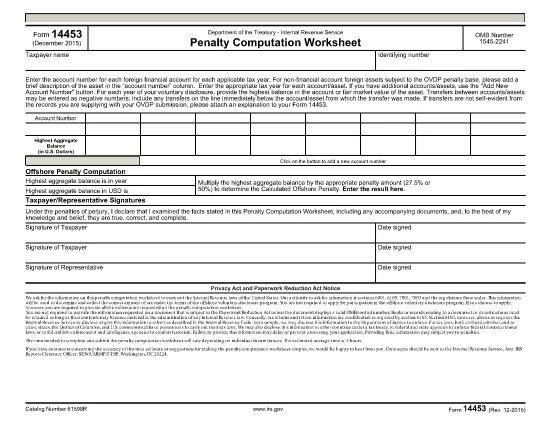
Form 14453 is the Penalty Computation Worksheet used by taxpayers who are participating in the IRS Offshore Voluntary Disclosure Program (OVDP) or similar offshore tax compliance initiatives. The worksheet helps calculate the aggregate balance of foreign accounts and the resulting penalty amount.

What Is Form 14453 and Who Needs It?

This form is required when you need to report the highest balance for each foreign financial account and let the IRS compute the offshore penalty. It is typically filed by U.S. persons with undisclosed foreign accounts, foreign trusts, or foreign corporations.

Key Sections of the Worksheet Explained

  • Account Information – List each foreign account, its highest balance, and the country of the account.
  • Aggregate Balance – The worksheet automatically adds the highest balances to give you a total aggregate balance.
  • Penalty Calculation – Based on the aggregate balance, the IRS applies the statutory penalty rate (usually 40%).
  • Signature & Date – Required to certify the accuracy of the information.

How to Complete Form 14453 with Formize

Instead of downloading the PDF and opening it in a PDF editor, simply click the "Fill out this form" button on this page. The Formize PDF Filler app will load in your browser, allowing you to complete the worksheet instantly.

Common Mistakes to Avoid

  • Entering the same balance for multiple accounts – each account must list its own highest balance.
  • Leaving negative numbers or blanks in the aggregate section – the form auto‑calculates, so leave those fields untouched.
  • Forgetting to sign the form – an unsigned worksheet will be rejected by the IRS.

Where to Find Additional IRS Guidance

Visit the IRS website for detailed instructions on the Offshore Voluntary Disclosure Program, penalty rates, and filing deadlines. You can also review related forms such as Form 14457 (OVDP Letter).

Ready to start? Click the button below and let Formize handle the rest.

KKK
  • Do I need to download Form 14453 before filling it out?

    No. With Formize you can fill the form directly in your browser. Just click the "Fill out this form" button and the app loads the PDF for you.

  • Can I edit the aggregate balance field?

    The aggregate balance is calculated automatically. Do not edit it manually; the worksheet will recalculate if you change any account balances.

  • Is Form 14453 required for every offshore account?

    Only if you are reporting undisclosed foreign accounts to the IRS under the Offshore Voluntary Disclosure Program or a similar compliance program.

  • What penalty rate is applied on the worksheet?

    The worksheet uses the statutory offshore penalty rate of 40% of the aggregate balance, unless the IRS provides a reduced rate based on reasonable cause.

  • Can I submit the filled form electronically?

    Yes. After completing the form in Formize, you can download the PDF and attach it to your electronic OVDP filing or mail it as part of a paper submission.

  • What if I make a mistake after submitting?

    You can download a new copy of the form, correct the error, and resubmit. Keep both versions for your records.

  • Is there a fee to use Formize for this form?

    Formize offers free filling for IRS forms like 14453. No hidden fees or subscriptions are required.

  • Do I need a PDF reader to view the completed form?

    No. The Formize app lets you view and edit the PDF in the browser. You can also open the final PDF with any standard PDF reader if you wish.

KUIDAS

5 lihtsa sammuga veebis tasuta Form 14453 täitmine:

  1. 1
    Open the Fillable Form
    Click the "Fill out this form" button on the page. The Formize PDF Filler will launch directly in your browser.
  2. 2
    Enter Your Account Details
    Add each foreign account, its highest balance, and the country. The worksheet will automatically calculate the aggregate balance.
  3. 3
    Review the Penalty Calculation
    Check the auto‑generated penalty amount. Make sure all numbers are correct before proceeding.
  4. 4
    Sign and Submit
    Enter your signature and the date, then click "Submit". You can download a completed copy for your records.
  5. 5
    Save or Print
    After submission, save the PDF to your computer or print it to attach to your OVDP filing package.
PDF-täiterakenduse vormindamine
UMBES

Internal Revenue Service (IRS) vormid

Form 14453 on üks ametlikest maksuvormidest, mida Ameerika Ühendriikides kasutatakse tulude teatamiseks, mahaarvamiste ja krediitide taotlemiseks, maksukohustuse arvutamiseks ja muude maksudega seotud kohustuste täitmiseks. IRS on föderaalne agentuur, mis vastutab Ameerika Ühendriikide sisemiste tulude seaduste haldamise ja jõustamise eest.

Siin on mõned näited Internal Revenue Service'i vormidest:

Vorm 1040: see on peamine üksikisiku tuludeklaratsiooni vorm, mida enamik maksumaksjaid kasutab. Seda kasutatakse erinevate tululiikide kajastamiseks, mahaarvamiste ja krediitide taotlemiseks, maksukohustuse arvutamiseks ja selle kindlakstegemiseks, kas maksumaksjal on lisamakse võlg või õigus saada tagasi.

Vorm 1099: vormil 1099 on erinevaid variatsioone, näiteks 1099-MISC, 1099-INT, 1099-DIV jne. Neid vorme kasutatakse üksikisikute või ettevõtete tulude kajastamiseks, mis on saadud erinevatest allikatest peale tööhõive, näiteks füüsilisest isikust ettevõtjana. tulu, intressitulu, dividenditulu ja üüritulu.

Vorm W-2: seda vormi kasutavad tööandjad töötajatele makstud palkade ja maksude teatamiseks palgast kinni peetud. Töötajad kasutavad oma individuaalse maksudeklaratsiooni täitmiseks vormi W-2 teavet.

Vorm 941: tööandjad kasutavad seda vormi oma töötajate tööjõumaksude, sealhulgas kinnipeetud föderaalse tulumaksu, sotsiaalkindlustusmaksu ja ravimaksu teatamiseks.

Vorm 1065: seda vormi kasutavad seltsingud oma tulude, mahaarvamiste ja maksukohustuste teatamiseks. Seltsingud ise tulumaksu ei maksa; selle asemel esitavad partnerid oma osa seltsingu tulust oma individuaalsetes maksudeklaratsioonides.

Vorm 1120: see on ettevõtte tulumaksu deklaratsiooni vorm, mida ettevõtted C kasutavad oma tulude teatamiseks, mahaarvamised ja maksukohustus.

Vorm 990: seda vormi kasutavad maksuvabad organisatsioonid, näiteks mittetulundusühingud ja heategevusorganisatsioonid teavitama oma finantsteavet, tegevust ja maksuseaduste järgimist.

Vorm 8862: seda vormi kasutavad maksumaksjad, kes varem taotlesid teenitud tulumaksukrediiti (EITC) kuid see keelati ja nüüd tahan seda uuesti nõuda.

Need on vaid mõned näited arvukatest IRS-i vormidest, mis on olemas erinevate maksudega seotud kohustuste täitmiseks. Üksikisiku või ettevõtte jaoks vajalikud konkreetsed vormid sõltuvad nende ainulaadsetest asjaoludest, sissetulekuallikatest ja mahaarvamistest. Täpse ja ajakohase teabe saamiseks konkreetse IRS-i kohta on soovitatav tutvuda maksuameti ametliku veebisaidiga (www.irs.gov) või küsida professionaalset maksunõustamist. teie maksuolukorraga seotud vormid.

FUNKTSIOONID

PDF täiteaine

Lihtsaim viis märksõna Form 14453 veebis täitmiseks

  • Täitke kiiresti Form 14453
    Kas otsite viisi Form 14453 kiireks veebis täitmiseks? Meie veebipõhise tasuta PDF-vormi täitja abil saate teada, kuidas seda PDF-dokumenti vähem kui minutiga redigeerida ja täita.
  • Lihtne kasutada veebipõhist PDF-redaktorit
    Kas olete tüdinenud PDF-failide printimisest, et saaksite neid enne uuesti skannimist ja tagasisaatmist redigeerida? Redigeerige PDF-dokumente võrgus tasuta. Kasutage meie veebipõhist PDF-redaktorit, et säästa aega ja paberit.
  • Suurepärased tööriistad, kõik platvormid
    Kas soovite teada, kuidas Macis täita Form 14453 või kuidas kasutada tasuta PDF-täitjat? Meie veebipõhised PDF-tööriistad töötavad kõigil platvormidel.
  • Turvaline failide salvestusruum
    Lõpetatud failid „Form 14453” salvestatakse turvatud andmebaasi, mida haldab Amazon Cloudi hostimine. Saate oma failid meie süsteemist igal ajal kustutada. Igal juhul kustutatakse need failid 24 tunni pärast automaatselt.
  • Vestelge kasutajaga Form 14453
    Vestelge kasutajaga „Form 14453” saidil Chatize, mis on tasuta PDF-i lugeja abiline. Esitage küsimusi ja saage vastused märksõnalt „Form 14453”. Klõpsake ülaloleval nupul Vestle dokumendiga.

Kustuta täitmise seanss

Kas kustutada valitud täitmisseanss? Sellisel juhul läheb teie edu vormi täitmisel kaotsi.

Kustuta redigeerimisseanss

Kas kustutada valitud redigeerimisseanss? Sel juhul lähevad teie edu vormi loomisel ja redigeerimisel kaotsi.