
Vali keel

Form 637 – Application for Excise Tax Registration (Fillable PDF)

  1. Riik USA
  2. Keel Inglise
  3. Tegevus Maksud
  4. osakond Internal Revenue Service
Täitke see vorm
Form 637 – Application for Excise Tax Registration (Fillable PDF)

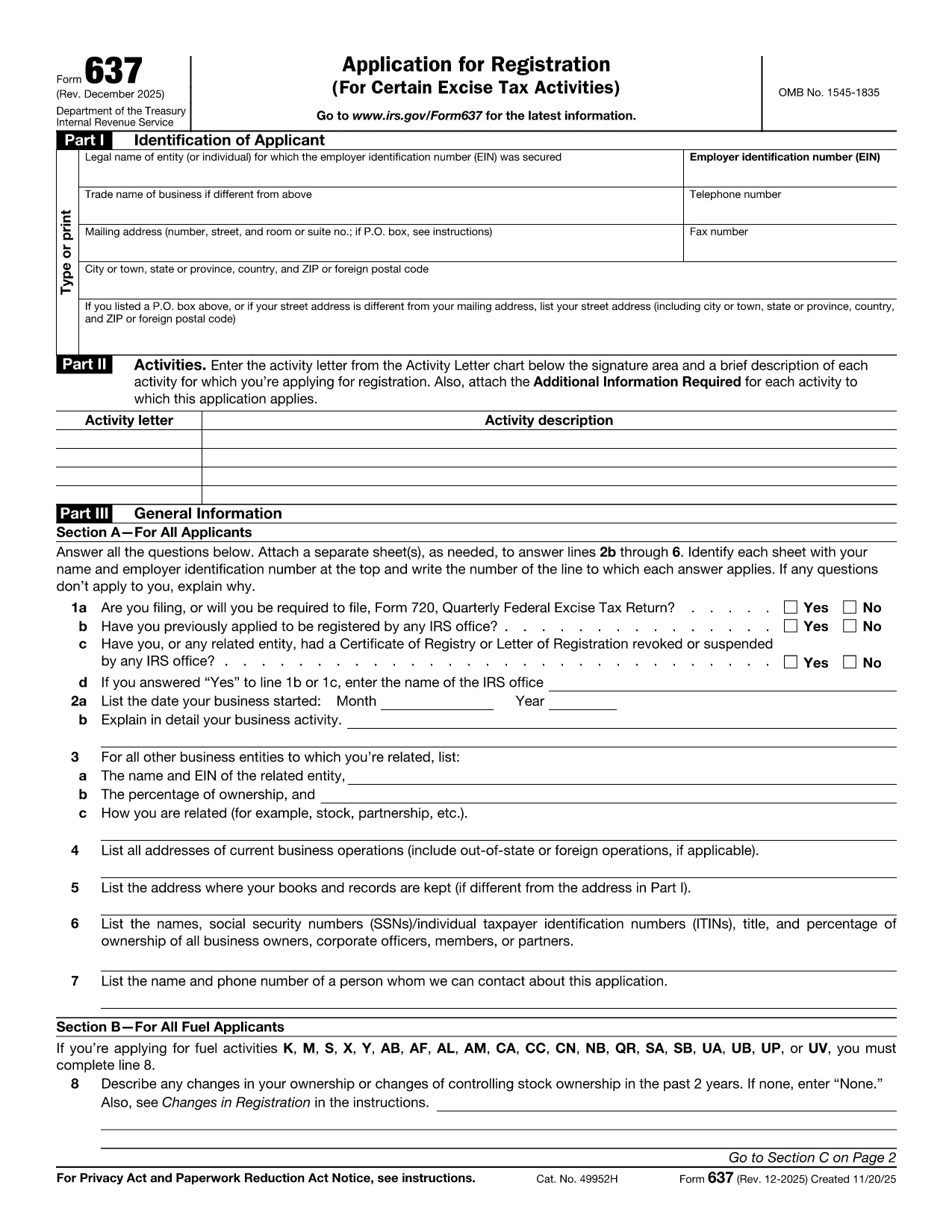
Form 637, Application for Registration (For Certain Excise Tax Activities), is the IRS’s official request to register for activities subject to federal excise taxes. Whether you are a manufacturer, importer, fuel seller, or any other entity that handles taxable products, you need this form to stay compliant.

On Formize.com you can fill the form directly in the browser—no PDF editor required. Just click the Fill out this form button, let the Formize PDF Filler load, and start entering your information.

Who Must File Form 637

  • Manufacturers, producers, or importers of excise‑taxed products.
  • Sellers or purchasers of taxable fuel.
  • Exporters of excise‑taxed goods.
  • Any entity using products that require a Certificate of Registration.

How to Complete Form 637 Online

Follow these simple steps to finish the application without printing a single page:

  1. Click the Fill out this form button on this page.
  2. Wait for the Formize PDF Filler to load (usually a few seconds).
  3. Enter your legal name, EIN, trade name, and contact information.
  4. Select the appropriate activity letter (M, S, etc.) and provide a brief description.
  5. Answer the general information questions in Part III.
  6. Upload any required supporting documents directly in the filler.
  7. Review the completed form, then click Submit to download a signed PDF or mail it to the IRS address shown in the instructions.

Common Mistakes & Tips

  • Incorrect EIN: Double‑check the number; a typo will delay approval.
  • Missing activity letter: Use the chart on pages 2‑5 of the form to pick the right letter.
  • Skipping supporting documents: Attach licenses, permits, or prior registration letters as required.
  • Out‑of‑date form: Always use the latest PDF – the link below points to the current IRS version.

Download the Fillable PDF

If you prefer to work offline, you can download the official PDF from the IRS and open it with any PDF editor. However, the online filler is faster, error‑proof, and saves you a trip to the printer.

FAQs About Form 637

Below are the most frequently asked questions. Click each question to see the answer.

KKK
  • What is Form 637 used for?

    Form 637 is the IRS application to register for activities subject to federal excise taxes, such as manufacturing or selling taxable fuel.

  • Who is required to file Form 637?

    Manufacturers, producers, importers, fuel sellers, exporters, and any entity that uses products requiring excise tax registration must file Form 637.

  • Can I file Form 637 electronically?

    Yes. On Formize.com you can fill the PDF online, then download the completed form to mail to the IRS. The IRS does not accept direct e‑filing, but the online filler streamlines the process.

  • Do I need an EIN to complete Form 637?

    An Employer Identification Number (EIN) is required. If you don’t have one, apply using Form SS‑4 before completing Form 637.

  • What supporting documents are required?

    Typically you must attach business licenses, permits, prior registration letters, and any documents that prove the activity you’re registering for.

  • How long does the IRS take to approve the registration?

    Processing times vary, but most applicants receive a response within 30‑45 days after the IRS receives the complete application.

  • Is there a fee to file Form 637?

    No filing fee is required for Form 637 itself. However, excise taxes will be due based on the activity once registration is approved.

  • What should I do if I make a mistake on the form?

    Correct the error in the online filler before downloading the final PDF. If you’ve already mailed the form, submit a corrected Form 637 with a cover letter explaining the changes.

  • Where do I mail the completed Form 637?

    The mailing address is listed in the form’s instructions. It is typically the IRS Office of Excise Tax at the address shown on page 1 of the PDF.

  • Can I save my progress while filling the form online?

    Yes. The Formize PDF Filler allows you to save a draft and return later to finish the application.

KUIDAS

5 lihtsa sammuga veebis tasuta Form 637 täitmine:

  1. 1
    Click "Fill out this form"
    Locate the button on this page and click it to launch the Formize PDF Filler.
  2. 2
    Wait for the filler to load
    The web app loads the fillable version of Form 637 in a few seconds.
  3. 3
    Enter required information
    Complete each field—legal name, EIN, activity letter, and any supporting details.
  4. 4
    Review and validate
    Use the built‑in validation to catch missing or incorrectly formatted entries.
  5. 5
    Submit or download
    When finished, either submit the form directly to the IRS address shown or download the completed PDF for your records.
PDF-täiterakenduse vormindamine
UMBES

Internal Revenue Service (IRS) vormid

Form 637 on üks ametlikest maksuvormidest, mida Ameerika Ühendriikides kasutatakse tulude teatamiseks, mahaarvamiste ja krediitide taotlemiseks, maksukohustuse arvutamiseks ja muude maksudega seotud kohustuste täitmiseks. IRS on föderaalne agentuur, mis vastutab Ameerika Ühendriikide sisemiste tulude seaduste haldamise ja jõustamise eest.

Siin on mõned näited Internal Revenue Service'i vormidest:

Vorm 1040: see on peamine üksikisiku tuludeklaratsiooni vorm, mida enamik maksumaksjaid kasutab. Seda kasutatakse erinevate tululiikide kajastamiseks, mahaarvamiste ja krediitide taotlemiseks, maksukohustuse arvutamiseks ja selle kindlakstegemiseks, kas maksumaksjal on lisamakse võlg või õigus saada tagasi.

Vorm 1099: vormil 1099 on erinevaid variatsioone, näiteks 1099-MISC, 1099-INT, 1099-DIV jne. Neid vorme kasutatakse üksikisikute või ettevõtete tulude kajastamiseks, mis on saadud erinevatest allikatest peale tööhõive, näiteks füüsilisest isikust ettevõtjana. tulu, intressitulu, dividenditulu ja üüritulu.

Vorm W-2: seda vormi kasutavad tööandjad töötajatele makstud palkade ja maksude teatamiseks palgast kinni peetud. Töötajad kasutavad oma individuaalse maksudeklaratsiooni täitmiseks vormi W-2 teavet.

Vorm 941: tööandjad kasutavad seda vormi oma töötajate tööjõumaksude, sealhulgas kinnipeetud föderaalse tulumaksu, sotsiaalkindlustusmaksu ja ravimaksu teatamiseks.

Vorm 1065: seda vormi kasutavad seltsingud oma tulude, mahaarvamiste ja maksukohustuste teatamiseks. Seltsingud ise tulumaksu ei maksa; selle asemel esitavad partnerid oma osa seltsingu tulust oma individuaalsetes maksudeklaratsioonides.

Vorm 1120: see on ettevõtte tulumaksu deklaratsiooni vorm, mida ettevõtted C kasutavad oma tulude teatamiseks, mahaarvamised ja maksukohustus.

Vorm 990: seda vormi kasutavad maksuvabad organisatsioonid, näiteks mittetulundusühingud ja heategevusorganisatsioonid teavitama oma finantsteavet, tegevust ja maksuseaduste järgimist.

Vorm 8862: seda vormi kasutavad maksumaksjad, kes varem taotlesid teenitud tulumaksukrediiti (EITC) kuid see keelati ja nüüd tahan seda uuesti nõuda.

Need on vaid mõned näited arvukatest IRS-i vormidest, mis on olemas erinevate maksudega seotud kohustuste täitmiseks. Üksikisiku või ettevõtte jaoks vajalikud konkreetsed vormid sõltuvad nende ainulaadsetest asjaoludest, sissetulekuallikatest ja mahaarvamistest. Täpse ja ajakohase teabe saamiseks konkreetse IRS-i kohta on soovitatav tutvuda maksuameti ametliku veebisaidiga (www.irs.gov) või küsida professionaalset maksunõustamist. teie maksuolukorraga seotud vormid.

FUNKTSIOONID

PDF täiteaine

Lihtsaim viis märksõna Form 637 veebis täitmiseks

  • Täitke kiiresti Form 637
    Kas otsite viisi Form 637 kiireks veebis täitmiseks? Meie veebipõhise tasuta PDF-vormi täitja abil saate teada, kuidas seda PDF-dokumenti vähem kui minutiga redigeerida ja täita.
  • Lihtne kasutada veebipõhist PDF-redaktorit
    Kas olete tüdinenud PDF-failide printimisest, et saaksite neid enne uuesti skannimist ja tagasisaatmist redigeerida? Redigeerige PDF-dokumente võrgus tasuta. Kasutage meie veebipõhist PDF-redaktorit, et säästa aega ja paberit.
  • Suurepärased tööriistad, kõik platvormid
    Kas soovite teada, kuidas Macis täita Form 637 või kuidas kasutada tasuta PDF-täitjat? Meie veebipõhised PDF-tööriistad töötavad kõigil platvormidel.
  • Turvaline failide salvestusruum
    Lõpetatud failid „Form 637” salvestatakse turvatud andmebaasi, mida haldab Amazon Cloudi hostimine. Saate oma failid meie süsteemist igal ajal kustutada. Igal juhul kustutatakse need failid 24 tunni pärast automaatselt.
  • Vestelge kasutajaga Form 637
    Vestelge kasutajaga „Form 637” saidil Chatize, mis on tasuta PDF-i lugeja abiline. Esitage küsimusi ja saage vastused märksõnalt „Form 637”. Klõpsake ülaloleval nupul Vestle dokumendiga.

Kustuta täitmise seanss

Kas kustutada valitud täitmisseanss? Sellisel juhul läheb teie edu vormi täitmisel kaotsi.

Kustuta redigeerimisseanss

Kas kustutada valitud redigeerimisseanss? Sel juhul lähevad teie edu vormi loomisel ja redigeerimisel kaotsi.