
Vali keel

IRS Form 8834 – Fillable PDF for Qualified Electric Vehicle Credit

  1. Riik USA
  2. Keel Inglise
  3. Tegevus Maksud
  4. osakond Internal Revenue Service
Täitke see vorm
IRS Form 8834 – Fillable PDF for Qualified Electric Vehicle Credit

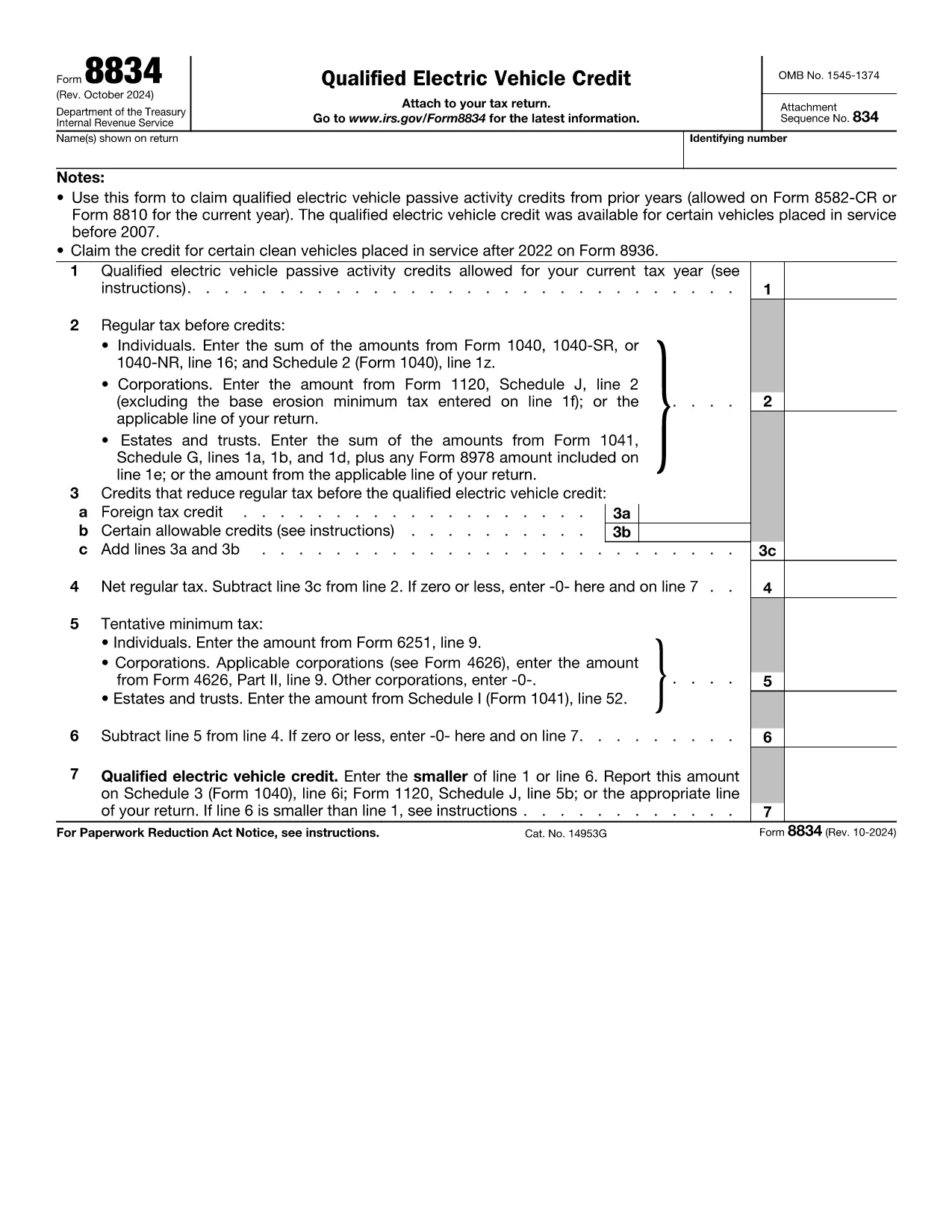
Form 8834, officially titled Qualified Electric Vehicle Credit, is used by taxpayers to claim passive activity credits from qualified electric vehicles placed in service before 2007. Although newer EV credits are reported on Form 8936, many taxpayers still have carry‑forward credits that belong on Form 8834.

What Is Form 8834?

This one‑page IRS form calculates the amount of qualified electric vehicle passive activity credit you can apply to your current tax year. It interacts with other forms such as Form 8582‑CR (individuals) or Form 8810 (corporations) to determine the credit limit.

How to Complete Form 8834 Online

Instead of downloading the PDF and editing it manually, simply click the "Fill out this form" button on this page. The Formize PDF Filler app will load instantly, allowing you to enter data directly in your browser.

  • Enter taxpayer information (name, SSN/EIN) exactly as it appears on your tax return.
  • Provide the credit amount allowed from prior years (Line 1).
  • Input your regular tax before credits (Line 2) and any other credits that reduce your tax (Line 3).
  • Follow the automatic calculations for net regular tax, tentative minimum tax, and the final credit amount.

Common Mistakes to Avoid

  • Using the wrong form: Form 8834 is only for pre‑2007 EV credits. New EV purchases require Form 8936.
  • Incorrect credit limit: Always reference the latest Form 8582‑CR or Form 8810 for the allowable amount.
  • Mismatching tax year: Credits must be claimed in the year you are allowed to use them, not the year the vehicle was purchased.
  • Leaving lines blank: Even a zero value must be entered to avoid IRS processing delays.

Where to Submit the Completed Form

After you finish in Formize, download the completed PDF. Attach it to your federal tax return:

  • Individuals – attach to Schedule 3 (Form 1040), line 6i.
  • Corporations – attach to Form 1120, Schedule J.
  • Estates & Trusts – attach to Form 1041, Schedule G.

Download the Fillable PDF

If you prefer to work offline, you can download the official IRS fillable PDF below. The same file is used by the Formize online filler.

KKK
  • Who should use Form 8834?

    Taxpayers who have qualified electric vehicle passive activity credits from vehicles placed in service before 2007 and need to claim any unused credit in the current tax year.

  • Can I use Form 8834 for a 2023 EV purchase?

    No. Vehicles placed in service after 2022 are claimed on Form 8936. Form 8834 only covers pre‑2007 credits.

  • Do I need to attach supporting schedules?

    Yes. Include the relevant credit limitation schedules (Form 8582‑CR for individuals or Form 8810 for corporations) that show the allowable credit amount.

  • What if my regular tax is lower than the credit amount?

    The credit you can claim is the lesser of the allowable credit (Line 1) or your net regular tax after other credits (Line 6). Any excess can be carried forward.

  • Is the Formize filler secure?

    Formize uses SSL encryption and processes data locally in your browser, ensuring your personal information remains private.

  • Can I e‑file Form 8834?

    Most commercial tax software accepts the completed PDF as an attachment. Check your software’s instructions for attaching supplemental forms.

  • What common errors cause IRS rejections?

    Missing SSN/EIN, entering a zero on Line 1 when a credit exists, or failing to include the required supporting schedules.

KUIDAS

6 lihtsa sammuga veebis tasuta Form 8834 täitmine:

  1. 1
    Click the Fill‑out Button
    Press the “Fill out this form” button on the page to launch the Formize PDF Filler.
  2. 2
    Wait for the Filler to Load
    The web‑based filler loads in seconds; no download or installation is required.
  3. 3
    Enter Your Information
    Fill in taxpayer name, SSN/EIN, credit amounts, and tax liability fields exactly as shown on your return.
  4. 4
    Review Calculations
    The filler automatically computes net regular tax, tentative minimum tax, and the final credit amount.
  5. 5
    Save or Download
    When finished, click “Save” to store the completed PDF in your browser or “Download” to get a copy for your records.
  6. 6
    Submit with Your Tax Return
    Attach the completed Form 8834 to the appropriate schedule of your federal tax return and file as usual.
PDF-täiterakenduse vormindamine
UMBES

Internal Revenue Service (IRS) vormid

Form 8834 on üks ametlikest maksuvormidest, mida Ameerika Ühendriikides kasutatakse tulude teatamiseks, mahaarvamiste ja krediitide taotlemiseks, maksukohustuse arvutamiseks ja muude maksudega seotud kohustuste täitmiseks. IRS on föderaalne agentuur, mis vastutab Ameerika Ühendriikide sisemiste tulude seaduste haldamise ja jõustamise eest.

Siin on mõned näited Internal Revenue Service'i vormidest:

Vorm 1040: see on peamine üksikisiku tuludeklaratsiooni vorm, mida enamik maksumaksjaid kasutab. Seda kasutatakse erinevate tululiikide kajastamiseks, mahaarvamiste ja krediitide taotlemiseks, maksukohustuse arvutamiseks ja selle kindlakstegemiseks, kas maksumaksjal on lisamakse võlg või õigus saada tagasi.

Vorm 1099: vormil 1099 on erinevaid variatsioone, näiteks 1099-MISC, 1099-INT, 1099-DIV jne. Neid vorme kasutatakse üksikisikute või ettevõtete tulude kajastamiseks, mis on saadud erinevatest allikatest peale tööhõive, näiteks füüsilisest isikust ettevõtjana. tulu, intressitulu, dividenditulu ja üüritulu.

Vorm W-2: seda vormi kasutavad tööandjad töötajatele makstud palkade ja maksude teatamiseks palgast kinni peetud. Töötajad kasutavad oma individuaalse maksudeklaratsiooni täitmiseks vormi W-2 teavet.

Vorm 941: tööandjad kasutavad seda vormi oma töötajate tööjõumaksude, sealhulgas kinnipeetud föderaalse tulumaksu, sotsiaalkindlustusmaksu ja ravimaksu teatamiseks.

Vorm 1065: seda vormi kasutavad seltsingud oma tulude, mahaarvamiste ja maksukohustuste teatamiseks. Seltsingud ise tulumaksu ei maksa; selle asemel esitavad partnerid oma osa seltsingu tulust oma individuaalsetes maksudeklaratsioonides.

Vorm 1120: see on ettevõtte tulumaksu deklaratsiooni vorm, mida ettevõtted C kasutavad oma tulude teatamiseks, mahaarvamised ja maksukohustus.

Vorm 990: seda vormi kasutavad maksuvabad organisatsioonid, näiteks mittetulundusühingud ja heategevusorganisatsioonid teavitama oma finantsteavet, tegevust ja maksuseaduste järgimist.

Vorm 8862: seda vormi kasutavad maksumaksjad, kes varem taotlesid teenitud tulumaksukrediiti (EITC) kuid see keelati ja nüüd tahan seda uuesti nõuda.

Need on vaid mõned näited arvukatest IRS-i vormidest, mis on olemas erinevate maksudega seotud kohustuste täitmiseks. Üksikisiku või ettevõtte jaoks vajalikud konkreetsed vormid sõltuvad nende ainulaadsetest asjaoludest, sissetulekuallikatest ja mahaarvamistest. Täpse ja ajakohase teabe saamiseks konkreetse IRS-i kohta on soovitatav tutvuda maksuameti ametliku veebisaidiga (www.irs.gov) või küsida professionaalset maksunõustamist. teie maksuolukorraga seotud vormid.

FUNKTSIOONID

PDF täiteaine

Lihtsaim viis märksõna Form 8834 veebis täitmiseks

  • Täitke kiiresti Form 8834
    Kas otsite viisi Form 8834 kiireks veebis täitmiseks? Meie veebipõhise tasuta PDF-vormi täitja abil saate teada, kuidas seda PDF-dokumenti vähem kui minutiga redigeerida ja täita.
  • Lihtne kasutada veebipõhist PDF-redaktorit
    Kas olete tüdinenud PDF-failide printimisest, et saaksite neid enne uuesti skannimist ja tagasisaatmist redigeerida? Redigeerige PDF-dokumente võrgus tasuta. Kasutage meie veebipõhist PDF-redaktorit, et säästa aega ja paberit.
  • Suurepärased tööriistad, kõik platvormid
    Kas soovite teada, kuidas Macis täita Form 8834 või kuidas kasutada tasuta PDF-täitjat? Meie veebipõhised PDF-tööriistad töötavad kõigil platvormidel.
  • Turvaline failide salvestusruum
    Lõpetatud failid „Form 8834” salvestatakse turvatud andmebaasi, mida haldab Amazon Cloudi hostimine. Saate oma failid meie süsteemist igal ajal kustutada. Igal juhul kustutatakse need failid 24 tunni pärast automaatselt.
  • Vestelge kasutajaga Form 8834
    Vestelge kasutajaga „Form 8834” saidil Chatize, mis on tasuta PDF-i lugeja abiline. Esitage küsimusi ja saage vastused märksõnalt „Form 8834”. Klõpsake ülaloleval nupul Vestle dokumendiga.

Kustuta täitmise seanss

Kas kustutada valitud täitmisseanss? Sellisel juhul läheb teie edu vormi täitmisel kaotsi.

Kustuta redigeerimisseanss

Kas kustutada valitud redigeerimisseanss? Sel juhul lähevad teie edu vormi loomisel ja redigeerimisel kaotsi.