
Vali keel

IRS Form 8879‑C – Fillable Corporate E‑File Signature Authorization

  1. Riik USA
  2. Keel Inglise
  3. Tegevus Maksud
  4. osakond Internal Revenue Service
Täitke see vorm
IRS Form 8879‑C – Fillable Corporate E‑File Signature Authorization

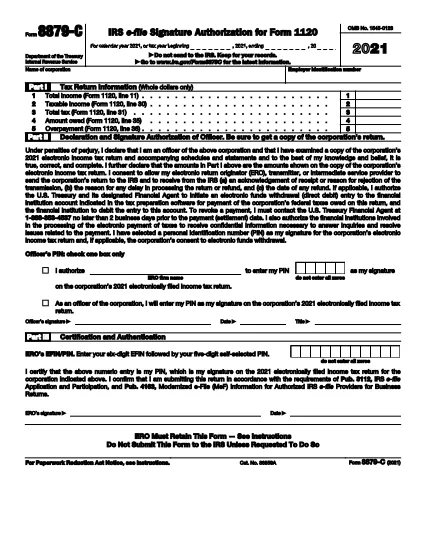
Form 8879‑C, IRS E‑File Signature Authorization for Corporations, is the official document that authorizes the IRS to accept an electronically filed corporate income‑tax return (Form 1120, 1120‑S, 1120‑F, etc.). Instead of mailing a paper signature, corporations can sign electronically using this fillable PDF, saving time and reducing errors.

What is Form 8879‑C?

The form serves as a written declaration that the corporate officer signing the return has reviewed the return, the information is accurate, and the corporation authorizes the IRS to process the e‑filed return. It must be signed by an authorized officer (president, treasurer, or other corporate officer) and attached to the electronic filing.

How to Fill Out Form 8879‑C with Formize

Instead of downloading the PDF and opening a separate editor, simply click the "Fill out this form" button on this page. The Formize PDF Filler app will load instantly, letting you complete every field directly in your browser.

  • Step 1: Click the orange "Fill out this form" button.
  • Step 2: Wait a few seconds for the Formize app to load.
  • Step 3: Enter the corporation’s name, EIN, tax year, and other required data.
  • Step 4: Add the electronic signature of the authorized officer.
  • Step 5: Click "Save" to download the completed PDF, then attach it to your e‑filed return.

Common Mistakes & Tips for a Smooth Submission

  • Incorrect EIN: Double‑check the nine‑digit Employer Identification Number; a typo will cause the return to be rejected.
  • Wrong Tax Year: Use the calendar year or fiscal year that matches the corporate tax return you are filing.
  • Missing Signature: The form is invalid without a clear electronic signature. Use the built‑in signature field—do not draw a signature in a comment box.
  • Unsigned Attachments: If you file multiple returns (e.g., Form 1120‑S and Schedule K‑1), each must have its own Form 8879‑C signed.
  • Saving Errors: After completing the form, click "Download" to store a copy on your computer. Do not rely solely on the browser’s temporary cache.

Where to Find Help and Additional Resources

For detailed instructions, see the IRS Instructions for Form 8879‑C. If you have questions about eligibility, signing authority, or e‑file technical issues, visit the IRS Help & Resources page or contact your tax professional.

KKK
  • Who must sign Form 8879‑C?

    An officer of the corporation who is authorized to sign the tax return (e.g., president, treasurer, CEO) must sign Form 8879‑C.

  • Can I use a handwritten signature on the fillable PDF?

    Yes, you can draw a handwritten signature using the PDF filler’s signature tool, but the signature must be clear and legible.

  • Is Form 8879‑C required for every corporate e‑file?

    Yes, any corporation that files its income‑tax return electronically must submit a signed Form 8879‑C as the electronic signature authorization.

  • What is the deadline for submitting Form 8879‑C?

    Form 8879‑C must be signed and attached before the corporate tax return is transmitted electronically to the IRS, typically by the filing deadline (usually March 15 for calendar‑year corporations).

  • What should I do if I make a mistake after signing?

    Correct the error on a new copy of Form 8879‑C, have the authorized officer re‑sign, and attach the updated form to the e‑filed return.

  • Do I need a separate Form 8879‑C for each state return?

    State tax authorities may have their own signature forms. Form 8879‑C is only for the federal corporate return.

  • Is there a fee to use Formize’s PDF filler?

    Formize offers a free, no‑cost option for filling out and downloading IRS forms like 8879‑C.

  • Where can I find the official instructions for Form 8879‑C?

    The official IRS instructions are available at https://www.irs.gov/instructions/i8879c.

KUIDAS

5 lihtsa sammuga veebis tasuta Form 8879-C täitmine:

  1. 1
    Open the Fillable Form
    Click the orange "Fill out this form" button on this page. The Formize PDF Filler will load in a new window.
  2. 2
    Enter Required Information
    Complete the corporation’s name, EIN, tax year, and any other fields shown in the form.
  3. 3
    Add Your Electronic Signature
    Use the built‑in signature field to sign as the authorized corporate officer.
  4. 4
    Save and Download
    After all fields are filled, click "Save" to download the completed PDF to your computer.
  5. 5
    Attach to Your E‑File
    Upload the saved Form 8879‑C PDF with your e‑filed corporate tax return (Form 1120, 1120‑S, etc.).
PDF-täiterakenduse vormindamine
UMBES

Maksuvormid

Form 8879-C on üks maksuvormidest, mida kasutatakse üksikisiku või ettevõtte tulude, mahaarvamiste ja maksukohustuste kohta teabe esitamiseks asjaomasele maksuhaldurile. Need vormid on vajalikud maksuseaduste täitmiseks ja maksukohustuste täitmiseks. Maksuvormid erinevad olenevalt riigist ja kehtivatest maksunõuetest. Siin on mõned levinumad maksuvormide tüübid.

Individuaalsed maksuvormid: üksikud maksumaksjad kasutavad neid vorme oma isikliku sissetuleku ja mahaarvamiste, krediitide ja maksuvabastuste esitamiseks. Näited hõlmavad 1040 vormi Ameerika Ühendriikides või Self-Assessment Tax Return vormi Ühendkuningriigis.

Ärimaksu vormid: ettevõtted, seltsingud või füüsilisest isikust ettevõtjad kasutavad ettevõtte tulude, kulude ja muu maksudega seotud teabe esitamiseks ettevõtte tulumaksu vorme. Näited hõlmavad C-vormingut (ärikasum või -kahjum) Ameerika Ühendriikides või vorm CT600 (ettevõtte maksudeklaratsioon) Ühendkuningriigis.

Palgamaksu vormid: neid vorme kasutavad tööandjad oma töötajate palgatšekkidest kinnipeetud palkade, palkade ja maksude teatamiseks. Näiteks on vorm W-2 Ameerika Ühendriikides või vorm P60 Ühendkuningriigis.

Müügimaksuvormid: ettevõtted kasutavad müügimaksu vorme maksustatavatelt kaupadelt või teenustelt kogutud käibemaksu aruandmiseks ja tasumiseks. Konkreetsed müügimaksu vormid erinevad jurisdiktsiooni järgi.

Käibemaksu (KM) vormid: käibemaksu vorme kasutatakse riikides, kus kehtestatakse käibemaks müügilt kogutud käibemaksu teatamiseks ja maksmiseks ning ostude käibemaksukrediidi taotlemiseks. Näiteks võib tuua käibedeklaratsiooni vormid, mida kasutatakse paljudes riikides.

Prognoositud maksuvormid: hinnangulisi maksuvorme kasutatakse selliste tulude hinnanguliste maksude teatamiseks ja maksmiseks, mida kinni ei peeta (nt füüsilisest isikust ettevõtja tulu või investeerimistulu).

Need on vaid mõned näited paljudest olemasolevatest maksuvormidest. Nõutavad konkreetsed vormid sõltuvad teie riigi või jurisdiktsiooni maksuseadustest ja -määrustest. Oluline on tutvuda maksuhalduri juhistega või küsida professionaalset nõu, et teha kindlaks, millised vormid on teie olukorras kohaldatavad.

FUNKTSIOONID

PDF täiteaine

Lihtsaim viis märksõna Form 8879-C veebis täitmiseks

  • Täitke kiiresti Form 8879-C
    Kas otsite viisi Form 8879-C kiireks veebis täitmiseks? Meie veebipõhise tasuta PDF-vormi täitja abil saate teada, kuidas seda PDF-dokumenti vähem kui minutiga redigeerida ja täita.
  • Lihtne kasutada veebipõhist PDF-redaktorit
    Kas olete tüdinenud PDF-failide printimisest, et saaksite neid enne uuesti skannimist ja tagasisaatmist redigeerida? Redigeerige PDF-dokumente võrgus tasuta. Kasutage meie veebipõhist PDF-redaktorit, et säästa aega ja paberit.
  • Suurepärased tööriistad, kõik platvormid
    Kas soovite teada, kuidas Macis täita Form 8879-C või kuidas kasutada tasuta PDF-täitjat? Meie veebipõhised PDF-tööriistad töötavad kõigil platvormidel.
  • Turvaline failide salvestusruum
    Lõpetatud failid „Form 8879-C” salvestatakse turvatud andmebaasi, mida haldab Amazon Cloudi hostimine. Saate oma failid meie süsteemist igal ajal kustutada. Igal juhul kustutatakse need failid 24 tunni pärast automaatselt.
  • Vestelge kasutajaga Form 8879-C
    Vestelge kasutajaga „Form 8879-C” saidil Chatize, mis on tasuta PDF-i lugeja abiline. Esitage küsimusi ja saage vastused märksõnalt „Form 8879-C”. Klõpsake ülaloleval nupul Vestle dokumendiga.

Kustuta täitmise seanss

Kas kustutada valitud täitmisseanss? Sellisel juhul läheb teie edu vormi täitmisel kaotsi.

Kustuta redigeerimisseanss

Kas kustutada valitud redigeerimisseanss? Sel juhul lähevad teie edu vormi loomisel ja redigeerimisel kaotsi.